Engineers Garage

  • Electronic Projects & Tutorials
    • Electronic Projects
      • Arduino Projects
      • AVR
      • Raspberry pi
      • ESP8266
      • BeagleBone
      • 8051 Microcontroller
      • ARM
      • PIC Microcontroller
      • STM32
    • Tutorials
      • Sensor Series
      • Engineering Deep Dives
      • AI
      • ARDUINO Compatible Coding
      • Audio Electronics
      • Battery Management
      • Beginners Electronics Series
      • Brainwave
      • Digital electronics (DE)
      • Electric Vehicles
      • EMI/EMC/RFI
      • EVs
      • Hardware Filters
      • IoT tutorials
      • LoRa/LoRaWAN
      • Power Tutorials
      • Protocol
      • Python
      • RPI Python Programming
      • Sensors
      • USB
      • Thermal management
      • Verilog
      • VHDL
    • Circuit Design
    • Project Videos
    • Components
  • Articles
    • Tech Articles
    • Insight
    • Invention Stories
    • How to
    • What Is
  • News
    • Electronic Product News
    • Business News
    • Company/Start-up News
    • DIY Reviews
    • Guest Post
  • Forums
    • EDABoard.com
    • Electro-Tech-Online
    • EG Forum Archive
  • DigiKey Store
    • Cables, Wires
    • Connectors, Interconnect
    • Discrete
    • Electromechanical
    • Embedded Computers
    • Enclosures, Hardware, Office
    • Integrated Circuits (ICs)
    • Isolators
    • LED/Optoelectronics
    • Passive
    • Power, Circuit Protection
    • Programmers
    • RF, Wireless
    • Semiconductors
    • Sensors, Transducers
    • Test Products
    • Tools
  • Learn
    • eBooks/Tech Tips
    • Design Guides
    • Learning Center
    • Tech Toolboxes
    • Webinars & Digital Events
  • Resources
    • Digital Issues
    • EE Training Days
    • LEAP Awards
    • Podcasts
    • Webinars / Digital Events
    • White Papers
    • Engineering Diversity & Inclusion
  • Guest Post Guidelines
  • Advertise
  • Subscribe

Microcontroller Based Accelerometer

By Ashish Chauhan, Aurangabad, India July 7, 2011

[[wysiwyg_imageupload:1651:]]This project is submitted by Mr. Ashish Chauhan from Dr. Babasaheb Ambedkar Marathwada University, Aurangabad.


1. Introduction:
Acceleration is a measure of how quickly speed changes. Just as a speedometer is a meter that measures speed, an accelerometer is a meter that measures acceleration. You can use an accelerometer’s ability to sense acceleration to measure a variety of things that are very useful to electronic and robotics projects and designs:
·         Acceleration
·         Tilt and tilt angle
·         Incline
·         Rotation
·         Vibration
·         Collision
·         Gravity


Step counting is a widely used method to assess physical activity. Very simple and cheap pedometer devices are available for any person to wear during running exercise or during daily activities to record the number of steps taken. The benefit of using such a device is mostly the improvement in motivation to increase physical activity. These devices are also used in rehabilitation and disease management. For example, physical activity assessment is important for the prevention or treatment of diabetes. Pedometers have also been used to assess mobility of the elderly.
Pedometer devices are typically worn on the hip clipped to a belt or trousers. The hip is an excellent place for sensing steps as the accelerations there correlate well with steps and the interfering accelerations are small. Another good location for a step counter sensor is on the foot, where even more details, like stride length, can be measured.
The wrist is a convenient place for informative gadgets. It is easy to casually look at the display of a wrist worn device and one can stay continuously aware of the step counts among other information. However, it is difficult to determine steps from the wrist as there is a lot of interfering acceleration signals from arm movements, which do not always correlate well with the steps taken.
There are wrist worn step counters on the market today, but there are no public scientific reports on this topic. As algorithm patents are difficult to supervise they are usually kept secret. The Nokia Wrist Attached Sensor Platform (NWSP) developed in the project is an open research platform, which has made this publication possible.
1.2 Need of Accelerometer:

    Accelerometers have a well established market, mainly 50g devices for airbag modules.
·         Accelerometer market is expanding from its base in the automotive industry to industrial and consumer applications.
·         Most non-automotive applications require high sensitivity, low g-Accelerometers.
·        The change in requirements represents an opportunity for new accelerometer technology. Read more about what is accelerometer and types of accelerometer. 
1.3 Methods of Accelerometer:
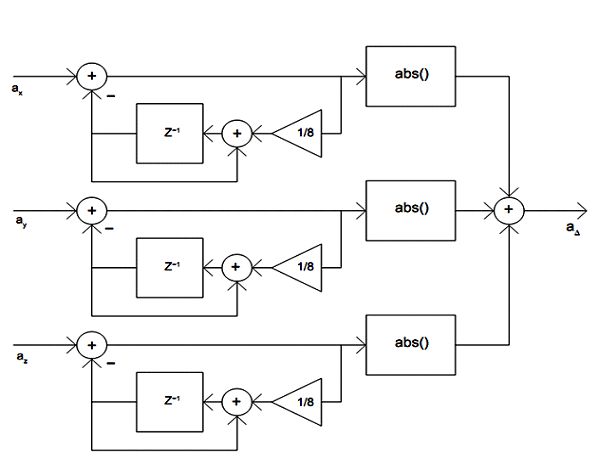
The step counting algorithm uses linear acceleration data from a 3-axis accelerometer sensor. To remove orientation dependency and the earth’s gravitational acceleration the sensor signals are processed according to the scheme pictured in Figure (1.1). Signals ax, ay and az are the accelerometer signals for each axis respectively.
Microcontroller based Accelerometer1


Figure (1.1) – Computing acceleration change value from 3-axis accelerometer sensor signal


          Firstly, each of them is high-pass filtered to remove the static or slowly varying gravitation signal. The filter is implemented by a computationally efficient autoregressive filter of the first degree. Effectively the filter subtracts from the input an integrated value of the output. A gain coefficient of 1/8 is inserted in the loop to adjust the response time and frequency response. The -3 dB cutoff frequency is approximately 1/53 of the sampling rate. The transfer function of the filter is:
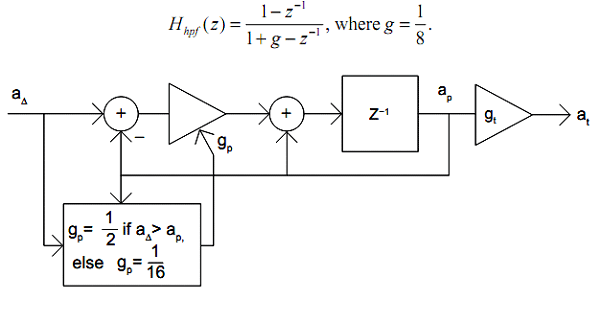
Microcontroller based Accelerometer2

                                          Figure (1.2) – Computing the adaptive threshold level

             The three high-pass filtered accelerations are combined to one output signal a? by taking the 1-norm: i.e. summing their absolute values. The 1-norm was chosen instead of the more accurate 2-norm to make the algorithm less computationally intense. The output a? is zero when the device is not moving. Any movement in any direction results in an output signal. With the 1-norm the gain (the scale of the output signal), depends somewhat on the orientation of the device, whereas with the 2-norm the gain is uniform in any direction.
However, as the algorithm features an adaptive threshold, it is insensitive to the gain and thus, there would not be any benefit for using the more computationally intensive 2-norm. To make the algorithm robust, it features an adaptive threshold. This feature makes the algorithm independent of sensor sensitivity and the drift of it.
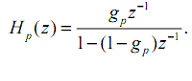
It also makes the algorithm less sensitive to different users and variations in running style and road material. Figure (1.2) shows the computation of the threshold lavel. It is essentially a peak detector with some slowness added to the reaction time. It is implemented as a low-pass filter of the first degree with a varying response time. The transfer function of the filter is
Microcontroller based Accelerometer3In a steady-state case the peak signal ap equals the input a? because the difference is integrated in a closed loop. The gain coefficient gp determines the loop gain and a smaller coefficient corresponds to a slower response. However, if the input is greater than ap the gp is set to 1/2, which results in a relatively fast response, driving ap close to a? in a few samples.
The step response time to 95% of the final value is 5 samples in this case. If a? is less or equal to ap the gp is set to 1/16, which result in a slow response, effectively holding the peak values for some time with a slow decay. In this case the step response time to 95% of the final value is 47 samples.


2. Literature Survey

2.1 Accelerometer:

In 1975, the performance to date of the Cactus ultrasensitive triaxial accelerometer, launched on the Castor satellite in May 1975, is described after a brief outline of its major design features. Qualification tests of Cactus have demonstrated a threshold lower than one billionth of a meter per second squared. The accelerometer is ten to twenty times more sensitive than previously developed devices. Amongst other things, Cactus will be used to determine the density of the atmosphere and to measure the impact of micrometeorites.


In 1987, this procedure was done as a follow up study for a NPH patient first evaluated by the Cleveland Clinic Foundation in 1987. The subject was asked to stand on a force plate with the dual-axis accelerometer headpiece on her head. She then stood quietly for six thirty-second periods, three with eyes open, three with eyes closed. During these intervals measurements were taken by both the force plate, measuring center of pressure, and by the accelerometer.


           In 1991, a rotary accelerometer has capacitively coupled rotary and fixed thin film electrodes fixed to a substrate. The rotary electrode is angularly flexible and has a central hub secured to the substrate and spoke electrodes radially extending from the hub. Elongated electrodes are fixed to the substrate in circumferential positions on each side of each spoke electrode and in the same plane as the spoke electrodes.

The rotary electrode, having a mass and being angularly flexible, responds to angular acceleration to differentially change the gaps between its spoke electrodes and the adjacent fixed electrodes. The fixed electrodes are energized with rectangular wave voltages of opposite phase. The sum of these voltages in the spoke electrodes is a function of the difference in the gaps which, in turn, is a function of the angular inertia of the rotary electrode.
In 1998, Analog Devices was the first to introduce motion and tilt sensor for consumer products with the first low-g single chip dual axisaccelerometer. Game pad controllers became the first consumer product volume application and adoption accelerated rapidly. Today, ADI leads the consumer low-g accelerometer market and supplies the industry’s smallest gyroscopes in their class featuring lower power consumption and unsurpassed immunity to shock and vibration.
In 2002, Data quality has been improved significantly. For the star camera and accelerometer data, the calibration parameters have been well determined and used in data generating and processing. The purpose of this paper is to investigate how well the GRACE satellite orbits can be determined using improved accelerometer data and to assess the differences between the use of accelerometer data and the use of a priori models for the surface forces.
As is known, the orbit accuracy depends on the force models used in the dynamic orbit determination, but the models for the surface forces acting on low-Earth satellites are uncertain. To alleviate this problem, the GRACE concept uses a three-axis accelerometer to measure the non-gravitational accelerations. To reduce the effects of force model error on precise orbit determination, one can estimate a set of empirical parameters.
In 2010, the most anticipated product in Apple’s history has finally been put on sale. The iPad is an iphone
 Like device that can go on the web with the built in Wi-Fi capabilities, as well as check e-mails, listen to music, watch videos and games. The iPad weights about 1.5 pounds and has a touch screen
 This measures at 9.7 inches diagonally. There are two versions of the iPad. One version can only go on the web using the built in Wi-Fi function.
The second version, along with the Wi-Fi, can go online using a cellular data connection. The second version will be available at the end of the month. The iPad also has an accelerometer, which allows owners of the iPad to tilt the it so they can view whatever is on the screen on its side, which helps out with web browsing and sending out e-mails.
2.2 Sensors Used 
2.2.1 Sensors in old days:
                        In old days we are using some less features type and less application type sensors for measuring the acceleration purpose. On those days the sensors, we ware measuring only two directions for vibration, shocks and the other purpose. That two direction are nothing but the X-axis and the Y-axis only. Now a day if we want to measure the two directions only, we can use this sensor also.
2.2.2 Sensors in recent days:
                        In the recent days we are using the more features and more application types of sensors over the measurement of the distance. These sensors are applicable for the all three direction that are the X-Axis, Y-Axis and Z-Axis measurement and also for the vibration, shocks and the step counting purpose.
            Here, we can see that what the features are provided in the previous sensors and now which features are provided in the sensors. There major difference between old sensors and the new upcoming sensors. Here, there is one difference table we mentioned below the paragraph so we can easily understand the difference between the old sensors and the new sensors. The difference about the sensitivity, taking turn on time, design, cost, Measurement of the Axis, sensor sensitivity also.

         Table (2.1) – Differentiate Sensors in Old & Recent Days


 Features/Sensors
 ADXL202
 MMA7260Q
Selectable Sensitivity
+/-1.0 degree
1.5g/2g/4g/6g
Sleep Mode
More than 3?A
3?A
Turn On Time
Not too much fast
Fast
High Sensitivity
–
800 mV/g @ 1.5g
Design
Robust Design
Robust Design, High Shocks Survivability
Axis Sensitivity
X & Y-Axis
XYZ-Axis
Cost
Medium to High
Low


3. System Development

3.1 Block Diagram:
            Accelerometers can be used for measuring both dynamic and static measurements of acceleration. Tilt is a static measurement where gravity is the acceleration being measured. Therefore, to achieve the highest degree resolution of a tilt measurement, a low-g, high sensitivity accelerometer is required. The Freescale MMA6200Q and MMA7260Q series accelerometers are good solutions for XY and XYZ tilt sensing. These devices provide a sensitivity of 800 mV/g in 3.3V applications. The MMA2260D and MMA1260D are also good solutions for 5 V applications providing a sensitivity of 1200mV/g for X and Z, respectively. All of these accelerometers will experience acceleration in the range of +1g to -1g as the device is tilted from -90 degrees to +90 degrees.
1g = 9.8 m/s
Microcontroller based Accelerometer4


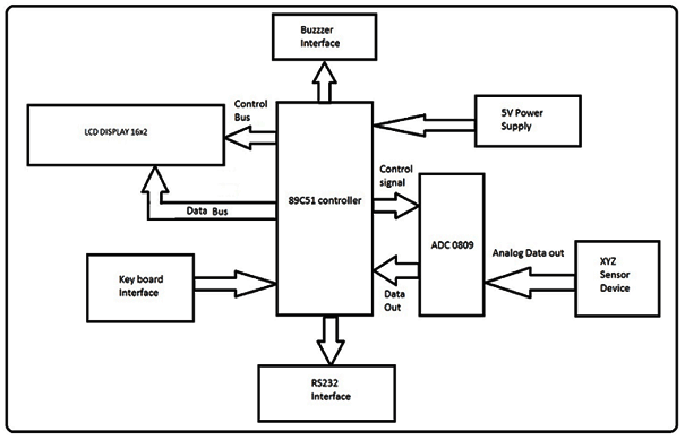
Figure (3.1) – Basic block diagram of Accelerometer
 A simple tilt application can be implemented using an 8 or 10-bit microcontroller that has 1 or 2 ADC channels to input the analog output voltage of the accelerometers and general purpose I/O pins for displaying the degrees either on a PC through a communication protocol or on an LCD. See Figure (3.1) for a typical block diagram.
Some applications may not require a display at all. These applications may only require an I/O channel to send a signal for turning on or off a device at a determined angle range.
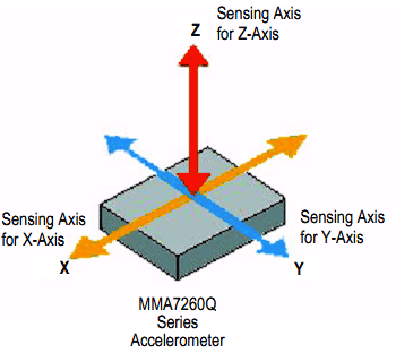
Device selection depends on the angle of reference and how the device will be mounted in the end application. This will allow you to achieve the highest degree resolution for a given solution due to the nonlinearity of the technology. First, you need to know what the sensing axis is for the accelerometer. See Figure (3.2) to see where the sensing axes are for the MMA7260Q. To obtain the most resolution per degree of change, the IC should be mounted with the sensitive axis parallel to the plane of movement where the most sensitivity is desired.
For example, if the degree range that an application will be measuring is only 0° to 45° and the PCB will be mounted perpendicular to gravity, then an X-Axis device would be the best solution. If the degree range was 0° to 45° and the PCB will be mounted perpendicular to gravity, then a Z-Axis device would be the best solution. This is understood more when thinking about the output response signal of the device and the nonlinearity.
Microcontroller based Accelerometer5


Figure (3.2) – Sensing axis for the MMA7260Q Accelerometer with X, Y & Z-Axis for sensing acceleration

3.2 Principle of Operation:

The Freescale accelerometer is a surface-micro machined integrated-circuit accelerometer. The device consists of two surface micro machined capacitive sensing cells (g-cell) and a signal conditioning ASIC contained in a single integrated circuit package.
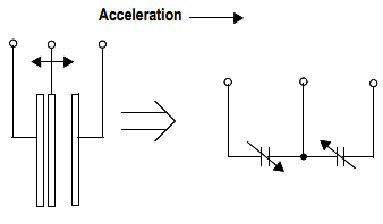
The g-cell is a mechanical structure formed from semiconductor materials (polysilicon) using semiconductor processes (masking and etching). It can be modeled as a set of beams attached to a movable central mass that move between fixed beams. The movable beams can be deflected from their rest position by subjecting the system to acceleration figure (3.3).
As the beams attached to the central mass move, the distance from them to the fixed beams on one side will increase by the same amount that the distance to the fixed beams on the other side decreases. The change in distance is a measure of acceleration.
Microcontroller based Accelerometer6


Figure (3.3) – Simple Transducer Physical Model
The g-cell beams form two back-to-back capacitors figure (3.3). As the center beam moves with acceleration, the distance between the beams changes and each capacitor’s value will change, (C = A?/D). Where A is the area of the beam, ? is the dielectric constant, and D is the distance between the beams.
The ASIC uses switched capacitor techniques to measure the g-cell capacitors and extract the acceleration data from the difference between the two capacitors. The ASIC also signal conditions and filters (switched capacitor) the signal, providing a high level output voltage that is ratio metric and proportional to acceleration.


3.3 Interfacing:
Here we are using following interfaces with the ATMega 89C51;
1)      Sensor Interface
2)      ADC Interface
3)      LCD Interface
3.3.1 Sensors:
            There are many types of different sensors for using the acceleration of vibrating, shocks, step counting and other applications. Some sensors are different from all other but there application and features are same for that only purpose. These sensors are only for three direction acceleration sensing. Because of following reasons and benefits of sensor MMA7260Q over other sensors.
Table (3.1) – Differentiated the Sensors


 Features/Sensors
 
MMA7260Q
 
 MMA6200Q
 MMA2260D
Selectable Sensitivity
1.5g/2g/4g/6g
±3g, ±11g
 
–
 
Sleep Mode
3 ?A
3 ?A
–
Turn On Time
Fast
0.5 ms Enable Response Time
–
High Sensitivity
800 mV/g @ 1.5g
–
Fast
Design
Robust Design, High Shocks Survivability
Axis Sensitivity
XYZ-Axis
XY-Axis
XZ-Axis
Cost
Low
Low
Medium
3.3.1.1 Sensor MMA7260Q:
3.3.1.1.1 Functional block diagram:
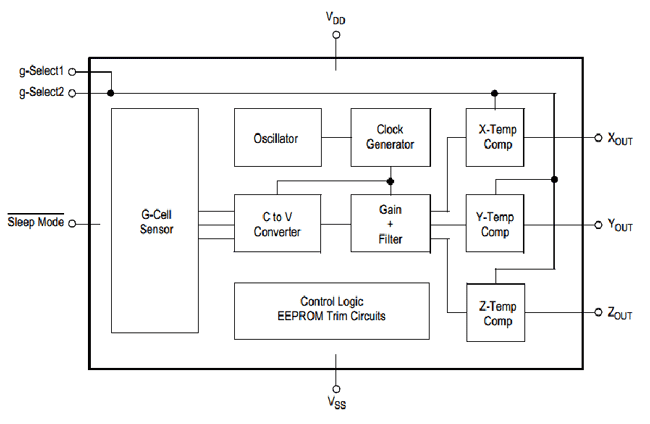
The MMA7260QT low cost capacitive micro machined accelerometer features signal conditioning, a 1-pole low pass filter, temperature compensation and g-Select which allows for the selection among 4 sensitivities. Zero-g offset full scale span and filter cut-off are factory set and require no external devices. Includes a Sleep Mode that makes it ideal for handheld battery powered electronics.
An accelerometer measures acceleration (change in speed) of anything that it’s mounted on. Single axis accelerometers measure acceleration in only one direction. Dual-axis accelerometers, which are the most common, measure acceleration in two directions, perp-endicular to each other. Three-axis accelerometers measure acceleration in three directions.
Accelerometers are very handy for measuring the orientation of an object relative to the earth, because gravity causes all objects to accelerate towards the earth. A two-axis accelerometer can be used to measure how level an object is with a three-axis accelerometer, you can measure an object’s acceleration in every direction.

Microcontroller based Accelerometer7


Figure (3.4) – Simplified Accelerometer Sensor Functional Block Diagram


3.3.1.1.2 Features of MMA7260Q Sensor:
1) Selectable Sensitivity (1.5g/2g/4g/6g)
2) Low Current Consumption: 500 ?A
3) Sleep Mode: 3 A
4) Low Voltage Operation: 2.2 V – 3.6 V
5) 6mm x 6mm x 1.45mm QFN
6) High Sensitivity (800 mV/g @ 1.5g)
7) Fast Turn On Time
8) Integral Signal Conditioning with Low Pass Filter
9) Robust Design, High Shocks Survivability
10) Pb-Free Terminations
11) Environmentally Preferred Package
12) Low Cost


3.3.1.1.3 Pin Description: 


              Table (3.2) – Pin description of sensor MMA7260Q


 Pin No.
 Pin Name
 Description
1
g-select1
Logic input pin to select g-level
2
g-select2
Logic input pin to select g-level
3
VDD
Power supply input
4
VSS
Power supply ground
5-7
N/C
No internal connection. Leave unconnected
8-11
N/C
Unused for factory trim. Leave Unconnected
12
Sleep Mode
Logic input pin to enable product or sleep mode.
13
Zout
Z direction output voltage
14
Yout
Y direction output voltage
15
Xout
X direction output voltage
16
N/C
No internal connection. Leave unconnected
           
The given table shows us the pin configuration of MMA7260Q i.e. nothing but the Pin No. also a Pin Name and the Description of the Pin. So we can understand the sensor and configure and interface with the controller.
3.3.1.1.4 Pin-out of MMA7260Q:
The below diagram shows the Pinout diagram of MMA7260Q. So we can easily under-stand how the MMA7260Q sensor looks like and from the pinout diagram shows the where the pins comes and which pins interfacing with the microcontroller.
Because of sensor MMA7260Q small size our project size will be in small size. In this project we are using sensor MMA7160Q there are many pins which are not in using purpose so when we implementing the project that time we know that the how to put the sensors on the PCB board and easily interface with the microcontroller and making the project in less size on PCB.


Microcontroller based Accelerometer8


Figure (3.5) – Pinout of MMA7260Q


3.3.1.1.5 Circuit Connection of Sensor MMA7260Q:
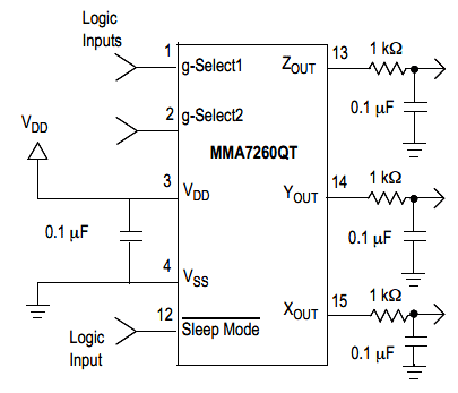
Microcontroller based Accelerometer9


Figure (3.6) – Accelerometer Sensor with Recommended Circuit Diagram
The upper figure shows the Accelerometer sensor of recommended circuit diagram than we can understand the where the connection comes from and the connection goes with the microcontroller and other circuitry parts.
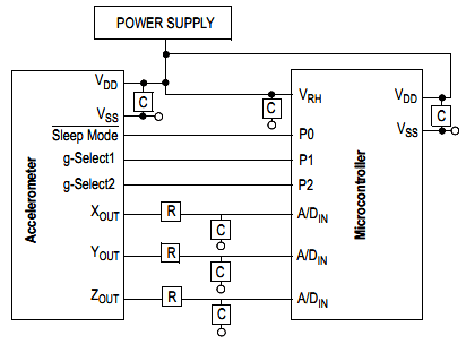
3.3.1.1.6 MMA7260Q Interface with Microcontroller:
The given figure shows the PCB interface diagram with the microcontroller. So we can easily understand that the how the interface comes between the sensor MMA7260Q and the ATMega 89C51 microcontroller.
We can also see that which port of microcontroller is connected with the pins of the sensor. Here we are using the power supply for given the input power to the microcontroller as well as sensor also.
 Microcontroller based Accelerometer11


Figure (3.7) – Recommended PCB interface with microcontroller


3.3.2 ADC 0809 Interface with 89C51:
3.3.2.1 An 8-Bit ADC:
An 8-bit ADC cuts 3.3V supply into 255 steps of 12.9mV for each step. Therefore, by taking one ADC reading of the MMA6260Q at 0g (0°of tilt for an x-axis device) and 1g (90° of tilt for an x-axis device), would result in the following:
0°: 1650mV + 12.9mV = 1662.9mV, which is 0.92° resolution
     90°: 2450mV+ 12.9mV = 2462.9mV, which is 6.51° resolution
Due to the nonlinearity discussed earlier, you will see that the accelerometer is most sensitive when the sensing axis is closer to 0°, and less sensitive when closer to 90°. Therefore, the system provides a 0.92 degree resolution at the highest sensitivity point (0 degrees), and a 6.51 degree resolution at the lowest sensitivity point (90°).
3.3.2.2 A 10-Bit ADC:
A 10-bit ADC cuts 3.3V supply into 1023 steps of 3.2mV for each step. Therefore, by taking one ADC reading of the MMA6260Q again at 0g (0° of tilt for an x-axis device), would now result in the following:
0°: 1650mV + 3.2mV = 1653.2mV
90° 2450mV + 3.2mV = 2453.2mV
This results in a 0.229 degree resolution at the highest sensitivity point (0°) and a 3.26 degree resolution at the lowest sensitivity point (90°).
3.3.2.3 A 12-Bit ADC:
A 12-bit ADC cuts 3.3V supply into 4095 steps of 0.8mV for each step. Therefore, by taking one ADC reading of the MMA6260Q again at 0g (0° of tilt for an x-axis device), would now result in the following:
0°: 1650mV + 0.8mV = 1650.8mV
90°: 2450mV + 0.8mV = 2450.8mV
This results in a 0.057 degree resolution at the highest sensitivity point (0°) and 1.63 degree resolution at the lowest sensitivity point (90°). However, for 0.8mV changes, the noise factor becomes the factor to consider during design. How much noise the system has will depend on how much resolution you can get with a higher bit count.
3.3.3 LCD Interfacing:
One of the most common display devices attached to an 8051microcontroller is an LCD (Liquid Crystal Display). LCDs are a passive display. This means they do not emit light; instead, they use the ambient light in the environment. By manipulating light, they display images using very little power. LCDs are performed due to low power consumption and compact size. Liquid Crystal (LC) is an organic substance that has both a liquid form and a crystal molecular structure. In this liquid, the rod-shaped molecular are normally in a parallel array and an electronic field can be used to control the molecules.
Some of the most common LCDs connected to 8051 are 16*2 and 20*2 display. This means 16 characters per line by 2 lines and 20 characters per line by 2 lines respectively.
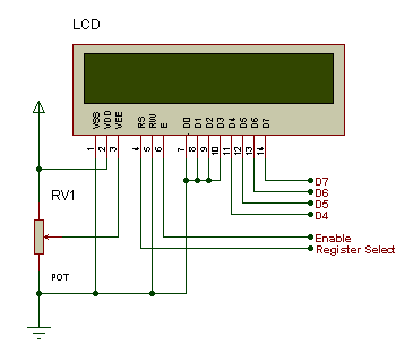
 Microcontroller based Accelerometer11


Figure (3.8) – Diagram of LCD Display


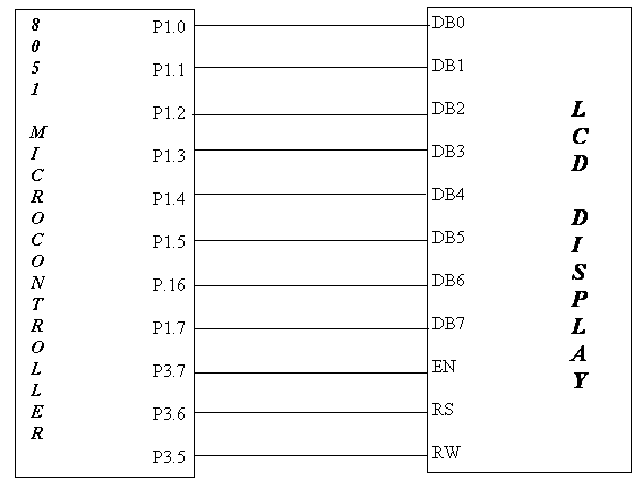
3.3.3.1 Interfacing of LCD with 8051:
            The given figure shows the interfacing of LCD display with the 8051. The port 1 of the 8051 microcontroller is connected to 8 data lines i.e. DB0 to DB7. Here, there are another three control lines EN (Enable), RS (Register Select), RW (Read-Write) are connected to the Port 3 of microcontroller.
Microcontroller based Accelerometer12


Figure (3.9) – LCD interfacing with 8051
3.4 Nonlinearity:


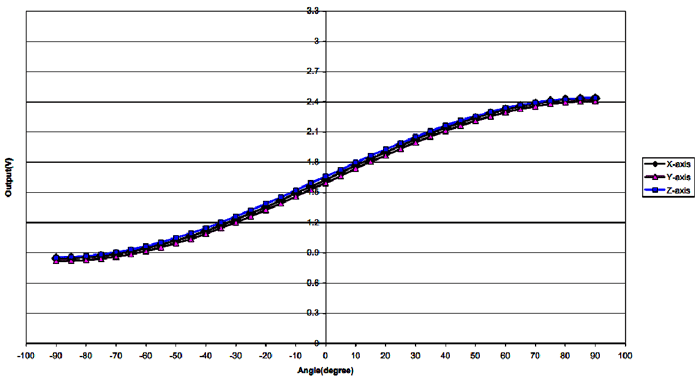
As seen in Figure (3.10), the typical output of capacitive, micro-machined accelerometers is more like a sine function. The figure shows the analog output voltage from the accelerometer for degrees of tilt from -90° to +90°. The change in degrees of tilt directly corresponds to a change in the acceleration due to a changing component of gravity acted on the accelerometer. The slope of the curve is actually the sensitivity of the device.
As the device is tilted from 0°, the sensitivity decreases. You see this in the graph as the slope of output voltage decreases for an increasing tilt towards 90°. Because of this nonlinearity, the degree resolution of the application must be determined at 0° and 90° to ensure the lowest resolution is still within the required application resolution.
 Microcontroller based Accelerometer13


Figure (3.10) – Typical nonlinear output of X, Y and Z-Axis Accelerometers

3.5 Flow Chart:


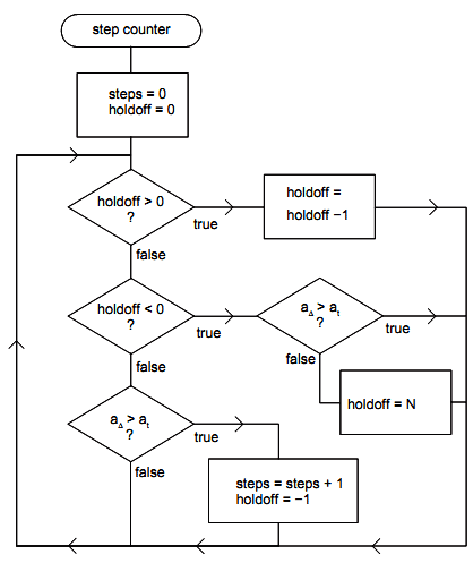
The step counting algorithm is shown in Figure (3.11). When the pedometer application is started the steps counter variable and the holdoff counter variable are initialized to zero. For each new acceleration sample, if the holdoff counter is zero and the a? signal exceeds the threshold at, the steps counter variable is incremented and the holdoff counter is set to value -1.
Microcontroller based Accelerometer13


Figure (3.11) – Flow Chart of Acceleration


This holdoff value puts the algorithm in a state waiting for a sample that is not above the threshold. When this sample has been read the holdoff is set to a value N greater than zero. If the holdoff counter is greater than zero, the algorithm does not count steps but decrements the holdoff counter for each sample period until it is zero.
The purpose of the holdoff period is to prevent superfluous step counts for cases when there is ripple in the acceleration signal. In practice a value of 1 has been used for N with success. A value this small works because the ripple is typically small and there are no extra transitions of the acceleration signal across the threshold. Hysteresis could be used instead or in addition to the holdoff to improve rejection of noise and ripple.
Also, a more advanced algorithm could include smart filtering to reject false step counts. Such filtering typically introduces delays in the display of the step count because several steps must be processed to make a decision on validity. The NWSP step counter avoids advanced filtering to enable an instant display of steps and not to infringe on proprietary technology.
 
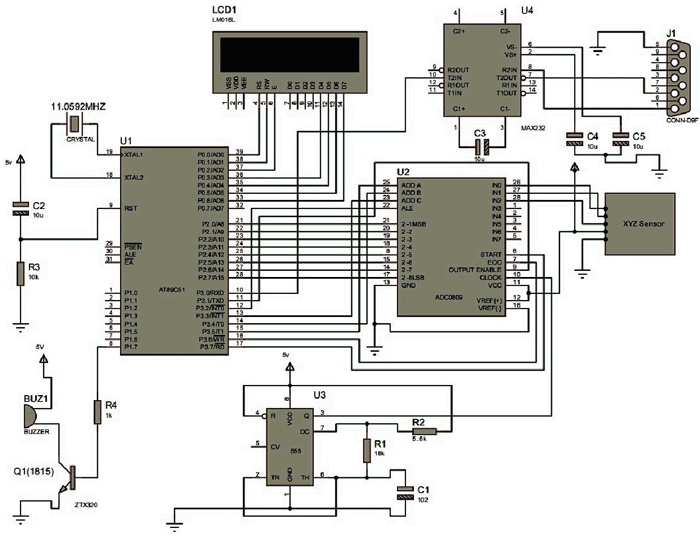
3.6 Circuit Diagram of accelerometer using sensor MMA7260Q


The figure in circuit diagram tab2 shows the circuit diagram of Accelerometer using the sensor MMA7260Q. It also shows that the appropriate circuit connection regarding the perfect acceleration of the all the three direction. In this circuit diagram we can also see and measure the vibration, shocks, heart beats and also step counting. Know the how the connection actual working with the sensors and the micro-controller also.
Here, the G-Select 1 and 2 pins are connect to the switch ports and we are given to 3V power supply than pin 3 and 4 are connected with the ground terminal and then pin number 13,14, and 15 are for the all three direction i.e. x-axis, y-axis and z-axis output signals. After that remaining all pins not connected and no internal connection over there leave them for un connected.


3.7 Proportional Result:
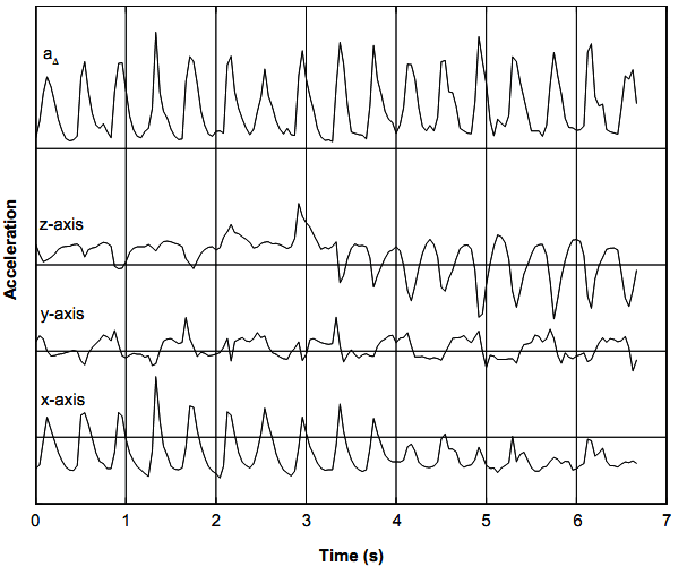
The step counter application was tested and the performance was evaluated. Figure (3.11) shows a set of acceleration signals for a short segment for one case where a subject was running. The x-axis is in the direction of the tangent of the forearm, the y-axis is parallel to it and the z-axis is perpendicular to it. Normally when a wrist-watch like device is worn tightly on the wrist and the arms are in a position for running, the x-axis of the device points downwards, the y-axis points forward in the running direction and the z-axis to the side.
The figure also includes the combined acceleration a?. The case in the figure shows an interesting phenomenon. During the first 4 seconds in the plot there is a strong signal from the x-axis sensor but in the latter part this signal has moved over to the z-axis sensor.
The reason for this is that the wrist device has been loosely fitted and has turned around the wrist during the running exercise to the side of the wrist, hanging on the downside of the arm. Each sharp spike in the waveforms of x- and y-axes corresponds to a combination of the heel strike in the gait cycle and the up–down movement of the body.
The heel strike signal is strongly softened by body spring–mass system when sensed on the wrist. On the y-axis a periodicity of half the frequency of the other axes can be observed. This is caused by the arm swinging forward and backward with the change in direction happening on each step.
This example shows that at least a sensor with two axes is needed to cover situations where the wrist device might turn around the wrist. As can be seen in the plot, the a? signal is insensitive to the change in the device orientation and has a fairly constant periodic acceleration signal with each step clearly distinguishable.
The NWSP pedometer demo application was intended for running exercise. Tests showed that the application does not count steps during walking. Figure shows the acceleration signals from the wrist during a walking exercise. The signals are very noisy and have low amplitude. From the z-axis signal some periodicity can be observed. This periodicity is caused by swinging motion of the arm and thus, the frequency is half of the step rate.
 Microcontroller based Accelerometer16

  Figure (3.13) – Acceleration signal during running
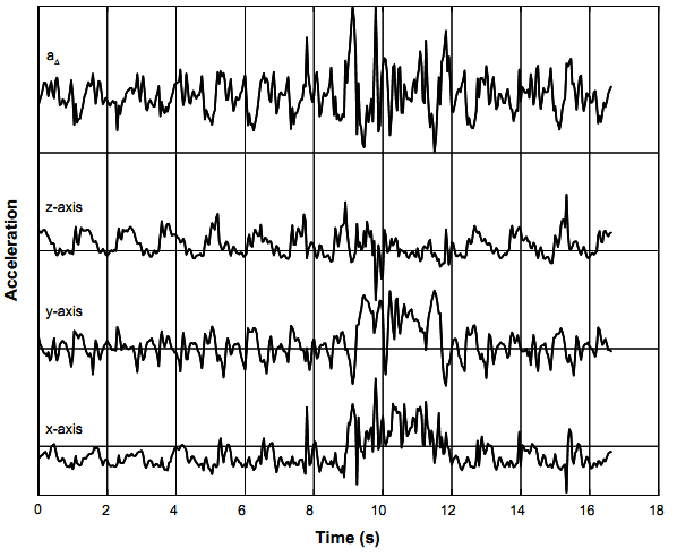
           
The combined acceleration signal a? has lost an obvious periodicity because noisy signals from x- and y-axes have been added. This makes it difficult to detect steps. In the plot around 10 seconds on the time line there are some disturbances corrupting the periodicity in axis z. This is a typical sporadic arm movement that occurs frequently while walking, making accurate step counting from the wrist very challenging for any activities other than running.
            A comparison was made against Nokia Step Counter application running on a Nokia N95 mobile phone as a reference. This application is believed to be very accurate and it is available for free from Nokia beta labs.
 Microcontroller based Accelerometer17


Figure (3.14) – Acceleration signal during walking


A small number of test users ran with the NWSP pedometer on the wrist and the N95 device in the pocket simultaneously counting the steps during short exercises of a few hundred steps. Results showed that the NWSP step counter acquired consistently around 30% fewer steps than the reference. This result was surprising as the contrary was expected. As there is no advanced filtering for rejecting false steps and no hysteresis to reject ripple and noise, it was expected that extra steps would be acquired by the NWSP. Also having a very low holdoff period could be expected to pass through some extra steps.
Measurements of accelerations from the wrist showed that steps can be identified from the acceleration signals. From running exercises the detection is very clear. From walking activity steps could be detected with some limited accuracy using proper algorithms. The NWSP step counting algorithm was designed for running exercise. This was done before the acceleration measurements were available and it was later verified to be functional in laboratory conditions. However, the real running test showed a significant loss of steps. The probable cause of loss of steps lies in the way the 3-axis accelerations are combined into one acceleration signal a?.
The sum of absolute values of the individual axes of acceleration may stay above the threshold at for a long time if there is interfering accelerations present from swinging arms, for example. Thus, steps are masked out by this interference. The problem could be remedied by raising the cutoff frequency of the high pass filters. As arm swinging has lower frequency accelerations than caused by the step impact it may be attenuated by the high pass filter. Another solution is to continuously monitor each acceleration axis separately and only use the one with clearest periodical signal as the source for step counting.
Reviews of pedometers have revealed very high inaccuracies in available devices based on acceleration sensors. To improve accuracy alternative sensing methods have been suggested, such as gyroscopes. As the NWSP includes gyro sensors, they could be utilized to improve the NWSP pedometer. Gyros are insensitive to linear acceleration and thus, interfering accelerations are suppressed. However, the heel strike or body up–down movement cannot be detected by this kind of sensor and the algorithm would have to rely on detecting arm swing.


4. Hardware And Software

4.1 Hardware Description:


4.1.1 Circuit Diagram of Project: Shown in Circuit Diagram tab2. 


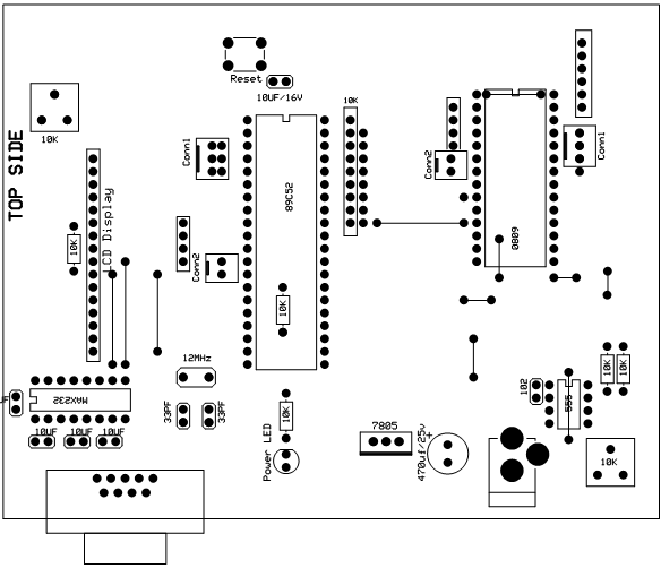
4.1.2 PCB Layout (Top Side):


Microcontroller based Accelerometer19


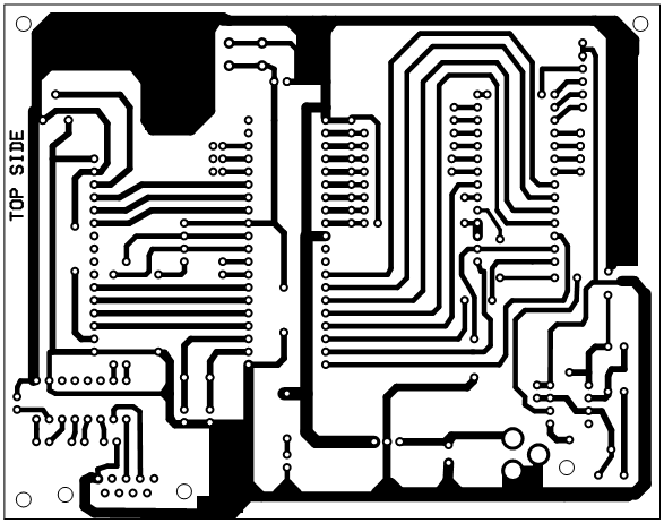
 Figure (4.2) – PCB Layout (Top Side)


Copper in the bottom layer is shown in Figure. It can be observed that an effort was done to try to fracture the ground plane as little as possible (as little routing as possible on this layer, trying to do most of the routing on the top layer). A good ground plane is necessary for correct antenna operation.
The antennas are dipoles, the reason they are slightly bent is to improve the radiation pattern (to make it unidirectional). The distance between the antennas and the ground plane affects the antenna impedance. Therefore, if a design is based on this design or another reference design (i.e. the SARD) the distances between the ground plane and the antennas should be left exactly the same. The top layer of the board is presented in Figure. Since the placement has already been discussed, now the comments will be on the routing.
In general, the length of the traces was tried to be kept at a minimum and the width of the traces was chosen in proportion to the current they were expected to carry (except for the RF traces).
Most of the routing was attempted to be done on the top layer to fracture the ground plane the least possible and to minimize the use of vias. Enough space between traces was left (in most cases more than .010 inches) to try to minimize crosstalk.
In the case of the RF traces, their width (as well as their distance to the ground plane and the PCB material dielectric constant) determines the characteristic impedance of the traces (transmission lines). The length of the transmission lines determines their effect. The traces through which the RF signals passes and that were not intended to behave as transmission lines were made short and wide to minimize unwanted transmission line effects.


4.1.3 Component Pads on the PCB:
Microcontroller based Accelerometer20


Figure (4.3) – Component Pads on the PCB
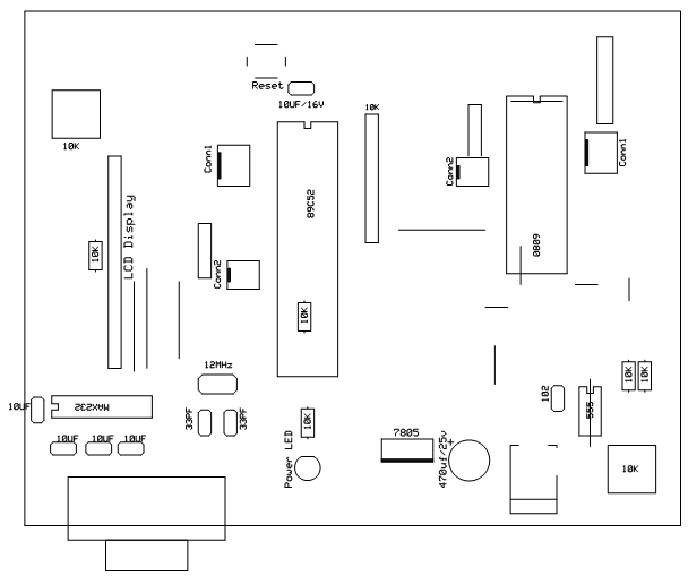
 

The component placement in the top layer is shown is Figure and the component placement in the bottom layer are presented in Figure.
The most critical parts in the design of the layout are the RF section and the accelerometer section. The RF section was placed on one extreme of the board for two reasons. One reason was to have the antenna at the border,
Microcontroller based Accelerometer21


Figure (4.4) – Component mounts on the PCB


So the ground plane and the PCB would obstruct the least possible the RF radiation. The other was to try to avoid having currents from other sections go through the ground plane below the RF section and induce noise to this sensitive part of the board. This last reason was also the motivation for placing the accelerometer section in an extreme of the board. In general, placement was done trying to have together the components used for the same function (to minimize routing complexity and board size).


4.1.4 General Layout Consideration:
General circuit board layout considerations were:
Ø Proper RF operation (i.e. minimum spurious emissions, etc.)
Ø Minimizing noise
Ø Minimizing size and routing complexity
Ø Easy to prototype an application (i.e. simulate a product)


4.2 Software Description            

4.2.1 Module Diagram:
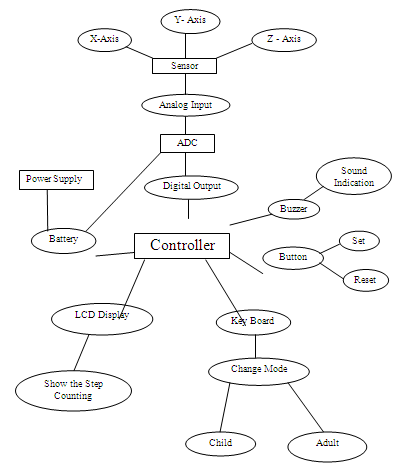
Microcontroller based Accelerometer22

Figure (4.5) – Module Diagram

4.2.2 Algorithm:

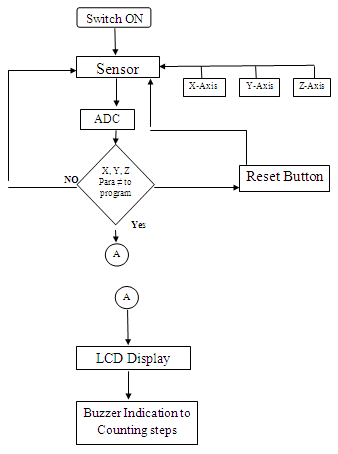
1)      Accelerometer device attach or tie on hips.

2)      Switch on the power supply of the project.

3)      It is provide the power to the controller and the analog to digital converter.

4)      By the power supply the sensor automatically turn on.

5)      After turn on the sensor.

6)      Start walking around there.

7)      Sensor senses the all three directions.

8)      Sensor taking the analog input from the three directions.

9)      Those analog inputs given to the analog to digital converter.

10) After converting the analog to digital those signals given to the controller.

11) In the controller we are defining the all interfaces like buzzer interface, LCD interface etc.

12) Here, we are using the buzzer interface for the indication of the distance will cover.

13) There will be the LCD interface with the controller for displaying the steps counting what you will walk on the road or everywhere.

14) There  is one button provided in the device for set and reset the device.


4.2.3 Flow Chart:
5. Result Analysis 

5.1 Time to Takes the Device:


·         Time to take Start the device – 5 Sec.
·         Time to take reset the device – 5 Sec.
·         Normally put the device as a vertically on the hip.
·         Take the time to set the sensor as per the user – 4 Sec to 5 Sec.
·         Battery life of the device – 15 to 18 Hours.


5.2 Sensor at the Different Angle:


  • For the Normal Walking:


    Table (5.1) – Observation on walking Mode


Serial No.
User Height in cm
Walking Angle set by Device
1.
181.5
68
2.
171.5
62
3.
170
60
 
  • For the Different Situation:


Table (5.2) – Observation on Normal Running


Sr. no
User Height
Reading 1
Reading 2
Reading 3
Avg. Angle
1
181.5
6D
6F
70
6E
2
171.5
65
68
6D
69
3
170
63
67
6A
67


Table (5.3) – Observation on Jumping Running


Sr. no
 
 
User Height
 
 Reading 1
 Reading 2
 
Reading 3
 
 Avg. Angle
1
181.5
70
72
6D
70
2
171.5
65
67
68
67
3
170
63
65
65
65


Table (5.4) – Observation on Long Jumping Running


Sr. no
User Height
Reading 1
Reading 2
Reading 3
Avg. Angle
1
181.5
73
6D
6F
6E
2
171.5
66
67
69
67
3
170
64
65
68
66


6. Applications

6.1 Applications:


Accelerometers are already used in a wide variety of machines, specialized equipment and personal electronics:
·         Medical instruments.
·         Machine efficiency measurement.
·         Level measurements.
·         Mobile Phone G – Sensor.
·         Self balancing robots 
·         Tilt-mode game controllers
·         Model airplane auto pilot
·         Car alarm systems 
·         Crash detection/airbag deployment
·         Human motion monitoring 
·         Leveling tool
There are some other applications over the accelerometer given below:
·         By measuring the amount of static acceleration due to gravity, you can find out the angle the device is tilted at with respect to the earth. By sensing the amount of dynamic acceleration, you can analyze the way the device is moving. At first, measuring tilt and acceleration doesn’t seem all that exciting. However, engineers have come up with many ways to make really useful products using them.
·         An accelerometer can help your project understand its surroundings better. Is it driving uphill? Is it going to fall over when it takes another step? Is it flying horizontally or is it dive bombing your professor? A good programmer can write code to answer all of these questions using the data provided by an accelerometer. An accelerometer can help analyze problems in a car engine using vibration testing, or you could even use one to make amusical instrument.
·         In the computing world, IBM and Apple have recently started using accelerometers in their laptops to protect hard drives from damage. If you accidentally drop the laptop, the accelerometer detects the sudden freefall, and switches the hard drive off so the heads don’t crash on the platters. In a similar fashion, high g accelerometers are the industry standard way of detecting car crashes and deploying airbags at just the right time.
·         Accelerometers are real workhorses in the sensor world because they can sense such a wide range of motion. They’re used in the latest Apple PowerBooks (and other laptops) to detect when the computer’s suddenly moved or tipped, so the hard drive can be locked up during movement. They’re used in cameras, to control image stabilization functions. They’re used in pedometers, gait meters, and other exercise and physical therapy devices. They’re used in gaming controls to generate tilt data. They’re used in automobiles, to control airbag release when there’s a sudden stop.


7. Advantages And Disadvantages


7.1 Advantages:
·         Flexibility to select 1.5g, 2g, 4g and 6g of acceleration for multifunctional applications
·         Low power for extended battery life
·         Fast power-up response time
·         Sleep mode is ideal for handheld battery-powered electronics
·         Low component count saves cost, saves space
·         Highly sensitive with low noise
·         Adaptable functionality
 
·         High frequency and resolution for accurate fall, tilt, motion, positioning, shock and vibration sensing


7.2 Disadvantages:

Calibration with the distance step counting with the different ages people like the adult and the children.

8. Conclusion

In this study, using acceleration sensor, we implement acceleration sensor module and algorithm to detect wearer’s posture, activity and fall. To assess the performance of algorithm, in specific space, we develop step counting monitoring system. The developed system can be used for patient or the senior people’s activity monitoring and fall detection, also, sports athlete’s activity measurement and pattern analysis, normal people’s exercise learning and just playthings.


Project Source Code


Circuit Diagrams

Microcontroller-based-Accelerometer15
Microcontroller-based-Accelerometer18

Project Datasheet

https://www.engineersgarage.com/wp-content/uploads/2019/10/Microcontroller-based-Accelerometer-Program.zip


Filed Under: Electronic Projects
Tagged With: 16x2 LCD, accelerometer, ATMega 89C51, microcontroller, MMA7260Q Sensor
 

Next Article

← Previous Article
Next Article →

Questions related to this article?
👉Ask and discuss on EDAboard.com and Electro-Tech-Online.com forums.


Tell Us What You Think!! Cancel reply

Log in to leave a comment:

Lost your password?

Don't have an account? Register here

Submit a Guest Post

submit a guest post

EE TECH TOOLBOX

“ee
Tech Toolbox: Sensors
In this Tech Toolbox, we cover some of those technologies driving the next generation of connected systems, including ultra-low-power sensing strategies that extend node battery life, and 60 GHz CMOS radar for contactless health and presence detection.

EE Learning Center

EE Learning Center
“engineers
EXPAND YOUR KNOWLEDGE AND STAY CONNECTED
Get the latest info on technologies, tools and strategies for EE professionals.

HAVE A QUESTION?

Have a technical question about an article or other engineering questions? Check out our engineering forums EDABoard.com and Electro-Tech-Online.com where you can get those questions asked and answered by your peers!


RSS EDABOARD.com Discussions.

  • Solenoid AC Magnetic field water pump
  • how RS-485 transmits and receive logic levels between two MCUs
  • what is missing from this circuit?
  • x86 vs. ARM: Architecture Differences and Application Scenarios
  • Analyses and design of LDO

RSS Electro-Tech-Online.com Discussions

  • What is the most suitable light source for making a book light like this?
  • How charging is done in Transformer Inverters
  • extracting material properties from open load resonance
  • Oshon Basic, programing IF statements
  • USBASP Programming problems

Featured Tutorials

Learn - VHDL Tutorials (22 Part)

  • VHDL Tutorial – 11: Designing half and full-subtractor circuits
    VHDL Tutorial – 11: Designing half and full-subtractor circuits
  • VHDL Tutorial – 12: Design a 8-bit parity generator and circuit checker
    VHDL Tutorial – 12: Design a 8-bit parity generator and circuit checker
  • VHDL tutorial 13: Design 3×8 decoder and 8×3 encoder using VHDL
    VHDL tutorial 13: Design 3×8 decoder and 8×3 encoder using VHDL
  • VHDL Tutorial 14: Design 1×8  demultiplexer and 8×1 multiplexer using VHDL
    VHDL Tutorial 14: Design 1×8  demultiplexer and 8×1 multiplexer using VHDL
  • VHDL Tutorial 17: Design a JK flip-flop (with preset and clear) using VHDL
    VHDL Tutorial 17: Design a JK flip-flop (with preset and clear) using VHDL
  • VHDL Tutorial 18: Design a T flip-flop (with enable and an active high reset input) using VHDL
    VHDL Tutorial 18: Design a T flip-flop (with enable and an active high reset input) using VHDL
More Tutorials >

Recent Articles

  • Navitas launches isolated TO-247 package for SiC
  • 3D scanning: How photogrammetry is reshaping digital engineering
  • EPC launches 3-phase GaN motor-drive boards
  • TDK launches 30 nH DC-link capacitors
  • Amphenol RF launches 40 GHz solderless connectors

EE ENGINEERING TRAINING DAYS

engineering
Engineers Garage
  • Analog IC TIps
  • Connector Tips
  • Battery Power Tips
  • EDABoard Forums
  • EE World Online
  • Electro-Tech-Online Forums
  • EV Engineering
  • Microcontroller Tips
  • Power Electronic Tips
  • Sensor Tips
  • Test and Measurement Tips
  • 5G Technology World
  • Subscribe to our newsletter
  • About Us
  • Contact Us
  • Advertise

Copyright © 2026 WTWH Media LLC. All Rights Reserved. The material on this site may not be reproduced, distributed, transmitted, cached or otherwise used, except with the prior written permission of WTWH Media
Privacy Policy

Search Engineers Garage

  • Electronic Projects & Tutorials
    • Electronic Projects
      • Arduino Projects
      • AVR
      • Raspberry pi
      • ESP8266
      • BeagleBone
      • 8051 Microcontroller
      • ARM
      • PIC Microcontroller
      • STM32
    • Tutorials
      • Sensor Series
      • Engineering Deep Dives
      • AI
      • ARDUINO Compatible Coding
      • Audio Electronics
      • Battery Management
      • Beginners Electronics Series
      • Brainwave
      • Digital electronics (DE)
      • Electric Vehicles
      • EMI/EMC/RFI
      • EVs
      • Hardware Filters
      • IoT tutorials
      • LoRa/LoRaWAN
      • Power Tutorials
      • Protocol
      • Python
      • RPI Python Programming
      • Sensors
      • USB
      • Thermal management
      • Verilog
      • VHDL
    • Circuit Design
    • Project Videos
    • Components
  • Articles
    • Tech Articles
    • Insight
    • Invention Stories
    • How to
    • What Is
  • News
    • Electronic Product News
    • Business News
    • Company/Start-up News
    • DIY Reviews
    • Guest Post
  • Forums
    • EDABoard.com
    • Electro-Tech-Online
    • EG Forum Archive
  • DigiKey Store
    • Cables, Wires
    • Connectors, Interconnect
    • Discrete
    • Electromechanical
    • Embedded Computers
    • Enclosures, Hardware, Office
    • Integrated Circuits (ICs)
    • Isolators
    • LED/Optoelectronics
    • Passive
    • Power, Circuit Protection
    • Programmers
    • RF, Wireless
    • Semiconductors
    • Sensors, Transducers
    • Test Products
    • Tools
  • Learn
    • eBooks/Tech Tips
    • Design Guides
    • Learning Center
    • Tech Toolboxes
    • Webinars & Digital Events
  • Resources
    • Digital Issues
    • EE Training Days
    • LEAP Awards
    • Podcasts
    • Webinars / Digital Events
    • White Papers
    • Engineering Diversity & Inclusion
  • Guest Post Guidelines
  • Advertise
  • Subscribe