
Sometimes we do not want the users of a particular computer or network to open a particular website. For example we want our children or our friends to stop accessing a website then we needs to block that website on the computer or network. Although web browsers provide facilities to block a website but they do not work always and it is quite easy to undo the settings. So through this guide I will show you how to block websites by using computer’s host file. By settings a password for your host file, other users will not be able to unblock the websites back. Here are the steps:
1. Open the ‘Command Prompt’ and type “notepad C:/Windows/System32/drivers/etc/hosts” and start instead of moving cursor just start typing, the host file will be open in Notepad.
2. Now in the host file find the line that says: “127.0.0.1 localhost,”. Bellow this line type the IP address and name of the website that you want to block separating by a space. If you want to block more than one site write the similar details in individual line. For example if you want to block Facebook.com then write the following line:
66.220.158.11 www.facebook.com
3. To find out the IP address of a website open the command prompt and type “ping www.facebook.com” and press Enter key. If a website has more than one IP address then write each one with the website name in separate line.
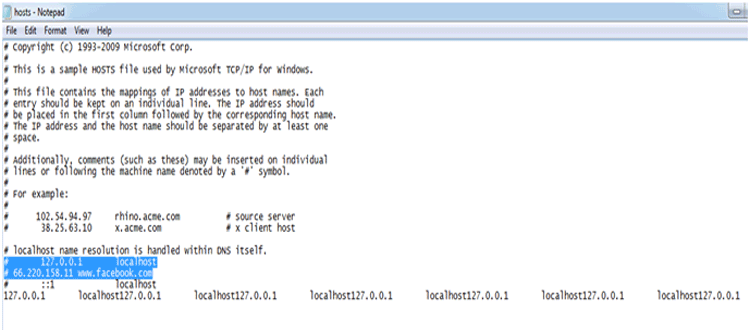
4. Save the host file after adding the details of all website that you want to block and close the host file and command prompt.
Filed Under: How to

Questions related to this article?
👉Ask and discuss on EDAboard.com and Electro-Tech-Online.com forums.
Tell Us What You Think!!
You must be logged in to post a comment.