
Gas leakage has been a cause of severe hazards. Many fire accidents in hotels, restaurants, and houses have been due to leakage of LPG gas. Though the leakage can be detected by the smell of the gas, many times it is not possible to sense a leakage straight forward. That is why, hotels, restaurants and even in houses, it is wise enough to install an LPG gas leakage detector. This project is an implementation of the same using MQ-6 gas sensor. The sensor is commonly used for detecting gas leakage for various applications. The device generates a visual alert using LED on detection of a dangerous leakage. It also opens an outlet by driving a servo motor so that the leaked gas could be evacuated. The device also keeps displaying the leakage amount on an LCD display.
The MQ6 gas sensor detects the concentration of gas in ppm and outputs analog value which can be converted to digital measure using inbuilt Analog to Digital Convertor of Arduino. The value of the digital measure will be 10-bit long and varies from 0 to 1023. The project allows the user to set the dangerous level for leakage based on the same digital measure. When the value set by the user matches with that of the value detected by the sensor, it invokes the alarm. The MQ6 sensor can be calibrated by interfacing a load resistance of fixed value with the sensor.
The project is built on Arduino Pro Mini and is a portable device that can be installed anywhere. The Arduino sketch on the board manages to read data from the MQ-6 sensor, compare data and invoke an alarm.
Components Required –
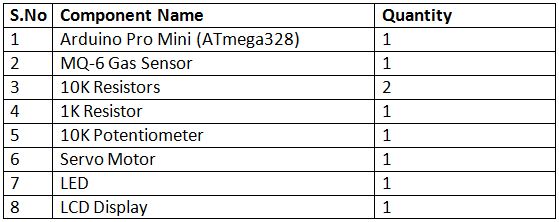
Fig. 1: List of Components required for Arduino based LPG Leakage Detector
Circuit Connections –
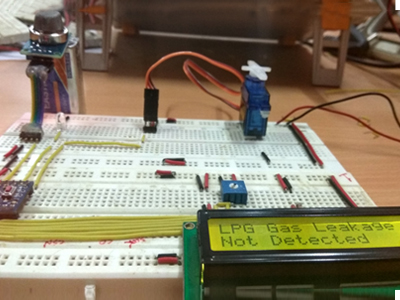
Fig. 2: Prototype of Arduino based LPG Leakage Detector
The circuit of the LPG gas leakage detector is built on Arduino Pro Mini. The MQ-6 gas sensor, servo motor and LCD display and LED are interfaced to the Arduino board. The circuit connections are as follow –
MQ6 Gas Sensor – The MQ6 is a gas sensor module. The module has 4 pins for interfacing of which two pins are VCC and ground, one pin is analog output and one pin is digital pin via a comparator (LM358). The analog output pin of the module is used for detecting concentration level of gas leakage and interfaced with the A0 analog input pin of the Arduino board. The sensor measures the concentration of leaked gas in ppm according to the following formulae –
Concen = 1036.5*R^-2.392 Where
Concen is the concentration of LPG in ppm
R is the ratio of Rs the resistance of the sensor to the R0 which is the resistance at 1000ppm at 20 degree Celsius and 65% humidity.
The resistance of the sensor Rs is given by the formulae –
Rs = (1024/ADC_DATA-1)*RL where
Rs is the resistance of the sensor
ADC_DATA is digital reading ranging from 0 to 1023
RL is load resistance ranging from 10K to 40K ohms
Therefore, for a fixed load resistance, the ADC reading is proportional to the concentration of gas in ppm.
In the datasheet, the ratio of concentration to the sensor resistance is given. The graph is done under the normal condition of 20 degree Celsius and 65% humidity. So Rs=R0 for the curve. This way the concentration of gas in ppm becomes equal to ADC reading. The ADC reading will range between 0 and 1023. The analog output pin of the sensor is used for getting the reading. The VCC and Ground pins are connected to the common VCC and ground while the analog output pin is connected to the A0 pin of the Arduino board.
16X2 LCD: The 16X2 LCD display is used to display the value of gas concentration. It is connected to the Arduino board by connecting its data pins to pins 4 to 7 of the Arduino board. The RS and E pins of the LCD are connected to pins 2 and 3 of the Arduino UNO respectively. The RW pin of the LCD is connected to ground.
Fig. 3: Table listing circuit connections between Arduino Uno and Character LCD
Servo Motor – The servo motor is used to open and close an outlet that allows evacuating the leaked gas. The servo motor has three terminals – VCC, Ground, and Control. The VCC and Ground are connected to common VCC and Ground respectively. The control terminal of the motor is connected to pin 10 of the Arduino board. A pulse width modulated signal need to be passed to the control terminal of the servo in order to rotate it between angles 0 and 180 degrees.
LED – An LED is directly connected to the pin 12 of the Arduino. The LED is set to ON once the leakage exceeds dangerous levels.
Power Supply – The circuit needs a 5V regulated DC for its operation. An 18V battery can used as the primary source of power. The supply from the battery can be regulated to 5V using 7805 voltage regulator IC. The pin 1 of the voltage regulator IC should be connected to the anode of the battery and pin 2 of it should be connected to the ground. The voltage output must be drawn from pin 3 of the 7805 IC.
How the circuit works –
Fig. 4: Image of Arduino based LPG Leakage Detector
The functioning of the circuit is very simple. Once the device is powered ON, the Arduino initializes the LCD display and start reading the analog voltage from the MQ-6 sensor. The analog voltage from the sensor is digitized using the in-built ADC channel and stored in a variable as a 10-bit value. The sensor value is compared with a calibrated threshold and if the sensor value exceeds that value, the buzzer is activated and the servo is rotated to open the gas outlet. If the sensor value remains within limits, a message showing “No Danger” keeps on displaying on the LCD screen and the servo is maintained at an angle at which the outlet remains closed. The buzzer is kept OFF for the condition.
Check out the project code to learn how the Arduino read data from the MQ-6 sensor, compare data, operate servo and invoke an alarm.
Programming Guide –
The Arduino sketch imports Servo.h for controlling servo motor and LiquidCrystal.h for LCD display. An object of LCD type is instantiated and assigned controller pins. Variables denoting LED and pin connection of MQ-6 sensor are declared and assigned controller pins. An object of servo type is declared and variable to servo angle is declared.
The setup() function is declared which runs for once after the controller is powered on. In the function, the baud rate for serial communication with the LCD module is set to 9600 baud per second. The LCD object is initialized to 16 by 2 character LCD mode and the pin connecting LED is set to digital output using pinMode() function. The servo motor is rotated to 10-degree angle by default. An initial heading displaying “LPG Gas Leakage” is printed on the first row of the LCD.
The loop() function is called which iterates infinitely. In the function, the sensor value is read using analogRead() method and printed on the LCD display. The sensor value is 10-bit long and compared with constant 380. If it exceeds 380, the LED is set n by passing HIGH logic at the respective pin and servo is rotated by an angle of 110 using write() method on the servo object. If the sensor value is less than 380, LED is set to OFF and a message “No Danger” is displayed on LCD.
The complete programming code for the LPG Gas Detector can be found in the code section.
Project Source Code
###
//Program to #include <Servo.h> #include <LiquidCrystal.h> LiquidCrystal lcd(2, 3, 4, 5, 6, 7); int led = 12; int Gassensor = A1; Servo myservo; int pos = 0;void setup() { pinMode(led,OUTPUT); Serial.begin(9600); myservo.attach(10); lcd.begin(16, 2); lcd.print("LPG Gas Leakage "); lcd.setCursor(0, 1); }void loop() { int sensorValue = analogRead(Gassensor); Serial.println(sensorValue); delay(15); if(sensorValue > 380) { lcd.setCursor(0, 2); lcd.print("Detected "); digitalWrite(led,HIGH); myservo.write(20); } else if (sensorValue < 380) { lcd.setCursor(0, 2); lcd.print("Not Detected "); digitalWrite(led,LOW); myservo.write(160); } }###
Project Video
Filed Under: Electronic Projects
Filed Under: Electronic Projects

Questions related to this article?
👉Ask and discuss on EDAboard.com and Electro-Tech-Online.com forums.
Tell Us What You Think!!
You must be logged in to post a comment.