Engineers Garage

  • Electronic Projects & Tutorials
    • Electronic Projects
      • Arduino Projects
      • AVR
      • Raspberry pi
      • ESP8266
      • BeagleBone
      • 8051 Microcontroller
      • ARM
      • PIC Microcontroller
      • STM32
    • Tutorials
      • Sensor Series
      • 3D Printing
      • AI
      • ARDUINO Compatible Coding
      • Audio Electronics
      • Battery Management
      • Beginners Electronics Series
      • Brainwave
      • Digital electronics (DE)
      • Electric Vehicles
      • EMI/EMC/RFI
      • EVs
      • Hardware Filters
      • IoT tutorials
      • LoRa/LoRaWAN
      • Power Tutorials
      • Protocol
      • Python
      • RPI Python Programming
      • Sensors
      • USB
      • Thermal management
      • Verilog
      • VHDL
    • Circuit Design
    • Project Videos
    • Components
  • Articles
    • Tech Articles
    • Insight
    • Invention Stories
    • How to
    • What Is
  • News
    • Electronic Product News
    • Business News
    • Company/Start-up News
    • DIY Reviews
    • Guest Post
  • Forums
    • EDABoard.com
    • Electro-Tech-Online
    • EG Forum Archive
  • DigiKey Store
    • Cables, Wires
    • Connectors, Interconnect
    • Discrete
    • Electromechanical
    • Embedded Computers
    • Enclosures, Hardware, Office
    • Integrated Circuits (ICs)
    • Isolators
    • LED/Optoelectronics
    • Passive
    • Power, Circuit Protection
    • Programmers
    • RF, Wireless
    • Semiconductors
    • Sensors, Transducers
    • Test Products
    • Tools
  • Learn
    • eBooks/Tech Tips
    • Design Guides
    • Learning Center
    • Tech Toolboxes
    • Webinars & Digital Events
  • Resources
    • Digital Issues
    • EE Training Days
    • LEAP Awards
    • Podcasts
    • Webinars / Digital Events
    • White Papers
    • Engineering Diversity & Inclusion
  • Guest Post Guidelines
  • Advertise
  • Subscribe

Arduino based Ultrasonic Radar

By Ashutosh Bhatt November 5, 2024

Arduino can control the servo motor very accurately because of it has built in 8 bit PWM generator and servo motor library functions. It can rotate servo motor to desire angle very accurately as well as by reading servo motor feed back, it can read exactly the current angle of servo motor. Similarly it is very easy to interface UltraSonic Distance measurement (UDM) sensor with arduino. By connecting UDM with arduino, we can easily detect any object and get its distance.

So the given project combines all three Arduino, UDM and servo motor to build very interesting application called “Ultrasonic Radar”. This radar uses UDM sensor that is continuously rotated from 0o to 180 o and 180 o to 0 o using servo motor. Whenever any object comes within specified range, the angle of object and distance of object are sent to computer / laptop.

Finding it great? So are you interested to build such simple radar? So lets start. First collect following required items.

1. Arduino UNO board with USB cable

2. Laptop or computer

3. DC servo motor – Micro servo (11 g)

4. Ultrasonic sensor with PWM output

5. Connecting wires

6. Bread board

Now before building the circuit you have to make some arrangements. Fix the servo motor on wooden board. Then fix the UDM sensor onto servo motor shaft so that it rotates as motor rotates. Draw the angular pattern on wooden board so that we can identify servo motor angular position. See the snaps of arrangement.

Prototype of Arduino based Ultrasonic Radar
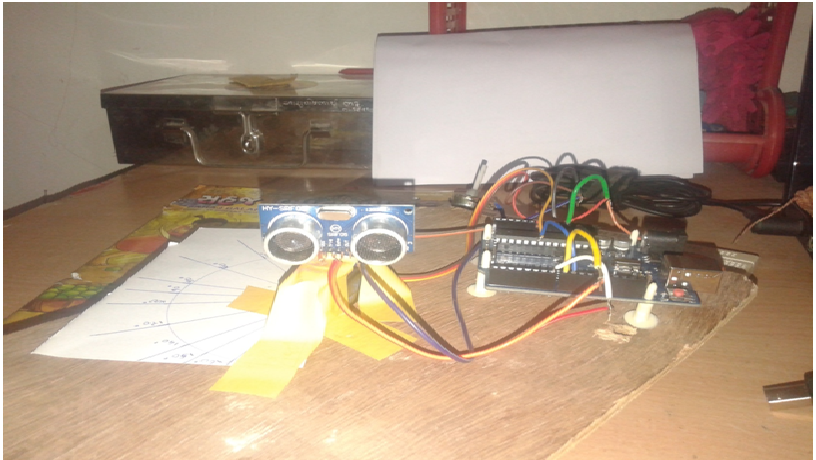
Fig. 1: Prototype of Arduino based Ultrasonic Radar

Image of Arduino based Ultrasonic Radar

Fig. 2: Image of Arduino based Ultrasonic Radar

Circuit description

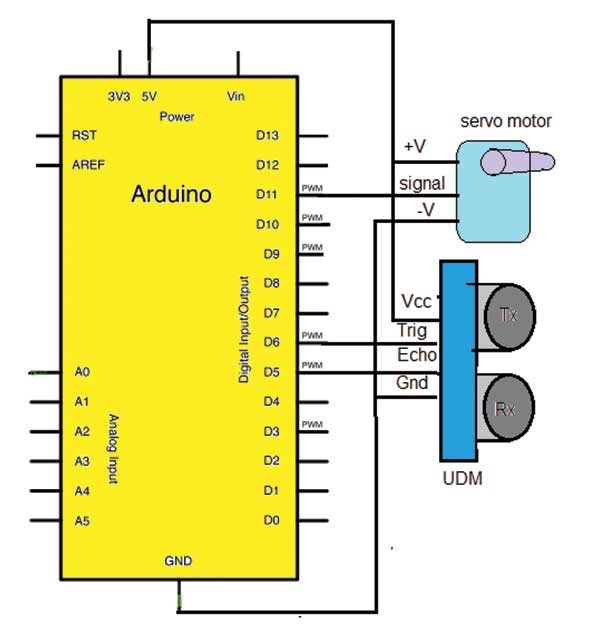
• Ultrasonic sensor (UDM) has 4 wire interface. (1) Vcc (2) Gnd (3) Trig(input) and (4) Echo (output). Vcc is connected to +5 V pin and Gnd is connected to ground pin of arduino board. Trig pin is connected to digital pin 6 and echo pin is connected to digital pin 5.

• Servo motor has 3 wire interface. (1) Vcc (2) Gnd and (3) PWM input (signal). Again Vcc is connected to +5V pin and Gnd is connected to ground pin of arduino board. PWM input is connected to analog output pin 11.

• Arduino board is connected to computer/laptop through USB cable for serial communication as well as to download the program.

Circuit operation

1. The servo motor continuously rotates from 0o to 180o and again back from 180o to 0o in steps of 30o

2. The UDM sensor is mounted on servo motor shaft. So the sensor also rotates from 0o – 180o – 0o continuously.

3. At every angle the trigger pulse is given to UDM and echo signal is received.

4. The received echo pulse duration is converted into distance using formula.

Distance (in cm) = pulse duration / 58*

5. If the any object is within the specified range (< 30 cm = 1 foot) then the distance of object and angle of object is sent to computer.

6. When object is detected its actual angle is read from servo motor and it is sent to computer.

7. Thus the UDM sensor continuously scans 180o circle and detects any object that is within 30 cm limit (actually the UDM sensor can detect objects upto 400 cm but here for demonstration, the range is kept 30 cm only. But one can keep any other range like 100 cm or 200 cm etc)

*Note:  The speed of sound is 340 m/s

That means sound signal covers distance of 340 m in 1 sec

Then in 1 us sound travels 1×10⁶/340×100 = 29.41 cm

So in 1 us the sound will travel 29.41 cm. Because we have to consider to-&-fro journey of sound signal, to get exact distance the pulse duration has to be divided by double of 29.41 that is 2×29.41≈58.

Software program

The software program is the soul of the system. Complete functionality of system depends upon the program. It performs following tasks – :

• Rotates servo motor in a step of 30o from 0o to 180o and back to 0o

• Gives trig pulse input to UDM sensor

• Receives echo signal from UDM sensor

• Convert echo pulse duration into distance

• Checks if distance is less than 30 cm

• If distance is less than 30 cm, reads servo motor angle and send it to serial monitor along with object distance

The program is edited and compiled in Arduino IDE and then it is uploaded into internal FLASH of Arduino AVR MCU Atmega328.

Project Source Code

###

//Program to 

#include // include header file for servo library

Servo myservo; // create instance of servo class

const int trigPin = 6; // declare UDM trigger pin
const int echoPin = 5; // declare UDM echo pin
int radar_angle = 0,actual_radar_angle;
void setup() 
{
  Serial.begin(9600);             // initialize serial communication:
  pinMode(trigPin, OUTPUT); // trig pin as output
  pinMode(echoPin, INPUT); // echo pin as input
   myservo.attach(11); // attach servo motor to pin 11
   myservo.write(90);   // rotate it to 90 deg first
}
void loop()
{
  long duration,distance_cm;
//increase radar angle from 0 to 180 deg in step of 30 deg
  for (radar_angle = 0; radar_angle <= 180; radar_angle += 30)
{ 
    myservo.write(radar_angle); // rotate motor    
    digitalWrite(trigPin, LOW); // apply trig as 0-1-0
    delayMicroseconds(2);
    digitalWrite(trigPin, HIGH);
    delayMicroseconds(10); // for 10 us
    digitalWrite(trigPin, LOW);
    duration = pulseIn(echoPin, HIGH); // get the pulse duration
// calculate the distance   
    distance_cm = microsecondsToCentimeters(duration);
if(distance_cm<30)
 {
         Serial.print("Object Detected at an angle = "); // print message
         actual_radar_angle = myservo.read(); // print motor actual angle
         Serial.print(actual_radar_angle);
         Serial.print(" deg and distance = ");
         Serial.print(distance_cm); // and object distance
         Serial.print(" cm");
         Serial.println();
      }
delay(500); // wait for half second
  }  
// now rotate motor reverse and do same as above  
for (radar_angle = 180; radar_angle >=0; radar_angle -= 30)
{ 
    myservo.write(radar_angle);    
    digitalWrite(trigPin, LOW);
    delayMicroseconds(2);
    digitalWrite(trigPin, HIGH);
    delayMicroseconds(10);
    digitalWrite(trigPin, LOW);
    duration = pulseIn(echoPin, HIGH);   
    distance_cm = microsecondsToCentimeters(duration);
    if(distance_cm<30
{
         Serial.print("Object Detected at an angle = ");
         actual_radar_angle = myservo.read();
         Serial.print(actual_radar_angle);
         Serial.print(" deg and distance = ");
         Serial.print(distance_cm);
         Serial.print(" cm");
         Serial.println();
      }
delay(500);
  }  
}
long microsecondsToCentimeters(long microseconds)
{
  return microseconds / 58;
}
 

###


Circuit Diagrams

Circuit-Diagram-Arduino-Based-Ultrasonic-Radar

Project Video


Filed Under: Electronic Projects


Next Article

← Previous Article
Next Article →

Questions related to this article?
👉Ask and discuss on EDAboard.com and Electro-Tech-Online.com forums.


Tell Us What You Think!! Cancel reply

You must be logged in to post a comment.

Submit a Guest Post

submit a guest post

EE TECH TOOLBOX

“ee
Tech Toolbox: Power Efficiency
Discover proven strategies for power conversion, wide bandgap devices, and motor control — balancing performance, cost, and sustainability across industrial, automotive, and IoT systems.

EE Learning Center

EE Learning Center
“engineers
EXPAND YOUR KNOWLEDGE AND STAY CONNECTED
Get the latest info on technologies, tools and strategies for EE professionals.

HAVE A QUESTION?

Have a technical question about an article or other engineering questions? Check out our engineering forums EDABoard.com and Electro-Tech-Online.com where you can get those questions asked and answered by your peers!


RSS EDABOARD.com Discussions.

  • Methods for Calculating SNR and SFDR in a CUI for Use in Machine Learning
  • rechargeable battery and simple alkaline battery in one single product
  • Industrial Network Market Analysis and Introduction to Common Bus Protocols
  • Ensuring Reliable Backups in Azure
  • Op-Amp oscillating

RSS Electro-Tech-Online.com Discussions

  • WTB: "The Theory Of Servicing AM, FM, And FM Receivers" by Clarence R. Green and Robert M. Bourque
  • Anyone In The US Ordered From AliExpress Recently?
  • Calculation of A Class amplifier
  • strange laptop problem
  • restarting this Christmas project

Featured Tutorials

Real Time Hardware Filter Design

  • Practical implementation of bandpass and band reject filters
    Practical implementation of bandpass and band reject filters
  • Practical application of hardware filters with real-life examples
    Practical application of hardware filters with real-life examples
  • A filter design example
    A filter design example
  • Types of filter responses
    Types of filter responses
  • What are the two types of hardware filters?
    What are the two types of hardware filters?
  • What are hardware filters and their types?
    What are hardware filters and their types?
More Tutorials >

Recent Articles

  • Stackpole introduces compact jumpers for high-current circuit routing
  • Ironwood Electronics launches near-device-footprint SMT elastomer socket for BGA264
  • Amphenol RF releases P67 FAKRA plugs for 6 GHz RF transmission
  • Microchip releases platform to deliver real-time specifications for AI assistants
  • GigaDevices introduces 32-bit MCUs with integrated DSP and FPU support

EE ENGINEERING TRAINING DAYS

engineering
Engineers Garage
  • Analog IC TIps
  • Connector Tips
  • Battery Power Tips
  • EDABoard Forums
  • EE World Online
  • Electro-Tech-Online Forums
  • EV Engineering
  • Microcontroller Tips
  • Power Electronic Tips
  • Sensor Tips
  • Test and Measurement Tips
  • 5G Technology World
  • Subscribe to our newsletter
  • About Us
  • Contact Us
  • Advertise

Copyright © 2025 WTWH Media LLC. All Rights Reserved. The material on this site may not be reproduced, distributed, transmitted, cached or otherwise used, except with the prior written permission of WTWH Media
Privacy Policy

Search Engineers Garage

  • Electronic Projects & Tutorials
    • Electronic Projects
      • Arduino Projects
      • AVR
      • Raspberry pi
      • ESP8266
      • BeagleBone
      • 8051 Microcontroller
      • ARM
      • PIC Microcontroller
      • STM32
    • Tutorials
      • Sensor Series
      • 3D Printing
      • AI
      • ARDUINO Compatible Coding
      • Audio Electronics
      • Battery Management
      • Beginners Electronics Series
      • Brainwave
      • Digital electronics (DE)
      • Electric Vehicles
      • EMI/EMC/RFI
      • EVs
      • Hardware Filters
      • IoT tutorials
      • LoRa/LoRaWAN
      • Power Tutorials
      • Protocol
      • Python
      • RPI Python Programming
      • Sensors
      • USB
      • Thermal management
      • Verilog
      • VHDL
    • Circuit Design
    • Project Videos
    • Components
  • Articles
    • Tech Articles
    • Insight
    • Invention Stories
    • How to
    • What Is
  • News
    • Electronic Product News
    • Business News
    • Company/Start-up News
    • DIY Reviews
    • Guest Post
  • Forums
    • EDABoard.com
    • Electro-Tech-Online
    • EG Forum Archive
  • DigiKey Store
    • Cables, Wires
    • Connectors, Interconnect
    • Discrete
    • Electromechanical
    • Embedded Computers
    • Enclosures, Hardware, Office
    • Integrated Circuits (ICs)
    • Isolators
    • LED/Optoelectronics
    • Passive
    • Power, Circuit Protection
    • Programmers
    • RF, Wireless
    • Semiconductors
    • Sensors, Transducers
    • Test Products
    • Tools
  • Learn
    • eBooks/Tech Tips
    • Design Guides
    • Learning Center
    • Tech Toolboxes
    • Webinars & Digital Events
  • Resources
    • Digital Issues
    • EE Training Days
    • LEAP Awards
    • Podcasts
    • Webinars / Digital Events
    • White Papers
    • Engineering Diversity & Inclusion
  • Guest Post Guidelines
  • Advertise
  • Subscribe