
Engineers Garage

  • Electronic Projects & Tutorials
    • Electronic Projects
      • Arduino Projects
      • AVR
      • Raspberry pi
      • ESP8266
      • BeagleBone
      • 8051 Microcontroller
      • ARM
      • PIC Microcontroller
      • STM32
    • Tutorials
      • Sensor Series
      • 3D Printing
      • AI
      • ARDUINO Compatible Coding
      • Audio Electronics
      • Battery Management
      • Beginners Electronics Series
      • Brainwave
      • Digital electronics (DE)
      • Electric Vehicles
      • EMI/EMC/RFI
      • EVs
      • Hardware Filters
      • IoT tutorials
      • LoRa/LoRaWAN
      • Power Tutorials
      • Protocol
      • Python
      • RPI Python Programming
      • Sensors
      • USB
      • Thermal management
      • Verilog
      • VHDL
    • Circuit Design
    • Project Videos
    • Components
  • Articles
    • Tech Articles
    • Insight
    • Invention Stories
    • How to
    • What Is
  • News
    • Electronic Product News
    • Business News
    • Company/Start-up News
    • DIY Reviews
    • Guest Post
  • Forums
    • EDABoard.com
    • Electro-Tech-Online
    • EG Forum Archive
  • DigiKey Store
    • Cables, Wires
    • Connectors, Interconnect
    • Discrete
    • Electromechanical
    • Embedded Computers
    • Enclosures, Hardware, Office
    • Integrated Circuits (ICs)
    • Isolators
    • LED/Optoelectronics
    • Passive
    • Power, Circuit Protection
    • Programmers
    • RF, Wireless
    • Semiconductors
    • Sensors, Transducers
    • Test Products
    • Tools
  • Learn
    • eBooks/Tech Tips
    • Design Guides
    • Learning Center
    • Tech Toolboxes
    • Webinars & Digital Events
  • Resources
    • Digital Issues
    • EE Training Days
    • LEAP Awards
    • Podcasts
    • Webinars / Digital Events
    • White Papers
    • Engineering Diversity & Inclusion
  • Guest Post Guidelines
  • Advertise
  • Subscribe

Displaying ASCII Characters on 16×2 lcd using 8051(89c51,89c52) Microcontroller

By EG Projects September 17, 2019

Here is a simple project/tutorial in which i will teach you about how to display ASCII characters on character lcd’s. In this tutorial i am using 16×2 lcd. You can use any other size of lcd if you want but be sure to change the lcd initialization statements in the code. Character lcd’s have a built in controller which controls its operations. Usually character lcd’s has HD44780 controller in them. This controller has pre-defined ASCII characters stored in its ROM(read only memory). When we send any character from external microcontroller on lcd data pins and write it to lcd screen, what happens actually is, the character is received by the lcd controller. 16×2 lcd controller then matches the character with its internal ROM characters if matches is found it then displays the character on 16×2 lcd screen.

What can we display on 16×2 lcd?

16×2 lcd is not limited to displaying ASCII characters. Its internal ROM also contains some special Chinese language characters some special shapes. We can display all of them by calling their addresses in ROM.

We can also display custom character’s on 16×2 lcd. By custom characters i mean we can create our own characters and can display them on 16×2 lcd. To display custom characters we utilize the internal CG-RAM(Character generated Random Access Memory) of 16×2 lcd controller. Custom characters generation are not part of this project. I have separate tutorials on them.

  • How to make and display Custom Characters on 16×2 lcd.
  • Custom Urdu characters/Alphabets made and displayed on lcd using 89c51 microcontroller.
  • Custom charcters made on lcd using Arduino uno.​

16×2 Lcd display character font size

Character lcd’s can display character of size 5×8 and 5×10. In 5×8 dimension 5 represents numbers of rows and 8 represents number of coulombs. Sp in a cube of 5×8 and 5×10 we can display our characters. Normally we display characters in 5×7 font. The 8th coulomb we left is for the cursor movement. 5×10 font is not popular and limited characters can be displayed in 5×10 font. Total 32 characters can be displayed in 5×10 matrix and 208 can be displayed in 5×8 matrix cube. An image of characters with their addresses in ROM of hd44780 lcd controller data sheet is below.    
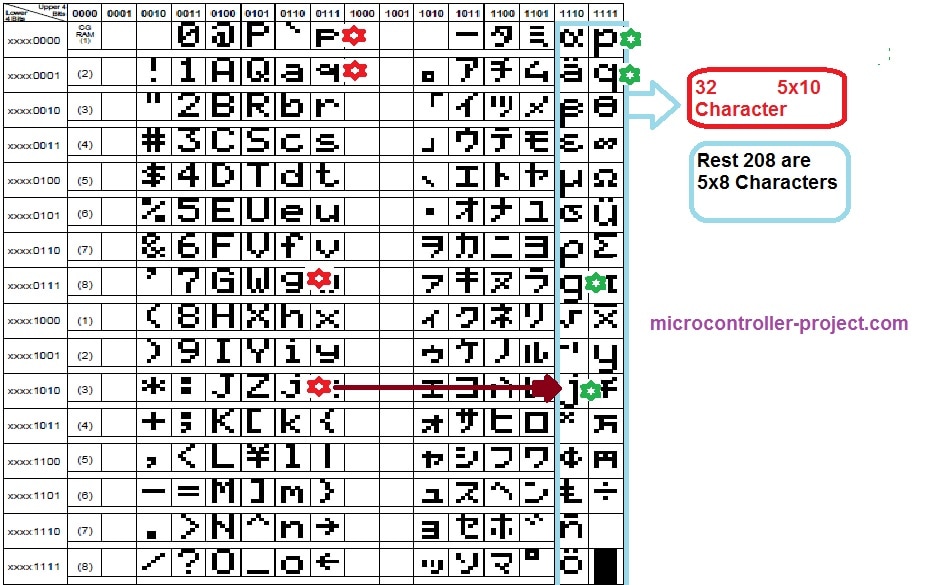
ascii characters displayed on 16x2 lcd using 89c51 microcontroller

ascii characters displayed on 16×2 lcd using 89c51 microcontroller

Going through the data sheet of HD44780 lcd controller. You will see the character’s that are stored in the ROM(random access memory) of the controller. Character’s with their addresses are listed in the data sheet. You can see the characters and their addresses in the picture given above.  

8051 microcontroller ASCII characters display on 16×2 lcd – Project requirements

  • 16×2 character lcd
  • Breadboard to make circuit
  • one 89s51 or 89c51 microcontroller
  • A potentiometer to set lcd contrast
  • 11.0592 Mhz crystal for clock input ​​

How the project works

I am going to invoke the addresses of each characters/numbers special characters ASCII characters stored in the ROM and they will display on 16×2 lcd screen automatically. On first line of lcd i am printing the decimal value of the ASCII character and on the second line i will display the original ASCII character. whole of the ASCII characters in lcd controller ROM will be displayed on lccd screen one by one. The code is placed in while(1) loop so the process will remain continuous unless the power is cut off.

16×2 Lcd ASCII Characters with 8051 microcontroller – Project circuit diagram

Lcd is interfaced in 8-bit mode with 8051 microcontroller. Lcd data pins are connected to port-2 of 89c51 microcontroller. Lcd rs(register select) pin is connected to port-3 pin#5. Lcd rw(read write) pin is connected to port-3 pin#7 and lcd en(enable) pin is connected to port-3 pin#6. Circuit diagram of the project is below.
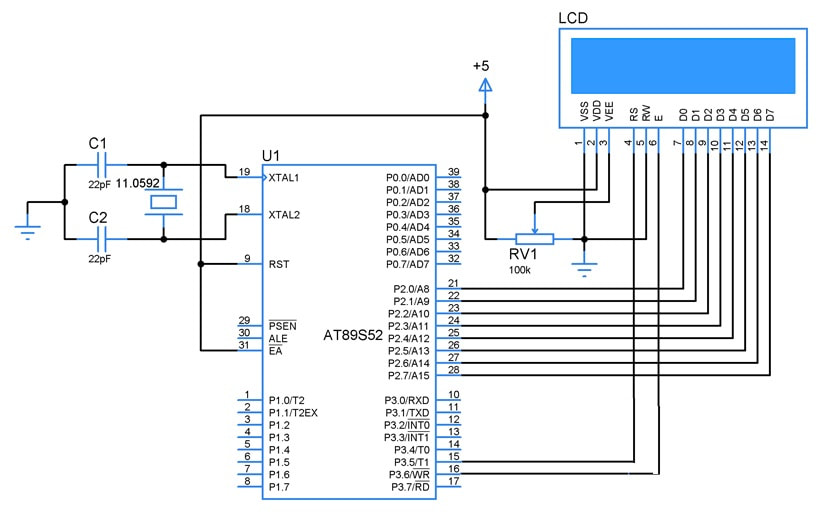
ASCII characters display on 16x2 lcd with 8051 microcontroller

ASCII characters display on 16×2 lcd with 8051 microcontroller

ASCII characters on lcd – Project code

The code is very simple we hope that you are already familiar with c/c++ programming language. Code is written and compiled in keil uvision ide. First of all the header file  re51.h is included. we have to include in our every project which includes 8051 microcontroller in it. Then the lcd rs(register set) rw(read/write) and en(Enable) pins are defined. 
Just copy the code and made your circuit burn the code in your microcontroller. Power the circuit and ascii characters will appear on your 16×2 lcd screen. You can also use another size of screen but take care you have to change just only one statement lcdcmd(0x38). If you want to know about the lcd initialization just visit thebelow tutorial.

  • How lcd 8×1 , 8×2 , 10×2 , 16×1 , 16×2 , 16×4 , 20×2 , 20×4 , 24×2 , 30×2 , 32×2 , 40×2 is initialized and works. ​​
Download the project code and simulation. Folder contains the keil uvision and proteaus files. Please give us your feed back on the tutorial. In case you have any queries please write them below.
                                                                                                   Files/Code Download


Filed Under: Arduino Projects, Microcontroller Projects


Next Article

← Previous Article
Next Article →

Questions related to this article?
👉Ask and discuss on EDAboard.com and Electro-Tech-Online.com forums.


Tell Us What You Think!! Cancel reply

You must be logged in to post a comment.

Submit a Guest Post

submit a guest post

EE TECH TOOLBOX

“ee
Tech Toolbox: Power Efficiency
Discover proven strategies for power conversion, wide bandgap devices, and motor control — balancing performance, cost, and sustainability across industrial, automotive, and IoT systems.

EE Learning Center

EE Learning Center
“engineers
EXPAND YOUR KNOWLEDGE AND STAY CONNECTED
Get the latest info on technologies, tools and strategies for EE professionals.

HAVE A QUESTION?

Have a technical question about an article or other engineering questions? Check out our engineering forums EDABoard.com and Electro-Tech-Online.com where you can get those questions asked and answered by your peers!


RSS EDABOARD.com Discussions.

  • Synchronous rectifier chips nil stocked everywhere?
  • PCB layout impact on RF path impedance
  • rechargeable battery and simple alkaline battery in one single product
  • Persistent Shoot-Through vin=vout in Synchronous Buck Converter – Physical Phenomenon Issue
  • Methods for Calculating SNR and SFDR in a CUI for Use in Machine Learning

RSS Electro-Tech-Online.com Discussions

  • Looking for obsolete item from Parallax
  • Panasonic RQ-A170 Walkman recorder
  • strange laptop problem
  • WTB: "The Theory Of Servicing AM, FM, And FM Receivers" by Clarence R. Green and Robert M. Bourque
  • Converting 1vac to 24vac

Featured – Real Time Hardware Filter Design

  • Practical implementation of bandpass and band reject filters
  • Practical application of hardware filters with real-life examples
  • A filter design example
  • Types of filter responses
  • What are the two types of hardware filters?
  • What are hardware filters and their types?

Recent Articles

  • GigaDevices introduces 32-bit MCUs with integrated DSP and FPU support
  • Grinn introduces 8-core SBC supporting AI-ready embedded development
  • EPC’s 100 kHz BLDC inverter supports high-efficiency motion control
  • Melexis announces 5 W smart driver to supports sensorless FOC operation
  • STMicroelectronics’ motion sensor simplifies industrial IoT system design

EE ENGINEERING TRAINING DAYS

engineering
Engineers Garage
  • Analog IC TIps
  • Connector Tips
  • Battery Power Tips
  • EDABoard Forums
  • EE World Online
  • Electro-Tech-Online Forums
  • EV Engineering
  • Microcontroller Tips
  • Power Electronic Tips
  • Sensor Tips
  • Test and Measurement Tips
  • 5G Technology World
  • Subscribe to our newsletter
  • About Us
  • Contact Us
  • Advertise

Copyright © 2025 WTWH Media LLC. All Rights Reserved. The material on this site may not be reproduced, distributed, transmitted, cached or otherwise used, except with the prior written permission of WTWH Media
Privacy Policy

Search Engineers Garage

  • Electronic Projects & Tutorials
    • Electronic Projects
      • Arduino Projects
      • AVR
      • Raspberry pi
      • ESP8266
      • BeagleBone
      • 8051 Microcontroller
      • ARM
      • PIC Microcontroller
      • STM32
    • Tutorials
      • Sensor Series
      • 3D Printing
      • AI
      • ARDUINO Compatible Coding
      • Audio Electronics
      • Battery Management
      • Beginners Electronics Series
      • Brainwave
      • Digital electronics (DE)
      • Electric Vehicles
      • EMI/EMC/RFI
      • EVs
      • Hardware Filters
      • IoT tutorials
      • LoRa/LoRaWAN
      • Power Tutorials
      • Protocol
      • Python
      • RPI Python Programming
      • Sensors
      • USB
      • Thermal management
      • Verilog
      • VHDL
    • Circuit Design
    • Project Videos
    • Components
  • Articles
    • Tech Articles
    • Insight
    • Invention Stories
    • How to
    • What Is
  • News
    • Electronic Product News
    • Business News
    • Company/Start-up News
    • DIY Reviews
    • Guest Post
  • Forums
    • EDABoard.com
    • Electro-Tech-Online
    • EG Forum Archive
  • DigiKey Store
    • Cables, Wires
    • Connectors, Interconnect
    • Discrete
    • Electromechanical
    • Embedded Computers
    • Enclosures, Hardware, Office
    • Integrated Circuits (ICs)
    • Isolators
    • LED/Optoelectronics
    • Passive
    • Power, Circuit Protection
    • Programmers
    • RF, Wireless
    • Semiconductors
    • Sensors, Transducers
    • Test Products
    • Tools
  • Learn
    • eBooks/Tech Tips
    • Design Guides
    • Learning Center
    • Tech Toolboxes
    • Webinars & Digital Events
  • Resources
    • Digital Issues
    • EE Training Days
    • LEAP Awards
    • Podcasts
    • Webinars / Digital Events
    • White Papers
    • Engineering Diversity & Inclusion
  • Guest Post Guidelines
  • Advertise
  • Subscribe
