Engineers Garage

  • Electronic Projects & Tutorials
    • Electronic Projects
      • Arduino Projects
      • AVR
      • Raspberry pi
      • ESP8266
      • BeagleBone
      • 8051 Microcontroller
      • ARM
      • PIC Microcontroller
      • STM32
    • Tutorials
      • Sensor Series
      • 3D Printing
      • AI
      • ARDUINO Compatible Coding
      • Audio Electronics
      • Battery Management
      • Beginners Electronics Series
      • Brainwave
      • Digital electronics (DE)
      • Electric Vehicles
      • EMI/EMC/RFI
      • EVs
      • Hardware Filters
      • IoT tutorials
      • LoRa/LoRaWAN
      • Power Tutorials
      • Protocol
      • Python
      • RPI Python Programming
      • Sensors
      • USB
      • Thermal management
      • Verilog
      • VHDL
    • Circuit Design
    • Project Videos
    • Components
  • Articles
    • Tech Articles
    • Insight
    • Invention Stories
    • How to
    • What Is
  • News
    • Electronic Product News
    • Business News
    • Company/Start-up News
    • DIY Reviews
    • Guest Post
  • Forums
    • EDABoard.com
    • Electro-Tech-Online
    • EG Forum Archive
  • DigiKey Store
    • Cables, Wires
    • Connectors, Interconnect
    • Discrete
    • Electromechanical
    • Embedded Computers
    • Enclosures, Hardware, Office
    • Integrated Circuits (ICs)
    • Isolators
    • LED/Optoelectronics
    • Passive
    • Power, Circuit Protection
    • Programmers
    • RF, Wireless
    • Semiconductors
    • Sensors, Transducers
    • Test Products
    • Tools
  • Learn
    • eBooks/Tech Tips
    • Design Guides
    • Learning Center
    • Tech Toolboxes
    • Webinars & Digital Events
  • Resources
    • Digital Issues
    • EE Training Days
    • LEAP Awards
    • Podcasts
    • Webinars / Digital Events
    • White Papers
    • Engineering Diversity & Inclusion
  • Guest Post Guidelines
  • Advertise
  • Subscribe

How to Display Text on 16×2 Character Lcd

By EG Projects June 23, 2019

Displaying Text on 16×1, 16×2 or any size of character lcd is not a complex task. Once you know about the internal structure of the character lcd, lcd pin out, registers associated with lcd’s and CG-RAM(Character Generated RAM) then its all on your finger tips. If you are really interested in lcd programming, and want to know about how to display text on lcd? First take a small tutorial on the Internal Structure of character 16×2 Lcd. Because if you don’t know about internal structure of lcd you will be unable to fully understand the sequence of steps taken to display text on Lcd given below. 

  • Character Lcd Pinout and Working. 

​
Character lcd can perform both read and write functions. Normally lcds are only used to write text on them. Read operation is performed in few nominal tasks. Below are some steps to display text on lcd. I am going to display Character ‘A’ on lcd.

Displaying Text on 16×2 lcd using microcontroller step by step

  1. First select the operation which you want to perform ‘Read’ or ‘Write’. Making R/W Pin of Lcd 0(R/W=0) will select the write operation. Now lcd is set in write mode and you can write any text to lcd. If R/W=1 lcd is set in Read mode and you can read data from lcd. Since i want to display ‘A‘ on lcd. I made R/W=0.
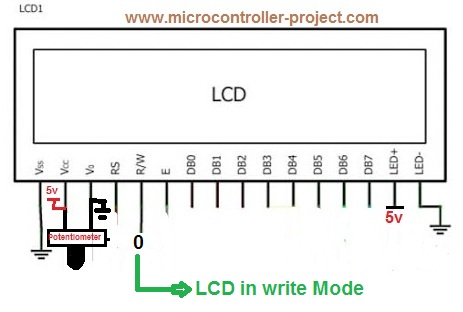
Character Lcd R/w (Read-write) pin

Character Lcd R/w (Read-write) pin

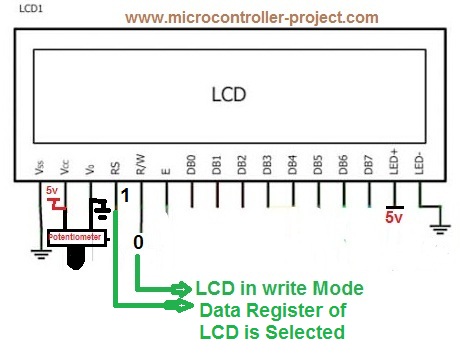
2. Their are two registers in lcd data and command. To display text on lcd you have to select data register of lcd. To execute command you have to select command register of lcd. To select data register make RS=1. To switch to command register make Rs=0. In our case we are displaying text on lcd so make RS=1.
Character Lcd RS(Register Select Pin)

Character Lcd RS(Register Select Pin)

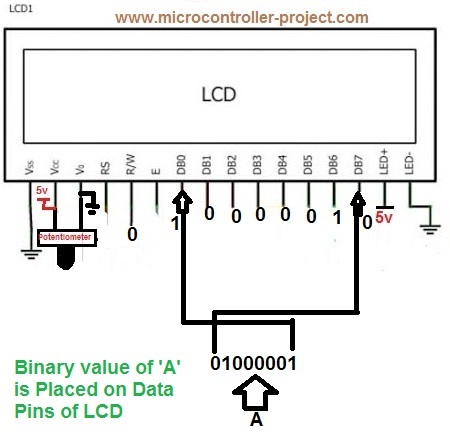
3. Place your text on data pins of Lcd. Since lcd’s data pins are 8-bit wide so place data that is 8-bit wide. Since we want to display ‘A‘ on lcd. ASCII value of ‘A‘ is 65(decimal), 01000001(Binary), 0x41 (Hexadecimal). Place this value on lcd data pins. 
Character Lcd data pins. Data Placed on Data Pins

Character Lcd data pins. Data Placed on Data Pins

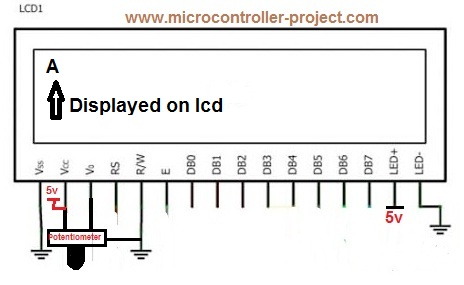
4. Now make en=1 and after some microseconds again make en=0. This en signal gives a push to data placed in data register or on data pins to display on 16×2 screen.
Text Displayed on Character lcd

Text Displayed on Character lcd

To display next character repeat the above steps again.To make lcd fully functional you first have to initialize lcd. By initialization i mean set the font of character, decide the cursor(Blinking or not blinking) select the position where you want to display character etc. These parameters are set by sending commands to lcd. Standard lcd commands and their functions are given in the link below.

  • Standarad lcd commands.

  
Note: To execute commands steps are same like to display text only difference is in the RS pin selection. To execute commands you have to select the command register of lcd. Make RS=0 to select command register of lcd. Now your commands goes to command register and you can execute them by make en=1 and back to en=0.

Simple text display on 16×2 lcd demo project using 8051 microcontroller

In this project i will display my name “USMAN ALI BUTT” on both rows of 16×2 lcd. First my name will appear on first row of 16×2 lcd. Then after some time it disappears and re appears on second line of 16×2 lcd. The project is really simple.
Hardware requirements

  • 16×2 character lcd.
  • 89c51 or 89c52 microcontroller.
  • Bread board large enough to make circuit on it
  • 5 volts DC power supply.
  • Potentiometer for setting lcd contrast.
  • Software for codding, keil etc
  • Burner to burn code in the microcontroller                                  

Dispay text on 16×2 lcd – Project code

The circuit for the project is simple. Connect Port-1 of your 8051(89c51,89c52) microcontroller to 8 data pins of the lcd. The pins should interface the microcontroller in the order that pin#1 of Port-1 is connected to pin#1 of data pin on lcd. Pin#2 of Port-1 of 8051 to pin#2 of lcd and so on up till pin 8. Connect pin#5 of Port-3 to rs(register select) pin of lcd. pin#7 of microcontroller Port-3 to rw(read write) pin of lcd and pin#6 of microcontroller Port-3 to en(enable) pin of lcd. ​
​

Rest of the connections are same as we made in all of our circuits apply 5 volts to vcc pin#40 and Pin#31 of 8051(89c51,89c52). Ground pin#20. Attach crystal of 11.0592MHz frequency in parallel to two 33pf capacitors to pin#18(XTAL1) and Pin#19(XTAL2) of microcontroller. You can also use crystal of any other frequency if you want and capacitors with them can very from 27pf to 33pf.
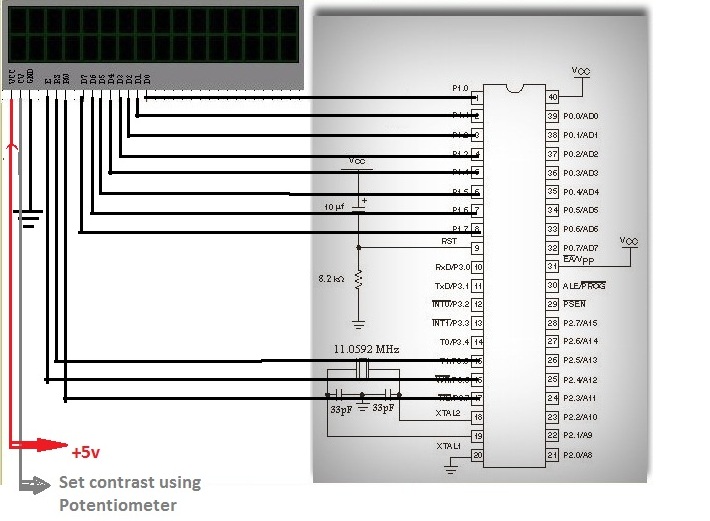
Displaying Text on Character Lcd using 8051(89c51,89c52) microcontroller

Displaying Text on Character Lcd with 8051(89c51,89c52) microcontroller

More Projects related to displaying Text On 16×2 lcd are given below. Each project is made using different type of microcontroller, arduino pic microcontroller etc. Projects are open source. You can use and edit code according to your need.

  • Displaying Moving Text on Lcd using 89c51 microcontroller
  • Displaying ASCII Characters on Lcd using 89c51 microcontroller
  • Displaying Custom Characters on 16×2 lcd using 8051(89c51,89c52) microcontroller
  • Displaying Urdu Characters on 16×2 lcd using 8051(89c51,89c52) microcontroller


To learn difference between sending commands and data to lcd click. Difference between sending commands and data to lcd. If you feel any difficulties in code just leave a comment regarding your problem. I will definitely figure it out.


Filed Under: Microcontroller Projects, PIC Microcontroller


Next Article

← Previous Article
Next Article →

Questions related to this article?
👉Ask and discuss on Electro-Tech-Online.com and EDAboard.com forums.


Tell Us What You Think!! Cancel reply

You must be logged in to post a comment.

Submit a Guest Post

submit a guest post

EE TECH TOOLBOX

“ee
Tech Toolbox: Power Efficiency
Discover proven strategies for power conversion, wide bandgap devices, and motor control — balancing performance, cost, and sustainability across industrial, automotive, and IoT systems.

EE Learning Center

EE Learning Center
“engineers
EXPAND YOUR KNOWLEDGE AND STAY CONNECTED
Get the latest info on technologies, tools and strategies for EE professionals.

HAVE A QUESTION?

Have a technical question about an article or other engineering questions? Check out our engineering forums EDABoard.com and Electro-Tech-Online.com where you can get those questions asked and answered by your peers!


RSS EDABOARD.com Discussions.

  • Why is military EMC so strict?
  • Cannot prototype a power supply
  • Phased array antenna never on full power for long?
  • TPS63070 Power Supply
  • Question about resistors values impact on lead reading

RSS Electro-Tech-Online.com Discussions

  • need help in photodetection TIA circuit
  • Need to solder a really delicate ribbon for an electric reel need advice
  • Help please! BLDC driver circuit using the IR2136s and the STP80NF06 MOSFETS
  • Measuring controller current output with a meter
  • Anyone In The US Ordered From AliExpress Recently?

Featured Tutorials

Real Time Hardware Filter Design

  • Practical implementation of bandpass and band reject filters
    Practical implementation of bandpass and band reject filters
  • Practical application of hardware filters with real-life examples
    Practical application of hardware filters with real-life examples
  • A filter design example
    A filter design example
  • Types of filter responses
    Types of filter responses
  • What are the two types of hardware filters?
    What are the two types of hardware filters?
  • What are hardware filters and their types?
    What are hardware filters and their types?
More Tutorials >

Recent Articles

  • Microchip extends single pair Ethernet lineup with software-less endpoint
  • Infineon MCU targets high-voltage BMS in electric vehicles
  • SemiQ releases expanded SiC MOSFET lineup with detailed thermal and switching data
  • TDK adds 1000 W models to dc-dc converter series
  • LEMO introduces resin-free IP68 connectors for compact equipment

EE ENGINEERING TRAINING DAYS

engineering
Engineers Garage
  • Analog IC TIps
  • Connector Tips
  • Battery Power Tips
  • EDABoard Forums
  • EE World Online
  • Electro-Tech-Online Forums
  • EV Engineering
  • Microcontroller Tips
  • Power Electronic Tips
  • Sensor Tips
  • Test and Measurement Tips
  • 5G Technology World
  • Subscribe to our newsletter
  • About Us
  • Contact Us
  • Advertise

Copyright © 2025 WTWH Media LLC. All Rights Reserved. The material on this site may not be reproduced, distributed, transmitted, cached or otherwise used, except with the prior written permission of WTWH Media
Privacy Policy

Search Engineers Garage

  • Electronic Projects & Tutorials
    • Electronic Projects
      • Arduino Projects
      • AVR
      • Raspberry pi
      • ESP8266
      • BeagleBone
      • 8051 Microcontroller
      • ARM
      • PIC Microcontroller
      • STM32
    • Tutorials
      • Sensor Series
      • 3D Printing
      • AI
      • ARDUINO Compatible Coding
      • Audio Electronics
      • Battery Management
      • Beginners Electronics Series
      • Brainwave
      • Digital electronics (DE)
      • Electric Vehicles
      • EMI/EMC/RFI
      • EVs
      • Hardware Filters
      • IoT tutorials
      • LoRa/LoRaWAN
      • Power Tutorials
      • Protocol
      • Python
      • RPI Python Programming
      • Sensors
      • USB
      • Thermal management
      • Verilog
      • VHDL
    • Circuit Design
    • Project Videos
    • Components
  • Articles
    • Tech Articles
    • Insight
    • Invention Stories
    • How to
    • What Is
  • News
    • Electronic Product News
    • Business News
    • Company/Start-up News
    • DIY Reviews
    • Guest Post
  • Forums
    • EDABoard.com
    • Electro-Tech-Online
    • EG Forum Archive
  • DigiKey Store
    • Cables, Wires
    • Connectors, Interconnect
    • Discrete
    • Electromechanical
    • Embedded Computers
    • Enclosures, Hardware, Office
    • Integrated Circuits (ICs)
    • Isolators
    • LED/Optoelectronics
    • Passive
    • Power, Circuit Protection
    • Programmers
    • RF, Wireless
    • Semiconductors
    • Sensors, Transducers
    • Test Products
    • Tools
  • Learn
    • eBooks/Tech Tips
    • Design Guides
    • Learning Center
    • Tech Toolboxes
    • Webinars & Digital Events
  • Resources
    • Digital Issues
    • EE Training Days
    • LEAP Awards
    • Podcasts
    • Webinars / Digital Events
    • White Papers
    • Engineering Diversity & Inclusion
  • Guest Post Guidelines
  • Advertise
  • Subscribe