Engineers Garage

  • Electronic Projects & Tutorials
    • Electronic Projects
      • Arduino Projects
      • AVR
      • Raspberry pi
      • ESP8266
      • BeagleBone
      • 8051 Microcontroller
      • ARM
      • PIC Microcontroller
      • STM32
    • Tutorials
      • Sensor Series
      • 3D Printing
      • AI
      • ARDUINO Compatible Coding
      • Audio Electronics
      • Battery Management
      • Beginners Electronics Series
      • Brainwave
      • Digital electronics (DE)
      • Electric Vehicles
      • EMI/EMC/RFI
      • EVs
      • Hardware Filters
      • IoT tutorials
      • LoRa/LoRaWAN
      • Power Tutorials
      • Protocol
      • Python
      • RPI Python Programming
      • Sensors
      • USB
      • Thermal management
      • Verilog
      • VHDL
    • Circuit Design
    • Project Videos
    • Components
  • Articles
    • Tech Articles
    • Insight
    • Invention Stories
    • How to
    • What Is
  • News
    • Electronic Product News
    • Business News
    • Company/Start-up News
    • DIY Reviews
    • Guest Post
  • Forums
    • EDABoard.com
    • Electro-Tech-Online
    • EG Forum Archive
  • DigiKey Store
    • Cables, Wires
    • Connectors, Interconnect
    • Discrete
    • Electromechanical
    • Embedded Computers
    • Enclosures, Hardware, Office
    • Integrated Circuits (ICs)
    • Isolators
    • LED/Optoelectronics
    • Passive
    • Power, Circuit Protection
    • Programmers
    • RF, Wireless
    • Semiconductors
    • Sensors, Transducers
    • Test Products
    • Tools
  • Learn
    • eBooks/Tech Tips
    • Design Guides
    • Learning Center
    • Tech Toolboxes
    • Webinars & Digital Events
  • Resources
    • Digital Issues
    • EE Training Days
    • LEAP Awards
    • Podcasts
    • Webinars / Digital Events
    • White Papers
    • Engineering Diversity & Inclusion
  • Guest Post Guidelines
  • Advertise
  • Subscribe

Executing a File using Execve On Raspberry Pi -(Part 14/38)

By Ajish Alfred September 6, 2013

The Raspberry pi board is a mini-computer which runs on ARM11 processor but is available at extremely cheap price. The device uses the Broadcom controller chip which is a SoC (System on Chip). The Raspberrypi is called a mini-computer because the SoC has the powerful ARM11 processor which runs on 700 MHz at its core and having the peripherals like timers, interrupt controller, GPIO, PCM / I2S, DMA controller, I2C, SPI slave, PWM, UART, USB, graphical processing unit (GPU) which includes VideoCore, MPEG-2 and MPEG-4 and a 512 MB SDRAM.

There is an Ethernet port which can be used to connect the board to a computer network. Those who don’t want to use a HDTV and separate keyboard and mouse for the Raspberrypi board can plug the board using a LAN cable to the Ethernet port of the PC and do remote access in TUI or GUI mode. The operating systems like Archlinux ARM, OpenELEC, Pidora, Raspbmc, RISC OS and the Raspbian and also Ubuntu versions are available for the Raspberrypi board.

Linux operating systems especially Ubuntu is preferred for all kind of programming and development. The immediate advantage of having an Operating System like Ubuntu running on an embedded system device is multitasking. This article discusses how to execute an executable file from another C code other than using a Shell script or system () function which simply passes execution commands to a Shell.


In an operating system, the user can write so many codes and made them executable and then run each of them as background processes to achieve multi-tasking. The another easy method to achieve the multitasking is using a Shell script in which all the commands to execute the codes as background process are scripted into, but it is not a proper method since the user can have little control over the processes which are initiated by the Shell script. The same thing can be done by executing a single C code in which the system () function opens up a new Shell and pass the commands to them. Since it may open up a new Shell for executing each and every process the better method is to use execve () function in the code which itself can execute a new process.

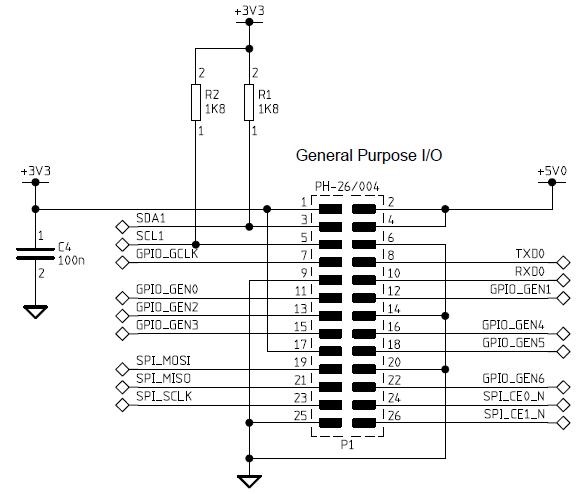
In this project the Raspberrypi board is loaded with Ubuntu and is remotely accessed using VNC. The Raspberrypi board is also connected to the internet. There are 26 connectors which can be taken out from the connector port of the Raspberrypi board. All the connector pins are taken out using 13*2 pin female connectors and at the other end of their wire 26 pin Burg stick male connectors are attached. The Burg stick male connectors allow each pin out from the Raspberrypi board to be plugged into the holes of a breadboard.  To access the pins that coming out of the Broadcom controller of the Raspberrypi board using C language, a C library is available called “bcm2835” which has been downloaded and installed.

There are eight general purpose IO pins on the 13*2 pin connectors of the Raspberrypi board and to each one of them a LED is connected through 1K resistor. Separate code has been written to blink the LEDs individually and made them into executable files named blink2, blink3, blink4, blink5, blink6, blink7 and blink8. It is suggested to keep all the .c files and the executable files in a single folder for this particular project.

The user can run any of the LED blinking programs from the command line. For example to execute the file ‘blink1’, the user can use the following command:

./blink1

The user can perform multi-tasking on them by entering the following commands one after the other. The user can perform multi-tasking with the eight LED codes by entering the following eight commands one after the other.

 ./blink1 &

./blink2 &

./blink3 &

./blink4 &

./blink5 &

./blink6 &

./blink7 &

./blink8 &

The following section discusses how to execute any of the above executable files from another C code rather than using the command line to pass the commands for execution.

execve ()

It is declared in the header file <unistd.h>.  The prototype of the function is given as follows;

int execve(const char *filename, char *const argv[], char *const envp[]);

The first parameter is the name of the file to be executed; the second parameter is the number of arguments that need to be passed to the file to be executed and the third parameter is the arguments. All the three parameters need be passed in the form of string.

To execute the file “blink1” using the execve () function the user can use the following statement in a C code.

execve ( “blink1”, 0, 0 );

The file blink1 is not taking any arguments and hence the second and third parameters are left as 0.

For execute the LED blinking codes as from another C code, simply open up a new .c file in vim editor  and write down the following simple code;

#include <unistd.h>

int main ()

{

          execve ( “./blink1”, 0, 0 );

            return 0;

}

Or

#include <unistd.h>

int main ()

{

            execve ( “./blink2”, 0, 0 );

            return 0;

}

Or

.

.

.

#include <unistd.h>

int main ()

{

            execve ( “./blink8”, 0, 0 );

            return 0;

}

Save this file with a name, say “execve_blink.c” and then compile them into an executable file “execve_blink”.

To execute the code use the following command:

./execve_blink

*** Make sure that all the executable files blink1, blink2 etc. are there in the same folder with the executable file “execve_blink_all”.

***Note that in this project the latest version of library “bcm2835” is used with an old version of Raspberrypi board. It is not possible to access the pin number 13 of the old board with the latest library version and hence in the code “blink3.c” the pin number 24 is used to blink the 3rd LED. The circuit diagram is also drawn accordingly. Those who have the latest version of the board can use the pin 13 without any trouble.

To find the ‘Revision’ and other important details about the Raspberrypi board, use the following command:

cat /proc/cpuinfo

*******************************************************************************
Note:
In this project the Raspberrypi board version 2 is used, but a previous version of the “bcm2835” library is installed. Accessing the GPIO pin 13 is not possible with this library and hence the 3rd IO pin is selected as pin24 of the P1 port of the Raspberrypi. The circuit and the code are modified accordingly. Those who have the version 2 of the Raspberrypi and the latest version of the “bcm2835” library can use the GPIO pin 13 using “RPI_V2_GPIO_P1_13” instead of “RPI_GPIO_P1_13” in the pin definition.
For example to define a ‘PIN’ as 13th pin of P1 port of Raspberrypi board version2, use the following statement in the code;
#define PIN RPI_V2_GPIO_P1_13


*******************************************************************************

Circuit Diagrams

Circuit-Diagram-Executing-File-using-Execve

Project Components

  • LED
  • Resistor

Project Video


Filed Under: Raspberry pi
Tagged With: execve, Raspberry Pi
 

Next Article

← Previous Article
Next Article →

Questions related to this article?
👉Ask and discuss on EDAboard.com and Electro-Tech-Online.com forums.


Tell Us What You Think!! Cancel reply

You must be logged in to post a comment.

Submit a Guest Post

submit a guest post

EE TECH TOOLBOX

“ee
Tech Toolbox: Power Efficiency
Discover proven strategies for power conversion, wide bandgap devices, and motor control — balancing performance, cost, and sustainability across industrial, automotive, and IoT systems.

EE Learning Center

EE Learning Center
“engineers
EXPAND YOUR KNOWLEDGE AND STAY CONNECTED
Get the latest info on technologies, tools and strategies for EE professionals.

HAVE A QUESTION?

Have a technical question about an article or other engineering questions? Check out our engineering forums EDABoard.com and Electro-Tech-Online.com where you can get those questions asked and answered by your peers!


RSS EDABOARD.com Discussions.

  • Abs. Max. VGS for GaN FET?
  • Using a PAM8403 module without output filters
  • Current version of LTspice not working on Windows 11?
  • How to Build an Audio Tone Control?
  • TPS63070 Power Supply

RSS Electro-Tech-Online.com Discussions

  • ESP32-S3 started outputting NMEA GPS location frames after EMC disturbance — what mode is this?
  • TraxMaker Pro? I only have the non-Pro version. Looking for the Pro version that has the integrated pick and place coordinates export.
  • Can a small solar panel safely trickle-charge old NiMH AA batteries?
  • desoldering
  • Need a fresh eye on my first PCB

Featured Tutorials

Real Time Hardware Filter Design

  • Practical implementation of bandpass and band reject filters
    Practical implementation of bandpass and band reject filters
  • Practical application of hardware filters with real-life examples
    Practical application of hardware filters with real-life examples
  • A filter design example
    A filter design example
  • Types of filter responses
    Types of filter responses
  • What are the two types of hardware filters?
    What are the two types of hardware filters?
  • What are hardware filters and their types?
    What are hardware filters and their types?
More Tutorials >

Recent Articles

  • LEMO introduces resin-free IP68 connectors for compact equipment
  • Taiwan Semiconductor adds 24-V automotive TVS devices
  • ST e-fuse controller enables fast, flexible automotive power protection
  • Posifa sensors improve low-flow accuracy in compact systems
  • Acopian releases low-profile power supplies rated to 900 W

EE ENGINEERING TRAINING DAYS

engineering
Engineers Garage
  • Analog IC TIps
  • Connector Tips
  • Battery Power Tips
  • EDABoard Forums
  • EE World Online
  • Electro-Tech-Online Forums
  • EV Engineering
  • Microcontroller Tips
  • Power Electronic Tips
  • Sensor Tips
  • Test and Measurement Tips
  • 5G Technology World
  • Subscribe to our newsletter
  • About Us
  • Contact Us
  • Advertise

Copyright © 2025 WTWH Media LLC. All Rights Reserved. The material on this site may not be reproduced, distributed, transmitted, cached or otherwise used, except with the prior written permission of WTWH Media
Privacy Policy

Search Engineers Garage

  • Electronic Projects & Tutorials
    • Electronic Projects
      • Arduino Projects
      • AVR
      • Raspberry pi
      • ESP8266
      • BeagleBone
      • 8051 Microcontroller
      • ARM
      • PIC Microcontroller
      • STM32
    • Tutorials
      • Sensor Series
      • 3D Printing
      • AI
      • ARDUINO Compatible Coding
      • Audio Electronics
      • Battery Management
      • Beginners Electronics Series
      • Brainwave
      • Digital electronics (DE)
      • Electric Vehicles
      • EMI/EMC/RFI
      • EVs
      • Hardware Filters
      • IoT tutorials
      • LoRa/LoRaWAN
      • Power Tutorials
      • Protocol
      • Python
      • RPI Python Programming
      • Sensors
      • USB
      • Thermal management
      • Verilog
      • VHDL
    • Circuit Design
    • Project Videos
    • Components
  • Articles
    • Tech Articles
    • Insight
    • Invention Stories
    • How to
    • What Is
  • News
    • Electronic Product News
    • Business News
    • Company/Start-up News
    • DIY Reviews
    • Guest Post
  • Forums
    • EDABoard.com
    • Electro-Tech-Online
    • EG Forum Archive
  • DigiKey Store
    • Cables, Wires
    • Connectors, Interconnect
    • Discrete
    • Electromechanical
    • Embedded Computers
    • Enclosures, Hardware, Office
    • Integrated Circuits (ICs)
    • Isolators
    • LED/Optoelectronics
    • Passive
    • Power, Circuit Protection
    • Programmers
    • RF, Wireless
    • Semiconductors
    • Sensors, Transducers
    • Test Products
    • Tools
  • Learn
    • eBooks/Tech Tips
    • Design Guides
    • Learning Center
    • Tech Toolboxes
    • Webinars & Digital Events
  • Resources
    • Digital Issues
    • EE Training Days
    • LEAP Awards
    • Podcasts
    • Webinars / Digital Events
    • White Papers
    • Engineering Diversity & Inclusion
  • Guest Post Guidelines
  • Advertise
  • Subscribe