Engineers Garage

  • Electronic Projects & Tutorials
    • Electronic Projects
      • Arduino Projects
      • AVR
      • Raspberry pi
      • ESP8266
      • BeagleBone
      • 8051 Microcontroller
      • ARM
      • PIC Microcontroller
      • STM32
    • Tutorials
      • Sensor Series
      • 3D Printing
      • AI
      • ARDUINO Compatible Coding
      • Audio Electronics
      • Battery Management
      • Beginners Electronics Series
      • Brainwave
      • Digital electronics (DE)
      • Electric Vehicles
      • EMI/EMC/RFI
      • EVs
      • Hardware Filters
      • IoT tutorials
      • LoRa/LoRaWAN
      • Power Tutorials
      • Protocol
      • Python
      • RPI Python Programming
      • Sensors
      • USB
      • Thermal management
      • Verilog
      • VHDL
    • Circuit Design
    • Project Videos
    • Components
  • Articles
    • Tech Articles
    • Insight
    • Invention Stories
    • How to
    • What Is
  • News
    • Electronic Product News
    • Business News
    • Company/Start-up News
    • DIY Reviews
    • Guest Post
  • Forums
    • EDABoard.com
    • Electro-Tech-Online
    • EG Forum Archive
  • DigiKey Store
    • Cables, Wires
    • Connectors, Interconnect
    • Discrete
    • Electromechanical
    • Embedded Computers
    • Enclosures, Hardware, Office
    • Integrated Circuits (ICs)
    • Isolators
    • LED/Optoelectronics
    • Passive
    • Power, Circuit Protection
    • Programmers
    • RF, Wireless
    • Semiconductors
    • Sensors, Transducers
    • Test Products
    • Tools
  • Learn
    • eBooks/Tech Tips
    • Design Guides
    • Learning Center
    • Tech Toolboxes
    • Webinars & Digital Events
  • Resources
    • Digital Issues
    • EE Training Days
    • LEAP Awards
    • Podcasts
    • Webinars / Digital Events
    • White Papers
    • Engineering Diversity & Inclusion
  • Guest Post Guidelines
  • Advertise
  • Subscribe

How to extract details from GPS Receiver using 8051 Microcontroller- (Part 37/45)

By Himanshu Choudhary March 10, 2011

This project is an extension to interfacing GPS with 8051. Here the microcontroller interfaced with GPS module is used to obtain latitude, longitude, time, date and speed of the receiver. These received values are displayed on a 16x2 character LCD.


The GPS module continuously transmits serial data (RS232 protocol) in the form of sentences according to NMEA standards. The latitude, longitude, time, date and speed values of the receiver are contained in the GPRMC sentence as given in the following example (also refer NMEA format for other sentences). In this project, these values are extracted from the GPRMC sentence and are displayed on LCD.
 

Example : $GPRMC,132455.970,A,2651.0145,N,07547.7051,E,0.50,342.76,301010,,,A*64
where: 
RMC
132455.970
A
2651.0145, N
07547.7051, E
0.50
342.76
301010
Empty field (xxx.x, y)
*64
Recommended Minimum sentence C
Fix taken at 13:24:55.970 UTC
Status A=Active or V=Void.
Latitude 26 deg 51.0145′ N
Longitude 075 deg 47.7051′ E
Speed over the ground in knots
Track angle in degrees True
Date : 30th of October 2010
Magnetic Variation
The checksum data, always begins with *
 
The serial data is taken from the GPS module through MAX232 into the SBUF register of 8051 controller (refer serial interfacing with 8051). The serial data from the GPS receiver is taken by using the Serial Interrupt of the controller. This data consists of a sequence of NMEA sentences from which GPRMC sentence is identified and processed.
The extraction of required values is done as follows. The first six bytes of the data received are compared with the pre-stored ($GPRMC) string and if matched then only data is further accounted for; otherwise the process is repeated again. From the comma delimited GPRMC sentence, latitude, longitude, date, time, speed values are extracted by finding the respective comma positions. The values thus extracted are displayed on the LCD interfaced with AT89C51.
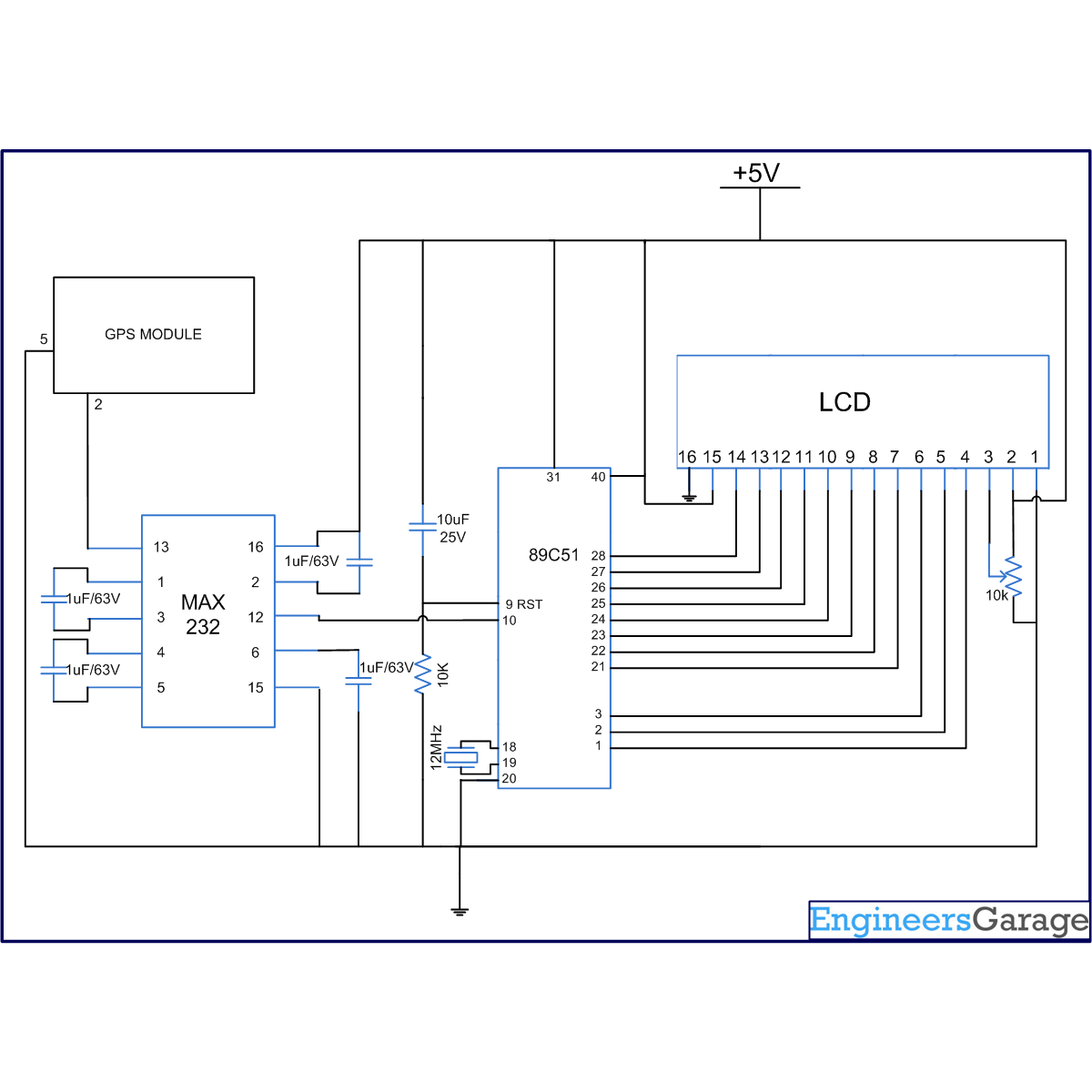
The circuit connections are as follows:
Receiver1 (R1) of MAX232 has been used for the serial communication. The receiver pin of GPS module is connected to R1IN (pin13) of MAX232. R1OUT (pin 12) of MAX232 is connected to RxD (P3.0) of AT89C51.
Pins 1-3 of port P1 (P1.0, P1.1 & P1.2 respectively) of AT89C51 are connected to the control pins (RS, R/W& EN) of LCD. The data pins of LCD are connected to Port P2 of the controller. The latitude and longitude positions are displayed on the LCD.


Project Source Code

###

 /* Program to display time date,latitude,longitude,speed on LCD by extracting the GPRMC...
...statement sent by GPS receiver*/ 
#include<reg51.h>
#define port2 P2
 sbit rs = P1^0;
sbit rw = P1^1;
sbit e = P1^2;
 char info[70];
char test[6]={"$GPRMC"};
char comma_position[13];
unsigned int check=0,i;
unsigned char a;
void receive_data();
void lcd_time();
void lcd_latitude();
void lcd_longitude();
void lcd_speed();
void lcd_date();

//DELAY FUNCTION
void delay(unsigned int msec)
{
    int i,j ;
    for(i=0;i<msec;i++)
    for(j=0;j<1275;j++); 
}

// LCD COMMAND SENDING FUNCTION
void lcd_cmd(unsigned char item)
{
    port2 = item;
    rs= 0;
    rw=0;
    e=1;
    delay(1);
    e=0;
    return;
} 

// LCD DATA SENDING FUNCTION
void lcd_data(unsigned char item)
{
    port2 = item;
    rs= 1;
    rw=0;
    e=1;
    delay(1);
    e=0;
    return;
}

 // LCD STRING SENDING FUNCTION 
void lcd_string(unsigned char *str)
{
    int i=0;
    while(str[i]!='')
    {
        lcd_data(str[i]);
        i++;
        delay(10);
    }
    return;
}

// SERIAL PORT SETTING
void serial()
{
    TMOD=0x20;    //MODE=2
    TH1=0xfa;      // 4800 BAUD
    SCON=0x50  ;  // SERIAL MODE 1 ,8- BIT DATA ,1 STOP BIT ,1 START BIT , RECEIVING ON
    TR1=1;          //TIMER START
}

void find_comma()
{
    unsigned int i,count=0;
    for(i=0;i<70;i++)
    {    
        if(info[i]==',')
        {
            comma_position[count++]=i;
        }
    }
}
void compare()
{  
    IE=0x00;       
    find_comma();
    lcd_time();
    lcd_date();
    lcd_latitude();
    lcd_longitude();
    lcd_speed();
    check=0;
    IE=0x90;
}


void receive_data()            interrupt 4                      
{
    info[check++]=SBUF;      //Read SBUF
    if(check<7)
    {
        if(info[check-1]!=test[check-1])
        check=0;
    }
    RI=0;
}
void lcd_time()
{
    unsigned int c1=comma_position[0]; 
    lcd_cmd(0x01);                 //Clear LCD display
    lcd_data(comma_position[0]);
    delay(50);
    lcd_cmd(0x01);                //Clear LCD display
    lcd_cmd(0x86);                //Move cursor to position 6 of line 1
    lcd_string("TIME");            //Showing time
    lcd_cmd(0xC0);                //Begining of second line
    lcd_data(info[c1+1]);        //Displaying hours
    lcd_data(info[c1+2]);
    lcd_string(":");    
    lcd_data(info[c1+3]);        //Displaying minutes
    lcd_data(info[c1+4]);                     
    lcd_string(":");
    lcd_data(info[c1+5]);        //Displaying seconds
    lcd_data(info[c1+6]);
    lcd_data(info[c1+8]);        
    lcd_data(info[c1+9]);    
    lcd_data(info[c1+10]);    
    delay(250);                    //Delay, so one can see time
}
    
void lcd_shape()                //Shape of degree symbol
{
    lcd_cmd(64);
    lcd_data(10);
    lcd_data(17);
    lcd_data(17);
    lcd_data(10);
    lcd_data(0);
    lcd_data(0);
    lcd_data(0);
    lcd_data(0);
}

void lcd_latitude()
{
    unsigned int c3=comma_position[2];
    lcd_shape();
    lcd_cmd(0x01);                 //Clear LCD display
    lcd_cmd(0x84);                 //Move cursor to position 6 of line 1
       lcd_string("LATITUDE");         //Showing latitude
    lcd_cmd(0xC0);                 //Begining of second line  
    lcd_data(info[c3+1]);
    lcd_data(info[c3+2]);
    lcd_data(0);
    lcd_data(info[c3+3]);
    lcd_data(info[c3+4]);
    lcd_data(info[c3+5]);
    lcd_data(info[c3+6]);
    lcd_data(info[c3+7]);
    lcd_data(info[c3+8]);
    lcd_data(info[c3+9]);
    lcd_data(0x27);             //ASCII of minute sign(')
    lcd_data(info[c3+10]);
    lcd_data(info[c3+11]);
    delay(250);
} 

void lcd_longitude()
{
    unsigned int c5=comma_position[4];
    lcd_cmd(0x01);                 //Clear LCD display
    lcd_cmd(0x84);                 //Move cursor to position 4 of line 1
    lcd_string("LONGITUDE");         //Showing longitude
    lcd_cmd(0xC0);                 //Begining of second line  
    lcd_data(info[c5+1]);
    lcd_data(info[c5+2]);
    lcd_data(info[c5+3]);
    lcd_data(0);
    lcd_data(info[c5+4]);
    lcd_data(info[c5+5]);
    lcd_data(info[c5+6]);
    lcd_data(info[c5+7]);
    lcd_data(info[c5+8]);
    lcd_data(info[c5+9]);
    lcd_data(info[c5+10]);
    lcd_data(0x27);               //ASCII of minute sign(')
    lcd_data(info[c5+11]);
    lcd_data(info[c5+12]);
    delay(250);
}

void lcd_speed()
{
    unsigned int c6=comma_position[6], c7=comma_position[7];
    lcd_cmd(0x01);                         //Clear LCD display
    lcd_cmd(0x80);                        //Move cursor to position 5 of line 1
    lcd_string("SPEED(inKNOTS)");        //Showing longitude
    lcd_cmd(0xC0);                        //Begining of second line 
    for(i=c6+1;i<c7;i++)
    {
        lcd_data(info[i]);
    }
    lcd_string("KNOTS");
    delay(250);
}
 
void lcd_date()
{
    unsigned int c9=comma_position[8];
    lcd_cmd(0x01);             //Clear LCD display
    lcd_cmd(0x85);             //Move cursor to position 5 of line 1
    lcd_string("DATE");
    lcd_cmd(0xC0);
    lcd_data(info[c9+1]);
    lcd_data(info[c9+2]);
    lcd_data('-');
    lcd_data(info[c9+3]);
    lcd_data(info[c9+4]);
    lcd_data('-');
    lcd_data(info[c9+5]);
    lcd_data(info[c9+6]);
    delay(250);
} 
 
void main()
{
    serial();
    lcd_cmd(0x38);       //2 LINE, 5X7 MATRIX
    lcd_cmd(0x0e);     //DISPLAY ON, CURSOR BLINKING
    IE=0x90;
    while(1)
    {
        if(check==69)
        compare();
    }
}

###


Circuit Diagrams

Circuit-Diagram-Extracting-Details-GPS-Receiver-Using-8051-Microcontroller

Project Components

  • AT89C51 Microcontroller
  • LCD
  • MAX232

Project Video


Filed Under: 8051 Microcontroller
Tagged With: 8051, gps, microcontroller
 

Next Article

← Previous Article
Next Article →

Questions related to this article?
👉Ask and discuss on Electro-Tech-Online.com and EDAboard.com forums.


Tell Us What You Think!! Cancel reply

You must be logged in to post a comment.

Submit a Guest Post

submit a guest post

EE TECH TOOLBOX

“ee
Tech Toolbox: Power Efficiency
Discover proven strategies for power conversion, wide bandgap devices, and motor control — balancing performance, cost, and sustainability across industrial, automotive, and IoT systems.

EE Learning Center

EE Learning Center
“engineers
EXPAND YOUR KNOWLEDGE AND STAY CONNECTED
Get the latest info on technologies, tools and strategies for EE professionals.

HAVE A QUESTION?

Have a technical question about an article or other engineering questions? Check out our engineering forums EDABoard.com and Electro-Tech-Online.com where you can get those questions asked and answered by your peers!


RSS EDABOARD.com Discussions.

  • MC145151/2 p2 calculation dip swich vs xtal divader
  • Looking for Detector Switches similar to PANASONIC ESE24CMH with a 12V rating
  • Crude Powerline FSK comms literally shorts the power bus at a certain frequency?
  • Direction and Orientation of Current in Transformer
  • Is a Digitizer Necessary for INL and DNL Measurement in DACs?

RSS Electro-Tech-Online.com Discussions

  • Need to solder a really delicate ribbon for an electric reel need advice
  • Need Help Troubleshooting a PCB Assembly Issue
  • Solar tracker simulation
  • need help in photodetection TIA circuit
  • Help please! BLDC driver circuit using the IR2136s and the STP80NF06 MOSFETS

Featured Tutorials

Real Time Hardware Filter Design

  • Practical implementation of bandpass and band reject filters
    Practical implementation of bandpass and band reject filters
  • Practical application of hardware filters with real-life examples
    Practical application of hardware filters with real-life examples
  • A filter design example
    A filter design example
  • Types of filter responses
    Types of filter responses
  • What are the two types of hardware filters?
    What are the two types of hardware filters?
  • What are hardware filters and their types?
    What are hardware filters and their types?
More Tutorials >

Recent Articles

  • Microchip extends single pair Ethernet lineup with software-less endpoint
  • Infineon MCU targets high-voltage BMS in electric vehicles
  • SemiQ releases expanded SiC MOSFET lineup with detailed thermal and switching data
  • TDK adds 1000 W models to dc-dc converter series
  • LEMO introduces resin-free IP68 connectors for compact equipment

EE ENGINEERING TRAINING DAYS

engineering
Engineers Garage
  • Analog IC TIps
  • Connector Tips
  • Battery Power Tips
  • EDABoard Forums
  • EE World Online
  • Electro-Tech-Online Forums
  • EV Engineering
  • Microcontroller Tips
  • Power Electronic Tips
  • Sensor Tips
  • Test and Measurement Tips
  • 5G Technology World
  • Subscribe to our newsletter
  • About Us
  • Contact Us
  • Advertise

Copyright © 2025 WTWH Media LLC. All Rights Reserved. The material on this site may not be reproduced, distributed, transmitted, cached or otherwise used, except with the prior written permission of WTWH Media
Privacy Policy

Search Engineers Garage

  • Electronic Projects & Tutorials
    • Electronic Projects
      • Arduino Projects
      • AVR
      • Raspberry pi
      • ESP8266
      • BeagleBone
      • 8051 Microcontroller
      • ARM
      • PIC Microcontroller
      • STM32
    • Tutorials
      • Sensor Series
      • 3D Printing
      • AI
      • ARDUINO Compatible Coding
      • Audio Electronics
      • Battery Management
      • Beginners Electronics Series
      • Brainwave
      • Digital electronics (DE)
      • Electric Vehicles
      • EMI/EMC/RFI
      • EVs
      • Hardware Filters
      • IoT tutorials
      • LoRa/LoRaWAN
      • Power Tutorials
      • Protocol
      • Python
      • RPI Python Programming
      • Sensors
      • USB
      • Thermal management
      • Verilog
      • VHDL
    • Circuit Design
    • Project Videos
    • Components
  • Articles
    • Tech Articles
    • Insight
    • Invention Stories
    • How to
    • What Is
  • News
    • Electronic Product News
    • Business News
    • Company/Start-up News
    • DIY Reviews
    • Guest Post
  • Forums
    • EDABoard.com
    • Electro-Tech-Online
    • EG Forum Archive
  • DigiKey Store
    • Cables, Wires
    • Connectors, Interconnect
    • Discrete
    • Electromechanical
    • Embedded Computers
    • Enclosures, Hardware, Office
    • Integrated Circuits (ICs)
    • Isolators
    • LED/Optoelectronics
    • Passive
    • Power, Circuit Protection
    • Programmers
    • RF, Wireless
    • Semiconductors
    • Sensors, Transducers
    • Test Products
    • Tools
  • Learn
    • eBooks/Tech Tips
    • Design Guides
    • Learning Center
    • Tech Toolboxes
    • Webinars & Digital Events
  • Resources
    • Digital Issues
    • EE Training Days
    • LEAP Awards
    • Podcasts
    • Webinars / Digital Events
    • White Papers
    • Engineering Diversity & Inclusion
  • Guest Post Guidelines
  • Advertise
  • Subscribe