Engineers Garage

  • Electronic Projects & Tutorials
    • Electronic Projects
      • Arduino Projects
      • AVR
      • Raspberry pi
      • ESP8266
      • BeagleBone
      • 8051 Microcontroller
      • ARM
      • PIC Microcontroller
      • STM32
    • Tutorials
      • Sensor Series
      • 3D Printing
      • AI
      • ARDUINO Compatible Coding
      • Audio Electronics
      • Battery Management
      • Beginners Electronics Series
      • Brainwave
      • Digital electronics (DE)
      • Electric Vehicles
      • EMI/EMC/RFI
      • EVs
      • Hardware Filters
      • IoT tutorials
      • LoRa/LoRaWAN
      • Power Tutorials
      • Protocol
      • Python
      • RPI Python Programming
      • Sensors
      • USB
      • Thermal management
      • Verilog
      • VHDL
    • Circuit Design
    • Project Videos
    • Components
  • Articles
    • Tech Articles
    • Insight
    • Invention Stories
    • How to
    • What Is
  • News
    • Electronic Product News
    • Business News
    • Company/Start-up News
    • DIY Reviews
    • Guest Post
  • Forums
    • EDABoard.com
    • Electro-Tech-Online
    • EG Forum Archive
  • DigiKey Store
    • Cables, Wires
    • Connectors, Interconnect
    • Discrete
    • Electromechanical
    • Embedded Computers
    • Enclosures, Hardware, Office
    • Integrated Circuits (ICs)
    • Isolators
    • LED/Optoelectronics
    • Passive
    • Power, Circuit Protection
    • Programmers
    • RF, Wireless
    • Semiconductors
    • Sensors, Transducers
    • Test Products
    • Tools
  • Learn
    • eBooks/Tech Tips
    • Design Guides
    • Learning Center
    • Tech Toolboxes
    • Webinars & Digital Events
  • Resources
    • Digital Issues
    • EE Training Days
    • LEAP Awards
    • Podcasts
    • Webinars / Digital Events
    • White Papers
    • Engineering Diversity & Inclusion
  • Guest Post Guidelines
  • Advertise
  • Subscribe

How to interface GSM Module with 8051 microcontroller (AT89C51) using PC and LCD- (Part 39/45)

By Himanshu Choudhary December 29, 2010

This project is an extension of interfacing microcontroller with hyperterminal and GSM module. The previous project explained a way to interface a GSM module with 8051 microcontroller where the information response and result codes received by the controller were sent back to computer to display them at HyperTerminal. In this project, the same output is displayed on a 16x2 LCD interface.


This project adds a feature to display the information response and result codes on a 16×2 LCD in response to the AT commands sent through the HyperTerminal of computer. The characters typed at HyperTerminal get transmitted serially through the transmit pin (Tx) of RS232 interface. The overall connection layout is depicted below.
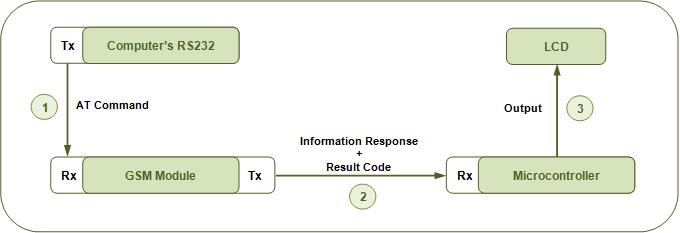
 
Block Diagram Of GSM Module With PC And Microcontroller
Fig. 2: Block Diagram Of GSM Module with PC and Microcontroller
 
The microcontroller program involves the following complexities to display data coming from the GSM/GPRS module on LCD.
i.      The data coming from the GSM module is stored in a character array. This character array is shifted to left every time character is read and deleted. This is important to maintain room for the incoming data and ensure that no character in an information response or result code is lost.
ii.     The information response and the result codes have carriage return and line feed characters in the beginning as well as end. These characters need to be monitored and removed by the controller’s program.
 
This project is first step towards making and independent system using the GSM module and a microcontroller. Here the HyperTerminal (computer) has been replaced with LCD at the output end. In the next project (MC076), the AT Commands will be transmitted to the GSM module by the microcontroller itself thus avoiding the need of using HyperTerminal entirely.
 

Project Source Code

###

// Program to interface GSM Module with 8051 microcontroller (AT89C51) using PC and LCD

#include<reg51.h>
#define port P1
#define dataport P2			// Data port for LCD
sbit rs = port^0;
sbit rw = port^1;
sbit en = port^2;
int count,i;
unsigned char check,str[15];
bit check_space ;

void init_serial()			// Initialize serial port
{
	TMOD=0x20;			// Mode=2
	TH1=0xfd;			// 9600 baud
	SCON=0x50;			// Serial mode=1, 8-Bit data, 1 Stop bit, 1 Start bit, Receiving on
	TR1=1;				// Start timer
}
void delay(unsigned int msec )		// Function for delay
{
	int i,j ;
	for(i=0;i<msec;i++)
	    for(j=0; j<1275; j++);
}

void lcd_cmd(unsigned char item)			// Function to send command on LCD
{
	dataport = item;
	rs= 0;
	rw=0;
	en=1;
	delay(1);
	en=0;
	return;
} 

void lcd_data(unsigned char item)			// Function to display character on LCD
{
	dataport = item;
	rs= 1;
	rw=0;
	en=1;
	delay(1);
	en=0;
	return;
}
	 	
void lcd_data_string(unsigned char *str)      	        // Function to display string on LCD
{
	int i=0;
	while(str[i]!='')
	{
 	  lcd_data(str[i]);				  
 	  i++;
 	  delay(10);					
   	}
	return; 
}
void lcd()
{
	lcd_cmd(0x38);					// For using 8-bit 2 row LCD 
	delay(5);						
	lcd_cmd(0x0F);					// For display on, cursor blinking
	delay(5);						
	lcd_cmd(0x80);					// Set the cursor on first position of lcd 
	delay(5);						
}


 void receive_data()  interrupt 4	      // Function to recieve data serialy from RS232 into microcontroller
 {
	 str[++count]=SBUF;  		//Read SBUF
	 RI=0;
 }
  
unsigned char byte_check() 		//Function to check carraige return and new line character
{
	switch(str[0])
	{
		case 0x0a:
		{			// Return 0x00 for new line
		return 0x00;
		break ;
		}
		case 0x0d:
		{			// Return 0x01 for carriage return
		return 0x1;
		break ;
		}
		default:return 0x02 ;		// Return 0x02 for characters except new line and carriage return
	}
}

void main()
{ 
	lcd();						// Initialize LCD
	init_serial();					// Initialize serial port
	count=(-1);
	lcd_data_string("Ready");
	delay(10);						
	lcd_cmd(0x01);	
	IE=0x94; 
	while(1)
	{
		if(count>=0)
		{
		check=byte_check();			               //Check the character
		if(check!=0x00)
		{			
			if(check==0x01)
			{
				if(check_space==1)			//Check previous character
	 			{
					lcd_data(0x20);
					check_space=0;
				}
			}
			else	
			{
				lcd_data(str[0]);
				check_space=1;
			}
		}
			count--;				   
			for(i=0;i<count;i++)				// Shift the whole array to one left
			{
				str[i]=str[i+1];
			}
		}
	}
}

###


Circuit Diagrams

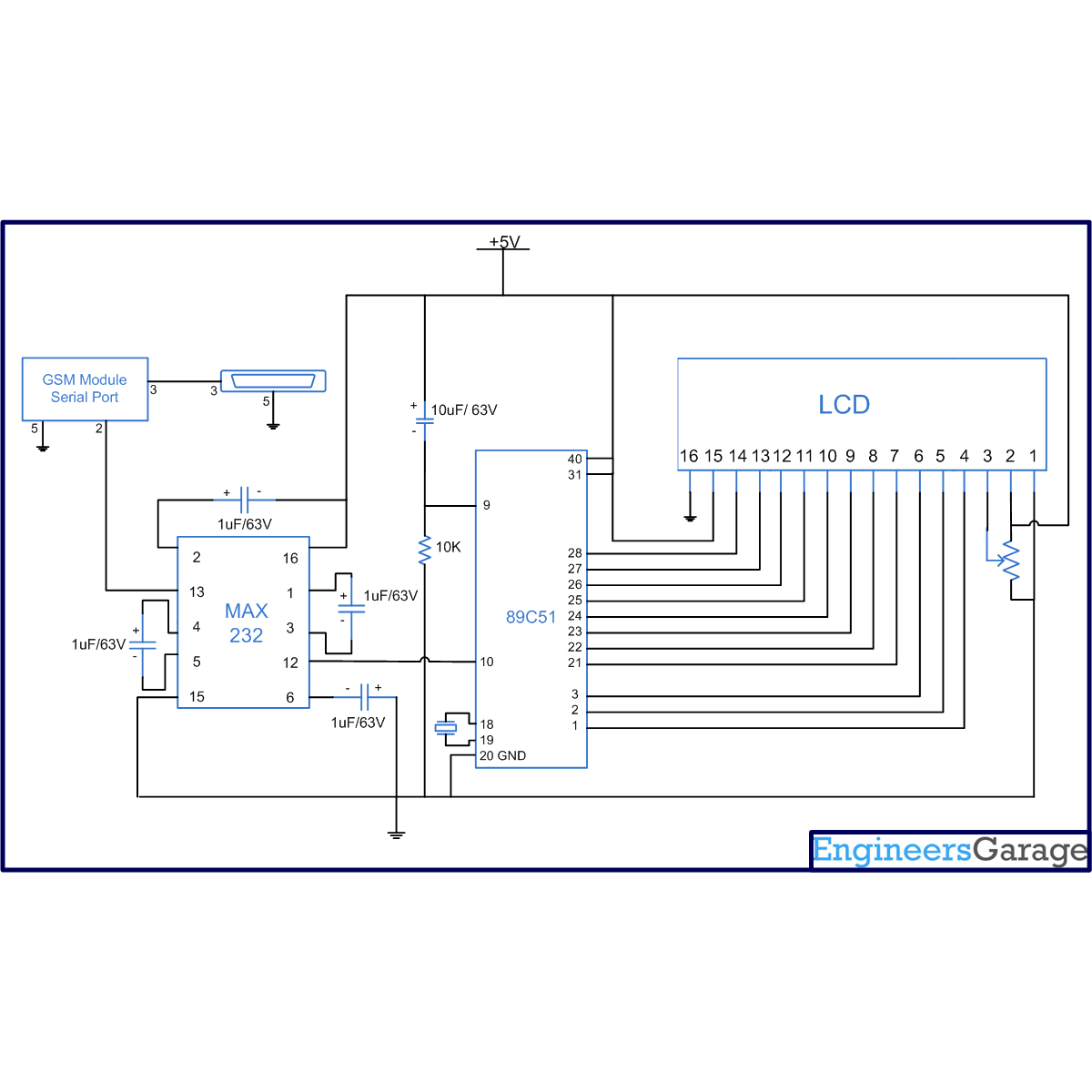
Circuit-Diagram-Interfacing-GSM-Module-8051-Microcontroller-AT89C51-Using-PC-LCD

Project Components

  • AT89C51 Microcontroller
  • LCD
  • MAX232

Project Video


Filed Under: 8051 Microcontroller
Tagged With: 8051, gsm, lcd, microcontroller
 

Next Article

← Previous Article
Next Article →

Questions related to this article?
👉Ask and discuss on Electro-Tech-Online.com and EDAboard.com forums.


Tell Us What You Think!! Cancel reply

You must be logged in to post a comment.

Submit a Guest Post

submit a guest post

EE TECH TOOLBOX

“ee
Tech Toolbox: Power Efficiency
Discover proven strategies for power conversion, wide bandgap devices, and motor control — balancing performance, cost, and sustainability across industrial, automotive, and IoT systems.

EE Learning Center

EE Learning Center
“engineers
EXPAND YOUR KNOWLEDGE AND STAY CONNECTED
Get the latest info on technologies, tools and strategies for EE professionals.

HAVE A QUESTION?

Have a technical question about an article or other engineering questions? Check out our engineering forums EDABoard.com and Electro-Tech-Online.com where you can get those questions asked and answered by your peers!


RSS EDABOARD.com Discussions.

  • Looking for FEMM expert. Need help to assess my model.
  • PCB layout impact on RF path impedance
  • Op-Amp oscillating
  • rechargeable battery and simple alkaline battery in one single product
  • Impedance Matching Under Low Modal Significance.

RSS Electro-Tech-Online.com Discussions

  • Anyone In The US Ordered From AliExpress Recently?
  • Calculation of A Class amplifier
  • strange laptop problem
  • restarting this Christmas project
  • Anyone understand roaming SIM cards?.

Featured Tutorials

Real Time Hardware Filter Design

  • Practical implementation of bandpass and band reject filters
    Practical implementation of bandpass and band reject filters
  • Practical application of hardware filters with real-life examples
    Practical application of hardware filters with real-life examples
  • A filter design example
    A filter design example
  • Types of filter responses
    Types of filter responses
  • What are the two types of hardware filters?
    What are the two types of hardware filters?
  • What are hardware filters and their types?
    What are hardware filters and their types?
More Tutorials >

Recent Articles

  • Stackpole introduces compact jumpers for high-current circuit routing
  • Ironwood Electronics launches near-device-footprint SMT elastomer socket for BGA264
  • Amphenol RF releases P67 FAKRA plugs for 6 GHz RF transmission
  • Microchip releases platform to deliver real-time specifications for AI assistants
  • GigaDevices introduces 32-bit MCUs with integrated DSP and FPU support

EE ENGINEERING TRAINING DAYS

engineering
Engineers Garage
  • Analog IC TIps
  • Connector Tips
  • Battery Power Tips
  • EDABoard Forums
  • EE World Online
  • Electro-Tech-Online Forums
  • EV Engineering
  • Microcontroller Tips
  • Power Electronic Tips
  • Sensor Tips
  • Test and Measurement Tips
  • 5G Technology World
  • Subscribe to our newsletter
  • About Us
  • Contact Us
  • Advertise

Copyright © 2025 WTWH Media LLC. All Rights Reserved. The material on this site may not be reproduced, distributed, transmitted, cached or otherwise used, except with the prior written permission of WTWH Media
Privacy Policy

Search Engineers Garage

  • Electronic Projects & Tutorials
    • Electronic Projects
      • Arduino Projects
      • AVR
      • Raspberry pi
      • ESP8266
      • BeagleBone
      • 8051 Microcontroller
      • ARM
      • PIC Microcontroller
      • STM32
    • Tutorials
      • Sensor Series
      • 3D Printing
      • AI
      • ARDUINO Compatible Coding
      • Audio Electronics
      • Battery Management
      • Beginners Electronics Series
      • Brainwave
      • Digital electronics (DE)
      • Electric Vehicles
      • EMI/EMC/RFI
      • EVs
      • Hardware Filters
      • IoT tutorials
      • LoRa/LoRaWAN
      • Power Tutorials
      • Protocol
      • Python
      • RPI Python Programming
      • Sensors
      • USB
      • Thermal management
      • Verilog
      • VHDL
    • Circuit Design
    • Project Videos
    • Components
  • Articles
    • Tech Articles
    • Insight
    • Invention Stories
    • How to
    • What Is
  • News
    • Electronic Product News
    • Business News
    • Company/Start-up News
    • DIY Reviews
    • Guest Post
  • Forums
    • EDABoard.com
    • Electro-Tech-Online
    • EG Forum Archive
  • DigiKey Store
    • Cables, Wires
    • Connectors, Interconnect
    • Discrete
    • Electromechanical
    • Embedded Computers
    • Enclosures, Hardware, Office
    • Integrated Circuits (ICs)
    • Isolators
    • LED/Optoelectronics
    • Passive
    • Power, Circuit Protection
    • Programmers
    • RF, Wireless
    • Semiconductors
    • Sensors, Transducers
    • Test Products
    • Tools
  • Learn
    • eBooks/Tech Tips
    • Design Guides
    • Learning Center
    • Tech Toolboxes
    • Webinars & Digital Events
  • Resources
    • Digital Issues
    • EE Training Days
    • LEAP Awards
    • Podcasts
    • Webinars / Digital Events
    • White Papers
    • Engineering Diversity & Inclusion
  • Guest Post Guidelines
  • Advertise
  • Subscribe