
Engineers Garage

  • Electronic Projects & Tutorials
    • Electronic Projects
      • Arduino Projects
      • AVR
      • Raspberry pi
      • ESP8266
      • BeagleBone
      • 8051 Microcontroller
      • ARM
      • PIC Microcontroller
      • STM32
    • Tutorials
      • Sensor Series
      • 3D Printing
      • AI
      • ARDUINO Compatible Coding
      • Audio Electronics
      • Battery Management
      • Beginners Electronics Series
      • Brainwave
      • Digital electronics (DE)
      • Electric Vehicles
      • EMI/EMC/RFI
      • EVs
      • Hardware Filters
      • IoT tutorials
      • LoRa/LoRaWAN
      • Power Tutorials
      • Protocol
      • Python
      • RPI Python Programming
      • Sensors
      • USB
      • Thermal management
      • Verilog
      • VHDL
    • Circuit Design
    • Project Videos
    • Components
  • Articles
    • Tech Articles
    • Insight
    • Invention Stories
    • How to
    • What Is
  • News
    • Electronic Product News
    • Business News
    • Company/Start-up News
    • DIY Reviews
    • Guest Post
  • Forums
    • EDABoard.com
    • Electro-Tech-Online
    • EG Forum Archive
  • DigiKey Store
    • Cables, Wires
    • Connectors, Interconnect
    • Discrete
    • Electromechanical
    • Embedded Computers
    • Enclosures, Hardware, Office
    • Integrated Circuits (ICs)
    • Isolators
    • LED/Optoelectronics
    • Passive
    • Power, Circuit Protection
    • Programmers
    • RF, Wireless
    • Semiconductors
    • Sensors, Transducers
    • Test Products
    • Tools
  • Learn
    • eBooks/Tech Tips
    • Design Guides
    • Learning Center
    • Tech Toolboxes
    • Webinars & Digital Events
  • Resources
    • Digital Issues
    • EE Training Days
    • LEAP Awards
    • Podcasts
    • Webinars / Digital Events
    • White Papers
    • Engineering Diversity & Inclusion
  • Guest Post Guidelines
  • Advertise
  • Subscribe

Interfacing LCD with LPC 2148

By Ashutosh Bhatt April 21, 2008

LCD stands for Liquid Crystal Display used to display numbers, strings and special characters as per the application. It is one of the widely used modules in embedded system. Almost all embedded product requires LCD.

Advantage of LCD over LEDs is its ability to display any number, alphabet, special characters and user defined symbol (at extra effort for programming) without increasing number of pins required to be connected with controller.

Interfacing of LCD with LPC2148 differs little bit compared to interfacing with 8051 or AVR which operates on 5V. LCD operates on 5V but LPC 2148 operates on 3.3V so we have to take care of this fact for the controller pins which has to be connected with LCD.

This requires level shifter circuit to be interfaced. The entire article aims to cover basics of LCD and level shifter circuit designing with programming to interface LCD with LPC 2148.


Let us start with basics of LCD. China made JHD 162A 16*2 LCD is widely used and easily available in market. It has total 16 pins which can be divided into three categories.

1.   Power Control pins: 1,2,3,15,16

2.   Control Pins: 4,5,6

3.   Data Pins: 7 to 14

Functions of pins are as follows.

Pin number

Pin Name

Function

1

Gnd

Ground pin

2

Vcc

Supply for LCD (4.7-5.3V)

3

Vee

Contrast Control

4

RS

Register select

0-Command Register

1-Data Register

5

R/W

Read/Write

0-Write LCD

1-Read LCD

6

E

Enable pin

7-14

DB0-DB7

Data pins

15

V+

Supply for backlight

16

Gnd

Ground pin of backlight supply

LCD needs to be configured properly. To configure LCD, we must know the command structure which is as given below.

This table must be understood properly for programming.

Well to reduce your efforts, generally required commands are short listed here.

Once you are aware of command structure, let’s move ahead.

LCD can operate in two modes.

1.   Command Mode: In this mode, RS pin is at logic 0 and the data on pin 7-14 represents the command which specifies the actions to be performed like clear LCD, go to home position, blink cursor etc.

2.   Data Mode: In this mode, RS pin is at logic 1 and data op pin 7-14 represents the data to be displayed on LCD.

While operating in data mode, we must keep in mind that the pattern to be displayed on dot matrix is already stored in internal memory of LCD. It is given below.

[Courstey: www.ocfreaks.com]

So to display any character on LCD, we must provide ASCII value of that on data pins and LCD is smart enough to do the rest. To convert

any number into ASCII, we must add 48 decimal value to it. So ASCII of 0 is 48, of 1 is 49 etc.


How many pins LCD needs ??

As provided earlier, LCD has 8 data pins and 3 control pins. So it needs 11 pins  of controller for operation. But by smart thinking, we can reduce it to six. Let’s see how we can do that.

RW pin is for specifying read or write operation. Well if LCD is output device so where we have to read it ? Let’s understand this properly.

LCD is slow compared to Microc-controllers and it needs time to perform the operations. Assume that controller is asking LCD to print data continuously. When LCD will receive command for that, it will start displaying on LCD but if controller will send another data and if LCD has not finished the task of displaying first data, the later data will be lost and will not be displayed on it.

To avoid this, LCD has one method known as busy flag. In this, MSB of data pins ie. Pin 14 is used as busy flag. Once LCD will start performing and actions, it will raise pin 14 high to indicate that it is in busy state. Once the operation is completed, it will bring it down. Controller must check the status of pin 14 before sending further data or command to avoid any loss of data.

Here it is necessary to read pin 14 and RW has to be made high to read. We can save 1 controller pin here. Although LCD is slow, it is able to finish executaion of command within few machine cycles. So after giving any command or data, if we provide delay of few microseconds, LCD will finish its task within that much time. So we don’t have to read status of pin14 and we can permenately ground it and save controller pin.

Another beautiful option available is to use LCD in 4bit mode. Here the data will be sent in two nibbles instead of a complete byte at a time. In this, only higher nibble of data pins has been connected with controller and pinf 7-10 of LCD are in NC state.

In this way, we need only 6 pins (4 bit data bus, RS and E) are required for LCD interafcing.

Once you are clear with basics of LCD, command structure and basic commands, let’s move ahead with hardware connections.

As mentioned earlier, LPC 2148 operates on 3.3V while LCD requires 5V for operation as well as 5V signals on data and control pins. So we need level shifter in between LCD and LPC 2148.

Some of the buffers / level shifters than can be used are : SN74AHC244N , SN74AC241N , CD74AC244E , CD4050B , etc.. out of which CD74AC244E is readily available. The below circuit explains how we can interface LCD with LPC 2148.

Project Source Code

###


Let us start with programming now.

Before reading further, you must understand what is MODULAR PROGRAMMING.


Functions for LCD are as follows.

Function Name

Description

void Delay(unsigned long b);

Provide delay of few microseconds

void write_command(int cmd);

Give command to LCD

void write_data(int dat);

Display data on LCD

void init_lcd(void);

Initialize LCD

void printlcd(char *CPtr);

Display string on LCD


We have declared thess functions in LCD4BIT.C files and defined in LCD4BIT.H file using moddular programming approach.


Once above files are created, we can use code to display data on LCD.

1.   Program for LCD.h file


#include


void Delay(unsigned long b)

{

  while (--b!=0); 

}


void write_command(int cmd)

 {

  IO1CLR  |= 0x00f00000;                    // Clear Data pins

  IO1CLR  |= 0x00040000;                            // RW = 0         

  IO1CLR  |= 0X00020000;                            // RS= 0,

  IO1SET  |= 0x00f00000 & cmd;           //Set Data pins

  IO1SET  |= 0X00080000;                            // Enable = 1                                

  Delay(30000);                                   // Provide Delay

  IO1CLR  |= 0x00080000;                    // Set Enable=0

  }


void write_data(int dat)

{

  IO1CLR  |= 0x00f00000;                    // Clear Data pins4-D7 

  IO1CLR  |= 0x00040000;                   // RW= 0                  

  IO1SET  |= 0X00020000;                    //RS= 1

  IO1SET  |= 0x00f00000 & dat;            // Set Data pins

  IO1SET  |= 0X00080000;                    // Enable = 1

  Delay(30000);                                   //Provide Delay

  IO1CLR  |= 0x00080000;                    //Set Enable=0

  }


void lcd_data(char dat)

{

  write_data(dat << 16);

  write_data(dat << 20);

}


void lcd_command(char cmd)

{

  write_command(cmd << 16);

  write_command(cmd << 20);

}


void printlcd(char *CPtr)

{

  while(*CPtr != '�')

 {

  lcd_data(*CPtr);

  CPtr++;

  Delay(20000);

 }

}


void init_lcd(void)

 {                                                                              

  IO1DIR    |= 0x00FE0000;   

  Delay(200000) ;

  Delay(100000);

  write_command(0x30 << 16);

  Delay(100000);

  write_command(0x20 << 16);


  lcd_command(0x01);                          /* clear display */

  lcd_command(0x06);                          /* auto address inc */

  lcd_command(0x0c);                          /* cursor off */

  lcd_command(0x80);                          /* first location */

  }


###


Project Source Code

###


//Program for main application


#include

#include "lcd4bit.h"


int main(void)

 {                                                                              

  init_lcd();

  printlcd("Welcome To");

  lcd_command(0xC0);

  printlcd("Engineers Garage ");


  while(1);


  }


###


Circuit Diagrams
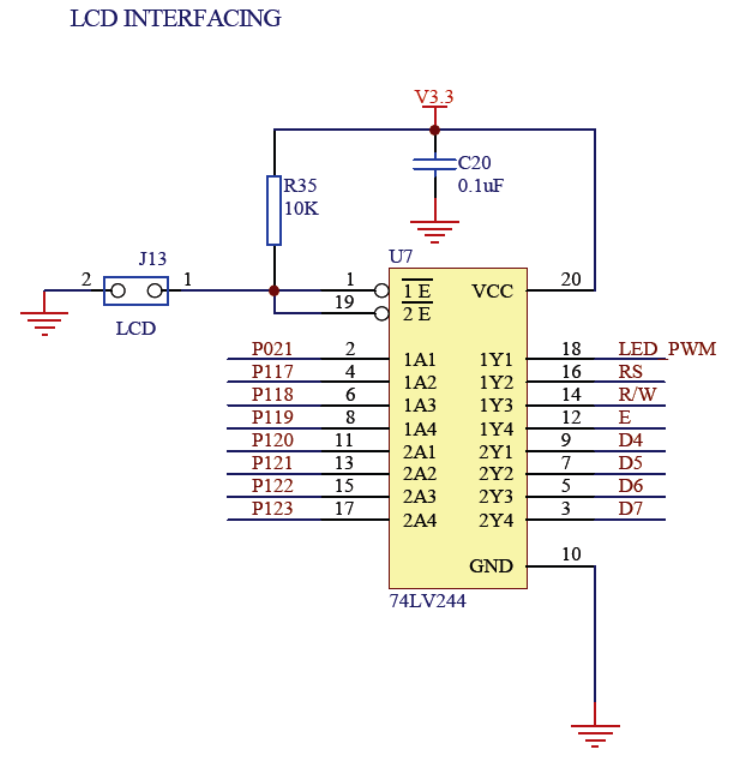
4.-Circuit-Diagram_0


Filed Under: ARM


Next Article

← Previous Article
Next Article →

Questions related to this article?
👉Ask and discuss on EDAboard.com and Electro-Tech-Online.com forums.


Tell Us What You Think!! Cancel reply

You must be logged in to post a comment.

Submit a Guest Post

submit a guest post

EE TECH TOOLBOX

“ee
Tech Toolbox: Power Efficiency
Discover proven strategies for power conversion, wide bandgap devices, and motor control — balancing performance, cost, and sustainability across industrial, automotive, and IoT systems.

EE Learning Center

EE Learning Center
“engineers
EXPAND YOUR KNOWLEDGE AND STAY CONNECTED
Get the latest info on technologies, tools and strategies for EE professionals.

HAVE A QUESTION?

Have a technical question about an article or other engineering questions? Check out our engineering forums EDABoard.com and Electro-Tech-Online.com where you can get those questions asked and answered by your peers!


RSS EDABOARD.com Discussions.

  • Cloning a HDD
  • PDKs setup for Virtuoso
  • Synchronous rectifier chips nil stocked everywhere?
  • improving in delivering a signal from source to load
  • delete my account

RSS Electro-Tech-Online.com Discussions

  • Help please! BLDC driver circuit using the IR2136s and the STP80NF06 MOSFETS
  • need two ICs
  • MLT-8530 Buzzer on ESP32: Why Is the Sound Output Lower Than Expected?
  • Scope Clock CRT Z-Axis - Grid bias positive?
  • Measuring controller current output with a meter

Featured – Real Time Hardware Filter Design

  • Practical implementation of bandpass and band reject filters
  • Practical application of hardware filters with real-life examples
  • A filter design example
  • Types of filter responses
  • What are the two types of hardware filters?
  • What are hardware filters and their types?

Recent Articles

  • GigaDevices introduces 32-bit MCUs with integrated DSP and FPU support
  • Grinn introduces 8-core SBC supporting AI-ready embedded development
  • EPC’s 100 kHz BLDC inverter supports high-efficiency motion control
  • Melexis announces 5 W smart driver to supports sensorless FOC operation
  • STMicroelectronics’ motion sensor simplifies industrial IoT system design

EE ENGINEERING TRAINING DAYS

engineering
Engineers Garage
  • Analog IC TIps
  • Connector Tips
  • Battery Power Tips
  • EDABoard Forums
  • EE World Online
  • Electro-Tech-Online Forums
  • EV Engineering
  • Microcontroller Tips
  • Power Electronic Tips
  • Sensor Tips
  • Test and Measurement Tips
  • 5G Technology World
  • Subscribe to our newsletter
  • About Us
  • Contact Us
  • Advertise

Copyright © 2025 WTWH Media LLC. All Rights Reserved. The material on this site may not be reproduced, distributed, transmitted, cached or otherwise used, except with the prior written permission of WTWH Media
Privacy Policy

Search Engineers Garage

  • Electronic Projects & Tutorials
    • Electronic Projects
      • Arduino Projects
      • AVR
      • Raspberry pi
      • ESP8266
      • BeagleBone
      • 8051 Microcontroller
      • ARM
      • PIC Microcontroller
      • STM32
    • Tutorials
      • Sensor Series
      • 3D Printing
      • AI
      • ARDUINO Compatible Coding
      • Audio Electronics
      • Battery Management
      • Beginners Electronics Series
      • Brainwave
      • Digital electronics (DE)
      • Electric Vehicles
      • EMI/EMC/RFI
      • EVs
      • Hardware Filters
      • IoT tutorials
      • LoRa/LoRaWAN
      • Power Tutorials
      • Protocol
      • Python
      • RPI Python Programming
      • Sensors
      • USB
      • Thermal management
      • Verilog
      • VHDL
    • Circuit Design
    • Project Videos
    • Components
  • Articles
    • Tech Articles
    • Insight
    • Invention Stories
    • How to
    • What Is
  • News
    • Electronic Product News
    • Business News
    • Company/Start-up News
    • DIY Reviews
    • Guest Post
  • Forums
    • EDABoard.com
    • Electro-Tech-Online
    • EG Forum Archive
  • DigiKey Store
    • Cables, Wires
    • Connectors, Interconnect
    • Discrete
    • Electromechanical
    • Embedded Computers
    • Enclosures, Hardware, Office
    • Integrated Circuits (ICs)
    • Isolators
    • LED/Optoelectronics
    • Passive
    • Power, Circuit Protection
    • Programmers
    • RF, Wireless
    • Semiconductors
    • Sensors, Transducers
    • Test Products
    • Tools
  • Learn
    • eBooks/Tech Tips
    • Design Guides
    • Learning Center
    • Tech Toolboxes
    • Webinars & Digital Events
  • Resources
    • Digital Issues
    • EE Training Days
    • LEAP Awards
    • Podcasts
    • Webinars / Digital Events
    • White Papers
    • Engineering Diversity & Inclusion
  • Guest Post Guidelines
  • Advertise
  • Subscribe
