
Engineers Garage

  • Electronic Projects & Tutorials
    • Electronic Projects
      • Arduino Projects
      • AVR
      • Raspberry pi
      • ESP8266
      • BeagleBone
      • 8051 Microcontroller
      • ARM
      • PIC Microcontroller
      • STM32
    • Tutorials
      • Sensor Series
      • 3D Printing
      • AI
      • ARDUINO Compatible Coding
      • Audio Electronics
      • Battery Management
      • Beginners Electronics Series
      • Brainwave
      • Digital electronics (DE)
      • Electric Vehicles
      • EMI/EMC/RFI
      • EVs
      • Hardware Filters
      • IoT tutorials
      • LoRa/LoRaWAN
      • Power Tutorials
      • Protocol
      • Python
      • RPI Python Programming
      • Sensors
      • USB
      • Thermal management
      • Verilog
      • VHDL
    • Circuit Design
    • Project Videos
    • Components
  • Articles
    • Tech Articles
    • Insight
    • Invention Stories
    • How to
    • What Is
  • News
    • Electronic Product News
    • Business News
    • Company/Start-up News
    • DIY Reviews
    • Guest Post
  • Forums
    • EDABoard.com
    • Electro-Tech-Online
    • EG Forum Archive
  • DigiKey Store
    • Cables, Wires
    • Connectors, Interconnect
    • Discrete
    • Electromechanical
    • Embedded Computers
    • Enclosures, Hardware, Office
    • Integrated Circuits (ICs)
    • Isolators
    • LED/Optoelectronics
    • Passive
    • Power, Circuit Protection
    • Programmers
    • RF, Wireless
    • Semiconductors
    • Sensors, Transducers
    • Test Products
    • Tools
  • Learn
    • eBooks/Tech Tips
    • Design Guides
    • Learning Center
    • Tech Toolboxes
    • Webinars & Digital Events
  • Resources
    • Digital Issues
    • EE Training Days
    • LEAP Awards
    • Podcasts
    • Webinars / Digital Events
    • White Papers
    • Engineering Diversity & Inclusion
  • Guest Post Guidelines
  • Advertise
  • Subscribe

PCB Designing using Kicad (Part 10/12)

By Venugopal M September 22, 2016

PCB Design – Copper filling: 

Copper pour or fill refers to an area of the printed circuit board filled with copper. Actually, copper fill is the original copper which is not etched away from the PCB. Usually, this copper fill is connected to ground plane, but not fixed for the ground plane, if we want; we can connect it to any other. This copper flows around the tracks and pads but does not belong to any track.
 
Image of Printed Circuit Board Filled with Copper
 
Fig. 1: Image of Printed Circuit Board Filled with Copper
 
Need:
1. To reduce the amount of the etching fluid used during the manufacturing.
2. To reduce the amount of electrical noise.
3. To reduce the crosstalk experienced by the circuit elements.
 
How to fill the copper pour:
 
• Before filling copper, first ensure the layer for example front layer, the bottom layer, or if we are using multiple layers, then inner layer1, or inner layer 2, etc.
 
• Select “Add filled zones” from the right toolbar.
 
Note: Before selecting Add filled zone, turn ON the zone display, or else it will show an error like below.
 
Screenshot of Error Message When Zone Display is not ON
 
Fig. 2: Screenshot of Error Message When Zone Display is not ON
 
• After selecting Add filled zones, click at the first corner of the board. A properties window will  appear on the screen. 
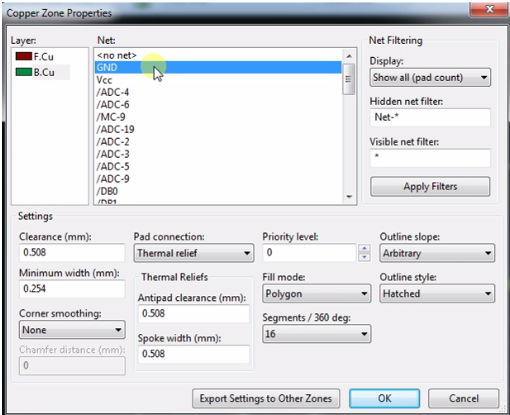
 
Screenshot of Properties Window
 
Fig. 3: Screenshot of Properties Window 
 
• In this window, we can select layer, Net like options. Select the relevant copper layer and Net for filling the copper (GND,Vcc etc). If needed, we can select any other net also but the commonly ground is  preferred to avoid noise and cross talk.
 
• Select fill Mode as a polygon, and select Thermal relief under pad connection. If it is required, change the remaining settings also. Select “OK”.
 
Note: 
1. Clearance – controls the filled area between pads/traces and the nets.
2. Minimum width – controls the thinnest that the fill can be when flowing around other pads/traces. 
3. Thermal Relief – controls the clearance around the ground pads.
 
• After closing the properties window with mouse cursor graphical line will follow.  Place the graphical line by clicking at the remaining three corners and close the loop by double click at the starting point. After this, we can observe a small change in graphical line.  Red or green diagonal lines follow the inside. 
 
• Now we can run the DRC (Design rule check) tool. After running DRC tool, we can see some changes in Board. The board is filled with the light color layer (like green, yellow, red etc).  It may look like as shown in figure given below:
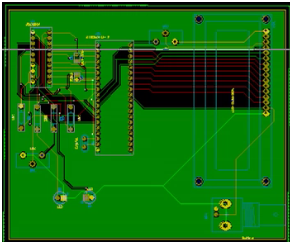
 
Image of Board is Filled with the Light Color Layer
 
Fig. 4: Image of Board is Filled with the Light Color Layer
 
• If we want to fill copper both sides of the board follow the  given steps:
 
right-click on the existing board edge >> select “Zone outline” >> then go to “Zones” >>”Duplicate Zone”.


Filed Under: Tutorials

 

Next Article

← Previous Article
Next Article →

Questions related to this article?
👉Ask and discuss on Electro-Tech-Online.com and EDAboard.com forums.


Tell Us What You Think!! Cancel reply

You must be logged in to post a comment.

Submit a Guest Post

submit a guest post

EE TECH TOOLBOX

“ee
Tech Toolbox: Power Efficiency
Discover proven strategies for power conversion, wide bandgap devices, and motor control — balancing performance, cost, and sustainability across industrial, automotive, and IoT systems.

EE Learning Center

EE Learning Center
“engineers
EXPAND YOUR KNOWLEDGE AND STAY CONNECTED
Get the latest info on technologies, tools and strategies for EE professionals.

HAVE A QUESTION?

Have a technical question about an article or other engineering questions? Check out our engineering forums EDABoard.com and Electro-Tech-Online.com where you can get those questions asked and answered by your peers!


RSS EDABOARD.com Discussions.

  • Phase shift full bridge with extra added dead time?
  • Need some help on Patch Antenna Design
  • Lighting bus needed: 2kW at 40Vdc
  • Question on SSPD circuit implementation
  • Interfacing Flash chip to FPGA

RSS Electro-Tech-Online.com Discussions

  • Calculation of A Class amplifier
  • restarting this Christmas project
  • strange laptop problem
  • Have a ultrasonic washer but not knowing what detergent for cleaning soot
  • JLCPBC are using a different shipping company = less $$$$$$$$

Featured Tutorials

Real Time Hardware Filter Design

  • Practical implementation of bandpass and band reject filters
    Practical implementation of bandpass and band reject filters
  • Practical application of hardware filters with real-life examples
    Practical application of hardware filters with real-life examples
  • A filter design example
    A filter design example
  • Types of filter responses
    Types of filter responses
  • What are the two types of hardware filters?
    What are the two types of hardware filters?
  • What are hardware filters and their types?
    What are hardware filters and their types?
More Tutorials >

Recent Articles

  • Microchip releases platform to deliver real-time specifications for AI assistants
  • GigaDevices introduces 32-bit MCUs with integrated DSP and FPU support
  • Grinn introduces 8-core SBC supporting AI-ready embedded development
  • EPC’s 100 kHz BLDC inverter supports high-efficiency motion control
  • Melexis announces 5 W smart driver to supports sensorless FOC operation

EE ENGINEERING TRAINING DAYS

engineering
Engineers Garage
  • Analog IC TIps
  • Connector Tips
  • Battery Power Tips
  • EDABoard Forums
  • EE World Online
  • Electro-Tech-Online Forums
  • EV Engineering
  • Microcontroller Tips
  • Power Electronic Tips
  • Sensor Tips
  • Test and Measurement Tips
  • 5G Technology World
  • Subscribe to our newsletter
  • About Us
  • Contact Us
  • Advertise

Copyright © 2025 WTWH Media LLC. All Rights Reserved. The material on this site may not be reproduced, distributed, transmitted, cached or otherwise used, except with the prior written permission of WTWH Media
Privacy Policy

Search Engineers Garage

  • Electronic Projects & Tutorials
    • Electronic Projects
      • Arduino Projects
      • AVR
      • Raspberry pi
      • ESP8266
      • BeagleBone
      • 8051 Microcontroller
      • ARM
      • PIC Microcontroller
      • STM32
    • Tutorials
      • Sensor Series
      • 3D Printing
      • AI
      • ARDUINO Compatible Coding
      • Audio Electronics
      • Battery Management
      • Beginners Electronics Series
      • Brainwave
      • Digital electronics (DE)
      • Electric Vehicles
      • EMI/EMC/RFI
      • EVs
      • Hardware Filters
      • IoT tutorials
      • LoRa/LoRaWAN
      • Power Tutorials
      • Protocol
      • Python
      • RPI Python Programming
      • Sensors
      • USB
      • Thermal management
      • Verilog
      • VHDL
    • Circuit Design
    • Project Videos
    • Components
  • Articles
    • Tech Articles
    • Insight
    • Invention Stories
    • How to
    • What Is
  • News
    • Electronic Product News
    • Business News
    • Company/Start-up News
    • DIY Reviews
    • Guest Post
  • Forums
    • EDABoard.com
    • Electro-Tech-Online
    • EG Forum Archive
  • DigiKey Store
    • Cables, Wires
    • Connectors, Interconnect
    • Discrete
    • Electromechanical
    • Embedded Computers
    • Enclosures, Hardware, Office
    • Integrated Circuits (ICs)
    • Isolators
    • LED/Optoelectronics
    • Passive
    • Power, Circuit Protection
    • Programmers
    • RF, Wireless
    • Semiconductors
    • Sensors, Transducers
    • Test Products
    • Tools
  • Learn
    • eBooks/Tech Tips
    • Design Guides
    • Learning Center
    • Tech Toolboxes
    • Webinars & Digital Events
  • Resources
    • Digital Issues
    • EE Training Days
    • LEAP Awards
    • Podcasts
    • Webinars / Digital Events
    • White Papers
    • Engineering Diversity & Inclusion
  • Guest Post Guidelines
  • Advertise
  • Subscribe