Engineers Garage

  • Electronic Projects & Tutorials
    • Electronic Projects
      • Arduino Projects
      • AVR
      • Raspberry pi
      • ESP8266
      • BeagleBone
      • 8051 Microcontroller
      • ARM
      • PIC Microcontroller
      • STM32
    • Tutorials
      • Complete Sensor Guide
      • Engineering Deep Dives
      • AI
      • ARDUINO Compatible Coding
      • Audio Electronics
      • Battery Management
      • Beginners Electronics Series
      • Brainwave
      • Digital electronics (DE)
      • Electric Vehicles
      • EMI/EMC/RFI
      • EVs
      • Hardware Filters
      • IoT tutorials
      • LoRa/LoRaWAN
      • Power Tutorials
      • Protocol
      • Python
      • RPI Python Programming
      • Sensors
      • USB
      • Thermal management
      • Verilog
      • VHDL
    • Circuit Design
    • Project Videos
    • Components
  • Articles
    • Tech Articles
    • Insight
    • Invention Stories
    • How to
    • What Is
  • News
    • Electronic Product News
    • Business News
    • Company/Start-up News
    • DIY Reviews
    • Guest Post
  • Forums
    • EDABoard.com
    • Electro-Tech-Online
    • EG Forum Archive
  • DigiKey Store
    • Cables, Wires
    • Connectors, Interconnect
    • Discrete
    • Electromechanical
    • Embedded Computers
    • Enclosures, Hardware, Office
    • Integrated Circuits (ICs)
    • Isolators
    • LED/Optoelectronics
    • Passive
    • Power, Circuit Protection
    • Programmers
    • RF, Wireless
    • Semiconductors
    • Sensors, Transducers
    • Test Products
    • Tools
  • Learn
    • Design Guides
    • Learning Center
    • Tech Toolboxes
    • Tech Terms
    • Webinars & Digital Events
  • Resources
    • EE Training Days
    • LEAP Awards
    • Podcasts
    • White Papers
  • Guest Post Guidelines
  • Advertisers
    • Advertise
    • PR Submissions
    • Eblast Submissions
  • Subscribe

Seven segment display interfacing with 8051(89c51,89c52) Microcontroller

By EG Projects April 15, 2019

This is a simple tutorial on how to interface seven segment display with 8051(89c51,89c52) microcontroller. The post/tutorial explains the connections and interfacing of 7 segment display with 89c51 microcontroller. 7 segment display is interfacedwith Port-1 of 89c51 microcontroller. Numeric characters from 1 to 9 and alphabets from A to F will be displayed on single seven segment display using 89c51 microcontroller.

Types of 7 segment display

​There are basically two types of seven segment displays Anode and Cathode. First i would like you to take a simple tutorial on whats the difference between the two

  • Difference between common anode and cathode seven segment displays.

Above Tutorial will help you in determining which seven segment you are using anode or cathode. You will be familiarize with the pin out and internal structure of the seven segment display. The upper tutorial will also explain you what are the pros and cons of using anode and cathode seven segment displays.

7 segment display with 8051 microcontroller – circuit diagram
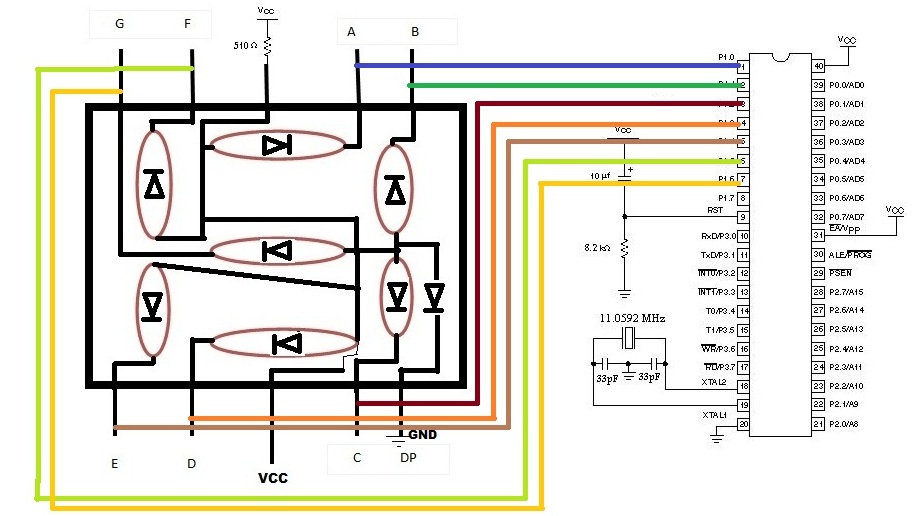
The circuit of the project is straight forward. No messy circuit connections. I am using common anode seven segment display in the project.  Common anode 7 segment display led’s are switched ON when we make any led pin ground. 11.0592 Mhz crystal is used to provide clock to 89c51 microcontroller. Circuit diagram of 7 segment interfacing 8051 microcontroller is given below.
7 segment display with 8051 microcontroller

7 segment display with 8051 microcontroller

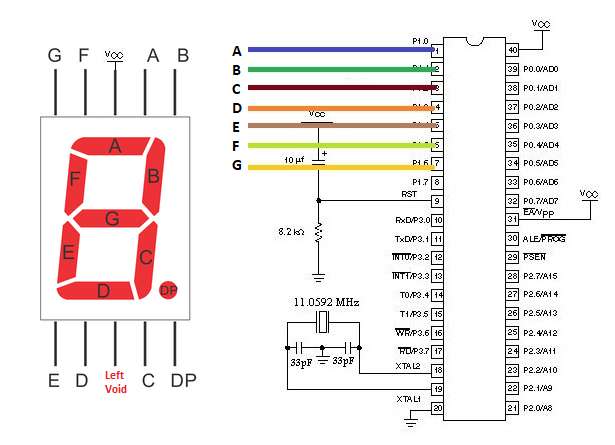
The above 7 segment display interfaced with 89c51 micrococntroller translates to some thing given below. I just removed the wires in the above diagram. Wires makes circuit messy. Both the circuits are same. No difference in connections or working.  
circuit diagram

seven segment display interfacing 8051(89c51) microcontroller-circuit diagram

8051 microcontroller port-1 interfaced with 7 segment – Individual pin connections

7 segment pins connection’s with 89c51 microcontroller port-1 individual pins is shown in the below picture. 7 segment display only has 7 sevens pins and 8051 microcontroller port-1 is 8-bit wide. So one pin of 89c51 port-1 is left void.
8051 Port 1 pin assignment

8051(89c51,89c52) Port 1 pin assignment to seven segment display

How numbers and characters are displayed on 7 segment display?

89c51 microcontroller port pins are assigned to seven segment in the above order(picture). Instructions like P1=0xCF are hexadecimal instructions and they are making port 1 pins high or low.

Like P1=0xCF is equivalent to 11001111(C=1100 and F=1111) in binary. This instruction makes f & e(P1.5 and P1.4) pins of seven segment ground and the corresponding led’s to these pins becomes high. which prints 1 on the seven segment display. 

Below are the full instructions used to display numbers and alphabets on the 7 segment display. These instructions are hard coded in the code.

  • Making 1- f e                      is grounded P1=0xCF;   11001111
  • Making 2- a b g e d            is grounded P1=0xA4;   10100100
  • Making 3- a b c d g            is grounded P1=0xB0;   10110000
  • Making 4- b c f g                is grounded P1=0x99;   10011001
  • Making 5- a c d f g             is grounded P1=0x92;   10010010
  • Making 6- a c d e f g          is grounded P1=0x82;   10000010
  • Making 7- a b c                  is grounded P1=0xF8;   11111000
  • Making 8- a b c d e f g       is grounded P1=0x00;   00000000
  • Making 9- a b c f g             is grounded P1=0x98;   10011000
  • Making A- a b c e f g          is grounded P1=0x88;   10001000
  • Making B- a b c d e f g       is grounded P1=0x00;   00000000
  • Making C- a d e f                is grounded P1=0xC6;  11000110
  • Making D- a b c d e f          is grounded P1=0xC0;  11000000
  • Making E- a d e f g             is grounded P1=0x86;   10000110
  • Making F- a e f g                is grounded P1=0x8E;   10001110​

7 segment with 89c51 microcontroller – Code

Coming to the code first i included the necessary header file reg51.h. If you are using keil for writing and compiling code you have to include this library other wise their will be an error during compilation of the code. If you are using 89c52 or 89s52 include library reg52.h instead of reg51.h. Then a delay function is used to give some delay to a particular character/alphabet  or number to remain printed on the seven segment display. Delay is for viewing the character/alphabet or number for some time and then moving to next. If their is no delay the numbers will display so fast that we can not see them. In main function my first instruction is P1=0x00. This instruction is initializing Port-1 as output port. Rest of the instructions are in hexa-decimal form and there functions are discussed above.

Note: If you are using Common cathode seven segment display the upper commands will be same just make a little change turn 0(zeros) to 1(ones) and 1(ones) to 0(zeros) because common cathode lit its leds when any pin is high.

​The while 1 loop is continuously running our seven segment display. Means continuously printing characters and numbers on it. 

More microcontroller projects involving 7 segment display. Each microcontroller project contains free source code and circuit diagram of the project. Seven segment display is used for different purposes in each project. 7 segment microcontroller project list is below. 

7 segment display interfaced with arduino uno

7 segment display interfaced with stm32 microcontroller

7 segment display controlled over WiFi using Nodemcu

Download the project files. Folder contains Code(c++,hex). Give mus your feed back on the post. If you have any questions just leave them below in the comments section .
8051-seven segment project 


Filed Under: 8051 Microcontroller, Electronic Projects, Microcontroller Projects


Next Article

← Previous Article
Next Article →

Questions related to this article?
👉Ask and discuss on EDAboard.com and Electro-Tech-Online.com forums.


Tell Us What You Think!! Cancel reply

Log in to leave a comment:

Lost your password?

Don't have an account? Register here

Submit a Guest Post

submit a guest post

EE TECH TOOLBOX

“ee
Tech Toolbox: Wide Bandgap Semiconductors
Moving from silicon to GaN or SiC feels like a whole new ballgame, doesn’t it? It isn’t just about faster switching; it’s about managing the layout parasitics and thermal realities that come with that speed. This month’s Tech Toolbox features a curated eBook that tackles these design hurdles head-on.

EE Learning Center

EE Learning Center
“engineers
EXPAND YOUR KNOWLEDGE AND STAY CONNECTED
Get the latest info on technologies, tools and strategies for EE professionals.

HAVE A QUESTION?

Have a technical question about an article or other engineering questions? Check out our engineering forums EDABoard.com and Electro-Tech-Online.com where you can get those questions asked and answered by your peers!


RSS feed: EDABOARD.com Discussions. EDABOARD.com Discussions.

  • voltage amplifier for a signal generator
  • Hand soldering a 10 Pin WSON 92mm x 2mm)
  • Flyback converter working incorrectly
  • Propagation delay of comparator?
  • Reuse of washing machine motor and inverter

RSS feed: Electro-Tech-Online.com Discussions Electro-Tech-Online.com Discussions

  • Ways of handle battery when reaching charge
  • Cleaned House
  • PIR AM312 to Seeed XIAO SAMD21
  • Battery treatment
  • PIC Assembler Code Libraries

Featured Tutorials

LoRa and LoRaWAN: A Complete Guide to Wireless Communication

  • Best practices for securing LoRa networks
    Best practices for securing LoRa networks
  • Understanding LoRa architecture: nodes, gateways, and servers
    Understanding LoRa architecture: nodes, gateways, and servers
  • Revolutionizing RF: LoRa applications and advantages
    Revolutionizing RF: LoRa applications and advantages
  • How to build a LoRa gateway using Raspberry Pi
    How to build a LoRa gateway using Raspberry Pi
  • How LoRa enables long-range communication
    How LoRa enables long-range communication
  • How communication works between two LoRa end-node devices
    How communication works between two LoRa end-node devices
More Tutorials >

Recent Articles

  • Choosing a toolchain for embedded and edge AI (Part 2)
  • Emerson adds 1.5 GHz oscilloscopes and 6½-digit DMM
  • TASKING introduces unified toolchain for automotive multicore processors
  • Harwin launches custom cable assembly and testing service
  • Renesas introduces 64-bit MPU for four-axis motor control

EE ENGINEERING TRAINING DAYS

engineering
Engineers Garage
  • Analog IC TIps
  • Connector Tips
  • Battery Power Tips
  • EDABoard Forums
  • EE World Online
  • Electro-Tech-Online Forums
  • EV Engineering
  • Microcontroller Tips
  • Power Electronic Tips
  • Sensor Tips
  • Test and Measurement Tips
  • 5G Technology World
  • Subscribe to our newsletter
  • About Us
  • Contact Us
  • Advertise

Copyright © 2026 Arrowfly LLC. All Rights Reserved. The material on this site may not be reproduced, distributed, transmitted, cached or otherwise used, except with the prior written permission of Arrowfly
Privacy Policy

Search Engineers Garage

  • Electronic Projects & Tutorials
    • Electronic Projects
      • Arduino Projects
      • AVR
      • Raspberry pi
      • ESP8266
      • BeagleBone
      • 8051 Microcontroller
      • ARM
      • PIC Microcontroller
      • STM32
    • Tutorials
      • Complete Sensor Guide
      • Engineering Deep Dives
      • AI
      • ARDUINO Compatible Coding
      • Audio Electronics
      • Battery Management
      • Beginners Electronics Series
      • Brainwave
      • Digital electronics (DE)
      • Electric Vehicles
      • EMI/EMC/RFI
      • EVs
      • Hardware Filters
      • IoT tutorials
      • LoRa/LoRaWAN
      • Power Tutorials
      • Protocol
      • Python
      • RPI Python Programming
      • Sensors
      • USB
      • Thermal management
      • Verilog
      • VHDL
    • Circuit Design
    • Project Videos
    • Components
  • Articles
    • Tech Articles
    • Insight
    • Invention Stories
    • How to
    • What Is
  • News
    • Electronic Product News
    • Business News
    • Company/Start-up News
    • DIY Reviews
    • Guest Post
  • Forums
    • EDABoard.com
    • Electro-Tech-Online
    • EG Forum Archive
  • DigiKey Store
    • Cables, Wires
    • Connectors, Interconnect
    • Discrete
    • Electromechanical
    • Embedded Computers
    • Enclosures, Hardware, Office
    • Integrated Circuits (ICs)
    • Isolators
    • LED/Optoelectronics
    • Passive
    • Power, Circuit Protection
    • Programmers
    • RF, Wireless
    • Semiconductors
    • Sensors, Transducers
    • Test Products
    • Tools
  • Learn
    • Design Guides
    • Learning Center
    • Tech Toolboxes
    • Tech Terms
    • Webinars & Digital Events
  • Resources
    • EE Training Days
    • LEAP Awards
    • Podcasts
    • White Papers
  • Guest Post Guidelines
  • Advertisers
    • Advertise
    • PR Submissions
    • Eblast Submissions
  • Subscribe