
Engineers Garage

  • Electronic Projects & Tutorials
    • Electronic Projects
      • Arduino Projects
      • AVR
      • Raspberry pi
      • ESP8266
      • BeagleBone
      • 8051 Microcontroller
      • ARM
      • PIC Microcontroller
      • STM32
    • Tutorials
      • Sensor Series
      • 3D Printing
      • AI
      • ARDUINO Compatible Coding
      • Audio Electronics
      • Battery Management
      • Beginners Electronics Series
      • Brainwave
      • Digital electronics (DE)
      • Electric Vehicles
      • EMI/EMC/RFI
      • EVs
      • Hardware Filters
      • IoT tutorials
      • LoRa/LoRaWAN
      • Power Tutorials
      • Protocol
      • Python
      • RPI Python Programming
      • Sensors
      • USB
      • Thermal management
      • Verilog
      • VHDL
    • Circuit Design
    • Project Videos
    • Components
  • Articles
    • Tech Articles
    • Insight
    • Invention Stories
    • How to
    • What Is
  • News
    • Electronic Product News
    • Business News
    • Company/Start-up News
    • DIY Reviews
    • Guest Post
  • Forums
    • EDABoard.com
    • Electro-Tech-Online
    • EG Forum Archive
  • DigiKey Store
    • Cables, Wires
    • Connectors, Interconnect
    • Discrete
    • Electromechanical
    • Embedded Computers
    • Enclosures, Hardware, Office
    • Integrated Circuits (ICs)
    • Isolators
    • LED/Optoelectronics
    • Passive
    • Power, Circuit Protection
    • Programmers
    • RF, Wireless
    • Semiconductors
    • Sensors, Transducers
    • Test Products
    • Tools
  • Learn
    • eBooks/Tech Tips
    • Design Guides
    • Learning Center
    • Tech Toolboxes
    • Webinars & Digital Events
  • Resources
    • Digital Issues
    • EE Training Days
    • LEAP Awards
    • Podcasts
    • Webinars / Digital Events
    • White Papers
    • Engineering Diversity & Inclusion
  • Guest Post Guidelines
  • Advertise
  • Subscribe

HOME AUTOMATION USING ESP8266

By Prabakaran P.M April 7, 2021

This Project is to Create Home Automation Prototype using the ESP8266 WiFi transceiver. As ESP8266-01 has only two GPIOs, here we are using that Two pins to control Two LED which can be connected to the relay to control home Appliances.

You can go through “Getting started with ESP8266” if you are new to this. Before continuing with this project you have to flash ESPs with NodeMCU firmware and go through Getting Started with the ESPlorer IDE.

Circuit Connection:

Here we are using USB to TTL converter for connecting the Module with the PC. The 3.3V output of the converter is used to power the module.

The connection details are as below:


ESP8266

USB-TTL

Vcc

3.3v

Gnd

Gnd

TX

RX

RX

TX

CH_PD

Connected to 3.3v to enable chip firmware boot


Fig. 1: Table showing pin connections between USB to TTL Converter and ESP8266 Module for making Home Automation System

Don’t forget to pull up CH_PD HIGH, you won’t get a response from the module if it is not done.

You can also use Arduino for the connection. For more details refer here.

 The connection details are as below:


  ESP8266

Arduino UNO

Vcc

3.3v

Gnd

Gnd

TX

TX

RX

RX

CH_PD

Connected to 3.3v to enable chip firmware boot


Fig. 2: Table showing pin connections for connecting ESP8266 Module with the PC through Arduino UNO for making Home Automation System

Connect Two LEDs two GPIO 1 and GPIO2.

Downloading ESPlorer:

It’s recommended to use the ESPlorer program to open and save Lua files into your ESP8266.

Follow these instructions:

  1. Download ESPlorer.

  2. Unzip that folder.

  3. Run ESPlorer.jar. It’s a JAVA program, make sure that JAVA is installed on your computer.

  4. Open the ESPlorer.

Uploading Your Lua Script:

Follow these steps to send code to your ESP8266:

  1. Connect your FTDI programmer and select your FTDI COM Port.

  2. Set baud rate at 9600

  3. Select NodeMCU+MicroPtyhon tab

  4. Copy the your Lua script into ESPlorer and save your file with the name “init.lua”.

  5. Upload to the ESP and Run on ESP.

Don’t forgot to change the SSID and Password to your Home WiFi Network.

Working:

In this project when the Client request is established from any device, Esp8266 will respond to it in real time with HTML lines which will be displayed as a web page.
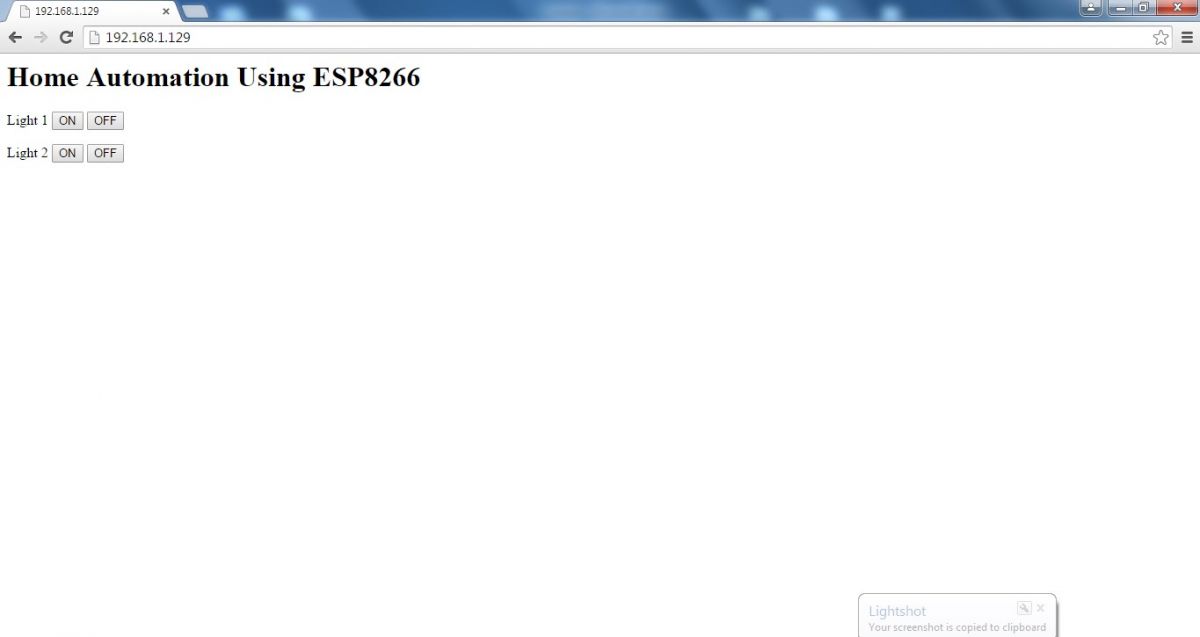
Screenshot of the webpage controlling ESP8266 based Internet controlled Home Automation System

Fig. 3: Screenshot of the webpage controlling ESP8266 based Internet controlled Home Automation System

Click the approximate button to turn on the Corresponding LEDs.

For Connecting the GPIO’s of the ESP8266 to the Home Appliances you can refer Home Automation using Android Project.
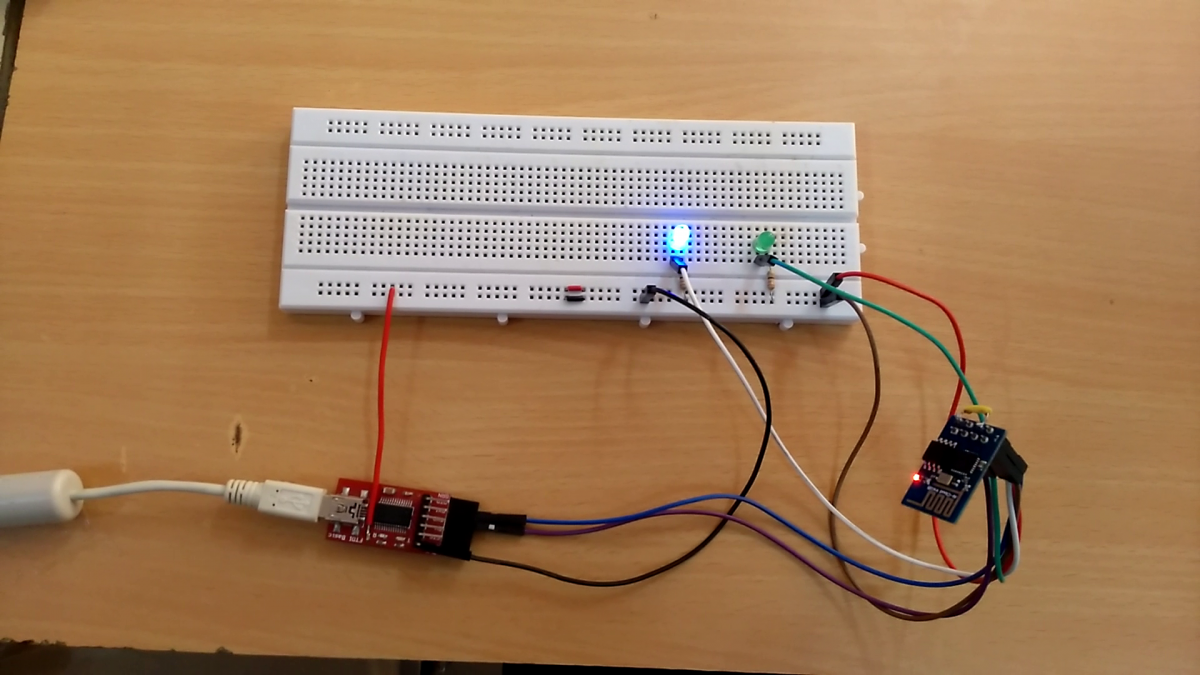
Prototype of ESP8266 based Internet Controlled Home Automation System

Fig. 4: Prototype of ESP8266 based Internet Controlled Home Automation System

Project Source Code

###


wifi.setmode(wifi.STATION)
wifi.sta.config("Your SSID","Your Password")
print(wifi.sta.getip())
led1 = 3
led2 = 4
gpio.mode(led1, gpio.OUTPUT)
gpio.mode(led2, gpio.OUTPUT)
srv=net.createServer(net.TCP)
srv:listen(80,function(conn)
    conn:on("receive", function(client,request)
        local buf = "";
        local _, _, method, path, vars = string.find(request, "([A-Z]+) (.+)?(.+) HTTP");
        if(method == nil)then
            _, _, method, path = string.find(request, "([A-Z]+) (.+) HTTP");
        end
        local _GET = {}
        if (vars ~= nil)then
            for k, v in string.gmatch(vars, "(%w+)=(%w+)&*") do
                _GET[k] = v
            end
        end
        buf = buf.."

Home Automation Using ESP8266

";
        buf = buf.."

Light 1  

";
        buf = buf.."

Light 2  

";
        local _on,_off = "",""
        if(_GET.pin == "ON1")then
              gpio.write(led1, gpio.HIGH);
        elseif(_GET.pin == "OFF1")then
              gpio.write(led1, gpio.LOW);
        elseif(_GET.pin == "ON2")then
              gpio.write(led2, gpio.HIGH);
        elseif(_GET.pin == "OFF2")then
              gpio.write(led2, gpio.LOW);
        end
        client:send(buf);
        client:close();
        collectgarbage();
    end)
end)
 

###


Project Video


Filed Under: Featured Contributions


Next Article

← Previous Article
Next Article →

Questions related to this article?
👉Ask and discuss on Electro-Tech-Online.com and EDAboard.com forums.


Tell Us What You Think!! Cancel reply

You must be logged in to post a comment.

Submit a Guest Post

submit a guest post

EE TECH TOOLBOX

“ee
Tech Toolbox: Power Efficiency
Discover proven strategies for power conversion, wide bandgap devices, and motor control — balancing performance, cost, and sustainability across industrial, automotive, and IoT systems.

EE Learning Center

EE Learning Center
“engineers
EXPAND YOUR KNOWLEDGE AND STAY CONNECTED
Get the latest info on technologies, tools and strategies for EE professionals.

HAVE A QUESTION?

Have a technical question about an article or other engineering questions? Check out our engineering forums EDABoard.com and Electro-Tech-Online.com where you can get those questions asked and answered by your peers!


RSS EDABOARD.com Discussions.

  • Can anyone please help me with this single board computer?
  • Anyone successfully communicated to the BlueNRG-M0 module on the B-L4S5I-IOT01A board
  • How to Build an Audio Tone Control?
  • Current version of LTspice not working on Windows 11?
  • Addressable Latch in My Logic Project

RSS Electro-Tech-Online.com Discussions

  • Measuring controller current output with a meter
  • KiCad custom symbol definition correct approach
  • restarting this Christmas project
  • Anyone In The US Ordered From AliExpress Recently?
  • My Advanced Realistic Humanoid Robots Project

Featured Tutorials

Real Time Hardware Filter Design

  • Practical implementation of bandpass and band reject filters
    Practical implementation of bandpass and band reject filters
  • Practical application of hardware filters with real-life examples
    Practical application of hardware filters with real-life examples
  • A filter design example
    A filter design example
  • Types of filter responses
    Types of filter responses
  • What are the two types of hardware filters?
    What are the two types of hardware filters?
  • What are hardware filters and their types?
    What are hardware filters and their types?
More Tutorials >

Recent Articles

  • Posifa sensors improve low-flow accuracy in compact systems
  • Acopian releases low-profile power supplies rated to 900 W
  • Octavo Systems OSDZU-3 REF Development Platform
  • Same Sky adds enclosure design to its audio engineering capabilities
  • Waterproof SMA-to-MHF I LK assemblies introduced by Amphenol RF

EE ENGINEERING TRAINING DAYS

engineering
Engineers Garage
  • Analog IC TIps
  • Connector Tips
  • Battery Power Tips
  • EDABoard Forums
  • EE World Online
  • Electro-Tech-Online Forums
  • EV Engineering
  • Microcontroller Tips
  • Power Electronic Tips
  • Sensor Tips
  • Test and Measurement Tips
  • 5G Technology World
  • Subscribe to our newsletter
  • About Us
  • Contact Us
  • Advertise

Copyright © 2025 WTWH Media LLC. All Rights Reserved. The material on this site may not be reproduced, distributed, transmitted, cached or otherwise used, except with the prior written permission of WTWH Media
Privacy Policy

Search Engineers Garage

  • Electronic Projects & Tutorials
    • Electronic Projects
      • Arduino Projects
      • AVR
      • Raspberry pi
      • ESP8266
      • BeagleBone
      • 8051 Microcontroller
      • ARM
      • PIC Microcontroller
      • STM32
    • Tutorials
      • Sensor Series
      • 3D Printing
      • AI
      • ARDUINO Compatible Coding
      • Audio Electronics
      • Battery Management
      • Beginners Electronics Series
      • Brainwave
      • Digital electronics (DE)
      • Electric Vehicles
      • EMI/EMC/RFI
      • EVs
      • Hardware Filters
      • IoT tutorials
      • LoRa/LoRaWAN
      • Power Tutorials
      • Protocol
      • Python
      • RPI Python Programming
      • Sensors
      • USB
      • Thermal management
      • Verilog
      • VHDL
    • Circuit Design
    • Project Videos
    • Components
  • Articles
    • Tech Articles
    • Insight
    • Invention Stories
    • How to
    • What Is
  • News
    • Electronic Product News
    • Business News
    • Company/Start-up News
    • DIY Reviews
    • Guest Post
  • Forums
    • EDABoard.com
    • Electro-Tech-Online
    • EG Forum Archive
  • DigiKey Store
    • Cables, Wires
    • Connectors, Interconnect
    • Discrete
    • Electromechanical
    • Embedded Computers
    • Enclosures, Hardware, Office
    • Integrated Circuits (ICs)
    • Isolators
    • LED/Optoelectronics
    • Passive
    • Power, Circuit Protection
    • Programmers
    • RF, Wireless
    • Semiconductors
    • Sensors, Transducers
    • Test Products
    • Tools
  • Learn
    • eBooks/Tech Tips
    • Design Guides
    • Learning Center
    • Tech Toolboxes
    • Webinars & Digital Events
  • Resources
    • Digital Issues
    • EE Training Days
    • LEAP Awards
    • Podcasts
    • Webinars / Digital Events
    • White Papers
    • Engineering Diversity & Inclusion
  • Guest Post Guidelines
  • Advertise
  • Subscribe
