Engineers Garage

  • Electronic Projects & Tutorials
    • Electronic Projects
      • Arduino Projects
      • AVR
      • Raspberry pi
      • ESP8266
      • BeagleBone
      • 8051 Microcontroller
      • ARM
      • PIC Microcontroller
      • STM32
    • Tutorials
      • Sensor Series
      • Engineering Deep Dives
      • AI
      • ARDUINO Compatible Coding
      • Audio Electronics
      • Battery Management
      • Beginners Electronics Series
      • Brainwave
      • Digital electronics (DE)
      • Electric Vehicles
      • EMI/EMC/RFI
      • EVs
      • Hardware Filters
      • IoT tutorials
      • LoRa/LoRaWAN
      • Power Tutorials
      • Protocol
      • Python
      • RPI Python Programming
      • Sensors
      • USB
      • Thermal management
      • Verilog
      • VHDL
    • Circuit Design
    • Project Videos
    • Components
  • Articles
    • Tech Articles
    • Insight
    • Invention Stories
    • How to
    • What Is
  • News
    • Electronic Product News
    • Business News
    • Company/Start-up News
    • DIY Reviews
    • Guest Post
  • Forums
    • EDABoard.com
    • Electro-Tech-Online
    • EG Forum Archive
  • DigiKey Store
    • Cables, Wires
    • Connectors, Interconnect
    • Discrete
    • Electromechanical
    • Embedded Computers
    • Enclosures, Hardware, Office
    • Integrated Circuits (ICs)
    • Isolators
    • LED/Optoelectronics
    • Passive
    • Power, Circuit Protection
    • Programmers
    • RF, Wireless
    • Semiconductors
    • Sensors, Transducers
    • Test Products
    • Tools
  • Learn
    • eBooks/Tech Tips
    • Design Guides
    • Learning Center
    • Tech Toolboxes
    • Webinars & Digital Events
  • Resources
    • Digital Issues
    • EE Training Days
    • LEAP Awards
    • Podcasts
    • Webinars / Digital Events
    • White Papers
    • Engineering Diversity & Inclusion
  • Guest Post Guidelines
  • Advertise
  • Subscribe

How Video Players work

By shingaridavesh November 17, 2011

Clicking on Michael Jackson video or Mission Impossible movie leads to…
Video display, but what is so special about these files? What is the data present in these files and how a player plays these files? The answer is Codec.
A codec is a software (at times also considered as hardware unit as set-top box attached with video conferencing system) which encodes or/and decodes a signal or digital media file such as song or video. Player use codecs to play and create digital media files.
CODEC = COder + DECoder
Codec is also referred as amalgamation of compression (encoding) function or/and decompression (decoding) function. But it is not necessary that a codec include both, some codecs only include one of them. 
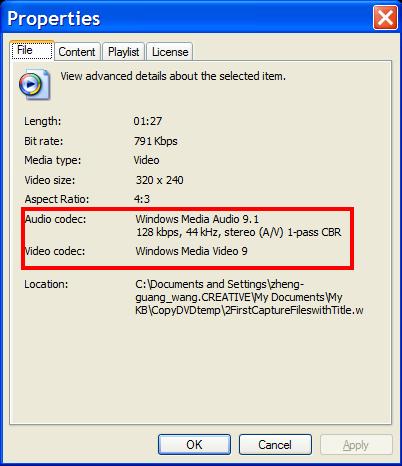
 
How Video Player works
A codec is a critical component in the process of digital audio and video signal transmission.
 

Video Codec

A video codec is a combination of hardware (eg. our video players) and/or software which represents the video and audio captured by camera as digital stream of data (generally binary -0 & 1 data). 
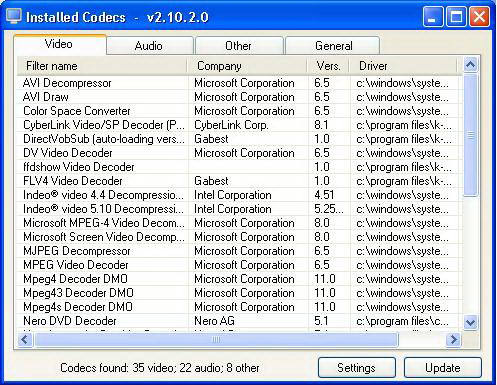
 
How Video Players work2
Encoders have different functionality in different capturing devices because output format is functionality of a specific system. But capture devices and encoders are different things example a capture card will create a binary stream of data which will be stored as s file whereas encoder creates a stream of data which is transferred to a second device. The second device is generally termed as decoder, and its task is to decode the stream of data and recreate the video and audio captured by camera.
 
Process:
To start the process, video and audio should be present and this is shot by camera (Digicam, pan tilt zoom camera etc.). The camera has a sensor (CMOS sensor for eg.) which scans the scene left to right, so as to create lines and then vertically making a grid of 480 lines per scene. This creates video frames, shot at rate of 30 frames per sec. In standard definition TV samples are taken at 720 points on the line and each point corresponds to 1 pixel. To generate the original scene these pixel points are energized. In present day television brightness parameter along with color (chroma value – amount of Red, Blue, Green) of the sampled position is passed. But today Y, Cr, and Cb – as brightness, the red signal, and the blue signal parameters are passed, as they can generate the 4th parameter automatically.
The functionality of video codecs can be roughly divided into 3 categories:
1.       Camera captures the video and audio in form of signal, which is analog in nature. Codec samples the output signal. The rate at which sampling is done is known as the sampling rate. But the data related to brightness is sampled more than color because our eyes are more sensitive to brightness then color.
2.       Then the analog to digital conversion takes place and each sample is converted into 8 bits generally. This stage is called quantization.
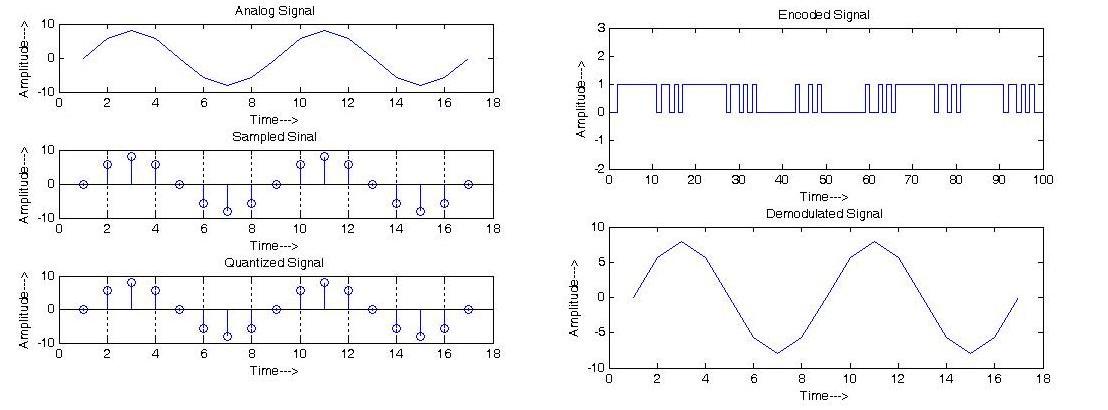
How VIdeo Players work3
3.       3. In the last phase codec compresses the binary data stream to transmit the data efficiently, as there is lot of information related to video. Compression can be done in two ways: lossless and lossy. Lossless compression is the optimized mechanism as it uses fewer bits and also allows recovery of the original data stream. For example ziipping a file and disk compression. But lossless compression rarely allows more than an 80 % reduction in the number of data stream bits. So, in most of the cases it is never used for audio or video compression.  Lossy compression is generally preferred for audio and video compression. In this technique sampled values of brightness and other parameters are stored on the base how much they vary from average value.


Filed Under: How to


Next Article

← Previous Article
Next Article →

Questions related to this article?
👉Ask and discuss on Electro-Tech-Online.com and EDAboard.com forums.


Tell Us What You Think!! Cancel reply

Log in to leave a comment:

Lost your password?

Don't have an account? Register here

Submit a Guest Post

submit a guest post

EE TECH TOOLBOX

“ee
Tech Toolbox: Sensors
In this Tech Toolbox, we cover some of those technologies driving the next generation of connected systems, including ultra-low-power sensing strategies that extend node battery life, and 60 GHz CMOS radar for contactless health and presence detection.

EE Learning Center

EE Learning Center
“engineers
EXPAND YOUR KNOWLEDGE AND STAY CONNECTED
Get the latest info on technologies, tools and strategies for EE professionals.

HAVE A QUESTION?

Have a technical question about an article or other engineering questions? Check out our engineering forums EDABoard.com and Electro-Tech-Online.com where you can get those questions asked and answered by your peers!


RSS EDABOARD.com Discussions.

  • PCB manufacturing
  • Solenoid AC Magnetic field water pump
  • H-bridge power supply capacitor - heating and selection
  • how RS-485 transmits and receive logic levels between two MCUs
  • Solving adaptive frequency ..., process hf3d error: Failed to solve port 1, solving at too low frequency is a possible cause.

RSS Electro-Tech-Online.com Discussions

  • My Advanced Realistic Humanoid Robots Project
  • What is the most suitable light source for making a book light like this?
  • extracting material properties from open load resonance
  • Oshon Basic, programing IF statements
  • How charging is done in Transformer Inverters

Featured Tutorials

Learn - VHDL Tutorials (22 Part)

  • VHDL Tutorial – 11: Designing half and full-subtractor circuits
    VHDL Tutorial – 11: Designing half and full-subtractor circuits
  • VHDL Tutorial – 12: Design a 8-bit parity generator and circuit checker
    VHDL Tutorial – 12: Design a 8-bit parity generator and circuit checker
  • VHDL tutorial 13: Design 3×8 decoder and 8×3 encoder using VHDL
    VHDL tutorial 13: Design 3×8 decoder and 8×3 encoder using VHDL
  • VHDL Tutorial 14: Design 1×8  demultiplexer and 8×1 multiplexer using VHDL
    VHDL Tutorial 14: Design 1×8  demultiplexer and 8×1 multiplexer using VHDL
  • VHDL Tutorial 17: Design a JK flip-flop (with preset and clear) using VHDL
    VHDL Tutorial 17: Design a JK flip-flop (with preset and clear) using VHDL
  • VHDL Tutorial 18: Design a T flip-flop (with enable and an active high reset input) using VHDL
    VHDL Tutorial 18: Design a T flip-flop (with enable and an active high reset input) using VHDL
More Tutorials >

Recent Articles

  • Finwave launches RF switches up to 18 GHz
  • pSemi switch spans 5 MHz to 3.1 GHz
  • Navitas launches isolated TO-247 package for SiC
  • 3D scanning: How photogrammetry is reshaping digital engineering
  • EPC launches 3-phase GaN motor-drive boards

EE ENGINEERING TRAINING DAYS

engineering
Engineers Garage
  • Analog IC TIps
  • Connector Tips
  • Battery Power Tips
  • EDABoard Forums
  • EE World Online
  • Electro-Tech-Online Forums
  • EV Engineering
  • Microcontroller Tips
  • Power Electronic Tips
  • Sensor Tips
  • Test and Measurement Tips
  • 5G Technology World
  • Subscribe to our newsletter
  • About Us
  • Contact Us
  • Advertise

Copyright © 2026 WTWH Media LLC. All Rights Reserved. The material on this site may not be reproduced, distributed, transmitted, cached or otherwise used, except with the prior written permission of WTWH Media
Privacy Policy

Search Engineers Garage

  • Electronic Projects & Tutorials
    • Electronic Projects
      • Arduino Projects
      • AVR
      • Raspberry pi
      • ESP8266
      • BeagleBone
      • 8051 Microcontroller
      • ARM
      • PIC Microcontroller
      • STM32
    • Tutorials
      • Sensor Series
      • Engineering Deep Dives
      • AI
      • ARDUINO Compatible Coding
      • Audio Electronics
      • Battery Management
      • Beginners Electronics Series
      • Brainwave
      • Digital electronics (DE)
      • Electric Vehicles
      • EMI/EMC/RFI
      • EVs
      • Hardware Filters
      • IoT tutorials
      • LoRa/LoRaWAN
      • Power Tutorials
      • Protocol
      • Python
      • RPI Python Programming
      • Sensors
      • USB
      • Thermal management
      • Verilog
      • VHDL
    • Circuit Design
    • Project Videos
    • Components
  • Articles
    • Tech Articles
    • Insight
    • Invention Stories
    • How to
    • What Is
  • News
    • Electronic Product News
    • Business News
    • Company/Start-up News
    • DIY Reviews
    • Guest Post
  • Forums
    • EDABoard.com
    • Electro-Tech-Online
    • EG Forum Archive
  • DigiKey Store
    • Cables, Wires
    • Connectors, Interconnect
    • Discrete
    • Electromechanical
    • Embedded Computers
    • Enclosures, Hardware, Office
    • Integrated Circuits (ICs)
    • Isolators
    • LED/Optoelectronics
    • Passive
    • Power, Circuit Protection
    • Programmers
    • RF, Wireless
    • Semiconductors
    • Sensors, Transducers
    • Test Products
    • Tools
  • Learn
    • eBooks/Tech Tips
    • Design Guides
    • Learning Center
    • Tech Toolboxes
    • Webinars & Digital Events
  • Resources
    • Digital Issues
    • EE Training Days
    • LEAP Awards
    • Podcasts
    • Webinars / Digital Events
    • White Papers
    • Engineering Diversity & Inclusion
  • Guest Post Guidelines
  • Advertise
  • Subscribe