Engineers Garage

  • Electronic Projects & Tutorials
    • Electronic Projects
      • Arduino Projects
      • AVR
      • Raspberry pi
      • ESP8266
      • BeagleBone
      • 8051 Microcontroller
      • ARM
      • PIC Microcontroller
      • STM32
    • Tutorials
      • Complete Sensor Guide
      • Engineering Deep Dives
      • AI
      • ARDUINO Compatible Coding
      • Audio Electronics
      • Battery Management
      • Beginners Electronics Series
      • Brainwave
      • Digital electronics (DE)
      • Electric Vehicles
      • EMI/EMC/RFI
      • EVs
      • Hardware Filters
      • IoT tutorials
      • LoRa/LoRaWAN
      • Power Tutorials
      • Protocol
      • Python
      • RPI Python Programming
      • Sensors
      • USB
      • Thermal management
      • Verilog
      • VHDL
    • Circuit Design
    • Project Videos
    • Components
  • Articles
    • Tech Articles
    • Insight
    • Invention Stories
    • How to
    • What Is
  • News
    • Electronic Product News
    • Business News
    • Company/Start-up News
    • DIY Reviews
    • Guest Post
  • Forums
    • EDABoard.com
    • Electro-Tech-Online
    • EG Forum Archive
  • DigiKey Store
    • Cables, Wires
    • Connectors, Interconnect
    • Discrete
    • Electromechanical
    • Embedded Computers
    • Enclosures, Hardware, Office
    • Integrated Circuits (ICs)
    • Isolators
    • LED/Optoelectronics
    • Passive
    • Power, Circuit Protection
    • Programmers
    • RF, Wireless
    • Semiconductors
    • Sensors, Transducers
    • Test Products
    • Tools
  • Learn
    • Design Guides
    • Learning Center
    • Tech Toolboxes
    • Tech Terms
    • Webinars & Digital Events
  • Resources
    • EE Training Days
    • LEAP Awards
    • Podcasts
    • White Papers
  • Guest Post Guidelines
  • Advertise
  • Subscribe

Raspberry Pi-based digital door peekhole

By Nikhil Agnihotri September 12, 2021

Raspberry Pi based digital door peekhole

Demonstration of Raspberry Pi based digital door peekhole

A peephole, spyhole, or peekhole is a small opening through the door that allows viewing from inside to outside. Such door holes allow seeing outside the door without opening it. Usually, these door holes have a fisheye lens to have a wider look of the outside. In this project, we have developed a digital version of the peekhole with the help of a Raspberry Pi camera and a Raspberry Pi board. The first apparent advantage of a digital peekhole is that it can be easily concealed in a door design compared to conventional peekholes. Secondly, a camera-based peekhole gives a 180˚ view of the outside. A programmatically sophisticated version of the same peekhole can provide features like visitor identification (through face detection), logging unidentified visitors, and playing pre-recorded voice messages to specific visitors.

The device designed in this project uses a Raspberry Pi camera, Raspberry Pi board, a PIR sensor, and a small LCD screen with HDMI input. It can be easily integrated into any door and easily concealed in a door design. The prototype demonstrated here is developed on Raspberry Pi 3. This project’s commercial or hobby version can be developed using Raspberry Pi Zero to make the design compact. Once installed in a door design, the whole device can be powered with the help of a 5V 2A adaptor.

Components required

  1. Raspberry Pi 2/3/4 or Raspberry Pi Zero x1
  2. Raspberry Pi Camera x1
  3. Ribbon Cable for connecting Raspberry Pi camera x1
  4. PIR Sensor x1
  5. 5″ HDMI LCD
  6. Connecting wires/Jumper wires for testing prototype on a breadboard

Circuit connections
While testing the project, you can interface the Raspberry Pi with a desktop display. Connect a small HDMI LCD to the Raspberry Pi’s HDMI port. Connect the Raspberry Pi camera to the CSI port of the board.
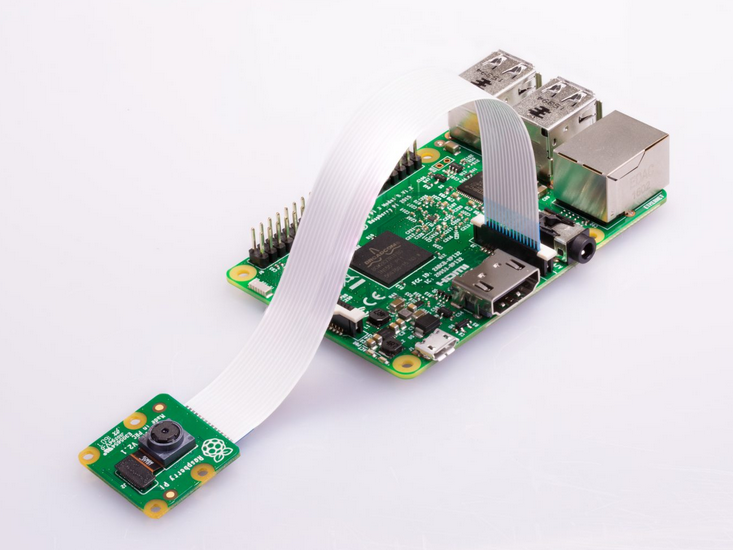
Demonstration of Raspberry Pi-based Attaching Raspberry Pi camera to CSI port door peekhole

For interfacing the PIR sensor with Raspberry Pi, connect the input pin of the PIR sensor to any GPIO. Here board pin 7 is connected to the input pin of the PIR sensor. Connect the VCC and GND pins of the PIR sensor with the Raspberry Pi’s 3.3V out and ground pins.
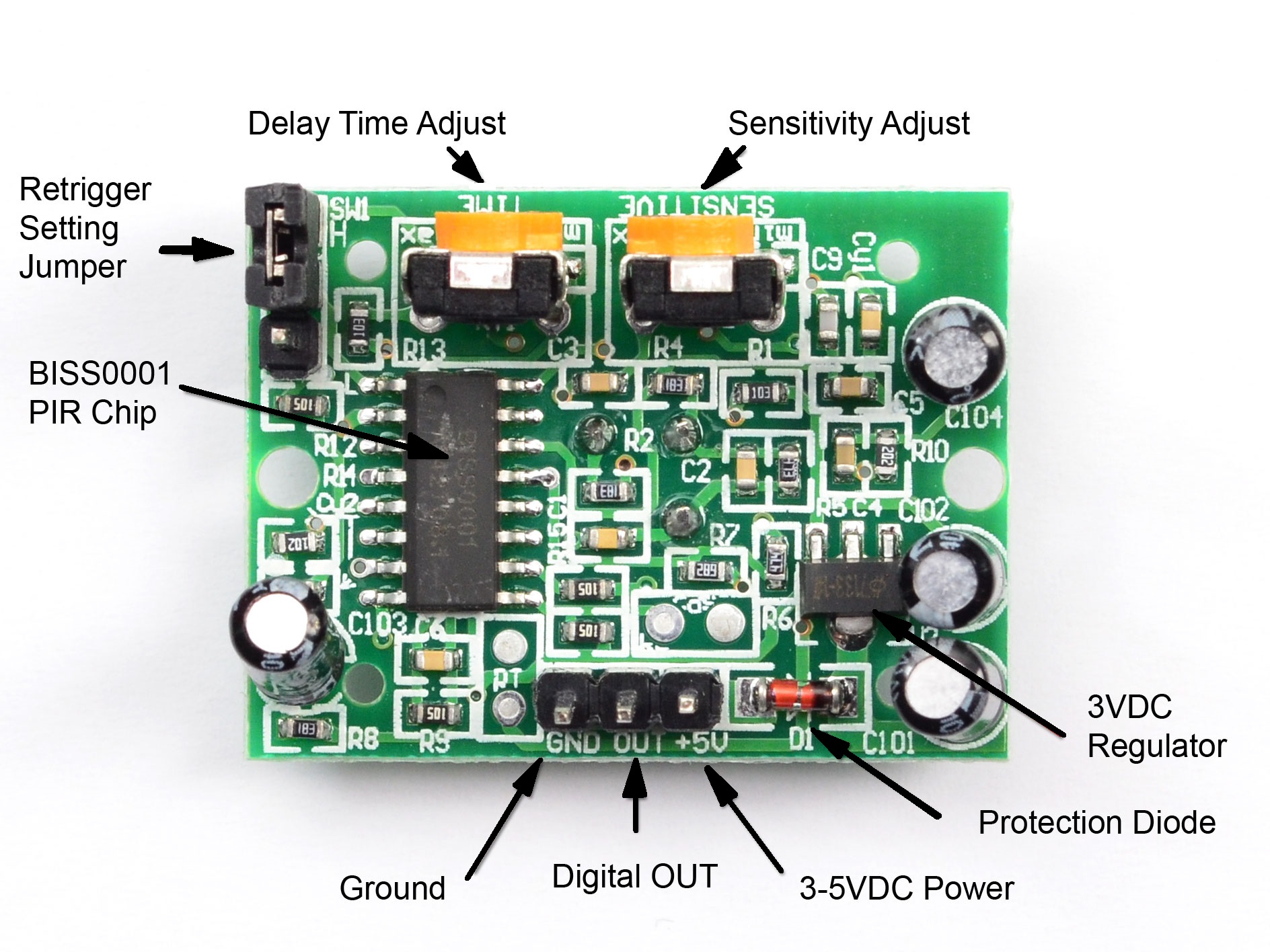
PIR sensor

It should be noted that the sensitivity of the PIR sensor needs to be adjusted to get the proper digital input. The PIR sensor is calibrated to provide defined output during program testing.

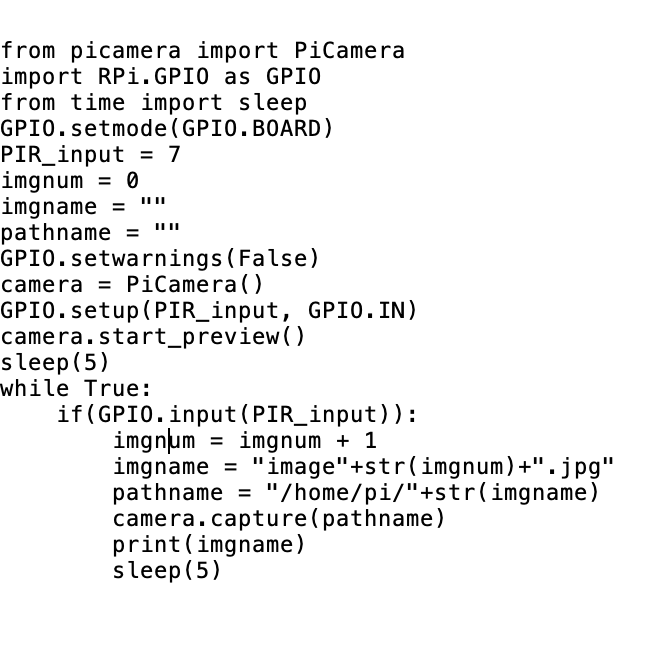
Python code
How the project works
The Raspberry Pi camera and the PIR sensor are installed at the front of the door. The Raspberry Pi itself is installed at the rear of the door. The door has a small horizontal cut to pass through the ribbon cable of the Raspberry Pi camera. The entire circuit is powered at the rear of the door with the help of a power bank or DC adaptor. A 5-inch LCD is connected with the Raspberry Pi at the rear of the door.

The user can run the python script as the device is powered on and Raspberry Pi boots up. The python script can be made to launch on the startup automatically. As the python script runs, it starts a preview of the outside on the LCD. For testing the preview, Raspberry Pi can also be connected to a desktop display with HDMI input. The preview continues without interruption throughout the script execution. After launching a preview, the Raspberry Pi continuously checks for the digital signal from the PIR sensor. Here the PIR sensor is calibrated to give an output of digital HIGH as it detects any motion outside the door. As it detects any motion, the Raspberry Pi camera captures the outside image and stores it with a file name having an ascending number.

The code
The python script begins with importing PiCamera class from the PiCamera library and RPi.GPIO class from GPIO library. If the PiCamera library is not installed, it must be installed using pip or installed manually. Similarly, time class is imported from the sleep library. The GPIO is set to board numbering, and board pin 7 is assigned to input from the PIR sensor. Variables to hold image number, image name, and image URL are declared. The GPIO.setwarning() is set to false.

An object of camera class is instantiated using the Picamera() method. The PIR sensor pin is set as a digital input. The camera preview is started using the start_preview() method. A delay of 5 seconds is provided after starting the preview. This helps to stabilize the camera to ambient light and exposure.

An infinite loop is run to capture images of any movement outside the door. If the PIR sensor detects any motion, it gives an output of logical HIGH. If the output of the PIR sensor is HIGH, the image number is increased by 1 and is concatenated to string “image” in variable ‘imagename’.  The image name is appended to a file path in variable ‘pathname’. The image of the outside is captured with the updated file location using the capture() method. The new image name is logged to the console using the print() function. A delay of 5 seconds is provided after an image has been captured.

Demonstration
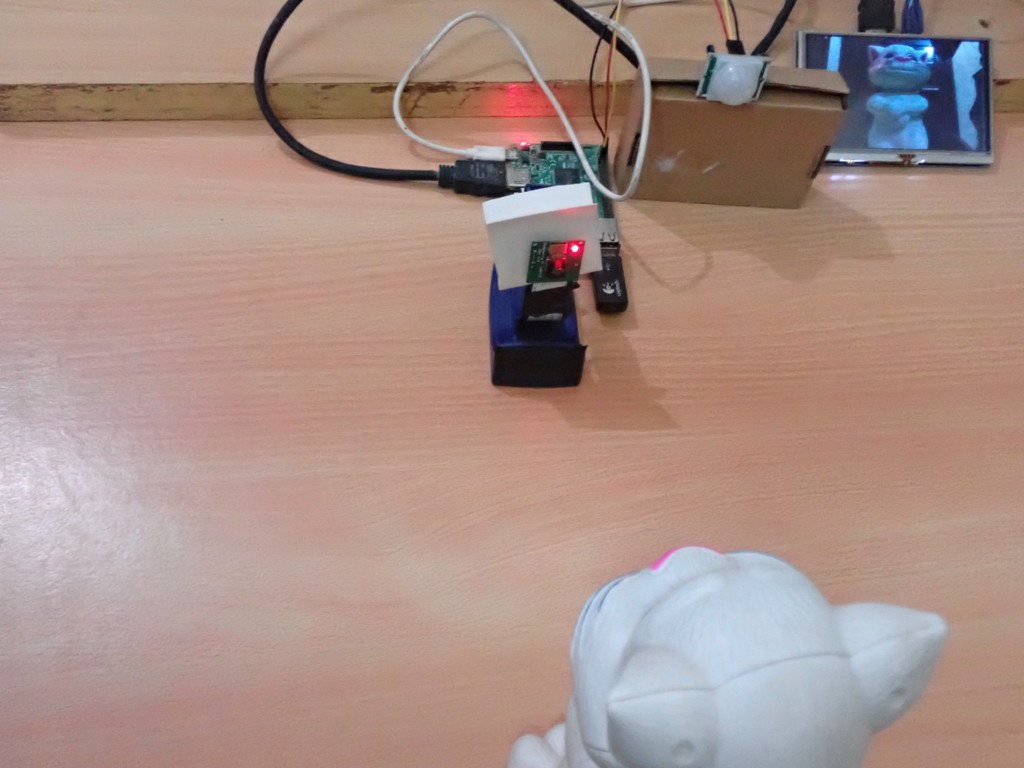
The following images and video are of the testing of the device using a desktop display. Note that how the device captures the image of the outside on detecting every movement.
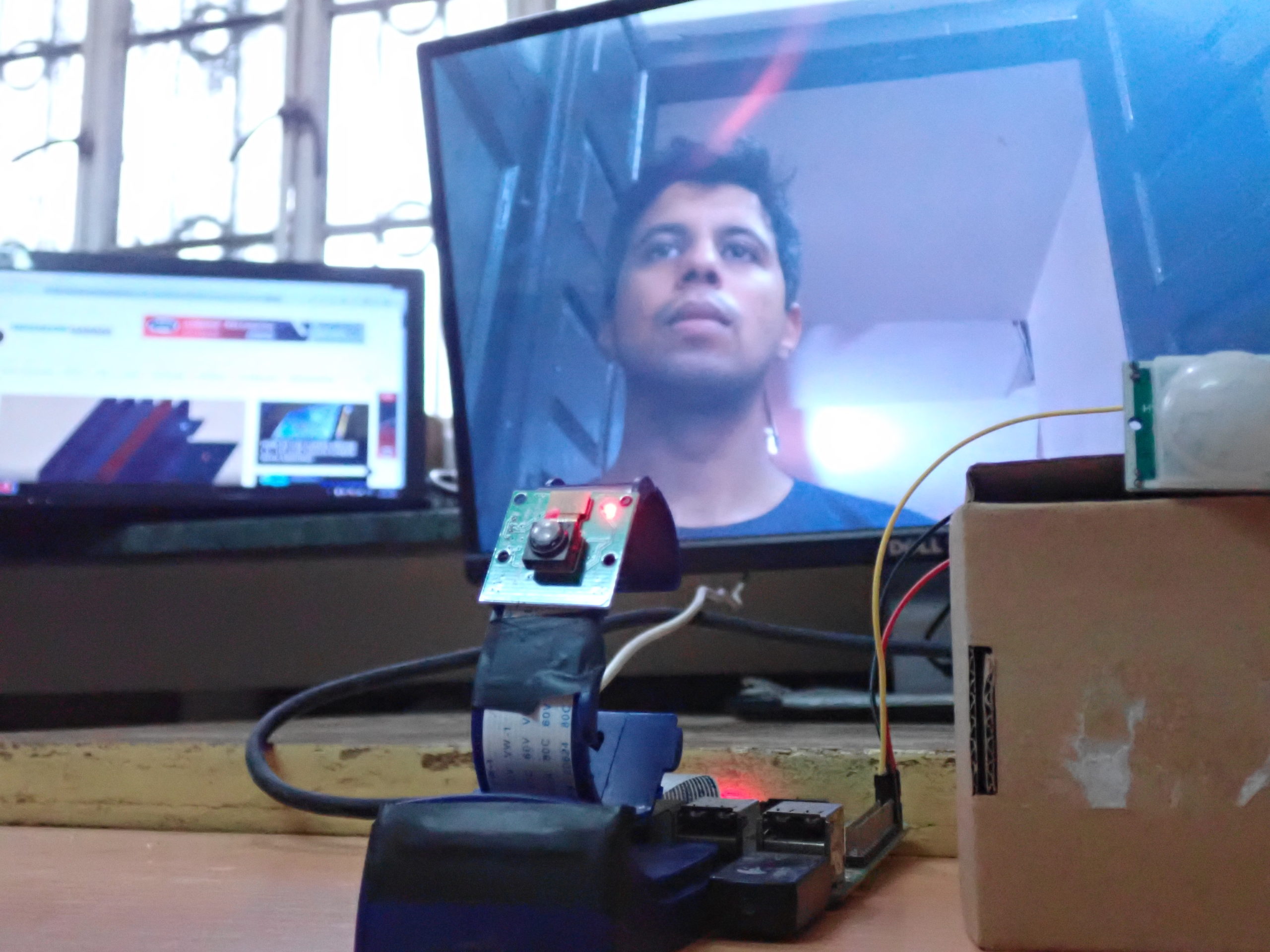
Testing Raspberry Pi based digital door peekhole
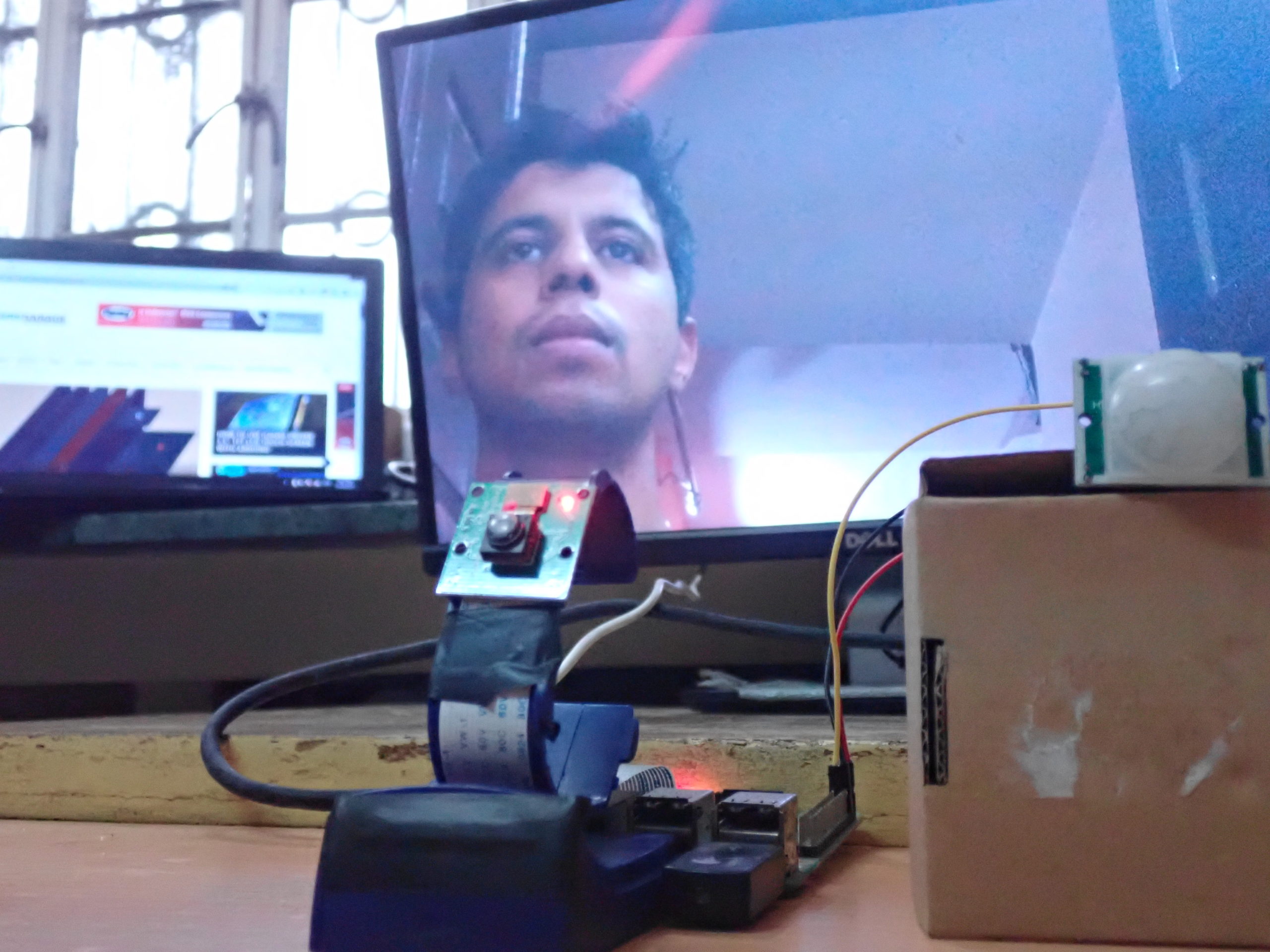
Demonstration of Raspberry Pi based digital door peekhole

Demonstration video

You may also like:

  • What types of motors are used in electric vehicles?

  • Intruder detection with Raspberry Pi using camera

  • Raspberry Pi-based smart home security system

  • Top 11 applications of Raspberry Pi

  • EmonPi- a Raspberry Pi-based energy meter

  • Raspberry Pi Based Digital Frame

Filed Under: Complete Sensor Guide, Electronic Projects, Microcontrollers, Raspberry pi, Tutorials, Video
Tagged With: Raspberry Pi, raspberry pi 5 inch lcd, raspberry pi camera, raspberry pi digital door peekhole, Raspberry pi graphic lcd, raspberry pi PIR sensor, raspberry pi project, raspberry pi projects
 

Next Article

← Previous Article
Next Article →

Questions related to this article?
👉Ask and discuss on EDAboard.com and Electro-Tech-Online.com forums.


Tell Us What You Think!! Cancel reply

Log in to leave a comment:

Lost your password?

Don't have an account? Register here

Submit a Guest Post

submit a guest post

EE TECH TOOLBOX

“ee
Tech Toolbox: Wide Bandgap Semiconductors
Moving from silicon to GaN or SiC feels like a whole new ballgame, doesn’t it? It isn’t just about faster switching; it’s about managing the layout parasitics and thermal realities that come with that speed. This month’s Tech Toolbox features a curated eBook that tackles these design hurdles head-on.

EE Learning Center

EE Learning Center
“engineers
EXPAND YOUR KNOWLEDGE AND STAY CONNECTED
Get the latest info on technologies, tools and strategies for EE professionals.

HAVE A QUESTION?

Have a technical question about an article or other engineering questions? Check out our engineering forums EDABoard.com and Electro-Tech-Online.com where you can get those questions asked and answered by your peers!


RSS feed: EDABOARD.com Discussions. EDABOARD.com Discussions.

  • Convert Open Collector comparator to PushPull?
  • Slew Rate measurement in Cadence
  • Opamp differentiator is in error
  • Differential Pair Routing: Impedance, Spacing and Return Paths
  • How embedded Linux system works

RSS feed: Electro-Tech-Online.com Discussions Electro-Tech-Online.com Discussions

  • Bearing Temp Monitor
  • 4060 counter doesn't stop ?
  • Interfacing the NTC with 5V microcontroller
  • PIC code for 2.42" I2C OLED Display?
  • Need help about crimping tool

Featured Tutorials

VHDL Series (1-24)

  • VHDL Tutorial 17: Design a JK flip-flop (with preset and clear) using VHDL
    VHDL Tutorial 17: Design a JK flip-flop (with preset and clear) using VHDL
  • VHDL Tutorial 18: Design a T flip-flop (with enable and an active high reset input) using VHDL
    VHDL Tutorial 18: Design a T flip-flop (with enable and an active high reset input) using VHDL
  • VHDL Tutorial – 19: Designing a 4-bit binary counter using VHDL
    VHDL Tutorial – 19: Designing a 4-bit binary counter using VHDL
  • VHDL Tutorial – 20: Designing 4-bit binary-to-gray & gray-to-binary code converters
    VHDL Tutorial – 20: Designing 4-bit binary-to-gray & gray-to-binary code converters
  • VHDL Tutorial – 21: Designing an 8-bit, full-adder circuit using VHDL
    VHDL Tutorial – 21: Designing an 8-bit, full-adder circuit using VHDL
  • VHDL Tutorial – 22: Designing a 1-bit & an 8-bit comparator by using VHDL
    VHDL Tutorial – 22: Designing a 1-bit & an 8-bit comparator by using VHDL
More Tutorials >

Recent Articles

  • Infineon and Enphase link 900 V GaN for SSTs
  • How Wi-Fi 8 improves reliability without increasing peak speeds
  • Siglent adds phase-coherent RF source for MIMO testing
  • Same Sky adds compact MEMS microphones for portable devices
  • Innodisk launches four-camera GMSL2™ starter kit

EE ENGINEERING TRAINING DAYS

engineering
Engineers Garage
  • Analog IC TIps
  • Connector Tips
  • Battery Power Tips
  • EDABoard Forums
  • EE World Online
  • Electro-Tech-Online Forums
  • EV Engineering
  • Microcontroller Tips
  • Power Electronic Tips
  • Sensor Tips
  • Test and Measurement Tips
  • 5G Technology World
  • Subscribe to our newsletter
  • About Us
  • Contact Us
  • Advertise

Copyright © 2026 Arrowfly LLC. All Rights Reserved. The material on this site may not be reproduced, distributed, transmitted, cached or otherwise used, except with the prior written permission of Arrowfly
Privacy Policy

Search Engineers Garage

  • Electronic Projects & Tutorials
    • Electronic Projects
      • Arduino Projects
      • AVR
      • Raspberry pi
      • ESP8266
      • BeagleBone
      • 8051 Microcontroller
      • ARM
      • PIC Microcontroller
      • STM32
    • Tutorials
      • Complete Sensor Guide
      • Engineering Deep Dives
      • AI
      • ARDUINO Compatible Coding
      • Audio Electronics
      • Battery Management
      • Beginners Electronics Series
      • Brainwave
      • Digital electronics (DE)
      • Electric Vehicles
      • EMI/EMC/RFI
      • EVs
      • Hardware Filters
      • IoT tutorials
      • LoRa/LoRaWAN
      • Power Tutorials
      • Protocol
      • Python
      • RPI Python Programming
      • Sensors
      • USB
      • Thermal management
      • Verilog
      • VHDL
    • Circuit Design
    • Project Videos
    • Components
  • Articles
    • Tech Articles
    • Insight
    • Invention Stories
    • How to
    • What Is
  • News
    • Electronic Product News
    • Business News
    • Company/Start-up News
    • DIY Reviews
    • Guest Post
  • Forums
    • EDABoard.com
    • Electro-Tech-Online
    • EG Forum Archive
  • DigiKey Store
    • Cables, Wires
    • Connectors, Interconnect
    • Discrete
    • Electromechanical
    • Embedded Computers
    • Enclosures, Hardware, Office
    • Integrated Circuits (ICs)
    • Isolators
    • LED/Optoelectronics
    • Passive
    • Power, Circuit Protection
    • Programmers
    • RF, Wireless
    • Semiconductors
    • Sensors, Transducers
    • Test Products
    • Tools
  • Learn
    • Design Guides
    • Learning Center
    • Tech Toolboxes
    • Tech Terms
    • Webinars & Digital Events
  • Resources
    • EE Training Days
    • LEAP Awards
    • Podcasts
    • White Papers
  • Guest Post Guidelines
  • Advertise
  • Subscribe