
In the previous tutorial, we learned how to interface a SIM900 GSM-GPRS modem with Raspberry Pi (RPi) and a desktop computer. We employed serial UART communication to “talk” with the SIM900 modem. By using bidirectional data communication with the modem via a standard UART interface, we were able to make/receive calls and send/receive SMS messages on RPi and a desktop computer.
By using the same UART interface and protocol in this tutorial, we’ll interface a global positioning system (GSP) module with RPi.
We use the GPS module, NEO-6MV2. This is a low-cost GPS receiver that’s commonly used in embedded devices and robotic projects (there are others from several different vendors). A GPS receiver gives its location by linking to available GPS satellites.
A GPS receiver can be used to track a location. For example, by interfacing a GPS receiver (like NEO-6) and a GSM modem (like SIM900) to a controller or embedded computer, we can design a vehicle tracking system. In this system, the GPS receiver gets the current location of the vehicle and the GSM-GPRS modem communicates that location to a remote server via a mobile network.
Similarly, we can use a GPS receiver in a drone to keep track of its location and manage a GPS-guided flight. The same GPS receivers are used in smartphones, tablets, and GPS navigation systems.
Now, let’s learn how to interface a GPS receiver with an embedded computer such as Raspberry Pi.
The NEO-6MV2 GPS module
The NEO-6MV2 is a standalone GPS receiver that’s used for navigation. The GPS receiver links with GPS satellites to get its own location. It, then, outputs the latitude and longitude of its position as serial data.
The NEO-6 module is based on a 50-channel, ublox-6 positioning engine that boasts a time-to-first-fix (TTFF) of one second. This GPS engine has two million correlators and is capable of massive parallel time/frequency space searches. This enables it to find satellites instantly. The module also has a small form-factor that makes it ideal for battery-operated mobile devices.

The NEO-6M GPS modem operates on a supply voltage of 2.7 to 3.6V. It communicates GPS data according to the NMEA or UBX protocol. While NMEA is a standard ASCII protocol, UBX is a u-blox proprietary binary protocol.
The receiver chipset has UART, USB, SPI, and DDC (I2C-compliant) interfaces to communicate this data. The chipset has three configuration pins. One of these configuration pins — CFG-GPS0 — is used to enable boot configuration of the power mode.

The other two configuration pins — CFG_COM0 and CFG_COM1 — are used to decide whether GPS data is communicated by using the NMEA protocol or UBX protocol.

The NEO-6 modem has this pin assignment:
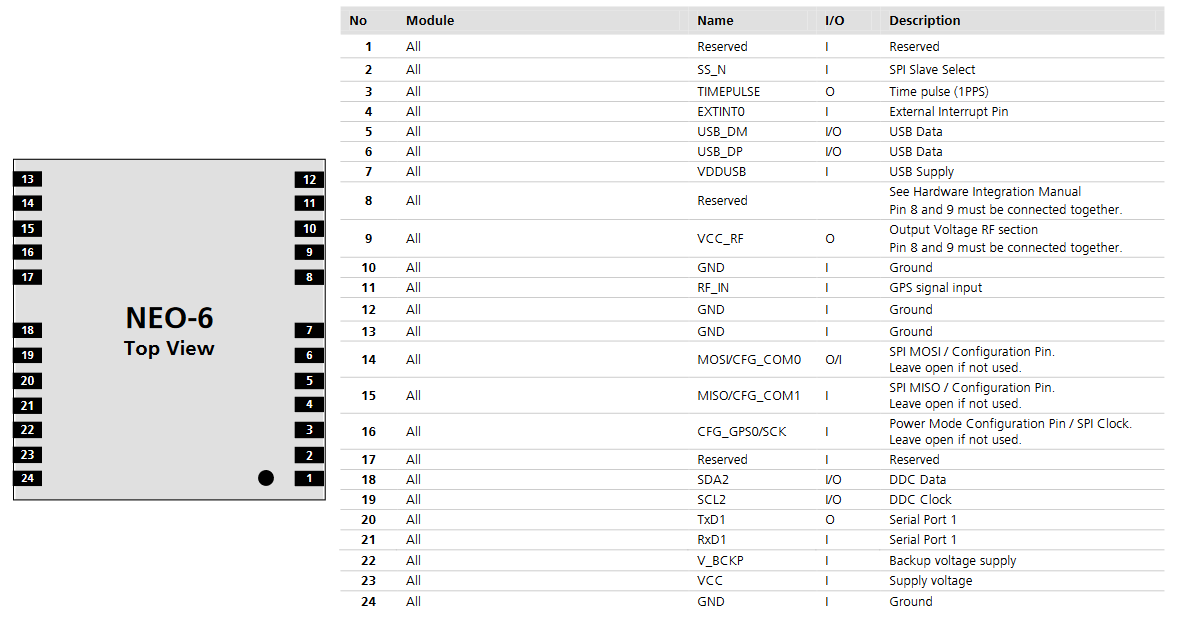
In the module used here, the NEO-6 modem is pre-configured to output data using the serial (UART) interface and encode GPS data to the NMEA protocol.
The configuration pins CFG_COM0 and CFG_COM1 are pulled to HIGH and, as a result, the GPS data is communicated over the NMEA protocol at a baud rate of 9600 bps. As you can see from the above table, with this configuration, the NMEA data includes GSV, RMC, GSA, GGA, GLL, and VTG messages.
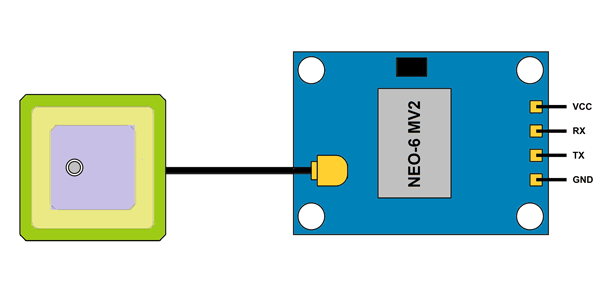
The module only exposes four channels as shown in this pin diagram:
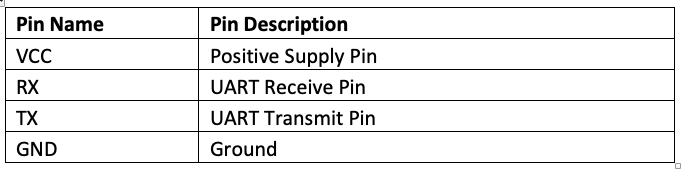
 The module has the following pin assignment:
The maximum navigation update rate of the module is 5 Hz. So, a controller or embedded computer can read the GPS data from the modem in a minimum of 0.2 seconds.
When the modem is powered on, it takes 32 seconds for a cold start, 23 seconds for a warm start, or one second for a hot start. Since the module is configured for a cold start, it initially takes 32 seconds to get the GPS reading for the first time.
The module also comes with an external antenna that has a sensitivity of -160dBm. The module has an onboard EEPROM and RTC with battery backup. The NEO-6M modem can operate in temperatures between -40˚ to 85˚ C.
Interfacing the NEO-6MV2 GPS module
The module has all of the hardware connections onboard with the NEO-6M modem, which is already pre-configured. According to the hardware configuration, the module only exposes four channels of the modem:
1. The VCC (pin 23 of the modem)
2. The UART receiver (pin 21 of the modem)
3. The UART transmitter (pin 20 of the modem)
4. The ground (which can be pin 10, 12, 13, or 24 of the modem)
The NEO-6MV2 GPS module can easily interface with the serial TTL port of a controller/computer. However, the VCC pin must be supplied with a maximum of 3.6V DC voltage and the ground pin must be connected to a common ground. The TX pin of the module should be connected to the Rxd of the serial TTL port of the controller/computer.
To connect the module with desktop computers, the USB-serial board can be used. Remember that the GPS module has an operating voltage maximum of 3.6V. Therefore, when interfaced with a controller (such as Arduino) or an embedded computer (such as RPi), the modem should be supplied with the VCC from a 3V3 power output pin.
When interfaced to desktop computers via a USB-serial board, this board must first be configured to use the 3V3 TTL voltage levels by placing the jumper to the 3.3V header.
NMEA protocol
NMEA is an acronym for the National Marine Electronics Association. In context to a GPS, NMEA is a standard data format supported by all GPS manufacturers. It’s a protocol for GPS data that is used by the GPS receivers and associated software.
NMEA-formatted GPS data can be transmitted over a variety of data communication standards, including UART, SPI, I2C, USB, Wi-Fi, UHF, and Bluetooth.
In NMEA protocol, the GPS data is communicated as NMEA message strings. There are also GPS receivers with different capabilities. According to their capabilities, they typically communicate a subset of NMEA message strings. All NMEA messages start with the $ character, followed by the message ID and various data fields that are separated by a comma. The message ends with an asterisk (*), followed by checksum character. Lastly, a carriage return and line feed serve as the end characters.
The GPS module used here communicates GSV, RMC, GSA, GGA, GLL, and, VTG NMEA messages. Let’s examine the NMEA message strings one by one.
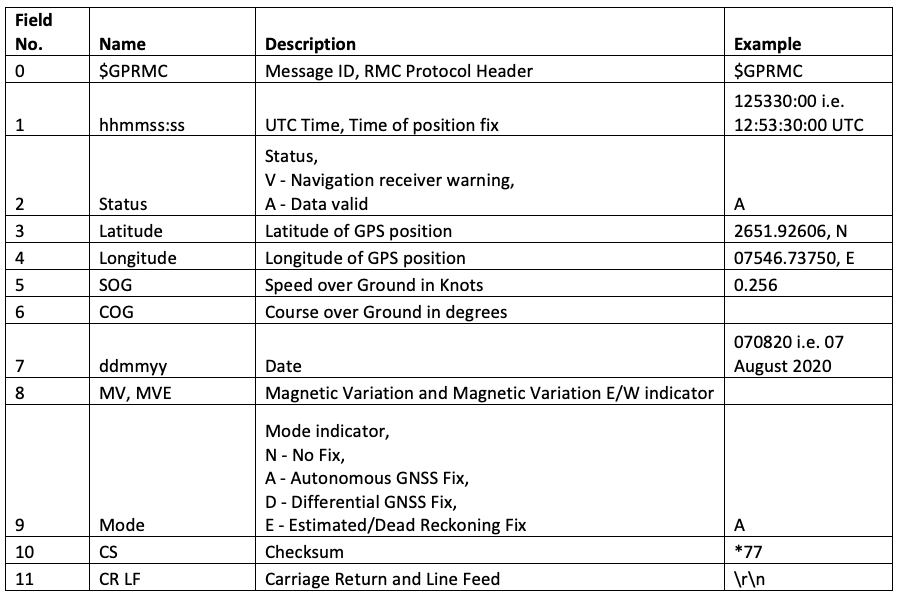
GPRMC – indicates the position, velocity, and time. It has this format:
$GPRMC,hhmmss:ss,Status,Latitude,N,Longitude,E,SOG,COG,ddmmyy,MV,MVE,Mode*CS<CR><LF>
The data fields of the GPRMC NMEA message are described in this table:
GPVTG – indicates the track made good and speed over ground. It has this format:
$GPVTG,cogt,T,cogm,M,sog,N,kph,K,mode*cs<CR><LF>
The data fields of the GPVTG NMEA message are described in this table:

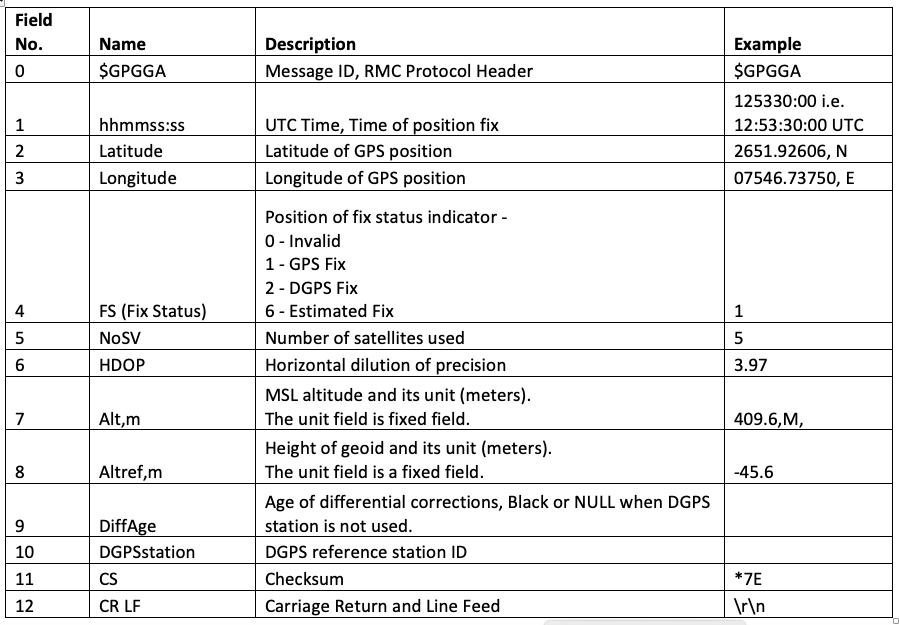
GPGGA – indicates the time, position, and fix related data. It has this format:
$GPGGA,hhmmss:ss,Latitude,N,Longitude,E,FS,NoSV,HDOP,msl,m,Altref,m,DiffAge,DiffStation*cs<CR><LF>
The data fields of the GPGGA NMEA message are described in this table:
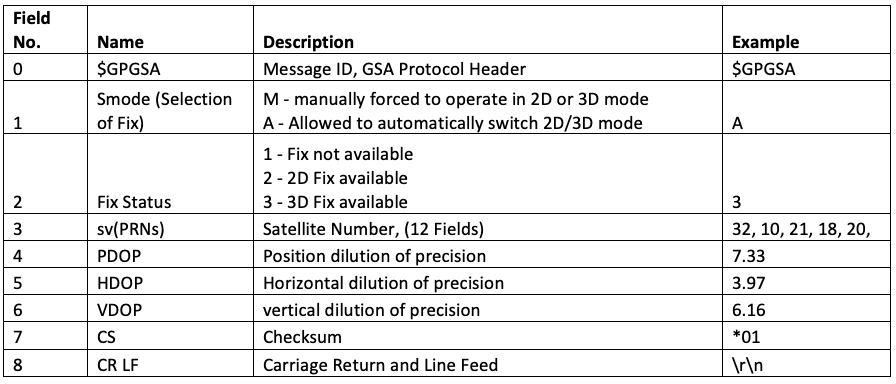
GPGSA – indicates the GPS DOP and active satellites. It has this format:
$GPGSA,Smode,FS{,sv},PDOP,HDOP,VDOP*cs<CR><LF>
The data fields of the GPGSA NMEA message are described in this table:
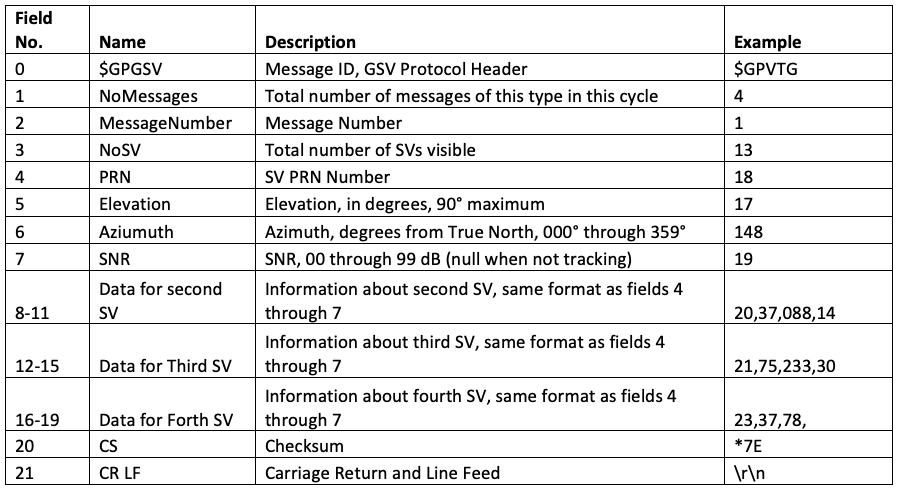
GPGSV – indicates the number of SVs in view, the PRN numbers, elevations, azimuths, and the SNR values. It has this format:
$GPGSV,NoMessages,MessageNumber,NoSV,PRN,Elevation,Azimuth,SNR,
<Information about second SV in same format>,
<Information about third SV in same format>,
<Information about fourth SV in same format>,*cs<CR><LF>
The data fields of the GPGSV NMEA message are described in this table:
GPGLL – indicates the position data, such as the position fix, time of the position fix, and its status. It has this format:
$GPGLL,Latitude,DirLat,Longitude,DirLongitude,hhmmss:ss,A,cs<CR><LF>
The data fields of the GPGLL NMEA message are described in this table:

Interfacing the NEO-6MV2 GPS with RPi
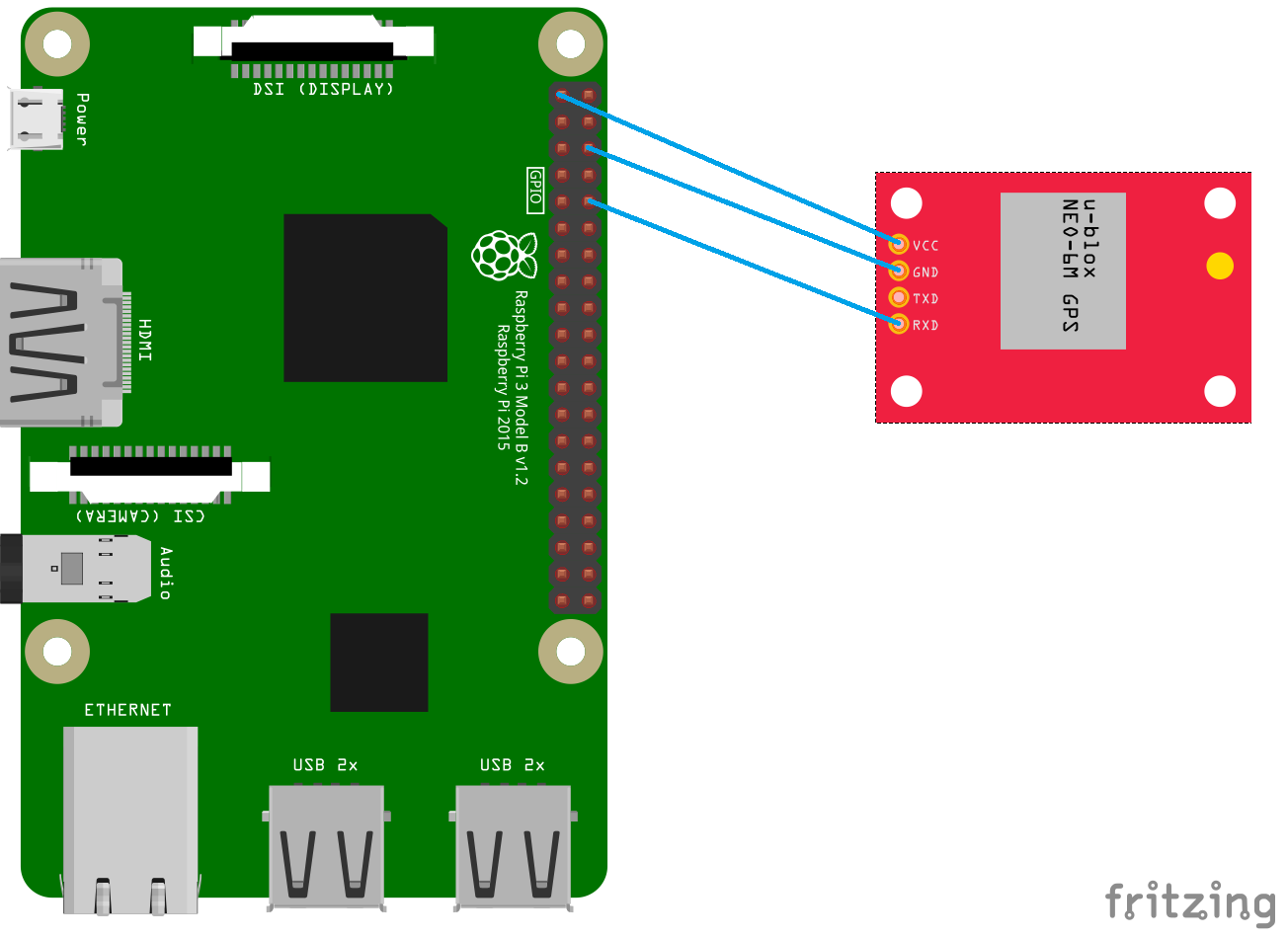
To interface the NEO-6MV2 GPS module with Raspberry Pi, supply the module VCC from RPi’s 3.3V pin (board pin 1 or 17) and then ground from any of the ground pins on RPi (board pin 6, 9, 14, 20, 25, 30, 34, or 39).
Next, connect the TX of the module with the UART Rxd of the Raspberry Pi (board pin 10). It’s unnecessary to send any of the serial data to the NEO-6 modem, which means there’s no need to connect with the RX of the module.
Checking if the NEO-6MV2 GPS module is working
When the GPS module is supplied power, it initially takes some time to get ready. This will depend on the configuration of the module whether it’s configured for a cold, warm, or hot start.
After waking up, if the GPS satellites are visible to the receiver and it begins to attain its location, a status LED on the module will start blinking.
If this LED fails to blink, either the module is not working properly or the satellite is unclear. In this case, you can try to get raw GPS data from the module. If you’re able to attain at least some information (such as the UTC time) but unable to get the location data, this means that the module is fine but that there isn’t a satellite visible to the GPS receiver.
Wait for some time (say, a few minutes or a half-hour) and try getting raw GPS data again. If the module is working properly, it may attain the location data after some time.
Getting raw data from the NEO-6MV2 GPS using Python
The raw GPS data can be read from the NEO-6M GPS module using the serial.read() or serial.readline() methods of Python.
Here’s how:
- Import the serial, time, and sys libraries.
- Open serial the TTL port where the GPS module is interfaced using the serial.Serial() method.
- This port name will be /dev/serial0. Alternatively, /dev/ttyAMA0 or /dev/ttyS0 can be used as a port name, depending on the primary UART on the respective Raspberry Pi model.
- Read the serial data from the GPS module line-by-line by using the serial.readline() method. Or, use the specific number of characters of the serial data from the GPS module using the serial.read() method.
- Continue reading the data until the NMEA message strings starts repeating.
Here’s an example of a Python script that reads the raw GPS data from the NEO-6M GPS module:
import serial
from time import sleep
import sys
ser = serial.Serial (“/dev/ttyS0”)
try:
while True:
received_data = (str)(ser.readline()) #read NMEA string received
print(received_data, “\n”)
except KeyboardInterrupt:
sys.exit(0)
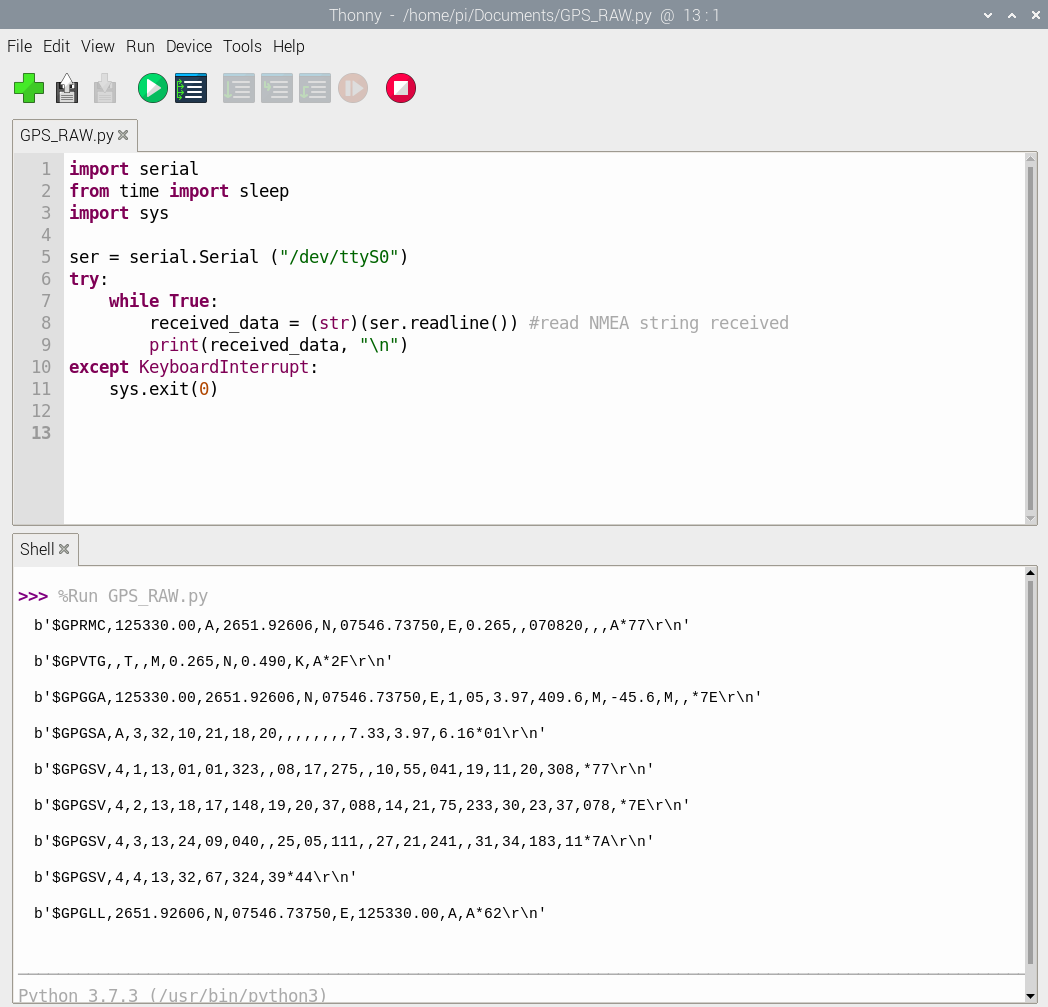
When running the above script in Raspberry Pi, we received the following GPS data in the IDLE’s console:
Getting the GPS position from the NEO-6MV2 GPS using Python
The raw GPS data contains RMS, VTG, GGA, GSA, GSV, and the GLL NMEA message strings. There are a total of nine message strings of raw GPS data at a time.
To get the GPS location, we can extract the $GPGGA or $GPGLL message strings. Both of these strings contain the location information. Here, we have extracted the GPS location from the $GPGGA message string.
The raw GPS data can be stored in a string type variable. By using the string manipulation functions, such as find(), we can search for the $GPGGA or $GPGLL in the received string.
If the received GPS data contains one of these strings, split the message string after the $GPGGA or $GPGLL by using the split() function. Next, split the received NMEA message data fields to an array by using the comma as a delimiter in the split() function.
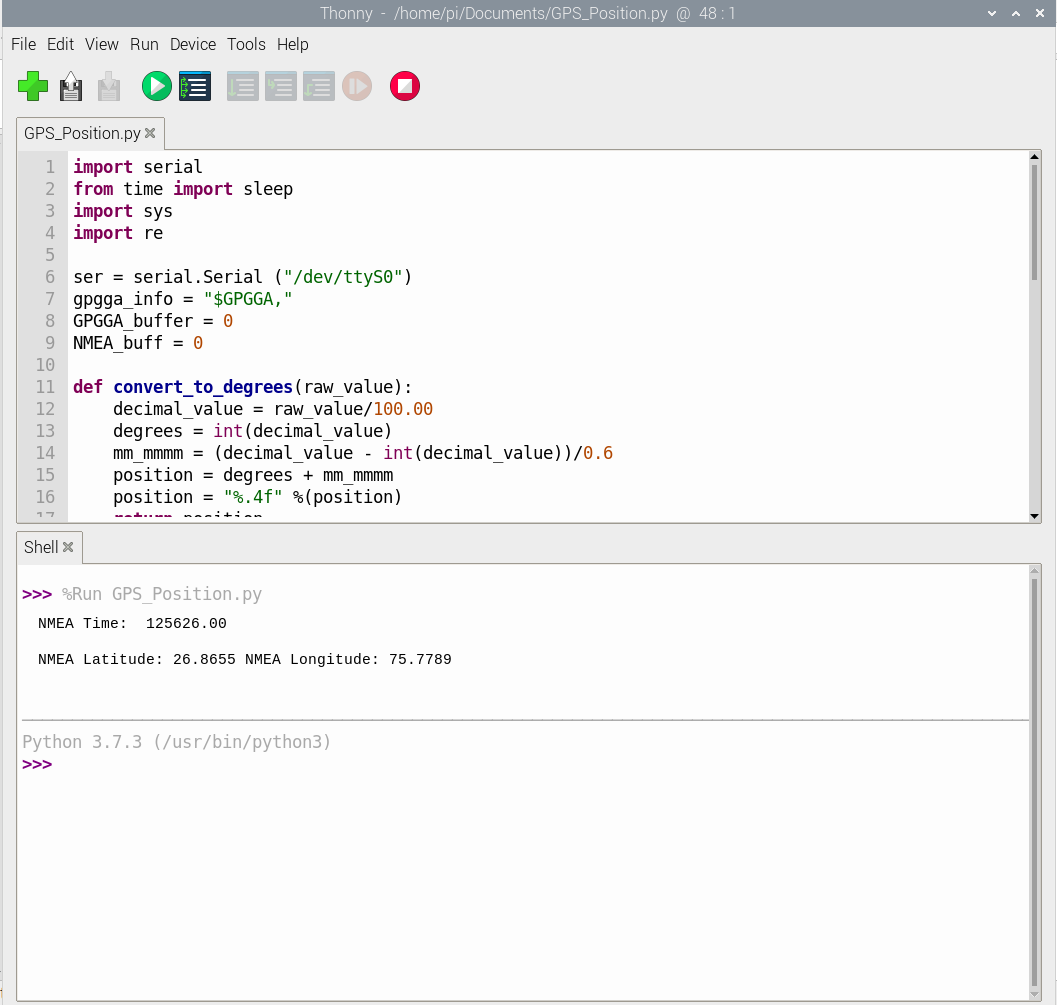
Now, you have the data fields of $GPGGA or the $GPGLL NMEA message string in an array. You can extract the UTC time, latitude, and longitude by accessing a different index of the resultant array. The latitude and longitude can be converted to degrees by using the simple mathematical and formatting operations on the received values. The converted values of latitude and longitude can also be printed on the console or transferred to a variable.
The following is an example of a Python script that extracts the GPS location from raw GPS data of the NEO-6M GPS module:
import serial
from time import sleep
import sys
ser = serial.Serial (“/dev/ttyS0”)
gpgga_info = “$GPGGA,”
GPGGA_buffer = 0
NMEA_buff = 0
def convert_to_degrees(raw_value):
decimal_value = raw_value/100.00
degrees = int(decimal_value)
mm_mmmm = (decimal_value – int(decimal_value))/0.6
position = degrees + mm_mmmm
position = “%.4f” %(position)
return position
try:
while True:
received_data = (str)(ser.readline()) #read NMEA string received
GPGGA_data_available = received_data.find(gpgga_info) #check for NMEA GPGGA string
if (GPGGA_data_available>0):
GPGGA_buffer = received_data.split(“$GPGGA,”,1)[1] #store data coming after “$GPGGA,” string
NMEA_buff = (GPGGA_buffer.split(‘,’))
nmea_time = []
nmea_latitude = []
nmea_longitude = []
nmea_time = NMEA_buff[0] #extract time from GPGGA string
nmea_latitude = NMEA_buff[1] #extract latitude from GPGGA string
nmea_longitude = NMEA_buff[3] #extract longitude from GPGGA string
print(“NMEA Time: “, nmea_time,’\n’)
lat = (float)(nmea_latitude)
lat = convert_to_degrees(lat)
longi = (float)(nmea_longitude)
longi = convert_to_degrees(longi)
print (“NMEA Latitude:”, lat,”NMEA Longitude:”, longi,’\n’)
except KeyboardInterrupt:
sys.exit(0)
When running the above script in RPi, we received the following GPS location in the IDLE’s console:
The GPS position in Google Maps using Python
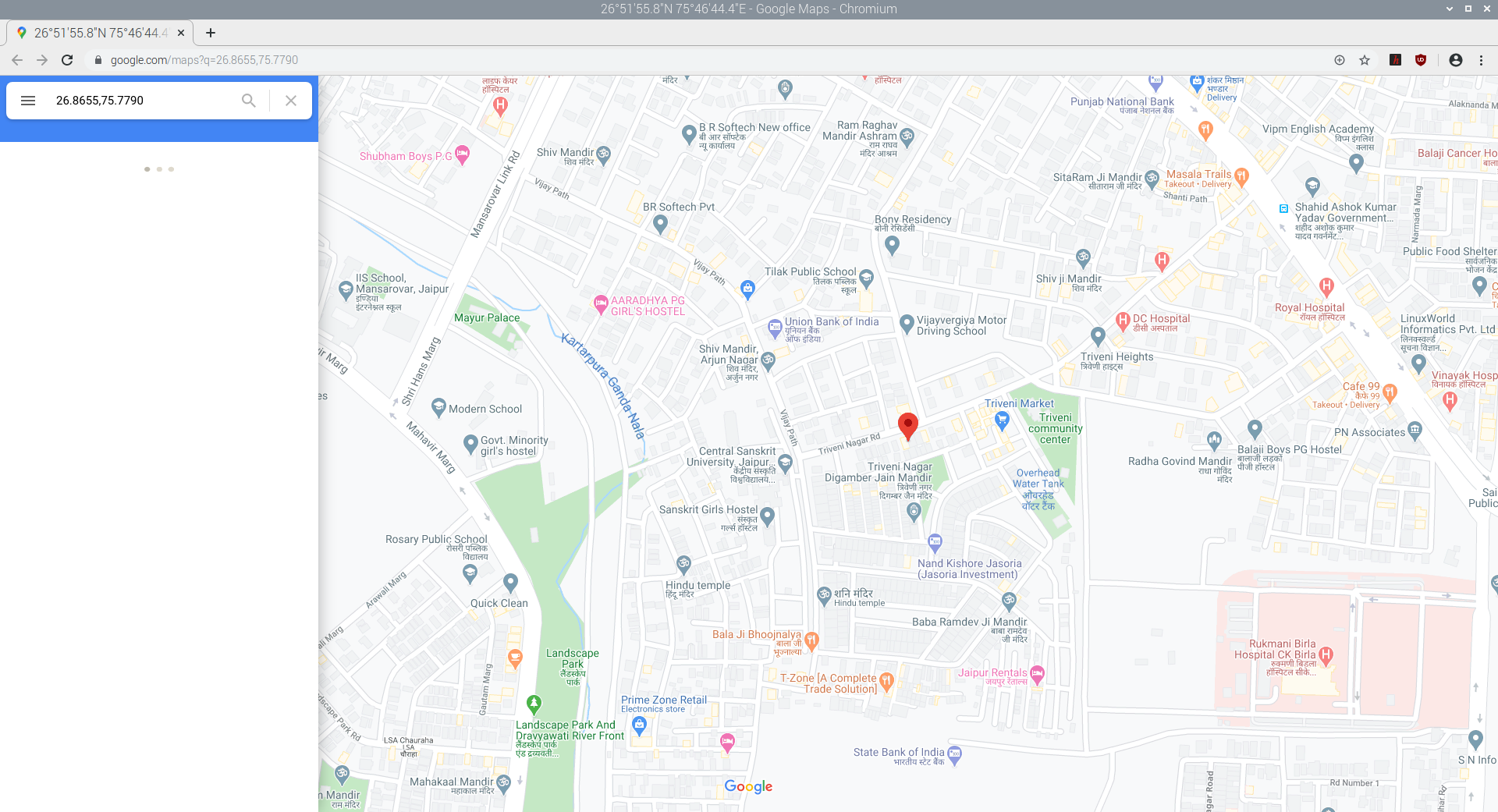
To show the GPS position in Google Maps, the webbrowser library of Python can be used. You can use the open() method of this library to open a Google Maps link with the latitude and longitude that was obtained in the previous example.
Here’s an example of a Python script that shows the GPS location of the NEO-6M GPS module in Google Maps:
import serial
from time import sleep
import sys
import webbrowser
ser = serial.Serial (“/dev/ttyS0”)
gpgga_info = “$GPGGA,”
GPGGA_buffer = 0
NMEA_buff = 0
GPGGA_data_available = “”
def convert_to_degrees(raw_value):
decimal_value = raw_value/100.00
degrees = int(decimal_value)
mm_mmmm = (decimal_value – int(decimal_value))/0.6
position = degrees + mm_mmmm
position = “%.4f” %(position)
return position
received_data = (str)(ser.read(200)) #read NMEA string received
GPGGA_data_available = received_data.find(gpgga_info) #check for NMEA GPGGA string
if (GPGGA_data_available>0):
GPGGA_buffer = received_data.split(“$GPGGA,”,1)[1] #store data coming after “$GPGGA,” string
NMEA_buff = (GPGGA_buffer.split(‘,’))
nmea_time = []
nmea_latitude = []
nmea_longitude = []
nmea_time = NMEA_buff[0] #extract time from GPGGA string
nmea_latitude = NMEA_buff[1] #extract latitude from GPGGA string
nmea_longitude = NMEA_buff[3]
print(“NMEA Time: “, nmea_time,’\n’)
lat = (float)(nmea_latitude)
lat = convert_to_degrees(lat)
longi = (float)(nmea_longitude)
longi = convert_to_degrees(longi)
print (“NMEA Latitude:”, lat,”NMEA Longitude:”, longi,’\n’)
map_link = ‘http://maps.google.com/?q=’ + lat + ‘,’ + longi
webbrowser.open(map_link)
sys.exit(0)
When running the above script in RPi, we received the following GPS location in Google Maps:
In the next tutorial, we we’ll cover serial communication using I2C in Raspberry Pi.
Filed Under: Raspberry pi

Questions related to this article?
👉Ask and discuss on EDAboard.com and Electro-Tech-Online.com forums.
Tell Us What You Think!!
You must be logged in to post a comment.