Engineers Garage

  • Electronic Projects & Tutorials
    • Electronic Projects
      • Arduino Projects
      • AVR
      • Raspberry pi
      • ESP8266
      • BeagleBone
      • 8051 Microcontroller
      • ARM
      • PIC Microcontroller
      • STM32
    • Tutorials
      • Sensor Series
      • 3D Printing
      • AI
      • ARDUINO Compatible Coding
      • Audio Electronics
      • Battery Management
      • Beginners Electronics Series
      • Brainwave
      • Digital electronics (DE)
      • Electric Vehicles
      • EMI/EMC/RFI
      • EVs
      • Hardware Filters
      • IoT tutorials
      • LoRa/LoRaWAN
      • Power Tutorials
      • Protocol
      • Python
      • RPI Python Programming
      • Sensors
      • USB
      • Thermal management
      • Verilog
      • VHDL
    • Circuit Design
    • Project Videos
    • Components
  • Articles
    • Tech Articles
    • Insight
    • Invention Stories
    • How to
    • What Is
  • News
    • Electronic Product News
    • Business News
    • Company/Start-up News
    • DIY Reviews
    • Guest Post
  • Forums
    • EDABoard.com
    • Electro-Tech-Online
    • EG Forum Archive
  • DigiKey Store
    • Cables, Wires
    • Connectors, Interconnect
    • Discrete
    • Electromechanical
    • Embedded Computers
    • Enclosures, Hardware, Office
    • Integrated Circuits (ICs)
    • Isolators
    • LED/Optoelectronics
    • Passive
    • Power, Circuit Protection
    • Programmers
    • RF, Wireless
    • Semiconductors
    • Sensors, Transducers
    • Test Products
    • Tools
  • Learn
    • eBooks/Tech Tips
    • Design Guides
    • Learning Center
    • Tech Toolboxes
    • Webinars & Digital Events
  • Resources
    • Digital Issues
    • EE Training Days
    • LEAP Awards
    • Podcasts
    • Webinars / Digital Events
    • White Papers
    • Engineering Diversity & Inclusion
  • Guest Post Guidelines
  • Advertise
  • Subscribe

Barcode Technology – What is Barcode?

By Preeti Jain November 27, 2011

Introduction
During a shopping excursion to a shopping mall, you would have noticed the cashier scanning your products using some Laser device to Barcode Scanner Functions

Fig. 1: A Representational Image of a Barcode / Laser Scanner

produce a bill. What actually he is doing that he is reading the product barcodes using a Laser/Barcode scanner. Barcode scanner reads the code, data is sent to the computer, and computer looks up into the database for the price and description of the item.
 
Barcodes are structured to contain specific product related information. It basically encodes alphanumeric characters and symbols using black and white stripes, also called bars.  Bar-coding is one of the AIDC (Automatic Identification and Data Collection) technologies which reduce human involvement in data entry and collection and thereby also reducing error and time.
 
Structure of Barcode
A typical barcode consists of the following:

·       Quiet Zone –The minimum required space for bar code scan-ability, preceding the Start Character of a bar code symbol. The quiet zone should be free from any printing and be the same colour and reflectance as the background of bar code symbol. The Quiet Zone should be ten times the width of the narrowest element in the bar code, or 0.25 inch minimum. Also known as Clear Area.
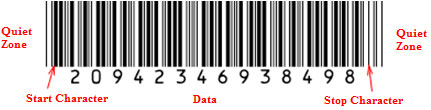
·       Start Code –Indicates the start of the barcode. These are sspecial bar code characters & they signify the start of data to the scanner/reader. Start characters are usually stripped-off and not transmitted to the host.

·        Data –The actual data the barcode stores.
·      Check Digit –Check digit (not always present) is a mathematical sum that is used to verify the accuracy of the other elements of the barcode. It is the eextra digit added at the end of a bar code to allow the scanner to confirm that it read the bar code correctly. It is typically stripped from the data and not transmitted to the host.
·       Stop Code – Indicates the stopping point of the barcode. These characters signify the end of data to the scanner/reader. They are also stripped-off and not transmitted to the host.
·        Trailing Quiet Zone – Another clear space with no printing following the Stop Character.
 

 A Diagram Illustrating Typical Structure of a Barcode

Fig. 2: A Diagram Illustrating Typical Structure of a Barcode

Standards
Number of bar code standards have evolved over the years and are represented in different symbologies. A symbology specification defines the details necessary for the barcode to be printed and also provides details to read and decode barcode by a scanner/reader.
 
Symbology specification documents typically range from 8 pages to 120 pages. However, in a simplified way, the standard must contain:
·         A definition of the width of the bars and the spaces.
·         A method to define each character that is encodable (whether numeric only or full ASCII).
·         The start and stop characters.
·         Any check character support built in.
·         Any free space needed around the symbology to allow for a clean decode.
 
Barcode symbologies can be either linear or two-dimensional.

Linear Barcode Standards

Linear barcodes use single row of black and white bars. Examples of linear barcodes are:

·             ISO/IEC 15420 Bar code symbology specification – EAN/UPC

UPC (Universal Product Code) uses 12-digit numeric containing a unique manufacturer ID number, and product number. EAN (European Article Numbering) is similar to UPC except the fact that it uses 13-digit numeric.

A Diagram Showing Types of Linear Barcode Structure

Fig. 3: A Diagram Showing Types of Linear Barcode Structure

·           ISO/IEC 16388 Bar code symbology specifications – Code 39
It is a discrete barcode. It implies that a single character is represented by a fixed pattern of bars. Each character is made up of 9 (5 black & 4 white) bars. Code 39 barcode symbology supports 43 characters set plus an additional character used as a delimiter or start/stop character. The start/stop character always occurs as the first and last character in a complete barcode and is represented in the human readable text by the * character.
 
The 43 character set includes the following: 1234567890ABCDEFGHIJKLMNOPQRSTUVWXYZ -   . $ / + % SPACE.
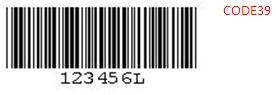
A check digit is generally not used with Code 39. The check digit is the modulus 43 sum of all the character values in the message and it is printed as the last data character.
A Diagram Displaying a Discrete Barcode
Fig. 4: A Diagram Displaying a Discrete Barcode
 
·           ISO/IEC 15417 Bar code symbology specification – Code 128
CODE 128 allows the full ASCII 128 character set to be encoded. Each bar or space can be one of four different unit widths. The narrowest possible bar or space will thus be one quarter the width of the widest. It permits bidirectional scanning and theoretically, there is no restriction on the number of characters allowed in each symbol.
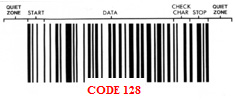
Code 128 has three different character sets as Code Set A, Code Set B and Code Set C. Any of these codes may be selected by appropriate selection of start character. The Code 128 Specification requires the inclusion of a check digit. The check digit is a Modulus 103 checksum.
Each character in the barcode symbol is composed of three bars and three spaces. The stop character has four bars and three spaces.  

A Diagram Showing Structure of 128 Barcode
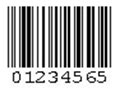
 

Fig. 5: A Diagram Showing Structure of 128 Barcode 

·           ISO/IEC 16390 Bar code symbology specifications – Interleaved 2-of-5 (ITF25)
Primarily used in the warehouse industry, Interleaved 2 of 5 encodes any even number of numeric characters in the width of both bars and spaces. It is called “Interleaved” because 2 characters are encoded in a unit of 5 bars and spaces. It uses both bar and space width to encode information so the density of ITF25 is much higher. Interleaved 2 of 5 is a numeric symbology and it character set only include 10 digital characters.
A Diagram Displaying an Interleaved Barcode

Fig. 6: A Diagram Displaying an Interleaved Barcode

2D Barcodes

2D Barcode Standards

2D (Two dimensional) Bar code symbols have more data capacity compared to linear bar code symbols. Two-dimensional symbols are categorized in two classes: multi-row (or stacked) and matrix. A 2D bar code is treated as an image. The picture is scanned by a camera which is then decoded.
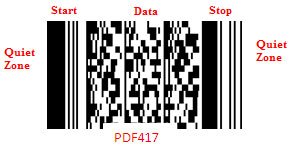
·           ISO/IEC 15424 Bar code symbology specification – PDF417
PDF417 is a 2-dimensional stacked bar code created by Symbol Technologies in 1991. It is one of the most popular 2D codes because of its ability to be read with line CCD scanners, laser scanners or two-dimensional scanners.
PDF stands for Portable Data File and 417 signifies that each symbol character is 17 modules wide of 4 bars and 4 spaces that make up each code. Each symbol character represents a value ranging from 0 to 928 which is called “codewords” in the specification.
Each symbol also has start and stop bar groups that allow the code to be easily identified. PDF417 is capable of encoding more than 1100 bytes, 1800 text characters or 2710 digits. It allows the full ASCII 128 character set (including extended set) to be encoded. Symbol size is 3 to 90 rows, 90 to 583X in width. It supports bidirectional scanning.
A Diagram Illustrating Structure of a 2-Dimensional Stacked Barcode
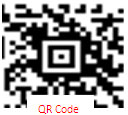
Fig. 7: A Diagram Illustrating Structure of a 2-Dimensional Stacked Barcode

 
·           ISO/IEC 18004 Bar code symbology QR Code
QR Code (Quick Response Code) is a matrix code developed by Nippondenso ID Systems. QR Code symbols are square in shape. Maximum symbol size is 177 modules square, capable of encoding 7366 numeric characters, or 4464 alpha numeric characters. QR Code is designed for rapid reading using CCD array cameras and image processing technology.
An Image of Quick Response or QR code

Fig. 8: An Image of Quick Response or QR code
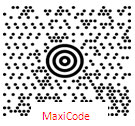
 
·            ISO/IEC 16023 Bar code symbology specification – Maxicode
Maxicode (originally called UPSCode, sometimes called Code 6) is a matrix code developed by United Parcel Service in 1992. MaxiCode is made up of a 1-inch by 1-inch array of 866 interlocking hexagons, instead of squares. This allows the code to be at least 15 percent denser than a square dot code, but requires higher resolution printers to print the symbol. Approximately 100 ASCII characters can be held in the 1-inch square symbol. The symbol can still be read even when up to 25 percent of the symbol has been destroyed and can be read by CCD camera or scanner.
An Image of Maxicode also known as UPS Code

Fig. 9: An Image of Maxicode also known as UPS Code

There are more than 400 different types of such barcodes. UPC or EAN is the barcode used on most of the retail products.
Depending upon the spacing of the black an white bars, the barcodes are classified as High, Medium and Low Resolution barcodes.
1. High Resolution : Spacing < 0.23mm
2. Medium Resolution : 0.23mm < Spacing <0.50mm
3. Low Resolution : Spacing > 0.50mm

Barcoding System

Elements of Barcoding System
·         Barcode printer
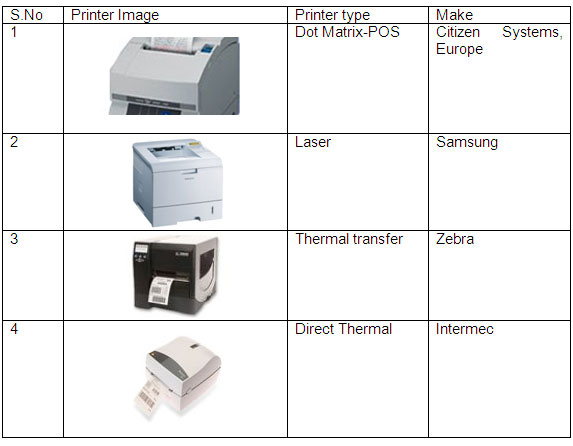
For printing of barcodes, four types of printers are typically used: Dot matrix, Laser, Thermal transfer and Direct thermal printer. Dot matrix printers produce labels with low print quality but at low cost. Laser printers produce good quality at moderate costs. Thermal transfer prints labels at very high quality at higher cost. Direct thermal printers prints labels with very high quality at moderate costs, but labels are sensitive to heat/light and are recommended for indoor uses only.
A Figure Illustrating Different Types of Barcode Print
Fig. 10: A Figure Illustrating Different Types of Barcode Print                                   

·         Barcode Label
Labels contain product specific information encoded into a barcode. These can be used on products or their parts, packages, tickets/ receipts, shipping containers, etc. allowing the item to be identified and. Bar codes need not be only adhesive labels, but also can be printed on receipt paper, tickets, tags and plastic cards, depending on the application
 
·         Barcode Scanner & Decoder
Scanners read & capture the information contained in a barcode. It extracts information optically from a Bar Code. When Barcode symbols are illuminated, reflected light is detected by electro optical sensor.  The intensity of reflected light from the dark bars is less than that of spaces. Reflected light is converted into electrical voltage signals. Analog voltages are digitized into raw data. Raw data is fed to the decoder which decoder converts this data into the character data representation of the symbol’s code. Scanner may or may not have in-built decoder.
Scanners are available in following types:
·         Contact type:
These types of readers must touch or come in very close proximity to the symbol. They are generally pen or wand type and are handheld/stationary units. These have a LED and a photo diode in the tip of a pen or wand. The pen is dragged across the barcode to capture it. The photo diode measures the intensity of the reflected light. One of the commercially available such type of scanner (Make: Unitech) is shown in forthe figure:
An Image of Contact Type Scanner

Fig. 11: An Image of Contact Type Scanner

 
·         Non Contact type:
They need not come in contact with the symbol. Scan distance may range from few inches to a few feet depending upon symbol size and scanner design. They are handheld, fixed beam readers. They are available in the form of laser scanners, CCD scanners and imagers.
Laser barcode scanners use a laser beam instead of LED and use a reciprocating mirror or a rotating prism to scan the laser beam back and forth across the bar code. Photodiode measures the reflected light. CCD scanners use LEDs as light source an array of tiny light CCD sensors for detecting the received light. Imager type uses a camera to capture the code and digital signal processing techniques to decode the code.
Various types of such commercially available scanners in various form factors are shown in the following table.
An Image Showing Different Types of Scanners and Their Respective Form Factors
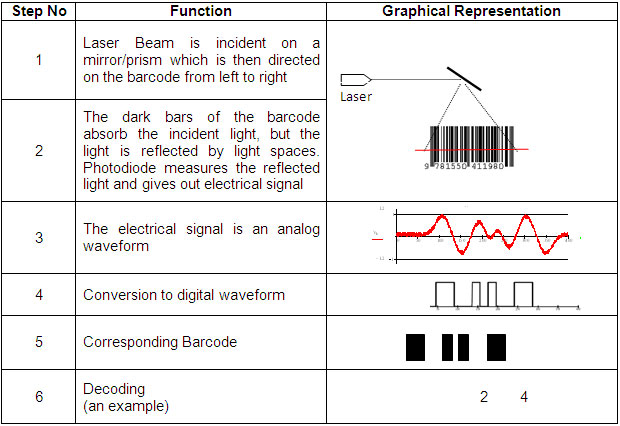
Fig. 12: An Image Showing Different Types of Scanners and Their Respective Form Factors 

 
The functionality of a typical laser scanner is explained below. However, the  steps are equally valid  for both pen or wand type reader as well.
 

A Diagram Illustrating Functionality of a Typical Laser Scanner

Fig. 13: A Diagram Illustrating Functionality of a Typical Laser Scanner

 
·         PC with product database
Database forms a vital part of bar-coding system. Each barcode must be mapped to an entry in the database. Database contains variety of information like product description, price, discounts, etc corresponding to a barcode. Without proper database, bar-coding system has no significance.

Advantages and Applications

Barcode Advantages
Barcodes allow real-time data to be collected accurately and rapidly, thereby enhancing productivity, better customer service and operational efficiency.
Advantages can be listed in terms of following parameters:
1.      Accuracy
Due to automated data entry, manual errors are removed. Accuracy of Barcode scanners is higher compared to OCRs.
2.      Time
The time taken to manual data entry is significantly higher.
3.      Simplicity in ease
Bar-coding systems are quite easy to use and even to learn.
4.      Cost Effectiveness
Since data entries can be done with better accuracy, requirement of operator and other peripherals is reduced
 
Barcode Applications
Manufacturing
Track batches, jobs and individual products.
Automatic alerts at low stock levels.
Immediate note of production shortfalls.
Compliance Labeling (chemicals, safety, required tracking tasks).
Work-In-Progress (WIP) data can be collected at any point in the process, uploaded to the computer, allows real-time tracking.
Time and Attendance of employees.
Warehousing/Distribution
            Log incoming/outgoing shipments more quickly and accurately.
            Provide accurate shipping manifests, packing slips and other management tools.
            Inventory Control – automatically update inventory database, Price and Stock Checking.
            Track location of specific items in warehouse.
            Track retrieval and issue.
Offices
            Asset Management – account for tools, books, documents; decreased training time; reduces loss from stolen or misplaced items.
            File Management – track materials from a central library or repository.
            Tracking physical assets (desks, computers, office furnishings, etc.).
            Barcode used to track inter-office/inter-company deliveries (i.e. UPS, FedEx), especially important documents.
Retail/ Hospitality
            Expedites checkout of product at the POS terminals. Airline baggage tags/ boarding passes, etc. are processed very quickly hassle-free.
Security
            Cards with bar code labels are used in Access Control Systems to track movement of people.
Healthcare
            Drugs, devices, instruments.
            Identification of expiry date.
            Blood banking – Blood group, Expiry date, Donor traceability.
Library
Eases tracking of documents & books.
Aids generation of suitable reminders to borrowers.
Eases Stock verification.

The applications listed are just a glimpse of wide variety of applications in various industries. 


Filed Under: Articles
Tagged With: 2d barcode, aidc, barcode
 

Next Article

← Previous Article
Next Article →

Questions related to this article?
👉Ask and discuss on EDAboard.com and Electro-Tech-Online.com forums.


Tell Us What You Think!! Cancel reply

You must be logged in to post a comment.

Submit a Guest Post

submit a guest post

EE TECH TOOLBOX

“ee
Tech Toolbox: Power Efficiency
Discover proven strategies for power conversion, wide bandgap devices, and motor control — balancing performance, cost, and sustainability across industrial, automotive, and IoT systems.

EE Learning Center

EE Learning Center
“engineers
EXPAND YOUR KNOWLEDGE AND STAY CONNECTED
Get the latest info on technologies, tools and strategies for EE professionals.

HAVE A QUESTION?

Have a technical question about an article or other engineering questions? Check out our engineering forums EDABoard.com and Electro-Tech-Online.com where you can get those questions asked and answered by your peers!


RSS EDABOARD.com Discussions.

  • CST Studio Suite 2021 – New Project Window Shows Black Screen
  • Introduction to the Principle of Human Detection by Millimeter-Wave Radar Modules
  • Biasing an AC signal
  • SiC FET turn-off in 2000W PFC
  • Why SG3525 + TL431 + PC817 feedback is not working on ±35 V push-pull SMPS?

RSS Electro-Tech-Online.com Discussions

  • restarting this Christmas project
  • desoldering
  • Unknown, to me, electric motor fitting
  • Can a small solar panel safely trickle-charge old NiMH AA batteries?
  • KiCad custom symbol definition correct approach

Featured Tutorials

Real Time Hardware Filter Design

  • Practical implementation of bandpass and band reject filters
    Practical implementation of bandpass and band reject filters
  • Practical application of hardware filters with real-life examples
    Practical application of hardware filters with real-life examples
  • A filter design example
    A filter design example
  • Types of filter responses
    Types of filter responses
  • What are the two types of hardware filters?
    What are the two types of hardware filters?
  • What are hardware filters and their types?
    What are hardware filters and their types?
More Tutorials >

Recent Articles

  • Taiwan Semiconductor adds 24-V automotive TVS devices
  • ST e-fuse controller enables fast, flexible automotive power protection
  • Posifa sensors improve low-flow accuracy in compact systems
  • Acopian releases low-profile power supplies rated to 900 W
  • Octavo Systems OSDZU-3 REF Development Platform

EE ENGINEERING TRAINING DAYS

engineering
Engineers Garage
  • Analog IC TIps
  • Connector Tips
  • Battery Power Tips
  • EDABoard Forums
  • EE World Online
  • Electro-Tech-Online Forums
  • EV Engineering
  • Microcontroller Tips
  • Power Electronic Tips
  • Sensor Tips
  • Test and Measurement Tips
  • 5G Technology World
  • Subscribe to our newsletter
  • About Us
  • Contact Us
  • Advertise

Copyright © 2025 WTWH Media LLC. All Rights Reserved. The material on this site may not be reproduced, distributed, transmitted, cached or otherwise used, except with the prior written permission of WTWH Media
Privacy Policy

Search Engineers Garage

  • Electronic Projects & Tutorials
    • Electronic Projects
      • Arduino Projects
      • AVR
      • Raspberry pi
      • ESP8266
      • BeagleBone
      • 8051 Microcontroller
      • ARM
      • PIC Microcontroller
      • STM32
    • Tutorials
      • Sensor Series
      • 3D Printing
      • AI
      • ARDUINO Compatible Coding
      • Audio Electronics
      • Battery Management
      • Beginners Electronics Series
      • Brainwave
      • Digital electronics (DE)
      • Electric Vehicles
      • EMI/EMC/RFI
      • EVs
      • Hardware Filters
      • IoT tutorials
      • LoRa/LoRaWAN
      • Power Tutorials
      • Protocol
      • Python
      • RPI Python Programming
      • Sensors
      • USB
      • Thermal management
      • Verilog
      • VHDL
    • Circuit Design
    • Project Videos
    • Components
  • Articles
    • Tech Articles
    • Insight
    • Invention Stories
    • How to
    • What Is
  • News
    • Electronic Product News
    • Business News
    • Company/Start-up News
    • DIY Reviews
    • Guest Post
  • Forums
    • EDABoard.com
    • Electro-Tech-Online
    • EG Forum Archive
  • DigiKey Store
    • Cables, Wires
    • Connectors, Interconnect
    • Discrete
    • Electromechanical
    • Embedded Computers
    • Enclosures, Hardware, Office
    • Integrated Circuits (ICs)
    • Isolators
    • LED/Optoelectronics
    • Passive
    • Power, Circuit Protection
    • Programmers
    • RF, Wireless
    • Semiconductors
    • Sensors, Transducers
    • Test Products
    • Tools
  • Learn
    • eBooks/Tech Tips
    • Design Guides
    • Learning Center
    • Tech Toolboxes
    • Webinars & Digital Events
  • Resources
    • Digital Issues
    • EE Training Days
    • LEAP Awards
    • Podcasts
    • Webinars / Digital Events
    • White Papers
    • Engineering Diversity & Inclusion
  • Guest Post Guidelines
  • Advertise
  • Subscribe