
An ac-dc converter is commonly used in many devices. Also called a rectifier, it converts alternating current (AC) to direct current (DC). Most electronic devices, such as computers, smartphones, and electronic circuits, operate on DC power.
However, there are different ways to convert AC into DC power (as discussed in the previous AC-to-DC conversion article).
For this project, we’ll employ a non-isolated topology using a buck converter (see Figure 1). In a non-isolated power supply, one of the AC mains lines is common to the DC ground, so there’s no isolation in input and output.

Figure 1. Block diagram of AC-to-DC conversion, with non-isolated topology using a buck converter.
The principle of operation
AC-to-DC conversion using a buck converter works via switching topology. The internal MOSFET in the converter’s integrated circuit (IC) and its oscillator generates the pulse-width modulation (PWM) signal, regulating the output voltage through a feedback network.
Conceptually, this is the same principle as a dc-dc buck converter. You can learn more in this article on switched mode power supply (SMPS), which covers the design of a buck converter.
Required components

Circuit diagram
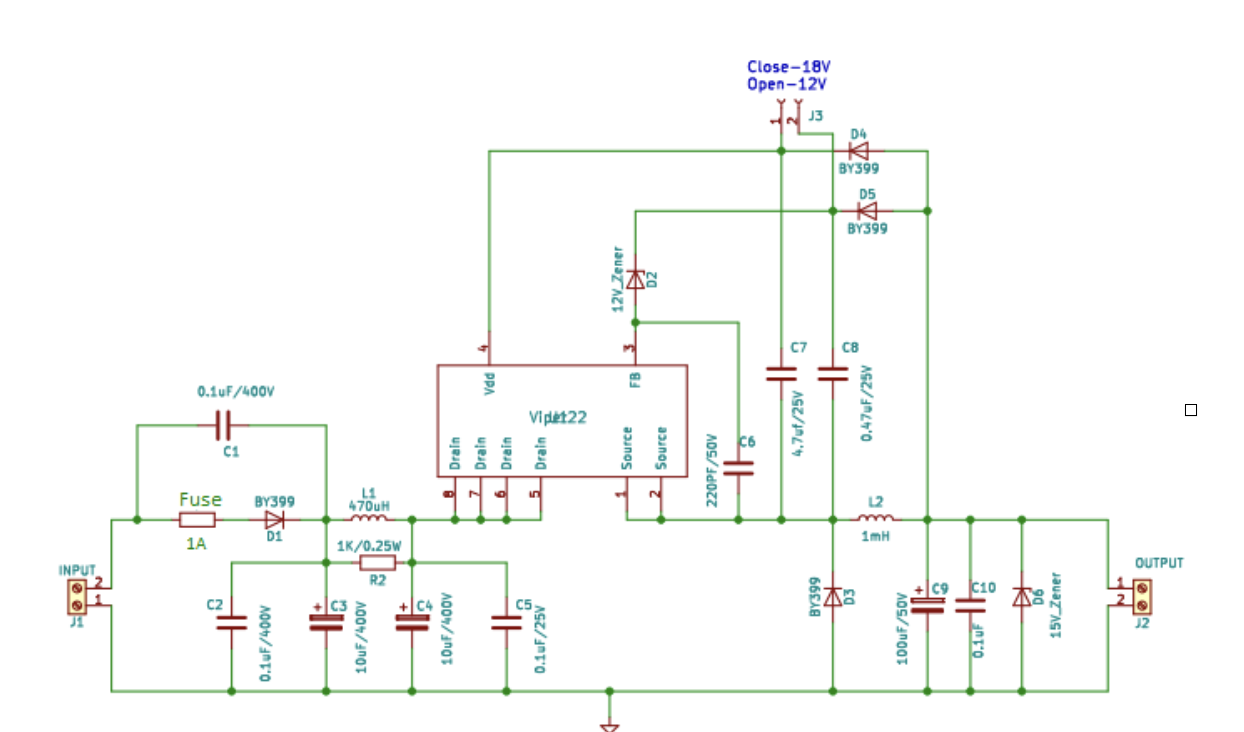
Figure 2. The circuit diagram of an AC-to-DC conversion using a buck converter.
Components
▪ Voltage regulator – a switching type of regulator should be used for this project because they’re more efficient than linear once. There are three types of switching regulators: buck, boost, and buck boost.
For this application, we will use a buck converter IC with the following parameters:
- A built-in MOSFET drain voltage
- An operating power supply voltage
- Output power
- A non-isolated design
▪ VIPER22 IC – this is a buck converter with a MOSFET and a few comparators (see Figure 3). Here are its specifications:
- Drain voltage – 730V
- Operating power supply voltage – 9 to 38V
- Output power – 12W

Figure 3. The internal diagram and pinout of the Viper22 buck converter IC.
How it works
- VDD pin – of the IC is used to control the power supply of the internal circuit and provides the charging current in the initial stage. The comparator compares the VDD voltage. For VDDon = 14.5V, the Viper begins switching. For VDDoff = 8V, the Viper stops switching.
- Drain – MOSFET drain and also used by the charging source in the initial stage
- Source – includes the MOSFET source and circuit ground
- FB – controls the maximum drain current limit of the IC
High current protection and rectification
For a high in-rush and short-circuit current, a fuse is used at the input side, which blows when the current is greater than 1A.
To convert the AC into DC voltage, a half-wave rectifier is used. The D1 diode provided the half-wave rectification.

Figure 4. The circuit diagram of the input filtration.
As per Figure 4, C1 helps reduce the electromagnetic interference (EMI) noise by balancing the mains and neutral lines as it will pass the EN55022 level “B” noise standard (however, if the requirement is less, this can be ignored). The C2, C3, and L1 form a Pi filter, which also helps reduce the EMI noise.
The R2 resistor ensures the in-rush current remains low during the start of the circuit.
Selecting the filtering capacitor
The minimum voltage of the capacitor should be 1.5 times greater than the AC voltage input. The capacitance is typically two or three times the output power.
So, if the AC input – 220V, then…
The voltage rating of Cin = 2*220 = 440V
If the output power – Vout*Iout = 12*0.1= 1.2W, then…
Cin = 2*1.2 = 2.4uF
As per the availability C3, C4 are 10uF/400V
Selecting the VDD capacitor

Figure 5. The circuit connections for selecting the VDD capacitor.
When the device starts, it will receive some energy from the inductor. The C7 capacitor helps filter and stabilize the VDD voltage. It also sets the start-up time of the IC.
The datasheet recommends a 100nF capacitor. However, by considering the output voltage, a 4.7uF/25V capacitor can be used in the circuit. The C6 capacitor also filters the voltage to the FB pin. A small ceramic picofarad works for this project.

Figure 6. The circuit diagram connections for the output diode.
The output diode
The output diode D3 is called a catch or freewheeling diode. In the MOSFET’s ON-OFF period, the inductor passes energy through the diode as output. A fast rectifying diode is needed, which is compatible with the IC frequency. Any drop in the diode causes losses in the circuit, which affects the efficiency.
The low forward voltage drop:
Rated reverse voltage of diode > Vin
Vin (DC) = 220*1.414 = 320V
i.e Vfr > 320V (on the safe side 400V can be used)
We use BY399 diode for this circuit.
Calculating losses in the BY399 diode:
Pd = Forward voltage drop *Iout
Pd = 1 *0.1
Pd = 0.1V
Selecting the inductor

Figure 7. The circuit diagram connections for selecting the inductor.
The inductor L2 and C9 forms a filter in the circuit. The inductor output will determine the discontinuous and continuous modes of operation. In continuous mode, the losses are more than the discontinuous mode. To learn more about these two modes please, refer to this article.
The below equation sets the inductor boundary condition for the continuous and discontinuous modes. To operate in the discontinuous mode, the “L” should be lower than this:
L = 0.5*R*(1-D)/f
R = output load, 120E
f= frequncy of the IC, 60kHz
D = duty cycle, Vo/Vin= 12/320= 0.0375
L = 1mH(approx.)
We use L2 = 1mH, which suits our design for this project.
Selecting the diodes

Figure 8. The circuit diagram connections for selecting the Zener diode.
The working circuit
- Drain voltage – The voltage from the C4 capacitor is delivered to the IC’s drain using pins 5 to 8.
- OFF state – When the circuit initially starts, the Viper is not switching. The internal current source in the IC supply is 1mA to the VDD pin. This current charges the C7. When the VDD reaches 14.5V, the current sources turn off and the Viper begins switching. During this period, the inductor and output capacitor supply the output energy, which is charged in the previous state (ON state).
- ON state – In this state, the Viper is switching and the stored energy in the C7 is supplied to the output. Therefore, the energy stored in C7 must be greater than required for the output current. Additionally, there must be energy to charge the output capacitor before the VDD falls below 8V. As a result, the charging and discharging time of C7 is based on the circuit’s ON and OFF time. The inductor also charges through the internal MOSFET, and C7 supplies energy to the output.
- Freewheeling state – This state occurs with the OFF state. When the VDD voltage falls below 8V (after supplying the energy to the output), the Viper stops switching (OFF state). Then, the current source will turn back ON and, simultaneously, the inductor begins discharging through diode D3 (forward-biased).
- Output regulation – D2, D5, and C8 regulate the output voltage. During the freewheeling state, D5 charges C8, and D4 charges C7. The source or ground reference is one diode drop, compensating for the energy in C7 and C8. The output voltage remains the same as the Zener D2 voltage. The D2 is a low-current Zener, providing the best accuracy for the output voltage.
Thermal management
For heat management of the IC, please review this article on heatsink selection. It’s possible to determine the maximum power dissipation limit of the circuit with or without a heat sink.
Practical observations:
Vin = 220V AC, Tested in a closed box, with no natural convection
No load, Vout = 14.88V

The datasheet states the IC will shut down if the junction temperature reaches 170-degrees. This circuit will shut down above 100mA current with no natural convection (in closed).
Precautions
- Ceramic capacitors should be used at the input and output for proper filtering, as they offer a low ESR.
- A high-power electromagnetic signal can disrupt the converter’s ability to function properly. Operation of the inductor will be disrupted if interfered with a magnetic field.
- The shorting of the converter’s output terminals should be avoided, as they can lead to permanent damage to the IC.
- The capacitor’s voltage rating should be 1.5 times that of the input voltage.
- Fully discharge the capacitor before handling the circuit.
- While handling the circuit, safety gloves are a must, especially by the output’s mains line.
- A heat sink can be used for the proper functioning of IC.
- Do not use a non-isolated power supply where the load is near a human.
PCB design guidelines
▪ Keep power traces thick and short
▪ Place the input and output capacitor as close as the IC’s input and output pins
▪ Minimize the path length of the inductor
▪ Keep voltage and switching nodes away from one another
▪ Keep all components as close to the IC as possible, and try to reduce the size of the PCB
▪ Note: The higher the frequency of the IC, the higher the switching losses, which decreases the efficiency. However, a higher switching frequency reduces the size of the energy storage element and improves the transient response.
PCB design
We made the circuit’s PCB using KICAD (see Figure 9).

Figure 9. The PCB design of the AC-to-DC conversion circuit using a buck converter.

Figure 10. The circuit prototype.
You may also like:


Filed Under: Power, Tutorials

Questions related to this article?
👉Ask and discuss on EDAboard.com and Electro-Tech-Online.com forums.
Tell Us What You Think!!
You must be logged in to post a comment.