
Fig. 1: Representational Image of a Hard Disk Drive
Have you ever given it a thought what happens when you double click on an icon of application or some file. During the course of time this operation is performed, you might see flickering of light associated with hard disk and listen to churning sound of hard disk. This definitely means that something is going on inside, rather one might correctly guess that data is being accessed.
To understand this first we need to understand, what is hard disk, how it stores data and how does it access the data.
History
The hard disks track their origin with IBM 305 computer during the year 1955. The hard disk started as large 
Fig. 2: Image of a 14 inch Disk Pack for Disk Drive
disks up to 20 inches in diameter holding just a few megabytes of memory. During the starting years they were called “fixed disks” or “Winchesters” (a code name which was generally used for a popular IBM product). They later became known as “hard disks” so as to distinguish them from “floppy disks.” As the 1980s began, hard disk drives were a rare and very expensive and were very rare on personal computers (PCs); however by the late ’80s, hard disk drives were standard on all Personal Computers.
Hardware-Physical Components
A hard disk contains a set of electromagnetic platters (consider it as a plate with fixed size hole at centre of them or CDs) stacked on top of one another (a bit like many CDs in a stack) with a narrow gap between each platter. These platters typically spin at 3,600 or 7,200 rpm when the disk is operating. Each platter is usually double-sided i.e. each platter has 2 sides to store data, and each side has its own read/write head. So, if you’ve got 4 platters, you’ve probably got 8 heads.
Each platter has set of concentric rings (technically called a “track”) which are used to store the data and each head reads from one of these concentric rings on the cylinder. There can be more than a thousand tracks on a 3.5-inch hard disk. All the heads move at the same time and are positioned to read or write to the same track on their respective platter, which means that they form a cylindrical shape and hence are known as cylinder. So, if head 2 is positioned to read from track 23, head 3 will also be positioned to read from track 23. Therefore, we might say that head 2 is positioned to read from cylinder 23 (which implies that head 3 and further heads are also positioned to read from same track i.e. cylinder 23).
Finally, each track is split into small segments. Each segment is called a “sector”, as shown in the figure. A sector is the smallest physical storage unit on a disk, and is most of the time 512 bytes (0.5 kB) in size. All the hardware operations take place in terms of sectors.
If some application or some file wants to access one particular sector, then it could refer it by specifying which head it is on, and which cylinder it is on and finally the appropriate corresponding sector. That would then uniquely identify the sector that we wanted to access.
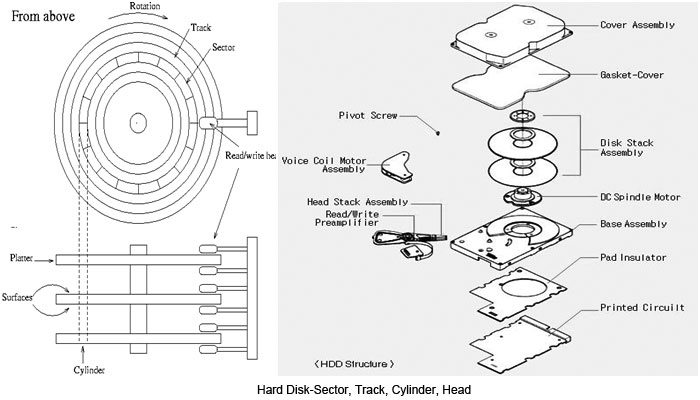
Fig. 3: Cross Sectional Diagram Showing Various Components of a Hard Disk Drive
Electronic Components
Hardware-Electronic Components
If you give it a thought that just knowing the head, track and sector is enough to read the data is not enough, because to realize this task physically is not that easy as it sounds. The missing piece is the 
Fig. 4: Image Showing Electronic Components of a Typical HDD
electronic hardware section that is associated with the disk. There is also piece of code/ software that helps the head to get it to the sector, for example, you want to access cylinder 23 then you have to move the head reader 2.5434567cm (say) from the edge of the platter. It is called the “disk controller” and it allows us to specify only the Cylinder, Head and Sector that we want to access. Basically it is just like the decrypting software. The disk controller calculates where the data is physically present on the disk (head, track and sector) and hands the data back to application/file by associating a pointer in memory to the data.
The electronic hardware controls the read/write mechanism and the motor associated with shaft that spins the platters, controls and connects the spindle, head actuator, and various functions of the disk. Embedded with a microcontroller, it executes self-diagnostics test and cleans up data working area in the memory and all internal chip bus in the hard drive when it powers up. The electronic hardware also assembles the magnetic domains on the drive into bytes (reading) and turns bytes into magnetic domains (writing). It also regulates the data traffic. It ensures massive data to be streamed in and out of the disk smoothly.
Standards
Now after understanding all the hardware associated with disk, a case comes that the upper layer associated with hardware should always be independent of the hardware. This simply means that you can load any operating system on your machine. It doesn’t matter that whether you have Seagate or Samsung hard-disk in your machine. So there must be some standard guidelines associated with disk. Let us consider a case that what if one manufacturer makes a hard disk with X cylinders, Y heads and Z sectors per cylinder. Another manufacturer makes a disk with A cylinder, B heads and C sector per head. It would ultimately lead to lot of fuss. Therefore, to counter this problem set of standards called the ATA (AT-Attachment) were laid in 1989 so as to regulate the possible number of cylinder, head and sectors.
Read/Write Operation
Read Write Operations
Data on a hard disk is stored in microscopic areas called magnetic domains on the magnetic material. Each domain stores either a 1 or 0 values.
The Read Write head (generally termed as RW head) is the key component that performs the reading and writing functions. It is placed on a slider which is further connected to an actuator arm which allows the RW head to access the sectors across the platter over the track during data Input Output functions by sliding across the spinning platter. The sliding motion is derived by passing a current through the coil which is part of the actuator-assembly (controlled by the electronic hardware). As the coil is placed between two magnets, the forward or backward sliding motion is hence derived by simple current reversal. This static/present location of the platter is identified by the embedded servo code written on the platter. The arm on a typical hard-disk drive can move from hub to edge and back up to 50 times per second.

Fig. 5: Diagram Explaining Intricate Details of a Hard Disk RW Head
The stack of platters rotates at a constant speed. The drive head, while positioned close to the center of the disk reads from a surface that is passing by more slowly than the surface at the outer edges of the disk (simple concept of angular motion). To compensate for this physical difference, tracks near the outside of the disk are less-densely populated with data as compared to the tracks near the center of the disk. The result of the different data density is that the same amount of data can be read over the same period of time, from any drive head position.

Fig. 6: Image Showing Read Write Head on a Platter
To write a piece of information (it might be the contents of the file i.e. data or some application) to the disk, an electromagnetic flux is transmitted through the head which hovers very closely to the platter. The RW head suspends on a thin cushion of air which the spinning platter induces (in general terms it is similar to the force/pressure experienced by the person standing near a fast moving train). This designed distance between the head and platter is called the flying height. It can literally measure to a few millionths of an inch.
Whenever a request for writing is made then the head writes data onto the disk by changing its magnetic polarization to induce either a one or zero value (as all the data is stored in terms of byte). During a read request, data is interpreted when the magnetic fields on the platter brings a corresponding electrical change (due to change in electrical resistance) in the read-head that passes over the platter at that very moment. These electrical fields are then encoded and transmitted to the CPU to be processed and read by the system. So this is how data is read or written on disk.
Safety
When the computer is switched off, then the head is lifted to a safe zone normally termed as safe parking zone to prevent the head from scratching against the data zone on platter when the air bearing subsides. This process is called a parking.
Filed Under: Articles
Log in to leave a comment:
Lost your password?
Don't have an account? Register here