Engineers Garage

  • Electronic Projects & Tutorials
    • Electronic Projects
      • Arduino Projects
      • AVR
      • Raspberry pi
      • ESP8266
      • BeagleBone
      • 8051 Microcontroller
      • ARM
      • PIC Microcontroller
      • STM32
    • Tutorials
      • Sensor Series
      • Engineering Deep Dives
      • AI
      • ARDUINO Compatible Coding
      • Audio Electronics
      • Battery Management
      • Beginners Electronics Series
      • Brainwave
      • Digital electronics (DE)
      • Electric Vehicles
      • EMI/EMC/RFI
      • EVs
      • Hardware Filters
      • IoT tutorials
      • LoRa/LoRaWAN
      • Power Tutorials
      • Protocol
      • Python
      • RPI Python Programming
      • Sensors
      • USB
      • Thermal management
      • Verilog
      • VHDL
    • Circuit Design
    • Project Videos
    • Components
  • Articles
    • Tech Articles
    • Insight
    • Invention Stories
    • How to
    • What Is
  • News
    • Electronic Product News
    • Business News
    • Company/Start-up News
    • DIY Reviews
    • Guest Post
  • Forums
    • EDABoard.com
    • Electro-Tech-Online
    • EG Forum Archive
  • DigiKey Store
    • Cables, Wires
    • Connectors, Interconnect
    • Discrete
    • Electromechanical
    • Embedded Computers
    • Enclosures, Hardware, Office
    • Integrated Circuits (ICs)
    • Isolators
    • LED/Optoelectronics
    • Passive
    • Power, Circuit Protection
    • Programmers
    • RF, Wireless
    • Semiconductors
    • Sensors, Transducers
    • Test Products
    • Tools
  • Learn
    • eBooks/Tech Tips
    • Design Guides
    • Learning Center
    • Tech Toolboxes
    • Tech Terms
    • Webinars & Digital Events
  • Resources
    • EE Training Days
    • LEAP Awards
    • Podcasts
    • Webinars / Digital Events
    • White Papers
  • Guest Post Guidelines
  • Advertise
  • Subscribe

Electronic code lock with user defined password using 8051 microcontroller (AT89C51)

By Himanshu Choudhary August 4, 2010

An electronic lock or digital lock is a device which has an electronic control assembly attached to it. They are provided with an access control system. This system allows the user to unlock the device with a password. The password is entered by making use of a keypad. The user can also set his password to ensure better protection. The major components include a keypad, LCD and the controller AT89C51 which belongs to the 8051 series of microcontrollers. This article describes the making of an electronic code lock using the 8051 microcontroller. 


A 4×3 matrix keypad and a 16×2 LCD have been used here. Keypad and LCD are very commonly used input & output devices, respectively. A four digit predefined password needs to be specified the user. This password is stored in the system.

While unlocking, if the entered password from keypad matches with the stored password, then the lock opens and a message is displayed on LCD. Also an output pin is made high to be used for further purpose.

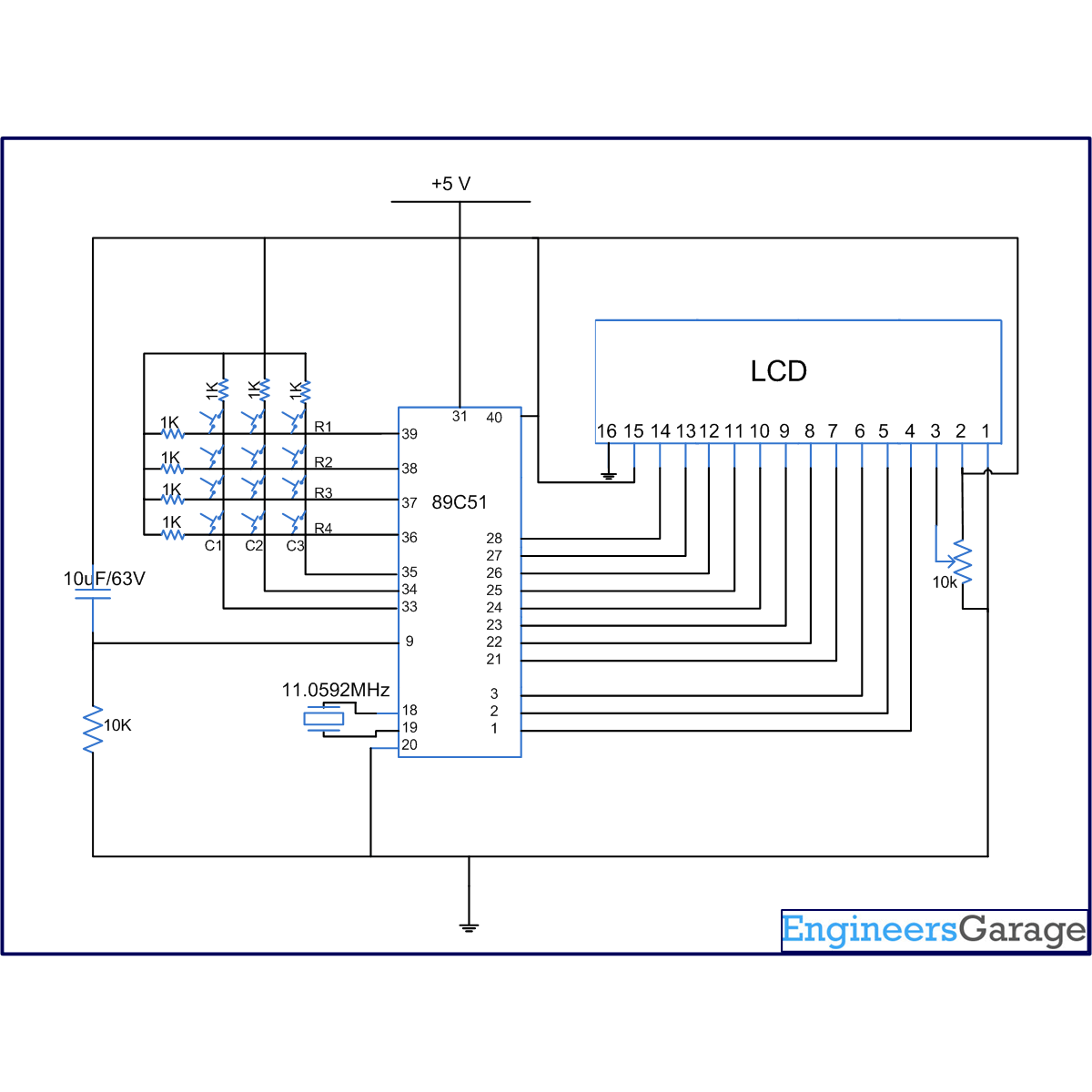
The connections in the circuit are as following: port P2 of microcontroller AT89C51 is used as data input port which is connected to data pins (7-14) of LCD. P1^0, P1^1 and P1^2 pins of microcontroller are connected to control pins RS, RW and EN of LCD. Port P0 is used to take input from keypad. P0^7 has been used as lock output pin of controller.
 
As the program starts, string ‘Enter Password’ is displayed on LCD. The keypad is scanned for pressed digits one by one. Every time, row and column of the key pressed is detected and a ‘*’ is displayed on LCD corresponding to the entered number. After the four digits are entered, the user is prompted to ‘Confirm Password’ and again the input is taken through LCD. If the passwords do not match, a message is displayed to indicate ‘Wrong Password’; otherwise the user is prompted to unlock the device.
 
To unlock, user needs to ‘Enter Password’ through keypad. Again the keypad is scanned for pressed keys and corresponding digits are identified. The passkey is displayed as ‘****’ on the LCD screen. After the four digits are entered, they are compared with the pre-set password. If all the four digits match with set password, LCD displays ‘Lock Open’ and the lock output pin goes high. If the security code is wrong, ‘Wrong Password’ is sent to be displayed on LCD. The system gets locked if more than three attempts are made with wrong password to open the electronic lock. The system needs to be reset in such a case.


Project Source Code

###

//Program to make a code lock with user defined password

#include<reg51.h>
#define port P1
#define dataport P2
#define key P0
#define sec 100
sbit rs = port^0;
sbit rw = port^1;
sbit en = port^2;

sbit col1=key^4;
sbit col2=key^5;
sbit col3=key^6;
sbit row1=key^0;
sbit row2=key^1;
sbit row3=key^2;
sbit row4=key^3;
sbit lock_output=P0^7;

int check=0;
int digit[4]={0,0,0,0};
int dig_input[4]={0,0,0,0};
int dig_input_recheck[4]={0,0,0,0};

int i,k;


void delay(unsigned int msec) // Time delay function
{
int i,j ;
for(i=0;i<msec;i++)
  for(j=0;j<1275;j++);
}

void lcd_cmd(unsigned char item) // Function to send command to LCD
{
dataport = item;
rs= 0;
rw=0;
en=1;
delay(1);
en=0;
return;
}

void lcd_data(unsigned char item) // Function to send data to LCD
{
dataport = item;
rs= 1;
rw=0;
en=1;
delay(1);
en=0;
return;
}

void lcd_data_string(unsigned char *str) // Function to send data to string
{
int i=0;
while(str[i]!='')
{
  lcd_data(str[i]);
  i++;
  //delay(10);
}
return;
}

void lcd(unsigned char str[10])
{
lcd_cmd(0x38);
lcd_cmd(0x0e);
lcd_data_string(str);
}


void ans()
{
if(check>3)
{
  lcd_cmd(0x01);
  lcd_cmd(0x82);
  lcd_data_string(" LOCK OPEN");
  lock_output=1;
  delay(300);
  while(1);
  }
else
{
  lcd_cmd(0x01);
  lcd_cmd(0x82);
  lcd_data_string(" WRONG PASSWORD");
  lock_output=0;
  delay(300);
}                   
}

void code_check() // Function to check password
{
if(i<=3 )
{
  switch((i+1))
  {
   case 1: {
      if(dig_input[0]==digit[0])
      {
       check=check+1;
      }
      break;
     }
   case 2: {
      if(dig_input[1]==digit[1])
      {
       check=check+1;
      }
      break;
     }
   case 3: {
      if(dig_input[2]==digit[2])
      {
       check=check+1;
      }
      break;
     }
   case 4: {
      if(dig_input[3]==digit[3])
      {
       check=check+1;
      }
      break;
     }
  }
}
delay(10);
if(i==3)
{
  ans();
}
}

void display(int a) //Display function
{
switch(a)
{ 
  case 1:{
    lcd_data('*');
    delay(100);
    digit[i]=1;
    code_check();
    break;
    }
  case 2:{
    lcd_data('*');
    delay(100);
    digit[i]=2;
    code_check(); 
    break;
    }
  case 3:{
    lcd_data('*');
    delay(100);
    digit[i]=3;
    code_check();
    break;
    }
  case 4:{
    lcd_data('*');
    delay(100);
    digit[i]=4;
    code_check();
    break;
    }
  case 5:{
    lcd_data('*');
    delay(100);
    digit[i]=5;
    code_check();
    break;
    }
  case 6:{
    lcd_data('*');
    delay(100);
    digit[i]=6;
    code_check();
    break;
    }
  case 7:{
    lcd_data('*');
    delay(100);
    digit[i]=7;
    code_check();
    break;
    }
  case 8:{
    lcd_data('*');
    delay(100);
    digit[i]=8;
    code_check();
    break;
    }
  case 9:{
    lcd_data('*');
    delay(100);
    digit[i]=9;
    code_check();
    break;
    }
  case 0:{
    lcd_data('*');
    delay(100);
    digit[i]=0;
    code_check();
    break;
    }
}
}

void check_col1()
{
row1=row2=row3=row4=1;
row1=0;
if(col1==0)
display(1);
row1=1;
row2=0;
if(col1==0)
display(4);
row2=1;
row3=0;
if(col1==0)
display(7);
row3=1;
row4=0;
if(col1==0)
{
  row4=1;
}
}

void check_col2()
{
row1=row2=row3=row4=1;
row1=0;
if(col2==0)
display(2);
row1=1;
row2=0;
if(col2==0)
display(5);
row2=1;
row3=0;
if(col2==0)
display(8);
row3=1;
row4=0;
if(col2==0)
display(0);
row4=1;
}

void check_col3()
{
row1=row2=row3=row4=1;
row1=0;
if(col3==0)
display(3);
row1=1;
row2=0;
if(col3==0)
display(6);
row2=1;
row3=0;
if(col3==0)
display(9);
row3=1;
row4=0;
if(col3==0)
{
  row4=1;
}
}


void check_password_col1()
{
row1=row2=row3=row4=1;
row1=0;
if(col1==0)
dig_input[k]=1;
row1=1;
row2=0;
if(col1==0)
dig_input[k]=4;
row2=1;
row3=0;
if(col1==0)
dig_input[k]=7;
row3=1;
row4=0;
if(col1==0)
{
  row4=1;
}
}

void check_password_col2()
{
row1=row2=row3=row4=1;
row1=0;
if(col2==0)
dig_input[k]=2;
row1=1;
row2=0;
if(col2==0)
dig_input[k]=5;
row2=1;
row3=0;
if(col2==0)
dig_input[k]=8;
row3=1;
row4=0;
if(col2==0)
{
  dig_input[k]=0;
  row4=1;
}
}


void check_password_col3()
{
row1=row2=row3=row4=1;
row1=0;
if(col3==0)
dig_input[k]=3;
row1=1;
row2=0;
if(col3==0)
dig_input[k]=6;
row2=1;
row3=0;
if(col3==0)
dig_input[k]=9;
row3=1;
row4=0;
if(col3==0)
{
  row4=1;
}
}

void pass_set()
{
row1=row2=row3=row4=0;
while(col1==1 && col2==1 && col3==1);
for(i=0;i<4;i++)
{
  k=i;
  delay(50);
  lcd_cmd(0xc4+i);
  delay(100);
  row1=row2=row3=row4=0;
  while(col1==1 && col2==1 && col3==1);
  row1=row2=row3=row4=0;
  if(col1==0)
  check_password_col1();
  else
   if(col2==0)
   check_password_col2();
   else
    if(col3==0)
    check_password_col3();
  lcd_data('*');
  delay(50);
}
}

void main()
{
int e,j=0,count=1;
col1=col2=col3=1;
//FOR PASSWoRD INPUT
do
{
  lcd_cmd(0x01);  //Clear LCD screen
  lcd_cmd(0x81);  
  lcd("ENTER PASSWORD:");
  pass_set();
  for(e=0;e<4;e++)
  dig_input_recheck[e]=dig_input[e];
  lcd_cmd(0x01);
  lcd("CONFIRM PASSWORD:");
  pass_set();
  for(e=0;e<4;e++)
  {
   if(dig_input_recheck[e]==dig_input[e])
   j++;
  }
  if(j<4)
  {
   lcd_cmd(0x01);
   lcd_cmd(0x85);
   lcd("PASSWORD");
   lcd_cmd(0xC2);
   lcd("NOT MATCH");
   delay(300);
  }
}
while(j<4);
    
while(count<4)	//Code input and check
{
  lcd_cmd(0x01); 
  lock_output=0;
  lcd_cmd(0x82);  
  lcd("ENTER PASSWORD");
  check=0;
  row1=row2=row3=row4=0;
  while(col1==1 && col2==1 && col3==1);
  for(i=0;i<4;i++)
  {
   delay(100);
   lcd_cmd(0xc4+i);
   row1=row2=row3=row4=0;
   while(col1==1 && col2==1 && col3==1);
   row1=row2=row3=row4=0;
   if(col1==0)
   check_col1();
   else
    if(col2==0)
    check_col2();
    else
     if(col3==0)
     check_col3();
  }
  count++;
  delay(1);   
}

if(count==4)
{
  lcd_cmd(0x01);
  lcd_cmd(0x86);
  lcd("SORRY");
  lcd_cmd(0xc1);
  lcd("NO MORE TRIALS");
  while(1);
}
}

###


Circuit Diagrams

Circuit-Diagram-of-Electronic-code-lock-with-user-defined-password-using-8051-microcontroller-AT89C51

Project Components

  • AT89C51 Microcontroller
  • LCD
  • Preset

Project Video


Filed Under: 8051 Microcontroller
Tagged With: 8051, lcd, lock, microcontroller
 

Next Article

← Previous Article
Next Article →

Questions related to this article?
👉Ask and discuss on EDAboard.com and Electro-Tech-Online.com forums.


Tell Us What You Think!! Cancel reply

Log in to leave a comment:

Lost your password?

Don't have an account? Register here

Submit a Guest Post

submit a guest post

EE TECH TOOLBOX

“ee
Tech Toolbox: Wide Bandgap Semiconductors
Moving from silicon to GaN or SiC feels like a whole new ballgame, doesn’t it? It isn’t just about faster switching; it’s about managing the layout parasitics and thermal realities that come with that speed. This month’s Tech Toolbox features a curated eBook that tackles these design hurdles head-on.

EE Learning Center

EE Learning Center
“engineers
EXPAND YOUR KNOWLEDGE AND STAY CONNECTED
Get the latest info on technologies, tools and strategies for EE professionals.

HAVE A QUESTION?

Have a technical question about an article or other engineering questions? Check out our engineering forums EDABoard.com and Electro-Tech-Online.com where you can get those questions asked and answered by your peers!


RSS EDABOARD.com Discussions.

RSS Electro-Tech-Online.com Discussions

Featured Tutorials

Learn - AWS IoT Tutorials

  • How to enable device-to-device messaging on AWS IoT Core using MQTT
    How to enable device-to-device messaging on AWS IoT Core using MQTT
  • How to connect Raspberry Pi to Amazon AWS IoT Core using MQTT
    How to connect Raspberry Pi to Amazon AWS IoT Core using MQTT
  • How to connect ESP32 to AWS IoT Core using MQTT
    How to connect ESP32 to AWS IoT Core using MQTT
  • How to connect a computer to AWS IoT Core
    How to connect a computer to AWS IoT Core
  • Arduino compatible coding 02: Getting started with Arduino
    Arduino compatible coding 02: Getting started with Arduino
  • Arduino compatible coding 03: Basics of Arduino sketches and Embedded C
    Arduino compatible coding 03: Basics of Arduino sketches and Embedded C
More Tutorials >

Recent Articles

  • Understanding the different types of AI
  • 100 Tech Terms You Need to Know
  • Rambus DDR5 chipset supports 9600 MT/s RDIMMs
  • Designing embedded systems with MicroPython and NodeMCU (Part 7)
  • AOS launches 80 V half-bridge MOSFET

EE ENGINEERING TRAINING DAYS

engineering
Engineers Garage
  • Analog IC TIps
  • Connector Tips
  • Battery Power Tips
  • EDABoard Forums
  • EE World Online
  • Electro-Tech-Online Forums
  • EV Engineering
  • Microcontroller Tips
  • Power Electronic Tips
  • Sensor Tips
  • Test and Measurement Tips
  • 5G Technology World
  • Subscribe to our newsletter
  • About Us
  • Contact Us
  • Advertise

Copyright © 2026 Arrowfly LLC. All Rights Reserved. The material on this site may not be reproduced, distributed, transmitted, cached or otherwise used, except with the prior written permission of Arrowfly
Privacy Policy

Search Engineers Garage

  • Electronic Projects & Tutorials
    • Electronic Projects
      • Arduino Projects
      • AVR
      • Raspberry pi
      • ESP8266
      • BeagleBone
      • 8051 Microcontroller
      • ARM
      • PIC Microcontroller
      • STM32
    • Tutorials
      • Sensor Series
      • Engineering Deep Dives
      • AI
      • ARDUINO Compatible Coding
      • Audio Electronics
      • Battery Management
      • Beginners Electronics Series
      • Brainwave
      • Digital electronics (DE)
      • Electric Vehicles
      • EMI/EMC/RFI
      • EVs
      • Hardware Filters
      • IoT tutorials
      • LoRa/LoRaWAN
      • Power Tutorials
      • Protocol
      • Python
      • RPI Python Programming
      • Sensors
      • USB
      • Thermal management
      • Verilog
      • VHDL
    • Circuit Design
    • Project Videos
    • Components
  • Articles
    • Tech Articles
    • Insight
    • Invention Stories
    • How to
    • What Is
  • News
    • Electronic Product News
    • Business News
    • Company/Start-up News
    • DIY Reviews
    • Guest Post
  • Forums
    • EDABoard.com
    • Electro-Tech-Online
    • EG Forum Archive
  • DigiKey Store
    • Cables, Wires
    • Connectors, Interconnect
    • Discrete
    • Electromechanical
    • Embedded Computers
    • Enclosures, Hardware, Office
    • Integrated Circuits (ICs)
    • Isolators
    • LED/Optoelectronics
    • Passive
    • Power, Circuit Protection
    • Programmers
    • RF, Wireless
    • Semiconductors
    • Sensors, Transducers
    • Test Products
    • Tools
  • Learn
    • eBooks/Tech Tips
    • Design Guides
    • Learning Center
    • Tech Toolboxes
    • Tech Terms
    • Webinars & Digital Events
  • Resources
    • EE Training Days
    • LEAP Awards
    • Podcasts
    • Webinars / Digital Events
    • White Papers
  • Guest Post Guidelines
  • Advertise
  • Subscribe