Engineers Garage

  • Electronic Projects & Tutorials
    • Electronic Projects
      • Arduino Projects
      • AVR
      • Raspberry pi
      • ESP8266
      • BeagleBone
      • 8051 Microcontroller
      • ARM
      • PIC Microcontroller
      • STM32
    • Tutorials
      • Sensor Series
      • Engineering Deep Dives
      • AI
      • ARDUINO Compatible Coding
      • Audio Electronics
      • Battery Management
      • Beginners Electronics Series
      • Brainwave
      • Digital electronics (DE)
      • Electric Vehicles
      • EMI/EMC/RFI
      • EVs
      • Hardware Filters
      • IoT tutorials
      • LoRa/LoRaWAN
      • Power Tutorials
      • Protocol
      • Python
      • RPI Python Programming
      • Sensors
      • USB
      • Thermal management
      • Verilog
      • VHDL
    • Circuit Design
    • Project Videos
    • Components
  • Articles
    • Tech Articles
    • Insight
    • Invention Stories
    • How to
    • What Is
  • News
    • Electronic Product News
    • Business News
    • Company/Start-up News
    • DIY Reviews
    • Guest Post
  • Forums
    • EDABoard.com
    • Electro-Tech-Online
    • EG Forum Archive
  • DigiKey Store
    • Cables, Wires
    • Connectors, Interconnect
    • Discrete
    • Electromechanical
    • Embedded Computers
    • Enclosures, Hardware, Office
    • Integrated Circuits (ICs)
    • Isolators
    • LED/Optoelectronics
    • Passive
    • Power, Circuit Protection
    • Programmers
    • RF, Wireless
    • Semiconductors
    • Sensors, Transducers
    • Test Products
    • Tools
  • Learn
    • eBooks/Tech Tips
    • Design Guides
    • Learning Center
    • Tech Toolboxes
    • Webinars & Digital Events
  • Resources
    • Digital Issues
    • EE Training Days
    • LEAP Awards
    • Podcasts
    • Webinars / Digital Events
    • White Papers
    • Engineering Diversity & Inclusion
  • Guest Post Guidelines
  • Advertise
  • Subscribe

Displaying Regional Languages on LCD using Arduino

By Rahul Kar March 18, 2013


PROJECT OVERVIEW

This project uses cheap Hitachi HD44780 based 16×2 LCD to display regional Indian language. These displays are designed for English text only, but they have provisions to display custom characters. On the LCD, each character is 8 pixels high by 5 pixels wide. Using a custom character designer from here-http://www.quinapalus.com/hd44780udg.html the regional fonts were converted to hex codes, later to be used in the project. In order to understand the theory behind custom character generation we have to take a look at the memory mapping of HD44780.

It consists of:-

1) DD RAM

2) CG ROM

3) CG RAM

1) DD RAM (Display Data RAM): This partof the memory holds the characters which are to be displayed on LCD screen. It has a capacity of 80 characters and it stores display data represented in 8-bit character codes.

2) CG ROM(Character Generator ROM):  This part of the memory holds the font bitmap for predefined characters that LCD can display.It can generate 5 x 8 dot character patterns from 8-bit character codes that are stored in the LCD controller. User defined character patterns are also available by mask-programmed ROM.

3) CG RAM(Character Generator RAM): CGRAM area is used to store our custom characters in LCD. The stored characters can now be sent to DD RAM for displaying. A maximum of eight character patterns can be written for 5×8 dots. However 8 characters have very limited use in displaying a full set of regional character set. So this part of memory is refreshed continuously to generate new character sets and provide a scrolling display.

In order to make it more flexible the project is designed as an Arduino library. User can add his/her regional language by creating the custom characters and mapping them to a keyboard layout. Presently only Bengali and Hindi are supported.

Design and mapping of characters

Display and Mapping


In order for the project to work each and every character needs to be transformed into a hex array of size n*8, where ‘n’ is the number of characters in a given language set. Using this online tool you can generate custom fonts to be displayed on a 16×2 LCD. Byclicking on desired green matrix to set /clear pixels you can get your desired font along with its hex representation. In order to add a new language set, one .h header file and one .cpp file has to be created. The .cpp file contains the hex array of custom characters generated by the above tool along with an int type array which maps each custom character with normal US-EN keyboard. Info about size and type of array used is stored in .h header file.

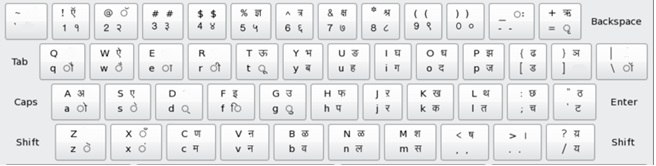
Keyboard Layout

To display user information on regional language the characters need to be mapped onto a standard keyboard. In this case, the custom characters are mapped to a standard US-EN keyboard. When defining new character set, ASCII values of keys are assigned uniquely to each new custom character in ascending order [order is important as binary search is employed!]. For example, to display a vacant position spacebar key with ASCII value 32 is assigned to hex array {0x00,0x00,0x00,0x00,0x00,0x00,0x00,0x00}.

Bengali Keyboard layout:-

Bengali Keyboard Pattern


Hindi Keyboard layout:-

Hindi Keyboard Layout


Sample Programs and Circuit

Usage

Three sample programs are included namely- “SerialDisplay” , “PrintAllChar” , “Bengali/Hindi Text”. The functioning of each sample programs is described below:-

#################

# SerialDisplay

#################

The SerialDisplay function requires the use of “Serial Monitor” in the Arduino IDE for input. After uploading the program the user needs to open the serial monitor from where the input can be given. For proper input please refer to the keyboard layout pictures.

#################

# PrintAllChar

#################

PrintAllChar function basically displays all the stored fonts in the library. It does not involve any user interaction. This can be used to test whether all the designed fonts are working as required.

#######################

# Bengali/Hindi Text

#######################

This function prints the regional fonts by taking the input from user in the form of function parameter. Usage involves sending the input in the form of String.

void loop()

{

   Bengali_Text(lcd,”r|H,l kr”);//printing my name[use the keyboard layout file for guidance]

   delay(300);

   Bengali_Text(lcd,”b|Vl|”);//printing the word “Bangla” [use the keyboard layout file for guidance]

   delay(300);

}

Circuit

HD44780 controllers use two types of addressing modes:  4 bit & 8 bit mode. This project uses 4 bit addressing mode which requires only 6 digital I/O Arduino pins to interface with 16×2 LCD. (Check here Arduino Tutorials) Following connections are made between Arduino and 16×2 LCD module:-


LCD Pin                            Arduino Pin


 1 (VSS)                      Arduino GND pin

 2 (VDD)                     + 5V Arduino pin

 3 (contrast)                 Resistor or potentiometer to ArduinoGND pin

 4 RS                           Arduino pin 12

 5 R/W                         ArduinoGND pin

 6 Enable                     Arduino pin 11

 7                                 NC     

 8                                 NC     

 9                                 NC

 10                               NC     

 11 (Data 4)                 Arduino pin 5

 12 (Data 5)                 Arduino pin 4

 13 (Data 6)                 Arduino pin 3

 14 (Data 7)                 Arduino pin 2

 15                               + 5V Arduino pin

16                                470Ohm resistor to GND Arduino                                  

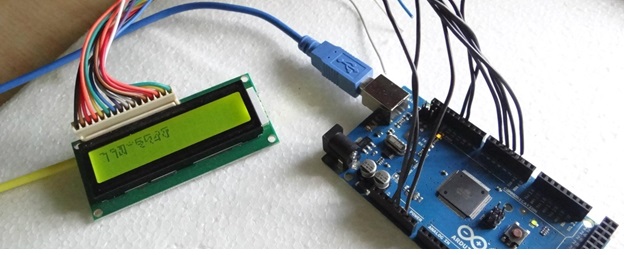
 Circuit Images and Code

Images


Regional Language on LCD using Arduino


Regional Language on LCD using Arduino

Regional Language on LCD using ArduinoRegional Language on LCD using ArduinoRegional Language on LCD using Arduino

Code:- 


Place the Hindi/Bengali libraries inside Arduino/libraries/ folder. Code files are attached with the document.

 Videos

Videos:-


Circuit Diagrams
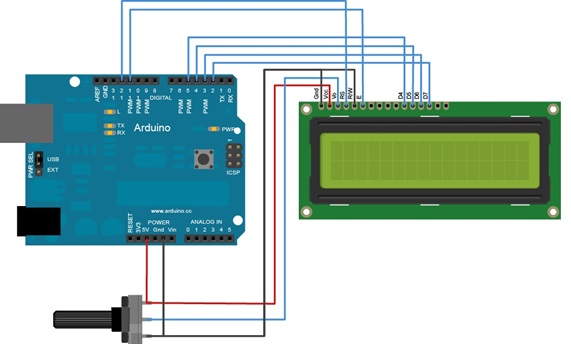
Arduino-Circuit


Filed Under: Electronic Projects
Tagged With: adruino, display, lcd, regional language
 

Next Article

← Previous Article
Next Article →

Questions related to this article?
👉Ask and discuss on Electro-Tech-Online.com and EDAboard.com forums.


Tell Us What You Think!! Cancel reply

Log in to leave a comment:

Lost your password?

Don't have an account? Register here

Submit a Guest Post

submit a guest post

EE TECH TOOLBOX

“ee
Tech Toolbox: Sensors
In this Tech Toolbox, we cover some of those technologies driving the next generation of connected systems, including ultra-low-power sensing strategies that extend node battery life, and 60 GHz CMOS radar for contactless health and presence detection.

EE Learning Center

EE Learning Center
“engineers
EXPAND YOUR KNOWLEDGE AND STAY CONNECTED
Get the latest info on technologies, tools and strategies for EE professionals.

HAVE A QUESTION?

Have a technical question about an article or other engineering questions? Check out our engineering forums EDABoard.com and Electro-Tech-Online.com where you can get those questions asked and answered by your peers!


RSS EDABOARD.com Discussions.

  • Is a 10:1 DC inverter 40kW possible?
  • Use an external Signal Generator to tune the PLL output of a circuit from 3Ghz to 10GHz
  • LG 42 PC1RV short circuit?
  • Enhancing Boost Converter Efficiency: From Practical Limitations to a Series-Boost Differential Topology
  • Mains electrical safety testing and standards?

RSS Electro-Tech-Online.com Discussions

  • Programmable 1kV DC Power Supply – Budget ~$600 with Display
  • USBASP Programming problems
  • Need Guidance to reduce noise in 3-stage Transimpedance amplifier
  • Harman Kardon radio module BMW noise
  • Win 7 and browsing

Featured Tutorials

Learn - VHDL Tutorials (22 Part)

  • VHDL Tutorial – 11: Designing half and full-subtractor circuits
    VHDL Tutorial – 11: Designing half and full-subtractor circuits
  • VHDL Tutorial – 12: Design a 8-bit parity generator and circuit checker
    VHDL Tutorial – 12: Design a 8-bit parity generator and circuit checker
  • VHDL tutorial 13: Design 3×8 decoder and 8×3 encoder using VHDL
    VHDL tutorial 13: Design 3×8 decoder and 8×3 encoder using VHDL
  • VHDL Tutorial 14: Design 1×8  demultiplexer and 8×1 multiplexer using VHDL
    VHDL Tutorial 14: Design 1×8  demultiplexer and 8×1 multiplexer using VHDL
  • VHDL Tutorial 17: Design a JK flip-flop (with preset and clear) using VHDL
    VHDL Tutorial 17: Design a JK flip-flop (with preset and clear) using VHDL
  • VHDL Tutorial 18: Design a T flip-flop (with enable and an active high reset input) using VHDL
    VHDL Tutorial 18: Design a T flip-flop (with enable and an active high reset input) using VHDL
More Tutorials >

Recent Articles

  • GigaDevice targets optical modules with new MCUs
  • HMS Networks bridges Automotive Ethernet and standard Ethernet
  • Nuvoton adds post-quantum security to secure MCU
  • TI battery monitor delivers less than 2 mV accuracy
  • Qorvo adds 10 W X-band radar front end

EE ENGINEERING TRAINING DAYS

engineering
Engineers Garage
  • Analog IC TIps
  • Connector Tips
  • Battery Power Tips
  • EDABoard Forums
  • EE World Online
  • Electro-Tech-Online Forums
  • EV Engineering
  • Microcontroller Tips
  • Power Electronic Tips
  • Sensor Tips
  • Test and Measurement Tips
  • 5G Technology World
  • Subscribe to our newsletter
  • About Us
  • Contact Us
  • Advertise

Copyright © 2026 WTWH Media LLC. All Rights Reserved. The material on this site may not be reproduced, distributed, transmitted, cached or otherwise used, except with the prior written permission of WTWH Media
Privacy Policy

Search Engineers Garage

  • Electronic Projects & Tutorials
    • Electronic Projects
      • Arduino Projects
      • AVR
      • Raspberry pi
      • ESP8266
      • BeagleBone
      • 8051 Microcontroller
      • ARM
      • PIC Microcontroller
      • STM32
    • Tutorials
      • Sensor Series
      • Engineering Deep Dives
      • AI
      • ARDUINO Compatible Coding
      • Audio Electronics
      • Battery Management
      • Beginners Electronics Series
      • Brainwave
      • Digital electronics (DE)
      • Electric Vehicles
      • EMI/EMC/RFI
      • EVs
      • Hardware Filters
      • IoT tutorials
      • LoRa/LoRaWAN
      • Power Tutorials
      • Protocol
      • Python
      • RPI Python Programming
      • Sensors
      • USB
      • Thermal management
      • Verilog
      • VHDL
    • Circuit Design
    • Project Videos
    • Components
  • Articles
    • Tech Articles
    • Insight
    • Invention Stories
    • How to
    • What Is
  • News
    • Electronic Product News
    • Business News
    • Company/Start-up News
    • DIY Reviews
    • Guest Post
  • Forums
    • EDABoard.com
    • Electro-Tech-Online
    • EG Forum Archive
  • DigiKey Store
    • Cables, Wires
    • Connectors, Interconnect
    • Discrete
    • Electromechanical
    • Embedded Computers
    • Enclosures, Hardware, Office
    • Integrated Circuits (ICs)
    • Isolators
    • LED/Optoelectronics
    • Passive
    • Power, Circuit Protection
    • Programmers
    • RF, Wireless
    • Semiconductors
    • Sensors, Transducers
    • Test Products
    • Tools
  • Learn
    • eBooks/Tech Tips
    • Design Guides
    • Learning Center
    • Tech Toolboxes
    • Webinars & Digital Events
  • Resources
    • Digital Issues
    • EE Training Days
    • LEAP Awards
    • Podcasts
    • Webinars / Digital Events
    • White Papers
    • Engineering Diversity & Inclusion
  • Guest Post Guidelines
  • Advertise
  • Subscribe