Voice control has become so routine that it’s easy to forget how much happens between a spoken command and the response. Say “turn on the light” to a smart speaker, and a moment later the light comes on. It feels like the device heard you. It didn’t. What it received was a list of numbers, 16,000 of them every second, and a chain of hardware and software turned those numbers back into words.
If you’ve wired an INMP441 microphone to an ESP32, you’ve already handled the first part of that chain, probably without thinking much about it. The Inter-IC Sound (I2S) driver hands you a buffer of samples, and that’s where most tutorials stop. This article picks up from there.

In this article, we’ll cover how sound becomes pulse-code modulation (PCM), follow the samples over I2S into memory, and look at what audio codecs do and whether speech recognition needs one. We’ll finish with a hands-on capture from an INMP441 to a PC.
In the following piece, we’ll walk through the recognizer, from feature extraction to the acoustic model and the search that produces the final text. By the end, you’ll know why a recognizer never looks at raw samples, why compressing audio before recognition usually costs accuracy, why I2S frames two channels anyway, and which codec, if any, belongs between your microphone and your model.
One word causes more confusion here than any other, and that’s “coding.” It turns up at three separate points in the pipeline, and they have nothing to do with each other. Only the first one is mandatory. The recognizer always works on PCM, no matter how the audio traveled to it.
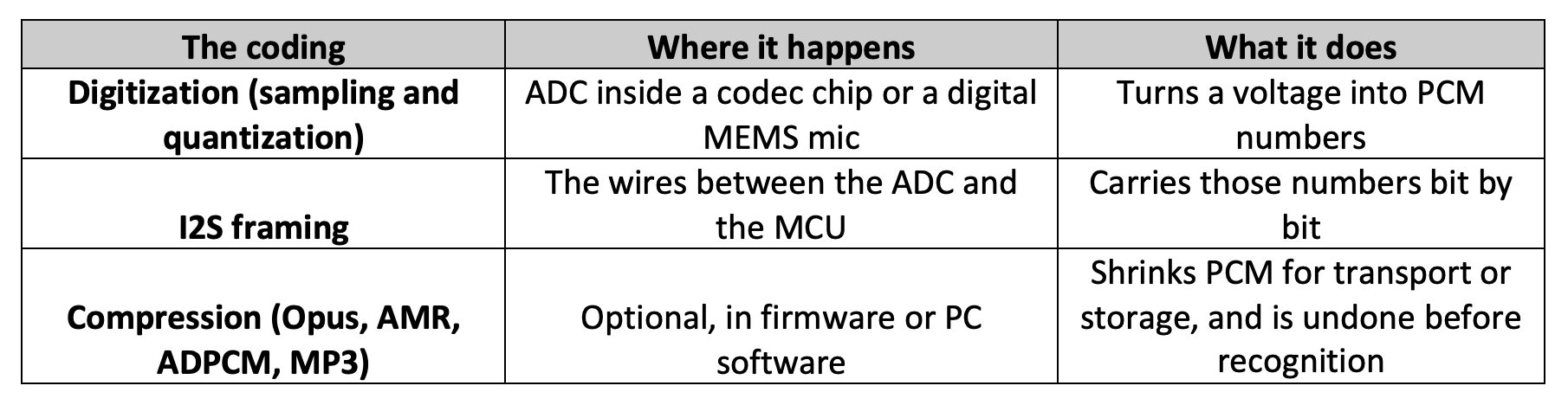
How sound becomes PCM
Sound is a pressure wave in the air. A MEMS microphone has a diaphragm a fraction of a millimeter across that flexes with that wave, changing a capacitance and producing a tiny voltage that rises and falls with your voice. At this point, the signal is still analog, continuous in time and continuous in value.
The ADC turns that voltage into numbers in two steps. Sampling comes first and measures the voltage at fixed intervals. At 16 kHz, the ADC takes a reading every 62.5 microseconds. Quantization then rounds each reading to the nearest available level. A 16-bit converter has 65,536 levels, running from -32,768 to +32,767.
What comes out is PCM, a plain sequence of signed integers, one per sample. Nothing is compressed, and nothing is modeled. One second of 16-kHz, 16-bit mono audio is 16,000 samples, or 32,000 bytes. That’s 256 kbit/s, a number worth remembering, because it comes back when we get to codecs.
Why speech runs at 16 kHz
The Nyquist theorem says a sampled signal can only represent frequencies up to half its sample rate. A 16-kHz stream captures everything up to 8 kHz, which covers the vowels and most of the consonant energy in speech. That’s why 16 kHz is the standard input rate for modern recognizers.
Telephone audio runs at 8 kHz, which caps it at 4 kHz. You can still understand the caller, but sounds like “s” and “f” lose much of their energy. It’s the reason you end up saying “S as in Sierra” on a support call. Music needs 44.1 or 48 kHz to reach the top of human hearing.
Everything above the Nyquist limit also has to be filtered out before sampling. Skip that step, and high frequencies fold back into the audible band as aliasing. Once that happens, no later processing can separate them from the real signal.
Where the ADC sits
On an embedded board, the ADC sits in one of two places. With an analog microphone, a hardware audio codec chip such as the ES8311, WM8960, or TLV320AIC3104 does the conversion. These chips also carry amplifiers, filters, and a digital-to-analog converter (DAC) for playback, and they talk to the MCU over I2S for audio and I2C for configuration.
With a digital MEMS microphone such as the INMP441, the ADC is built into the microphone package. The mic outputs I2S directly, so there’s no separate codec chip. Either way, what reaches the microcontroller is the same PCM stream.
Turning samples into memory
The ADC’s numbers travel to the microcontroller over I2S. If you’ve read our earlier article on the I2S digital audio protocol, you already know the bus. Here’s the short version. I2S is transport only. It frames the bits, and it doesn’t encode anything.

A 16-bit sample of -1,200, for example, leaves the ADC as 1111 1011 0101 0000, once per WS period.
DMA does the heavy lifting
On the ESP32, the I2S peripheral assembles incoming bits into words, and the direct memory access (DMA) controller copies them into a ring of buffers in RAM. The CPU doesn’t have to move samples one at a time. Your code calls i2s_channel_read() (ESP-IDF 5.x) and gets back a block of samples, usually 10 to 30 ms of audio, or 160 to 480 samples at 16 kHz. That buffer is the PCM that every later stage works on.
The INMP441 quirk
Here’s the detail that trips up most first INMP441 projects. The mic sends 24-bit samples inside 32-bit I2S slots, so you read 32-bit values and shift them right to get usable 16-bit samples. The shift amount, usually somewhere between 11 and 14 bits, works as a gain control. Shift less, and the audio gets louder, right up until it clips. The L/R pin picks which slot the mic answers in. Tie it to GND for the left channel or to 3.3 V for the right.
One channel or two?
Since I2S always carries a left and a right slot, it’s easy to assume proper audio needs two channels. It doesn’t. Mono is complete, accurate audio, and for speech, it’s usually all you need. Stereo exists for a different reason. It recreates the sense of where a sound is coming from.
Why stereo exists
You hear with two ears, and your brain locates a sound by comparing what each one receives. A sound from your left reaches your left ear a fraction of a millisecond earlier than your right, an effect known as the interaural time difference. It’s also slightly louder on the left, because your head shadows the right ear, which creates the interaural level difference. Two channels played through two speakers or a pair of headphones can reproduce those cues. That’s what gives music its width and lets a movie scene feel like it surrounds you.
So, stereo improves the listening experience, not the correctness of the audio. A mono recording of a voice holds everything needed to understand the words.
When mono is the right choice
Speech recognition expects mono at 16 kHz. The front end downmixes a stereo input anyway, so sending two channels doubles the data for no gain. Voice calls are mono too, whether they run over telephone networks or voice over IP (VoIP), and voice recordings and podcasts are usually mono or mono content placed in the center of a stereo file.
A project with a single INMP441 is mono by nature. One microphone captures sound at one point in space.
Why I2S frames two slots anyway
I2S dates from 1986, when Philips designed it for consumer gear like CD players, so every frame carries two slots, with WS low for left and WS high for right. The bus keeps that stereo framing even when you only use one channel.
With a single INMP441, the L/R pin decides which slot the mic answers in, and the other slot stays empty. Your firmware either tells the ESP32 to read only that slot or reads both and throws the empty one away. If you get nothing but zeros, there’s a good chance you’re reading the wrong slot.
You can also put two INMP441s on the same bus. They share BCLK, WS, and SD, with one L/R pin tied to GND and the other to 3.3 V. Each mic drives the data line only during its own slot, and the bus now carries a real stereo pair from two physical microphones.
When two mics help speech recognition
For capture, as opposed to playback, extra microphones do earn their place. Smart speakers use arrays of two to eight mics for beamforming. Your voice reaches each mic at a slightly different time, so the device can line the signals up to boost sound from your direction and suppress noise from everywhere else. The same array lets it estimate where you’re standing and cancel the echo of its own speaker.
The output of all that processing is still one cleaned-up mono stream, and that’s what goes to the recognizer. On the ESP32-S3, the audio front end (AFE) in Espressif’s ESP-SR does this with one or two microphones, runs wake word detection with WakeNet, and passes the cleaned mono audio to MultiNet for command recognition. So, two channels can make recognition more robust in a noisy room, even though the recognizer only ever sees one.
What the numbers carry
A common first reaction to PCM is that it’s “just amplitude.” If every sample is only a height, where are the pitch, the vowels, and the speaker’s voice? The information isn’t in any one sample. It’s in how the values change from one sample to the next.
Fourier analysis explains why. Any waveform can be built from sine waves of different frequencies, amplitudes, and phases. A 100-Hz component makes the samples rise and fall slowly. A 3-kHz component swings them back and forth every few samples. Add them together, and you get one wiggly line that holds both.
Think of a chord on a piano. You hear one sound, but it’s several notes at once, and a trained ear can pick them apart. A fast Fourier transform does the same thing to a block of samples. It doesn’t add information. It unpacks frequency content the samples already hold.
Speech sounds differ in which frequency bands they boost. The shape of your vocal tract creates resonances called formants. For an adult male speaker, “ee” has formants near 300 Hz and 2,300 Hz, while “ah” sits near 700 Hz and 1,100 Hz. Different mixtures produce different sample sequences.
Can two different sounds share the same samples?
No. If two recordings have exactly the same sample sequence, they’re physically the same sound, and no listener or machine could tell them apart. A Hindi word and an English word that sound different must have different waveforms.
A few things can match, though, and they’re probably why the question comes up. A single sample value means nothing on its own. The value 4,000 shows up in every voice, language, and instrument. The loudness envelope can also match. A whispered “cat” and “bat” may share a volume contour while the fine structure inside is different.
Homophones like “there” and “their,” or similar-sounding words across languages, produce nearly identical waveforms. The recognizer can’t separate them acoustically, so it leans on the language model and context.
The harder problem runs the other way. The same word never produces the same samples twice. Change the speaker, the microphone, or the room, or say it again, and the waveform changes. That’s why recognizers never match raw samples. They extract features that describe spectral shape and learn which shapes belong to which sounds.
The two meanings of audio codecs
Before going further, it’s worth clearing up a naming problem. A codec (coder-decoder) converts a signal into another representation and back again. In embedded audio, though, the word gets used for two very different things.
Hardware codec chips like the ES8311, WM8960, and TLV320AIC3104 contain an ADC and a DAC. They convert analog to PCM and PCM back to analog. Despite the name, they usually don’t compress anything. Compression codecs like FLAC, Opus, MP3, and AMR take PCM and reduce its data rate. That’s what the rest of this section covers.
Lossless versus lossy
- Lossless codecs such as FLAC give you back the original samples bit for bit. They predict each sample from its neighbors and store only the small prediction errors, which typically shrinks a file to 50 to 70% of its PCM size.
- Lossy codecs throw information away, either because your ear won’t miss it or because a model can regenerate something close enough. In exchange, they reach compression ratios of 10:1 to 100:1. The decoded output is no longer the original.
Five families of audio codecs
- Waveform codecs. These try to reproduce the samples. G.711 maps each sample to 8 bits on a logarithmic (mu-law or A-law) scale, giving fine steps to quiet sounds and coarse steps to loud ones, much as the ear does. Adaptive differential PCM (ADPCM) variants such as G.722, G.726, and IMA ADPCM store the difference between each sample and a prediction. IMA ADPCM is a microcontroller favorite, with 4:1 compression at almost no CPU cost.
- Parametric codecs (vocoders). These don’t store the waveform at all. They model your vocal tract as a filter, driven by a buzz for voiced sounds or by noise for sounds like “s,” and send a handful of parameters per frame. LPC-10 runs at 2.4 kbit/s and sounds robotic. Codec2, popular in amateur radio, goes as low as 700 bit/s.
- Hybrid codecs. These use the same source-filter model, but the encoder tries many candidate excitation signals and keeps the one whose synthesized output best matches the real waveform. This analysis-by-synthesis family, known as code-excited linear prediction (CELP), includes G.729, along with the AMR and AMR-WB codecs used in mobile networks. It delivers good speech at 6 to 24 kbit/s, which is why your phone calls run on it. SILK, the speech layer inside Opus, builds on the same linear-prediction approach.
- Perceptual transform codecs. These convert each frame to the frequency domain, usually with the modified discrete cosine transform (MDCT). A psychoacoustic model then finds sounds masked by louder nearby frequencies and spends few or no bits on them. MP3, AAC, Vorbis, and CELT (the other half of Opus) work this way, and they handle music far better than speech-only codecs.
- Neural codecs. These train an encoder and a decoder together. Google’s Lyra and SoundStream, Meta’s EnCodec, and Descript’s DAC produce intelligible speech at a few kilobits per second. They also double as the tokenizers behind many generative audio models.
Common codecs

Every one of these decodes back to PCM, because that’s what a DAC, a speaker, or a speech recognizer consumes.
Capturing INMP441 audio on ESP32
That covers the theory. Here’s how the first half of the chain looks on real hardware. Once it’s wired up, the INMP441’s samples land in the ESP32’s RAM, and from there, you can process them locally, stream them, or record them on a PC. Recognition gets its own treatment in the next part, so this section sticks to wiring, capture, and recording.
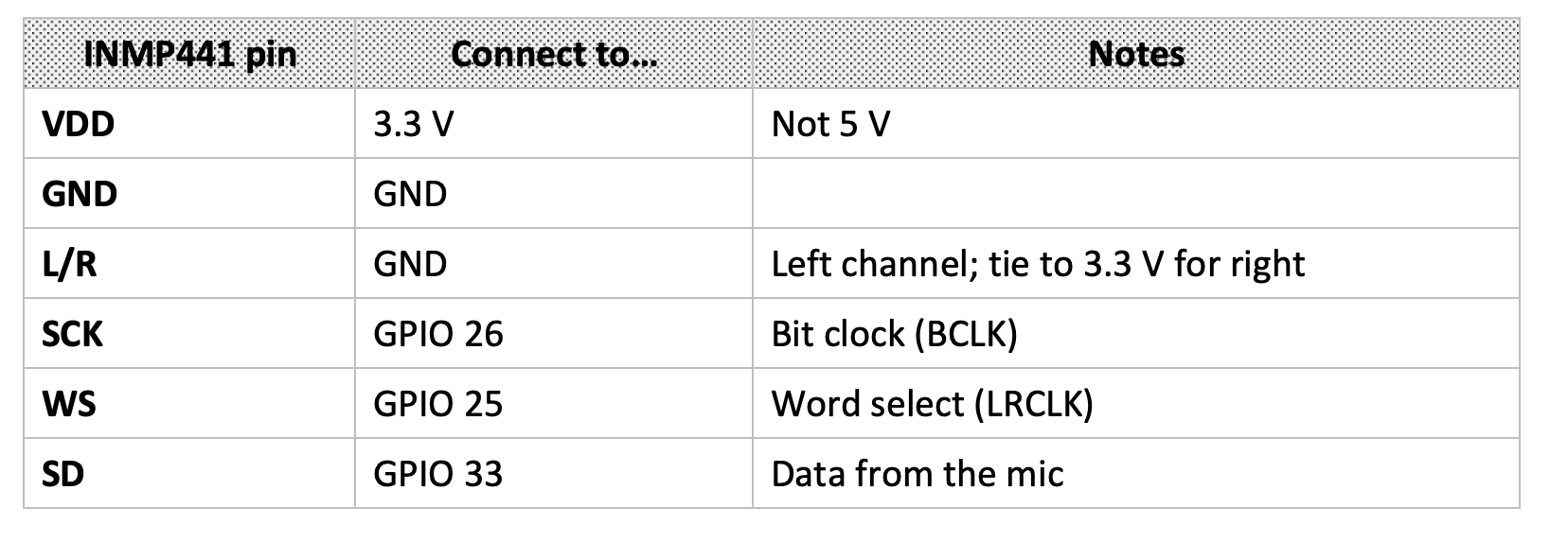
These pins are a common choice on the classic ESP32. On the ESP32-S3, almost any free general-purpose input/output (GPIO) pin works because I2S signals route through the GPIO matrix.
Configure the I2S peripheral as a receiver in standard (Philips) mode at 16 kHz with 32-bit slots, and shift each sample down to 16 bits. Eight DMA buffers of 256 to 512 samples give the read loop enough slack. One second of audio takes 32 KB of RAM.
Recording to a PC as WAV or MP3
When you’re building a dataset or testing the microphone, let the PC handle the files. You have a few ways to get the audio there.
USB serial is the simplest. Mono 16-kHz, 16-bit audio needs 32 KB/s, and a USB-UART at 921,600 baud carries about 92 KB/s. Send only raw bytes, or add simple framing, because one stray debug print will corrupt the stream.
Wi-Fi over TCP or a WebSocket is wireless and reliable, with headroom for 44.1-kHz audio. UDP has lower latency, but dropped packets show up as clicks. An SD card on the ESP32 works when the PC doesn’t need the audio live.
On the PC side, a short Python script reads the bytes with pyserial or socket and writes them through the built-in wave module, set for 1 channel, 2 bytes per sample, and 16,000 Hz. The module writes the 44-byte WAV header for you. For MP3, convert afterward with ffmpeg -i recording.wav -b:a 64k recording.mp3, or encode live with the lameenc package.
You can encode MP3 on the ESP32 with a port of the Shine encoder, but there’s little reason to. It eats CPU and gains nothing when a PC is sitting right there. If the audio is headed for recognition or model training, keep the WAV.
When it doesn’t work
Most INMP441 problems fall into a handful of patterns.
- Silence or garbage usually means the channel setting doesn’t match the L/R pin, or the bit width is wrong. On some ESP-IDF versions with the classic ESP32, the left and right selection is effectively swapped, so try the other channel before anything else.
- A small dc offset rides on the INMP441’s output. A simple high-pass filter, or subtracting a running average, removes it.
- Audio that’s too quiet or clipped comes from the shift amount.
- Gaps and skips mean the transmit side can’t keep up. Add DMA buffers and keep slow work out of the read loop.
- Hum and hiss often trace back to a noisy 3.3-V rail or long jumper wires. Short wires and a 0.1-µF decoupling capacitor near the mic help.
Conclusion
Audio capture looks like a single library call, but the chain underneath is short and logical. An ADC samples air pressure into PCM, I2S carries those numbers bit by bit, and DMA drops them into RAM without bothering the CPU. Everything after that, whether it’s a codec, a WAV file, or a speech recognizer, starts from the same buffer.
If you take a few things away from this article, make them these. PCM is amplitude over time, but the way it changes carries pitch, vowels, and voice. Mono is complete audio, and I2S only frames two slots because it was built for CD players. “Codec” means two different things, a chip that converts analog to digital and an algorithm that compresses, and only the first is required. In Part 2, we’ll take that PCM buffer and follow it through a speech recognizer.
References
- https://docs.espressif.com/projects/esp-idf/en/release-v5.4/esp32s3/api-reference/peripherals/i2s.html
- https://docs.espressif.com/projects/arduino-esp32/en/latest/api/i2s.html
- https://docs.espressif.com/projects/esp-sr/en/latest/esp32/audio_front_end/README.html
- https://www.espressif.com/en/solutions/audio-solutions/esp-afe
- https://github.com/drowe67/codec2
- https://www.itu.int/ITU-T/recommendations/rec.aspx?rec=6506
- https://www.itu.int/rec/T-REC-G.711
- https://en.wikipedia.org/wiki/FLAC
- https://ccrma.stanford.edu/~kglee/m220c/formant.html
- https://huggingface.co/docs/transformers/main/en/model_doc/dac
- https://www.engineersgarage.com/understanding-the-i2s-digital-audio-protocol/
- https://microcontroller-course.web.cern.ch/Project_Material/resources/INMP441.pdf
- https://www.nxp.com/docs/en/user-manual/UM11732.pdf
You may also like:

Filed Under: Tech Articles
Log in to leave a comment:
Lost your password?
Don't have an account? Register here