Engineers Garage

  • Electronic Projects & Tutorials
    • Electronic Projects
      • Arduino Projects
      • AVR
      • Raspberry pi
      • ESP8266
      • BeagleBone
      • 8051 Microcontroller
      • ARM
      • PIC Microcontroller
      • STM32
    • Tutorials
      • Sensor Series
      • Engineering Deep Dives
      • AI
      • ARDUINO Compatible Coding
      • Audio Electronics
      • Battery Management
      • Beginners Electronics Series
      • Brainwave
      • Digital electronics (DE)
      • Electric Vehicles
      • EMI/EMC/RFI
      • EVs
      • Hardware Filters
      • IoT tutorials
      • LoRa/LoRaWAN
      • Power Tutorials
      • Protocol
      • Python
      • RPI Python Programming
      • Sensors
      • USB
      • Thermal management
      • Verilog
      • VHDL
    • Circuit Design
    • Project Videos
    • Components
  • Articles
    • Tech Articles
    • Insight
    • Invention Stories
    • How to
    • What Is
  • News
    • Electronic Product News
    • Business News
    • Company/Start-up News
    • DIY Reviews
    • Guest Post
  • Forums
    • EDABoard.com
    • Electro-Tech-Online
    • EG Forum Archive
  • DigiKey Store
    • Cables, Wires
    • Connectors, Interconnect
    • Discrete
    • Electromechanical
    • Embedded Computers
    • Enclosures, Hardware, Office
    • Integrated Circuits (ICs)
    • Isolators
    • LED/Optoelectronics
    • Passive
    • Power, Circuit Protection
    • Programmers
    • RF, Wireless
    • Semiconductors
    • Sensors, Transducers
    • Test Products
    • Tools
  • Learn
    • eBooks/Tech Tips
    • Design Guides
    • Learning Center
    • Tech Toolboxes
    • Webinars & Digital Events
  • Resources
    • Digital Issues
    • EE Training Days
    • LEAP Awards
    • Podcasts
    • Webinars / Digital Events
    • White Papers
    • Engineering Diversity & Inclusion
  • Guest Post Guidelines
  • Advertise
  • Subscribe

How to display text on 16×2 LCD using PIC18F4550 Microcontroller- (Part 6/25)

By Amit Joshi May 18, 2010

Several automated and semi-automated devices require a message to be displayed in order to indicate their working status. In continuation to LCD interfacing with PIC18F4550, this article explains how to display a message or string on a 16x2 character LCD.


Programming steps:
·         Configure the LCD.
·         Store a string in a character array.
unsigned char data[20]=“EngineersGarage”;
·         Run a loop till the loop counter encounters the null character ‘’ of the string.
·         Use lcddata() function to send individual character values of the string to be displayed on LCD. 

Code:

while(data[i]!=’’)
    {
        lcddata(data[i]);   
        i++;
        Delay_ms(300);
    }

Project Source Code

###

// Program to display text on 16x2 LCD using PIC18F4550 Microcontroller

// Configuration bits
/* _CPUDIV_OSC1_PLL2_1L,  // Divide clock by 2
   _FOSC_HS_1H,           // Select High Speed (HS) oscillator
   _WDT_OFF_2H,           // Watchdog Timer off
   MCLRE_ON_3H            // Master Clear on
*/

//LCD Control pins
#define rs LATA.F0
#define rw LATA.F1
#define en LATA.F2

//LCD Data pins
#define lcdport LATB

void lcd_ini();
void lcdcmd(unsigned char);
void lcddata(unsigned char);
unsigned char data[20]="EngineersGarage";
unsigned int i=0;

void main(void)
{
	TRISA=0;		// Configure Port A as output port
	LATA=0;
	TRISB=0;		// Configure Port B as output port
	LATB=0;
	lcd_ini();		// LCD initialization
	while(data[i]!='')
	{
		lcddata(data[i]);	// Call lcddata function to send characters
					// one by one from "data" array
		i++;
		Delay_ms(300);
	}

}
void lcd_ini()
{
	lcdcmd(0x38);		// Configure the LCD in 8-bit mode, 2 line and 5x7 font
	lcdcmd(0x0C);		// Display On and Cursor Off
	lcdcmd(0x01);		// Clear display screen
	lcdcmd(0x06);		// Increment cursor
	lcdcmd(0x80);		// Set cursor position to 1st line, 1st column
}

void lcdcmd(unsigned char cmdout)
{
	lcdport=cmdout;		//Send command to lcdport=PORTB
	rs=0;						
	rw=0;
	en=1;
	Delay_ms(10);
	en=0;
}

void lcddata(unsigned char dataout)
{
	lcdport=dataout;	//Send data to lcdport=PORTB
	rs=1;
	rw=0;
	en=1;
	Delay_ms(10);
	en=0;
}

###


Circuit Diagrams

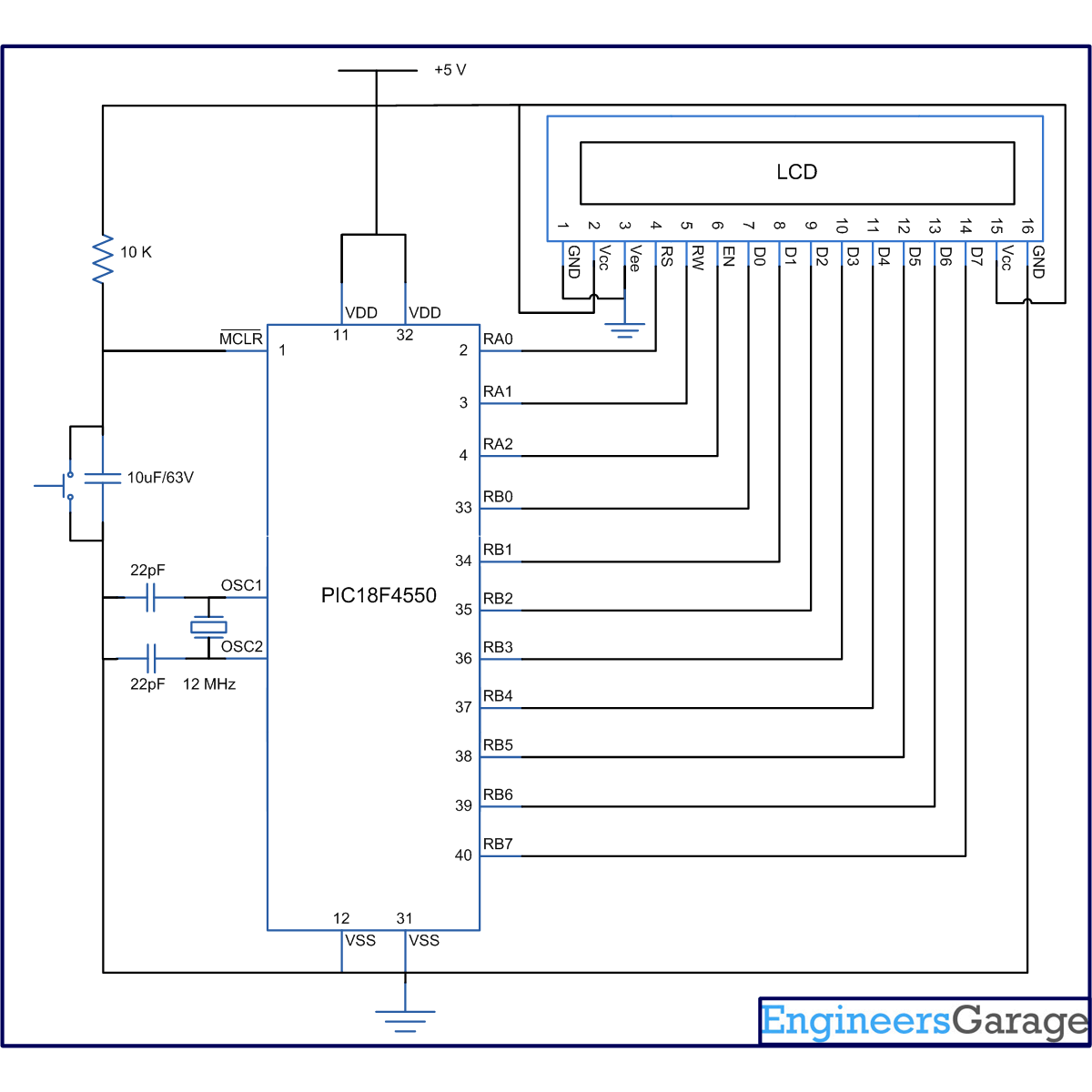
Circuit-Diagram-of-How-to-display-text-on-16×2-LCD-using-PIC18F4550-Microcontroller

Project Components

  • LCD
  • PIC18F4550
  • Preset

Project Video


Filed Under: PIC Microcontroller
Tagged With: display, lcd, microcontroller, pic18f4550
 

Next Article

← Previous Article
Next Article →

Questions related to this article?
👉Ask and discuss on Electro-Tech-Online.com and EDAboard.com forums.


Tell Us What You Think!! Cancel reply

Log in to leave a comment:

Lost your password?

Don't have an account? Register here

Submit a Guest Post

submit a guest post

EE TECH TOOLBOX

“ee
Tech Toolbox: Sensors
In this Tech Toolbox, we cover some of those technologies driving the next generation of connected systems, including ultra-low-power sensing strategies that extend node battery life, and 60 GHz CMOS radar for contactless health and presence detection.

EE Learning Center

EE Learning Center
“engineers
EXPAND YOUR KNOWLEDGE AND STAY CONNECTED
Get the latest info on technologies, tools and strategies for EE professionals.

HAVE A QUESTION?

Have a technical question about an article or other engineering questions? Check out our engineering forums EDABoard.com and Electro-Tech-Online.com where you can get those questions asked and answered by your peers!


RSS EDABOARD.com Discussions.

  • Inductor windings: Wire bundle diameter?
  • Enhancing Boost Converter Efficiency: From Practical Limitations to a Series-Boost Differential Topology
  • How to measure the mass of an object in space
  • Why is this metal PCB enclosure floating?
  • Load Disconection Voltage Spike - Boost Converter

RSS Electro-Tech-Online.com Discussions

  • Mystery amp noise - ??
  • 220v to 5v
  • What is the most suitable light source for making a book light like this?
  • PIC Assembler - New IDE
  • My Advanced Realistic Humanoid Robots Project

Featured Tutorials

Learn - VHDL Tutorials (22 Part)

  • VHDL Tutorial – 11: Designing half and full-subtractor circuits
    VHDL Tutorial – 11: Designing half and full-subtractor circuits
  • VHDL Tutorial – 12: Design a 8-bit parity generator and circuit checker
    VHDL Tutorial – 12: Design a 8-bit parity generator and circuit checker
  • VHDL tutorial 13: Design 3×8 decoder and 8×3 encoder using VHDL
    VHDL tutorial 13: Design 3×8 decoder and 8×3 encoder using VHDL
  • VHDL Tutorial 14: Design 1×8  demultiplexer and 8×1 multiplexer using VHDL
    VHDL Tutorial 14: Design 1×8  demultiplexer and 8×1 multiplexer using VHDL
  • VHDL Tutorial 17: Design a JK flip-flop (with preset and clear) using VHDL
    VHDL Tutorial 17: Design a JK flip-flop (with preset and clear) using VHDL
  • VHDL Tutorial 18: Design a T flip-flop (with enable and an active high reset input) using VHDL
    VHDL Tutorial 18: Design a T flip-flop (with enable and an active high reset input) using VHDL
More Tutorials >

Recent Articles

  • Smarter HVAC Climate Solutions by TE
  • Amphenol RF adds NEX10 jack for 1.37 mm cable
  • Samtec headers support 2 to 50 pins
  • Same Sky adds 2.54 mm rectangular connectors
  • Bourns adds high-power fuses up to 1000 VDC

EE ENGINEERING TRAINING DAYS

engineering
Engineers Garage
  • Analog IC TIps
  • Connector Tips
  • Battery Power Tips
  • EDABoard Forums
  • EE World Online
  • Electro-Tech-Online Forums
  • EV Engineering
  • Microcontroller Tips
  • Power Electronic Tips
  • Sensor Tips
  • Test and Measurement Tips
  • 5G Technology World
  • Subscribe to our newsletter
  • About Us
  • Contact Us
  • Advertise

Copyright © 2026 WTWH Media LLC. All Rights Reserved. The material on this site may not be reproduced, distributed, transmitted, cached or otherwise used, except with the prior written permission of WTWH Media
Privacy Policy

Search Engineers Garage

  • Electronic Projects & Tutorials
    • Electronic Projects
      • Arduino Projects
      • AVR
      • Raspberry pi
      • ESP8266
      • BeagleBone
      • 8051 Microcontroller
      • ARM
      • PIC Microcontroller
      • STM32
    • Tutorials
      • Sensor Series
      • Engineering Deep Dives
      • AI
      • ARDUINO Compatible Coding
      • Audio Electronics
      • Battery Management
      • Beginners Electronics Series
      • Brainwave
      • Digital electronics (DE)
      • Electric Vehicles
      • EMI/EMC/RFI
      • EVs
      • Hardware Filters
      • IoT tutorials
      • LoRa/LoRaWAN
      • Power Tutorials
      • Protocol
      • Python
      • RPI Python Programming
      • Sensors
      • USB
      • Thermal management
      • Verilog
      • VHDL
    • Circuit Design
    • Project Videos
    • Components
  • Articles
    • Tech Articles
    • Insight
    • Invention Stories
    • How to
    • What Is
  • News
    • Electronic Product News
    • Business News
    • Company/Start-up News
    • DIY Reviews
    • Guest Post
  • Forums
    • EDABoard.com
    • Electro-Tech-Online
    • EG Forum Archive
  • DigiKey Store
    • Cables, Wires
    • Connectors, Interconnect
    • Discrete
    • Electromechanical
    • Embedded Computers
    • Enclosures, Hardware, Office
    • Integrated Circuits (ICs)
    • Isolators
    • LED/Optoelectronics
    • Passive
    • Power, Circuit Protection
    • Programmers
    • RF, Wireless
    • Semiconductors
    • Sensors, Transducers
    • Test Products
    • Tools
  • Learn
    • eBooks/Tech Tips
    • Design Guides
    • Learning Center
    • Tech Toolboxes
    • Webinars & Digital Events
  • Resources
    • Digital Issues
    • EE Training Days
    • LEAP Awards
    • Podcasts
    • Webinars / Digital Events
    • White Papers
    • Engineering Diversity & Inclusion
  • Guest Post Guidelines
  • Advertise
  • Subscribe