Engineers Garage

  • Electronic Projects & Tutorials
    • Electronic Projects
      • Arduino Projects
      • AVR
      • Raspberry pi
      • ESP8266
      • BeagleBone
      • 8051 Microcontroller
      • ARM
      • PIC Microcontroller
      • STM32
    • Tutorials
      • Complete Sensor Guide
      • Engineering Deep Dives
      • AI
      • ARDUINO Compatible Coding
      • Audio Electronics
      • Battery Management
      • Beginners Electronics Series
      • Brainwave
      • Digital electronics (DE)
      • Electric Vehicles
      • EMI/EMC/RFI
      • EVs
      • Hardware Filters
      • IoT tutorials
      • LoRa/LoRaWAN
      • Power Tutorials
      • Protocol
      • Python
      • RPI Python Programming
      • Sensors
      • USB
      • Thermal management
      • Verilog
      • VHDL
    • Circuit Design
    • Project Videos
    • Components
  • Articles
    • Tech Articles
    • Insight
    • Invention Stories
    • How to
    • What Is
  • News
    • Electronic Product News
    • Business News
    • Company/Start-up News
    • DIY Reviews
    • Guest Post
  • Forums
    • EDABoard.com
    • Electro-Tech-Online
    • EG Forum Archive
  • DigiKey Store
    • Cables, Wires
    • Connectors, Interconnect
    • Discrete
    • Electromechanical
    • Embedded Computers
    • Enclosures, Hardware, Office
    • Integrated Circuits (ICs)
    • Isolators
    • LED/Optoelectronics
    • Passive
    • Power, Circuit Protection
    • Programmers
    • RF, Wireless
    • Semiconductors
    • Sensors, Transducers
    • Test Products
    • Tools
  • Learn
    • Design Guides
    • Learning Center
    • Tech Toolboxes
    • Tech Terms
    • Webinars & Digital Events
  • Resources
    • EE Training Days
    • LEAP Awards
    • Podcasts
    • White Papers
  • Guest Post Guidelines
  • Advertise
  • Subscribe

Making and displaying Custom Characters on 16×2 lcd using 8051(89c51,89c52) Microcontroller

By EG Projects February 12, 2021

This tutorial is about making and displaying custom characters on 16×2 lcd using 8051(89c51,89c52) microcontroller. By custom i mean characters that are not alphabets, digits or ASCII value characters. Rather they are new and designed by us. I first recommend you to please go through the following simple tutorial. This will clear you about the internal structure of character lcd’s its registers, memory and controller used for controlling the displayed characters (HD4478). But if you only require project code than proceed further.

  • How to display custom characters on character lcd. 
  • How NXN lcd works

Custom fonts display on 16x2 lcd

Custom fonts display on 16×2 lcd with 89c51 microcontroller
After reading the tutorial you will be able to understand the tutorial/project code written below and you will also be familiar with the character generated(CG-RAM) RAM of 16×2 lcd. Custom characters are made in the CG-RAM of 16×2 character lcd and then invoked by controller for displaying on the 16×2 lcd. CG stands for “Character Generated” RAM (Read only memory). I used Hitachi 16×2 lcd in the project you can use any other. But be sure to change few initializing commands of the code if you are using lcd of any other size other than 16×2 (Read the datasheet-Commands for initializing of lcd with size other than 16×2).

Custom characters on 16×2 lcd Circuit diagram

Circuit of the project is also simple. Port-3 pins 5 and 6 are used as rs(register set) and en(enable) pins for lcd don’t know what is it just click the link you will have a good tutorial on it (How NXN lcd works). Port-1 is of 8051 microcontroller is connected to data pins of 16×2 lcd. 11.0592Mhz external crystal is used to supply clock to the microcontroller. 
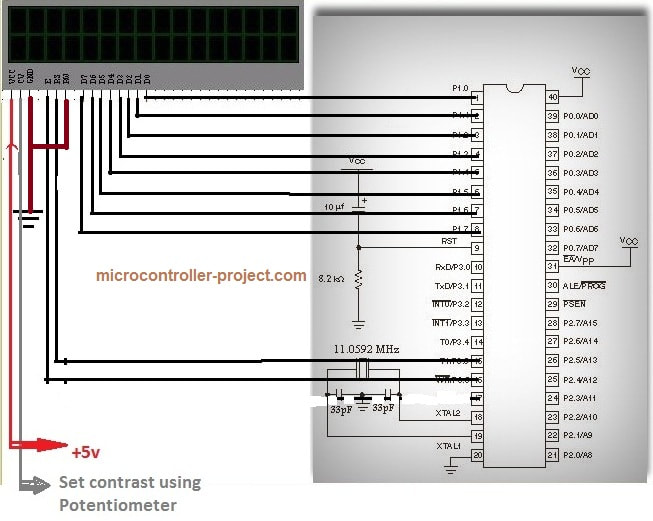
Custom characters displayed on 16x2 lcd with 89c51 microcontroller circuit diagram

Custom characters displayed on 16×2 lcd with 89c51 microcontroller circuit diagram

Custom character generation with 8051 microcontroller project code

I am using keil ide for writing and compiling code. In the code first of all I included the predefined header file reg51.h .This library is necessary to be included when ever you are writing code for 8051(89c51) series microcontrollers in keil ide. Absence of it can cause a problem for you most commonly the compiler will not compile your file.
​
I defined the required Custom characters in the form of Character arrays which are used later for generating characters. Port-1 of 89c51 microcontroller is used to send data and commands to lcd. The rest of the code is simple the delay function is their for generating some arbitrary delay. The lcdint() function is initializing the lcd. In my main function i am generating the custom characters and then printing them on 16×2 lcd. The main function is in while(1) continuous loop. Due to this while(1) continuous loop characters are continuously displaying on the character 16×2 lcd screen.
At a time you can make only 8 characters in CG-RAM. I also made only 8 custom characters but their is a simple method to generate more. The method is first create 8 characters and then display them on lcd. Now again make 8 characters. Making new characters will replace the previous from CG-RAM. Actually the CG-RAM is overwritten by new characters, So by applying this simple technique you can make as many characters as you need. If you have any questions regarding the post or you are unable to understand the code please leave your comments below.
Download the project files and code(C++,HEX). Code is written in c language. keil uvision 4 is used for generating hex code and for compiling code. The download folder contains all the project files.
Custom Character on lcd with 89c51 Microcontroller

You may also like:


  • What are the top development boards for AI and ML?

  • What are top applications of CAN protocol?

  • What drone parts you need to build a quadcopter?
  • battery selection low power design
    What are the battery-selection criteria for low-power design?

  • What’s a protective relay and what does it protect?

  • What is an Actuator Sensor Interface (AS-i)?

Filed Under: 8051 Microcontroller, Electronic Projects, Featured Contributions, Microcontroller Projects


Next Article

← Previous Article
Next Article →

Questions related to this article?
👉Ask and discuss on Electro-Tech-Online.com and EDAboard.com forums.


Tell Us What You Think!! Cancel reply

Log in to leave a comment:

Lost your password?

Don't have an account? Register here

Submit a Guest Post

submit a guest post

EE TECH TOOLBOX

“ee
Tech Toolbox: Wide Bandgap Semiconductors
Moving from silicon to GaN or SiC feels like a whole new ballgame, doesn’t it? It isn’t just about faster switching; it’s about managing the layout parasitics and thermal realities that come with that speed. This month’s Tech Toolbox features a curated eBook that tackles these design hurdles head-on.

EE Learning Center

EE Learning Center
“engineers
EXPAND YOUR KNOWLEDGE AND STAY CONNECTED
Get the latest info on technologies, tools and strategies for EE professionals.

HAVE A QUESTION?

Have a technical question about an article or other engineering questions? Check out our engineering forums EDABoard.com and Electro-Tech-Online.com where you can get those questions asked and answered by your peers!


RSS feed: EDABOARD.com Discussions. EDABOARD.com Discussions.

  • How to select coaxial cable for NFC antenna tuning
  • Circuit–EM co-simulation fails to flatten netlist in ADS
  • What preparations do I need for NFC antenna matching?
  • On-chip Clock Controller (a curious AND-gate)
  • Current sense transformer position in Phase Shift Full Bridge?

RSS feed: Electro-Tech-Online.com Discussions Electro-Tech-Online.com Discussions

  • Schematic help, odd symbol
  • Drawing software
  • Sony KV-29VL40 - 4 Blink error - IC001 Pin 17 high
  • How much does generator frequency stability matter for sensitive electrical equipment?
  • dosen't work as planned

Featured Tutorials

VHDL Series (1-24)

  • VHDL Tutorial 17: Design a JK flip-flop (with preset and clear) using VHDL
    VHDL Tutorial 17: Design a JK flip-flop (with preset and clear) using VHDL
  • VHDL Tutorial 18: Design a T flip-flop (with enable and an active high reset input) using VHDL
    VHDL Tutorial 18: Design a T flip-flop (with enable and an active high reset input) using VHDL
  • VHDL Tutorial – 19: Designing a 4-bit binary counter using VHDL
    VHDL Tutorial – 19: Designing a 4-bit binary counter using VHDL
  • VHDL Tutorial – 20: Designing 4-bit binary-to-gray & gray-to-binary code converters
    VHDL Tutorial – 20: Designing 4-bit binary-to-gray & gray-to-binary code converters
  • VHDL Tutorial – 21: Designing an 8-bit, full-adder circuit using VHDL
    VHDL Tutorial – 21: Designing an 8-bit, full-adder circuit using VHDL
  • VHDL Tutorial – 22: Designing a 1-bit & an 8-bit comparator by using VHDL
    VHDL Tutorial – 22: Designing a 1-bit & an 8-bit comparator by using VHDL
More Tutorials >

Recent Articles

  • Micron demonstrates 512GB DDR5 RDIMM
  • GLF4033 supports 3V to 13V input voltages
  • Samtec introduces 1.0 mm connector for 120 GHz applications
  • Nordic Semiconductor introduces multiprotocol IoT SoC
  • Taiwan Semiconductor adds 60 V dual MOSFETs

EE ENGINEERING TRAINING DAYS

engineering
Engineers Garage
  • Analog IC TIps
  • Connector Tips
  • Battery Power Tips
  • EDABoard Forums
  • EE World Online
  • Electro-Tech-Online Forums
  • EV Engineering
  • Microcontroller Tips
  • Power Electronic Tips
  • Sensor Tips
  • Test and Measurement Tips
  • 5G Technology World
  • Subscribe to our newsletter
  • About Us
  • Contact Us
  • Advertise

Copyright © 2026 Arrowfly LLC. All Rights Reserved. The material on this site may not be reproduced, distributed, transmitted, cached or otherwise used, except with the prior written permission of Arrowfly
Privacy Policy

Search Engineers Garage

  • Electronic Projects & Tutorials
    • Electronic Projects
      • Arduino Projects
      • AVR
      • Raspberry pi
      • ESP8266
      • BeagleBone
      • 8051 Microcontroller
      • ARM
      • PIC Microcontroller
      • STM32
    • Tutorials
      • Complete Sensor Guide
      • Engineering Deep Dives
      • AI
      • ARDUINO Compatible Coding
      • Audio Electronics
      • Battery Management
      • Beginners Electronics Series
      • Brainwave
      • Digital electronics (DE)
      • Electric Vehicles
      • EMI/EMC/RFI
      • EVs
      • Hardware Filters
      • IoT tutorials
      • LoRa/LoRaWAN
      • Power Tutorials
      • Protocol
      • Python
      • RPI Python Programming
      • Sensors
      • USB
      • Thermal management
      • Verilog
      • VHDL
    • Circuit Design
    • Project Videos
    • Components
  • Articles
    • Tech Articles
    • Insight
    • Invention Stories
    • How to
    • What Is
  • News
    • Electronic Product News
    • Business News
    • Company/Start-up News
    • DIY Reviews
    • Guest Post
  • Forums
    • EDABoard.com
    • Electro-Tech-Online
    • EG Forum Archive
  • DigiKey Store
    • Cables, Wires
    • Connectors, Interconnect
    • Discrete
    • Electromechanical
    • Embedded Computers
    • Enclosures, Hardware, Office
    • Integrated Circuits (ICs)
    • Isolators
    • LED/Optoelectronics
    • Passive
    • Power, Circuit Protection
    • Programmers
    • RF, Wireless
    • Semiconductors
    • Sensors, Transducers
    • Test Products
    • Tools
  • Learn
    • Design Guides
    • Learning Center
    • Tech Toolboxes
    • Tech Terms
    • Webinars & Digital Events
  • Resources
    • EE Training Days
    • LEAP Awards
    • Podcasts
    • White Papers
  • Guest Post Guidelines
  • Advertise
  • Subscribe