Engineers Garage

  • Electronic Projects & Tutorials
    • Electronic Projects
      • Arduino Projects
      • AVR
      • Raspberry pi
      • ESP8266
      • BeagleBone
      • 8051 Microcontroller
      • ARM
      • PIC Microcontroller
      • STM32
    • Tutorials
      • Sensor Series
      • Engineering Deep Dives
      • AI
      • ARDUINO Compatible Coding
      • Audio Electronics
      • Battery Management
      • Beginners Electronics Series
      • Brainwave
      • Digital electronics (DE)
      • Electric Vehicles
      • EMI/EMC/RFI
      • EVs
      • Hardware Filters
      • IoT tutorials
      • LoRa/LoRaWAN
      • Power Tutorials
      • Protocol
      • Python
      • RPI Python Programming
      • Sensors
      • USB
      • Thermal management
      • Verilog
      • VHDL
    • Circuit Design
    • Project Videos
    • Components
  • Articles
    • Tech Articles
    • Insight
    • Invention Stories
    • How to
    • What Is
  • News
    • Electronic Product News
    • Business News
    • Company/Start-up News
    • DIY Reviews
    • Guest Post
  • Forums
    • EDABoard.com
    • Electro-Tech-Online
    • EG Forum Archive
  • DigiKey Store
    • Cables, Wires
    • Connectors, Interconnect
    • Discrete
    • Electromechanical
    • Embedded Computers
    • Enclosures, Hardware, Office
    • Integrated Circuits (ICs)
    • Isolators
    • LED/Optoelectronics
    • Passive
    • Power, Circuit Protection
    • Programmers
    • RF, Wireless
    • Semiconductors
    • Sensors, Transducers
    • Test Products
    • Tools
  • Learn
    • eBooks/Tech Tips
    • Design Guides
    • Learning Center
    • Tech Toolboxes
    • Webinars & Digital Events
  • Resources
    • Digital Issues
    • EE Training Days
    • LEAP Awards
    • Podcasts
    • Webinars / Digital Events
    • White Papers
    • Engineering Diversity & Inclusion
  • Guest Post Guidelines
  • Advertise
  • Subscribe

How to interface computer’s Serial Port (RS232) with 8051 microcontroller (AT89C51)- (Part 21/45)

By Himanshu Choudhary August 10, 2010

Several devices collect data from sensors and need to send it to another unit, like a computer, for further processing. Data transfer/communication is generally done in two ways: parallel and serial. In the parallel mode, data transfer is fast and uses more number of lines. This mode is good for short range data transfer.

Serial communication on the other hand, uses only one or two data lines to transfer data and is generally used for long distance communication. In serial communication the data is sent as one bit at a time. This article describes the interfacing of 8051 microcontroller (AT89C51) with a computer via serial port, RS232. Serial communication is commonly used in applications such as industrial automation systems, scientific analysis and certain consumer products.


Serial Port


The microcontroller AT89C51 has an inbuilt UART for carrying out serial communication. The serial communication is done in the asynchronous mode. A serial port, like other PC ports, is a physical interface to establish data transfer between computer and an external hardware or device. This transfer, through serial port, takes place bit by bit.


IBM introduced the DB-9 RS-232 version of serial I/O standard, which is most widely used in PCs and several devices. In RS232, high and low bits are represented by flowing voltage ranges:

 
Bit
Voltage Range (in V)
0
+3
+25
1
-25
-3
Fig. 2: Voltage Range for High and Low bit in RS232 
 
The range -3V to +3V is undefined. The TTL standards came a long time after the RS232 standard was set. Due to this reason RS232 voltage levels are not compatible with TTL logic. Therefore, while connecting an RS232 to microcontroller system, a voltage converter is required. This converter converts the microcontroller output level to the RS232 voltage levels, and vice versa. IC MAX232, also known as line driver, is very commonly used for this purpose.
 
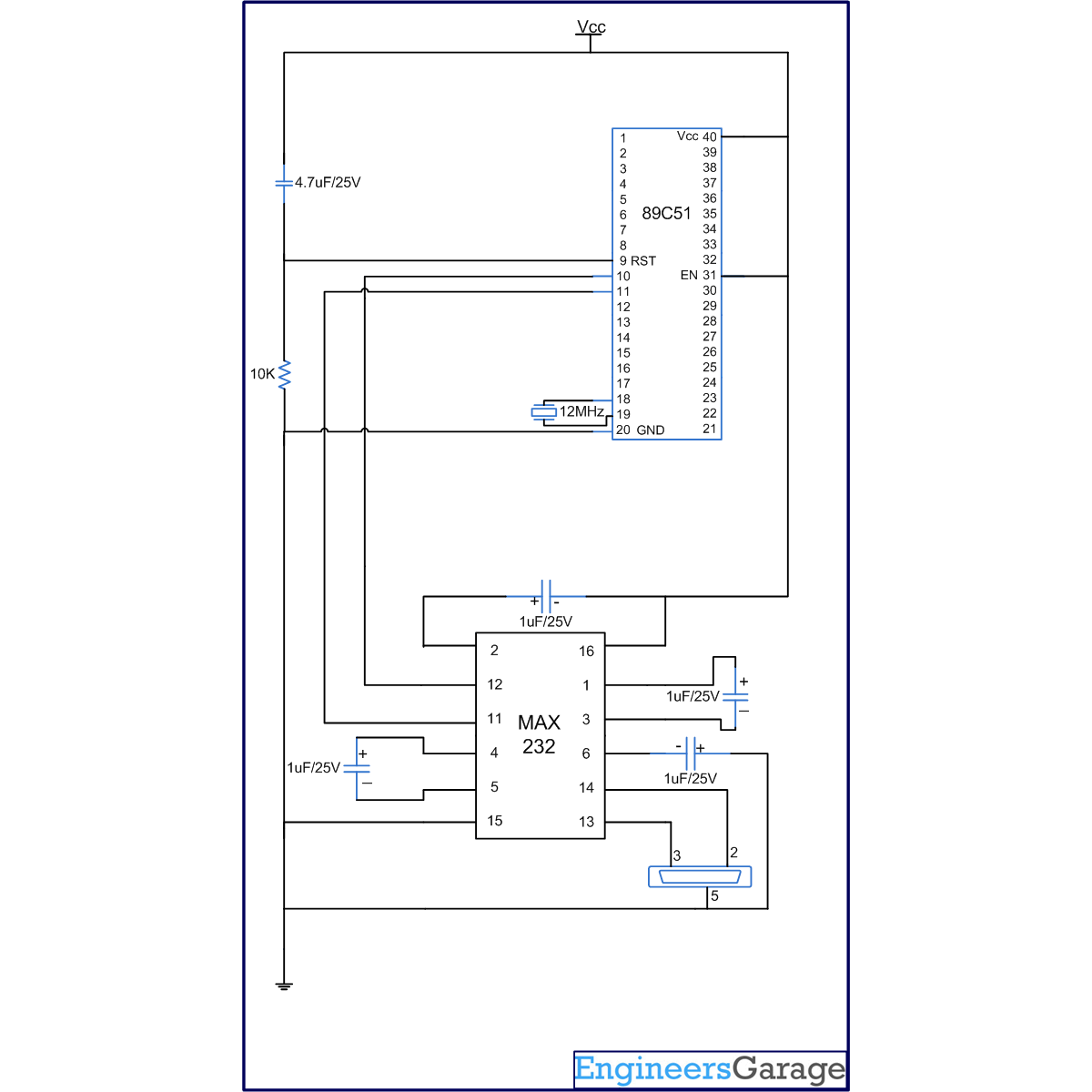
The simplest connection between a PC and microcontroller requires a minimum of three pins, RxD (receiver, pin2), TxD (transmitter, pin3) and ground (pin5) of the serial port of computer.  
 
Serial Port Of PC
Fig. 3: Serial port of PC
 
TxD pin of serial port connects to RxD pin of controller via MAX232. And similarly, RxD pin of serial port connects to the TxD pin of controller through MAX232.
 
MAX232 has two sets of line drivers for transferring and receiving data. The line drivers used for transmission are called T1 and T2, where as the line drivers for receiver are designated as R1 and R2. The connection of MAX232 with computer and the controller is shown in the circuit diagram.
 
Block Diagram Of ICMAX232 Connection With Computer And Controller
Fig. 4: Block Diagram of ICMAX232 Connection With Computer And Controller
 
An important parameter considered while interfacing serial port is the Baud rate which is the speed at which data is transmitted serially. It is defined as number of bits transmitted or received per second. It is generally expressed in bps (bits per second). AT89C51 microcontroller can be set to transfer and receive serial data at different baud rates using software instructions. Timer1 is used to set the baud rate of serial communication for the microcontroller. For this purpose, Timer1 is used in mode2 which is an 8-bit auto reload mode. (Refer Timer programming with 8051) To get baud rates compatible with the PC, TH1 should be loaded with the values as shown:
 
Baud Rate (bps)                      TH1 (Hex value)
9600                                                FD
4800                                                FA
2400                                                F4
1200                                                E8
 
In this project baud rate 9600bps is used.


For serial communication AT89C51 has registers SBUF and SCON (Serial control register). SBUF is an 8-bit register. For transmitting a data byte serially, it needs to be placed in the SBUF register. Similarly whenever a data byte is received serially, it comes in the SBUF register, i.e., SBUF register should be read to receive the serial byte.


SCON register is used to set the mode of serial communication. The project uses Mode1, in which the data length is of 8 bits and there is a start and a stop bit. The SCON register is bit addressable register. The following table shows the configuration of each bit.


SCON (Serial Control) Register


SM0
SM1
SM2
REN
TB8
RB8
TI
RI
D7
D6
D5
D4
D3
D2
D1
D0


  SM0                SM1


    0                     0                    Serial mode 0
    0                     1                    Serial mode 1, 8-bit data, 1 start bit, 1 stop bit
    1                     0                    Serial mode 2
    1                     1                    Serial mode 3
 
 
TI (transmit interrupt) is an important flag bit in the SCON register. The controller raises the TI flag when the 8-bit character is transferred. This indicates that the next byte can be transferred now. The TI bit is raised at the beginning of the stop bit.
RI (receive interrupt) is also a flag bit of the SCON register. On receiving the serial data, the microcontroller skips the start and stop bits, and puts the byte is SBUF register. The RI flag bit is then raised to indicate that the byte has been received and should be picked up.
 
Hyper Terminal
Hyper Terminal, a Windows XP application, can be used to receive or transmit serial data through RS232. To open Hyper Terminal, go to Start Menu, select all programs, go to Accessories, click on Communications and select Hyper Terminal.
 
To start a new connection, go to File menu and click on new connection. The connection window opens up. Give a name to your connection and select 1st icon and click on OK. Connection property window opens here. Select Bit rate as 9600bps, Data bits 8, Parity as none, Stop bit 1, Flow control none and click OK. Now the serial data can be read on hyper terminal.
In program, Timer1 is used with auto reload setting. The baud rate is fixed to 9600bps by loading TH1 to 0xFD. The value 0x50 is loaded in the SCON register. This will initialize the serial port in Mode1. The program continuously receives a character (say ‘a’) from the serial port of the computer and transmits it back.


Project Source Code

###


// Program to test serial communication of controller with PC using hyper terminal
#include<reg51.h>

void ini()     // Initialize Timer 1 for serial communication
{
TMOD=0x20;  //Timer1, mode 2, baud rate 9600 bps
TH1=0XFD; 
SCON=0x50;
TR1=1;
}

void recieve()  //Function to receive serial data
{
unsigned char value;
while(RI==0);
value=SBUF;
P1=value;
RI=0;
}

void transmit()  // Funtion to transmit serial data
{
P2=P1-32;
SBUF=P2;
while(TI==0);
TI=0;
SBUF=P1;
while(TI==0);
TI=0;
}

void main()
{
while(1)
{
  ini();
  recieve();
  transmit();
}
}

###


Circuit Diagrams

Circuit-Diagram-Interfacing-Computers-Serial-Port-RS232-8051-Microcontroller-AT89C51

Project Components

  • AT89C51 Microcontroller
  • MAX232

Project Video


Filed Under: 8051 Microcontroller
Tagged With: 8051, microcontroller, rs232, serial port
 

Next Article

← Previous Article
Next Article →

Questions related to this article?
👉Ask and discuss on EDAboard.com and Electro-Tech-Online.com forums.


Tell Us What You Think!! Cancel reply

Log in to leave a comment:

Lost your password?

Don't have an account? Register here

Submit a Guest Post

submit a guest post

EE TECH TOOLBOX

“ee
Tech Toolbox: Sensors
In this Tech Toolbox, we cover some of those technologies driving the next generation of connected systems, including ultra-low-power sensing strategies that extend node battery life, and 60 GHz CMOS radar for contactless health and presence detection.

EE Learning Center

EE Learning Center
“engineers
EXPAND YOUR KNOWLEDGE AND STAY CONNECTED
Get the latest info on technologies, tools and strategies for EE professionals.

HAVE A QUESTION?

Have a technical question about an article or other engineering questions? Check out our engineering forums EDABoard.com and Electro-Tech-Online.com where you can get those questions asked and answered by your peers!


RSS EDABOARD.com Discussions.

  • Why Are Some Semiconductor Categories Experiencing Renewed Price Pressure?
  • Symmetrical tail inductor simulation in SonnetSuite
  • KiCAD symbols and footprints question - capacitors and voltage MCP1700
  • Return Loss at Low frequencies
  • How is AI calculating gap sizes?

RSS Electro-Tech-Online.com Discussions

  • Replacement IGBT for DGG4015 for Honda Motorcycle ECU
  • Battery not working
  • effect of calibration on s-parameters
  • DC question
  • Diy project

Featured Tutorials

Learn - AWS IoT Tutorials

  • How to enable device-to-device messaging on AWS IoT Core using MQTT
    How to enable device-to-device messaging on AWS IoT Core using MQTT
  • How to connect Raspberry Pi to Amazon AWS IoT Core using MQTT
    How to connect Raspberry Pi to Amazon AWS IoT Core using MQTT
  • How to connect ESP32 to AWS IoT Core using MQTT
    How to connect ESP32 to AWS IoT Core using MQTT
  • How to connect a computer to AWS IoT Core
    How to connect a computer to AWS IoT Core
  • Arduino compatible coding 02: Getting started with Arduino
    Arduino compatible coding 02: Getting started with Arduino
  • Arduino compatible coding 03: Basics of Arduino sketches and Embedded C
    Arduino compatible coding 03: Basics of Arduino sketches and Embedded C
More Tutorials >

Recent Articles

  • B&K Precision adds modular DC electronic load system
  • Solid Sands adds C++ multithreading qualification support
  • Norstat offers M8 and M12 connectors
  • Stackpole Electronics adds 50GHz thin film resistor
  • Samtec adds 112 Gbps PAM4 cable assembly

EE ENGINEERING TRAINING DAYS

engineering
Engineers Garage
  • Analog IC TIps
  • Connector Tips
  • Battery Power Tips
  • EDABoard Forums
  • EE World Online
  • Electro-Tech-Online Forums
  • EV Engineering
  • Microcontroller Tips
  • Power Electronic Tips
  • Sensor Tips
  • Test and Measurement Tips
  • 5G Technology World
  • Subscribe to our newsletter
  • About Us
  • Contact Us
  • Advertise

Copyright © 2026 WTWH Media LLC. All Rights Reserved. The material on this site may not be reproduced, distributed, transmitted, cached or otherwise used, except with the prior written permission of WTWH Media
Privacy Policy

Search Engineers Garage

  • Electronic Projects & Tutorials
    • Electronic Projects
      • Arduino Projects
      • AVR
      • Raspberry pi
      • ESP8266
      • BeagleBone
      • 8051 Microcontroller
      • ARM
      • PIC Microcontroller
      • STM32
    • Tutorials
      • Sensor Series
      • Engineering Deep Dives
      • AI
      • ARDUINO Compatible Coding
      • Audio Electronics
      • Battery Management
      • Beginners Electronics Series
      • Brainwave
      • Digital electronics (DE)
      • Electric Vehicles
      • EMI/EMC/RFI
      • EVs
      • Hardware Filters
      • IoT tutorials
      • LoRa/LoRaWAN
      • Power Tutorials
      • Protocol
      • Python
      • RPI Python Programming
      • Sensors
      • USB
      • Thermal management
      • Verilog
      • VHDL
    • Circuit Design
    • Project Videos
    • Components
  • Articles
    • Tech Articles
    • Insight
    • Invention Stories
    • How to
    • What Is
  • News
    • Electronic Product News
    • Business News
    • Company/Start-up News
    • DIY Reviews
    • Guest Post
  • Forums
    • EDABoard.com
    • Electro-Tech-Online
    • EG Forum Archive
  • DigiKey Store
    • Cables, Wires
    • Connectors, Interconnect
    • Discrete
    • Electromechanical
    • Embedded Computers
    • Enclosures, Hardware, Office
    • Integrated Circuits (ICs)
    • Isolators
    • LED/Optoelectronics
    • Passive
    • Power, Circuit Protection
    • Programmers
    • RF, Wireless
    • Semiconductors
    • Sensors, Transducers
    • Test Products
    • Tools
  • Learn
    • eBooks/Tech Tips
    • Design Guides
    • Learning Center
    • Tech Toolboxes
    • Webinars & Digital Events
  • Resources
    • Digital Issues
    • EE Training Days
    • LEAP Awards
    • Podcasts
    • Webinars / Digital Events
    • White Papers
    • Engineering Diversity & Inclusion
  • Guest Post Guidelines
  • Advertise
  • Subscribe