Engineers Garage

  • Electronic Projects & Tutorials
    • Electronic Projects
      • Arduino Projects
      • AVR
      • Raspberry pi
      • ESP8266
      • BeagleBone
      • 8051 Microcontroller
      • ARM
      • PIC Microcontroller
      • STM32
    • Tutorials
      • Complete Sensor Guide
      • Engineering Deep Dives
      • AI
      • ARDUINO Compatible Coding
      • Audio Electronics
      • Battery Management
      • Beginners Electronics Series
      • Brainwave
      • Digital electronics (DE)
      • Electric Vehicles
      • EMI/EMC/RFI
      • EVs
      • Hardware Filters
      • IoT tutorials
      • LoRa/LoRaWAN
      • Power Tutorials
      • Protocol
      • Python
      • RPI Python Programming
      • Sensors
      • USB
      • Thermal management
      • Verilog
      • VHDL
    • Circuit Design
    • Project Videos
    • Components
  • Articles
    • Tech Articles
    • Insight
    • Invention Stories
    • How to
    • What Is
  • News
    • Electronic Product News
    • Business News
    • Company/Start-up News
    • DIY Reviews
    • Guest Post
  • Forums
    • EDABoard.com
    • Electro-Tech-Online
    • EG Forum Archive
  • DigiKey Store
    • Cables, Wires
    • Connectors, Interconnect
    • Discrete
    • Electromechanical
    • Embedded Computers
    • Enclosures, Hardware, Office
    • Integrated Circuits (ICs)
    • Isolators
    • LED/Optoelectronics
    • Passive
    • Power, Circuit Protection
    • Programmers
    • RF, Wireless
    • Semiconductors
    • Sensors, Transducers
    • Test Products
    • Tools
  • Learn
    • Design Guides
    • Learning Center
    • Tech Toolboxes
    • Tech Terms
    • Webinars & Digital Events
  • Resources
    • EE Training Days
    • LEAP Awards
    • Podcasts
    • White Papers
  • Guest Post Guidelines
  • Advertise
  • Subscribe

How to create an RFID-based locker system using Arduino

By Ayush Jain January 17, 2025

Need somewhere to secure a few items? No problem! In this project, we’ll design an RFID-based locker system that offers a reliable and convenient solution for securing objects using radio frequency identification (RFID) technology.

Figure 1. The protoype

Working operation: The RFID locker system

The RFID reader scans a unique tag, and if it matches a pre-registered one, the servo motor unlocks the door. However, the servo motor remains inactive if an unregistered tag is scanned. The servo’s shaft is mechanically connected to a door, allowing it to open and close within a predefined time frame.

Arduino manages the stored codes and controls the servo, activating it only when the RFID reader detects a valid tag. 

While this project demonstrates a small-scale model, it can be scaled up for larger applications with enhanced electronics. For example, the prototype uses a plastic-geared servo, but for bigger setups, a metal-geared servo could be employed for greater durability and efficiency.

Figure 2. The RFID lock.

Materials

  1. Arduino UNO
  2. RFID reader module
  3. RFID tags
  4. Servo motor
  5. OLED display
  6. Jumper wires
  7. Breadboard or prototype board
  8. 5V power supply
  9. Lockable enclosure or cabinet for the locker

Instructions

Step 1. Hardware set-up
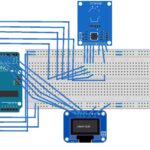
Begin by connecting the RFID reader module to Arduino UNO using the jumper wires. Ensure the breadboard’s power rails are connected to Arduino’s power and ground pins. The servo’s 5V must also connect with the OLED and RFID.

How to connect the RFID board to Arduino:

  1. SDA to D10
  2. SCK to D13
  3. MOSI to D11
  4. MISO to D12
  5. RST to D9

For the OLED display, connect:

  1. SCK to A5
  2. SDA to A4

Additionally, the servo’s signal pin must connect with Arduino’s D6. The servo acts as the locking mechanism for the locker. Once all of the components connected, you’re ready to add Arduino’s program to the board.

Figure 3. Circuit diagram

Mount the components securely on a breadboard or prototype board.

Step 2: Programming Arduino

  • Ensure Arduino IDE is installed on your computer.
  • Write the code to interface the RFID reader module. This code will read the unique IDs of the RFID tags and compare them with a list of authorized IDs.
  • Implement the logic to control the servo motor, based on the detected RFID tag. When an authorized tag is detected, the servo unlocks the locker, and when an unauthorized tag is detected, the servo remains locked.

The code


Step 3. The locker set-up

  • Design or procure a locker that can secure objects and provide access to the locker compartment.
  • Install the servo motor outside the locker in a way that it can actuate the locking mechanism.
  • One door should open and close the mechanism while another door will be equipped with the electronics like RFID board and OLED board.
  • Place RFID tags on items or cards that will serve as access keys for the locker. Assign each tag a unique ID and store these IDs within Arduino’s code.

Step 4. Test the system

  • Power up the system.
  • Test the system by presenting the RFID tag to the reader. Verify that the locker unlocks when the authorized tag is detected and remains locked for unauthorized ones.

Step 5. Final assembly

  • Once testing is successful, finalize the assembly of the components inside the locker enclosure.
  • Secure all connections and components to prevent damage or tampering.
  • Label the RFID tag.
  • Provide instructions for users on how to access the locker using their assigned tags.

Conclusion

By following the above steps, it’s possible to successfully build an RFID-based locker system that offers secure storage for valuables or sensitive items. This project demonstrates the adaptability of RFID technology in creating efficient and user-friendly security solutions.

Be sure to thoroughly test the system to verify that all components function properly and reliably before deploying it for practical use.

Video

https://www.engineersgarage.com/wp-content/uploads/2025/01/RFID_final-1.mp4


You may also like:


  • Arduino compatible coding 02: Getting started with Arduino

  • What are the most practical and useful modern spy gadgets?

  • How to build a GPS tracking device?

  • How to build your own smart home

  • What are the top open-source software systems for home automation?

  • Arduino-based RFID door lock

Filed Under: Arduino Projects, Electronic Projects, Featured Contributions, Video
Tagged With: Arduino, electronicproject, locker, rfid, storage, video
 

Next Article

← Previous Article
Next Article →

Questions related to this article?
👉Ask and discuss on Electro-Tech-Online.com and EDAboard.com forums.


Tell Us What You Think!! Cancel reply

Log in to leave a comment:

Lost your password?

Don't have an account? Register here

Submit a Guest Post

submit a guest post

EE TECH TOOLBOX

“ee
Tech Toolbox: Wide Bandgap Semiconductors
Moving from silicon to GaN or SiC feels like a whole new ballgame, doesn’t it? It isn’t just about faster switching; it’s about managing the layout parasitics and thermal realities that come with that speed. This month’s Tech Toolbox features a curated eBook that tackles these design hurdles head-on.

EE Learning Center

EE Learning Center
“engineers
EXPAND YOUR KNOWLEDGE AND STAY CONNECTED
Get the latest info on technologies, tools and strategies for EE professionals.

HAVE A QUESTION?

Have a technical question about an article or other engineering questions? Check out our engineering forums EDABoard.com and Electro-Tech-Online.com where you can get those questions asked and answered by your peers!


RSS feed: EDABOARD.com Discussions. EDABOARD.com Discussions.

  • A Practical Guide to Choosing a Flyback Diode for a Relay Coil
  • Microcontroller Resets When a Relay Switches On
  • Need to buy cheap scope
  • Buffer opAmp with RC at output
  • Increasing DC motor speed by modifying motor control unit

RSS feed: Electro-Tech-Online.com Discussions Electro-Tech-Online.com Discussions

  • 4060 counter doesn't stop ?
  • What Do You Check When a Circuit Works on the Bench but Fails in the Final Build?
  • A Simple Tip for Finding Intermittent Faults Without Replacing Parts
  • How does a UART Receiver detect the Start Bit without a Shared Clock
  • Need help about crimping tool

Featured Tutorials

VHDL Series (1-24)

  • VHDL Tutorial 17: Design a JK flip-flop (with preset and clear) using VHDL
    VHDL Tutorial 17: Design a JK flip-flop (with preset and clear) using VHDL
  • VHDL Tutorial 18: Design a T flip-flop (with enable and an active high reset input) using VHDL
    VHDL Tutorial 18: Design a T flip-flop (with enable and an active high reset input) using VHDL
  • VHDL Tutorial – 19: Designing a 4-bit binary counter using VHDL
    VHDL Tutorial – 19: Designing a 4-bit binary counter using VHDL
  • VHDL Tutorial – 20: Designing 4-bit binary-to-gray & gray-to-binary code converters
    VHDL Tutorial – 20: Designing 4-bit binary-to-gray & gray-to-binary code converters
  • VHDL Tutorial – 21: Designing an 8-bit, full-adder circuit using VHDL
    VHDL Tutorial – 21: Designing an 8-bit, full-adder circuit using VHDL
  • VHDL Tutorial – 22: Designing a 1-bit & an 8-bit comparator by using VHDL
    VHDL Tutorial – 22: Designing a 1-bit & an 8-bit comparator by using VHDL
More Tutorials >

Recent Articles

  • Hirose expands floating connectors for BEV powertrains
  • Bourns adds 25 µΩ current sense resistor modules
  • XP Power launches 750W fanless medical power supplies
  • Building AI for embedded and edge devices (Part 1)
  • Infineon MCUs control up to four brushless DC motors

EE ENGINEERING TRAINING DAYS

engineering
Engineers Garage
  • Analog IC TIps
  • Connector Tips
  • Battery Power Tips
  • EDABoard Forums
  • EE World Online
  • Electro-Tech-Online Forums
  • EV Engineering
  • Microcontroller Tips
  • Power Electronic Tips
  • Sensor Tips
  • Test and Measurement Tips
  • 5G Technology World
  • Subscribe to our newsletter
  • About Us
  • Contact Us
  • Advertise

Copyright © 2026 Arrowfly LLC. All Rights Reserved. The material on this site may not be reproduced, distributed, transmitted, cached or otherwise used, except with the prior written permission of Arrowfly
Privacy Policy

Search Engineers Garage

  • Electronic Projects & Tutorials
    • Electronic Projects
      • Arduino Projects
      • AVR
      • Raspberry pi
      • ESP8266
      • BeagleBone
      • 8051 Microcontroller
      • ARM
      • PIC Microcontroller
      • STM32
    • Tutorials
      • Complete Sensor Guide
      • Engineering Deep Dives
      • AI
      • ARDUINO Compatible Coding
      • Audio Electronics
      • Battery Management
      • Beginners Electronics Series
      • Brainwave
      • Digital electronics (DE)
      • Electric Vehicles
      • EMI/EMC/RFI
      • EVs
      • Hardware Filters
      • IoT tutorials
      • LoRa/LoRaWAN
      • Power Tutorials
      • Protocol
      • Python
      • RPI Python Programming
      • Sensors
      • USB
      • Thermal management
      • Verilog
      • VHDL
    • Circuit Design
    • Project Videos
    • Components
  • Articles
    • Tech Articles
    • Insight
    • Invention Stories
    • How to
    • What Is
  • News
    • Electronic Product News
    • Business News
    • Company/Start-up News
    • DIY Reviews
    • Guest Post
  • Forums
    • EDABoard.com
    • Electro-Tech-Online
    • EG Forum Archive
  • DigiKey Store
    • Cables, Wires
    • Connectors, Interconnect
    • Discrete
    • Electromechanical
    • Embedded Computers
    • Enclosures, Hardware, Office
    • Integrated Circuits (ICs)
    • Isolators
    • LED/Optoelectronics
    • Passive
    • Power, Circuit Protection
    • Programmers
    • RF, Wireless
    • Semiconductors
    • Sensors, Transducers
    • Test Products
    • Tools
  • Learn
    • Design Guides
    • Learning Center
    • Tech Toolboxes
    • Tech Terms
    • Webinars & Digital Events
  • Resources
    • EE Training Days
    • LEAP Awards
    • Podcasts
    • White Papers
  • Guest Post Guidelines
  • Advertise
  • Subscribe